
Best Cameras for Fitness Influencers: A First Time Buyer's Guide for 2026
Disclosure: We may earn a commission when you buy through links on this page, at no extra cost to you. As an Amazon Associate I earn from qualifying purchases. Learn more

Shopping for cameras for fitness influencers for the first time? Learn the terms, compare camera types, and avoid rookie mistakes with this easy guide.
Buying your first real camera feels different when the camera has to film you, not just sit in your hands while you film someone else. The best cameras for fitness influencers need to frame your whole body, hold focus while you move, and keep your voice clear over music and room echo. This guide starts with the plain basics, then covers the specs that actually change a workout video.
You do not need to master every camera term before you choose. Know which type fits your space, your filming style, and your budget, and the comparison table below pulls those choices together as you read.
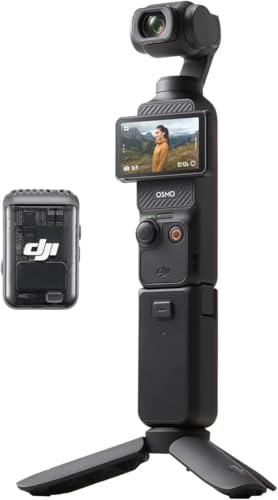




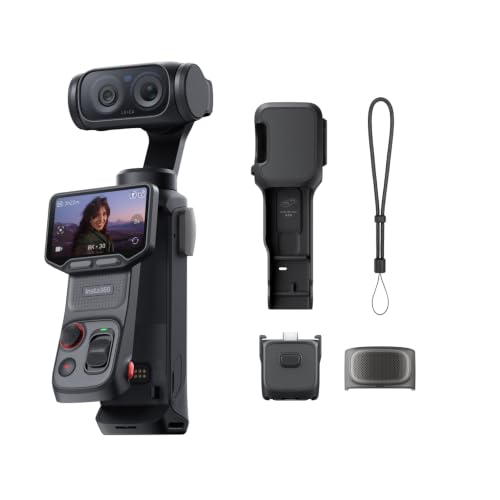



Cameras 101: The Basics for Fitness Creators
A camera turns light into a video file. Light passes through the lens, lands on a sensor, and the processor saves the result to a memory card. Three broad types serve fitness creators. Compact cameras have a fixed lens and slip into a gym bag. Mirrorless cameras accept interchangeable lenses, so the same body can grow with you. Small action cameras mount almost anywhere and shrug off bumps.
For a wider look at the category, see our guide to the best digital cameras for how these types differ in size and control.
Who Should Buy Which Camera Type for Fitness Content?
Your filming routine should decide the type before any spec does. See our guide to the best cameras for influencers for the general creator picture, then match one of the three routines below to your own week.
Solo Trainers Who Film Workouts Alone
You set up in an empty room, press record, and step into frame with nobody behind the camera to help. A flip screen you can see from the mat, dependable autofocus, and a standard tripod mount matter more than raw image quality. A compact or small mirrorless model suits you best, because setup takes minutes and you can check framing from where you stand.
Coaches Who Film Classes and Moving Demonstrations
You move across the room, turn away from the lens, and talk over music while a class follows along. You need a camera that keeps focus on a moving body, captures your voice from several feet away, and records long sessions without stopping. A mirrorless model with strong subject tracking and a microphone input fits you best.
Creators Who Film Outdoors and Travel Between Locations
You shoot in parks, on tracks, and in hotel rooms between events, so size and toughness shape your choice. A small action camera or a sealed compact handles dust, light rain, and rough handling better than a large body with a big lens. For more on shooting away from a studio, see our guide to the best cameras for fitness and compare how portable setups trade control for convenience.
Key Features to Compare
When you compare the best cameras for fitness influencers, work through the six factors below in order, from sharp, steady footage to easy weekly filming.
Sensor Size and Crisp Workout Footage
The sensor is the surface that gathers light, and bigger sensors usually give cleaner footage with softer backgrounds. A 1 inch sensor in a compact camera is a real step up from a phone. APS C sensors, common in mirrorless models, gather more light again, and full frame sensors sit at the top for size and cost. Megapixel counts matter less for video, because a 4K frame uses only about eight megapixels.
Autofocus That Tracks a Moving Body
Autofocus decides what stays sharp, and fitness filming stresses it hard. You lunge toward the lens, drop to the floor, and turn sideways, all in one set. Look for continuous autofocus with subject or face detection that follows you rather than locking onto the wall behind you. A system that hunts, pulsing in and out of focus, ruins an otherwise good take, so rank this feature above small gains in resolution or extra modes you may never open.
Image Stabilization for Handheld and Moving Shots
Image stabilization smooths the small shakes your hands and steps add to footage. In body stabilization moves the sensor, lens stabilization moves elements inside the lens, and electronic stabilization crops the frame slightly to steady it in software. On a tripod you can turn it off. For walkthroughs, gym tours, and handheld close ups of form, it keeps the picture calm.
Lens Choice, Zoom, and Fitting Your Whole Body in Frame
The lens decides how much of the room the camera sees. A wide angle view fits your full standing reach and floor work in a small spare room, while a longer view flatters talking segments but needs more distance. Optical zoom changes the view inside the lens without losing quality, unlike digital zoom, which just crops. An aperture around f2.8 or wider lets in more light and softens the background.
Low Light Performance in Gyms and Home Studios
Many workout spaces have weak, mixed lighting, and your footage has to stay clean there. Low light performance comes from the sensor, the lens aperture, and how well the camera handles high ISO settings, which amplify the signal along with some grain. If you film early or late, rank this factor high and favor a wider aperture lens over a longer zoom.
Sound, Screens, and Staying Power for Long Sessions
Viewers forgive soft footage sooner than muffled coaching cues, so check for a microphone input or an accessory shoe for audio. Battery life and heat limits matter too, because some cameras stop recording after a set time or grow hot during long 4K sessions. If your classes run past thirty minutes, confirm the camera records your full session on one battery.
Setting Up Your Camera for Your First Workout Video
Your first session goes better with a short routine. Charge the battery fully, format the memory card in the camera, and mount the camera at about hip height on a tripod a few steps from your mat. Record a twenty second test and check that your head and feet stay in frame at your widest move. For full follow along sessions, see our guide to the best cameras for fitness videos for framing ideas by workout style.
Use the standard color look and automatic white balance for your first week, because simple settings keep colors predictable while you learn. Wipe the lens with a lens cloth, not your shirt, since shirt fabric can drag grit across the glass. Carry a spare battery and a second card, and copy your files to a computer before you format anything.
Common Mistakes to Avoid
- Buying the highest resolution you can find, so huge files slow editing and fill cards before a class ends.
- Placing the camera too close to your mat, so arms and feet leave the frame during wide movements.
- Trusting the built in microphone across a large room, so your cues arrive faint under music.
- Ignoring recording time limits, so the camera stops in the middle of your best set.
- Filming against a bright window, so the camera exposes for daylight and leaves your body in shadow.
Care and Maintenance for Your Camera
Sweat and chalk dust are the two everyday enemies of a fitness camera. Wipe the body with a soft, slightly damp cloth after sessions, and keep the lens capped whenever the camera sits in a gym bag. Clean the front glass only with a lens cloth and gentle circles, blowing loose dust off first so you do not grind it in. Store batteries partly charged in a cool, dry spot, and keep memory cards in a hard case. Check the tripod mount screw every few weeks, because a loose mount can drop the camera mid session.
FAQ
What matters most when a fitness influencer films workouts alone?
A remote start matters most once the basics are covered. A small wireless remote, or the camera phone app, lets you begin and stop recording from the mat instead of walking back to the tripod between sets. Pair that with a self timer for photos of form milestones. This habit saves real time across a week of filming and keeps your energy for the workout itself.
Is a smartphone enough instead of a dedicated camera for fitness videos?
A smartphone is enough to start, and many phones shoot clean 4K video in good light. A dedicated camera earns its place when you film long sessions, because it frees your phone for music, timers, and class notes while recording continues. Upgrade when session length, low light, or audio limits start costing you retakes.
How much should a fitness influencer spend on a first camera?
Plan on about $300 to $600 for a capable first camera, plus a tripod and a basic microphone. Spending more mainly buys better autofocus tracking, stronger low light results, and longer recording without heat warnings. Keep roughly a fifth of your budget for support gear, because a steady tripod and clear audio improve videos more than a small step up in body.
What frame rate should fitness creators use for slow motion form checks?
Record at 60 frames per second for form checks you plan to play at half speed, and use 120 frames per second for very slow views of fast moves like jumps or lift catches. Standard filming for full workouts sits at 30 frames per second, which keeps file sizes sensible. High frame rates need more light, so a dim room may force the camera to raise ISO and add grain exactly when you want the clearest view of technique.
Do fitness influencers need a camera that handles vertical video well?
Yes, if short clips drive your growth, because most short form platforms show vertical video full screen. Some cameras add frame guide lines that show the vertical crop while you film horizontally, so your head and feet stay inside the safe area for both versions. For platform specific framing tips, see our guide to the best cameras for instagram influencers and plan each shot once for both shapes.
The Bottom Line
For a first purchase, rank tracking autofocus first, then sensor size for your lighting, then audio and recording limits that fit your session length. Match the type to your routine, solo, classes, or travel. Chosen that way, the best cameras for fitness influencers become a tool you stop thinking about, so check the product table above and pick the setup that fits how you already train.

