
Best Cameras for Live Streaming in 2026: A Buying Guide
Disclosure: We may earn a commission when you buy through links on this page, at no extra cost to you. As an Amazon Associate I earn from qualifying purchases. Learn more

Compare the best cameras for live streaming by clean output, heat duty, lenses, light and budget, with a clear buying guide for long streams at home.
A live audience sees every soft focus slip, every clipped voice and every frozen frame the moment it happens, so choosing best cameras for live streaming is really about choosing a signal you can trust for a full session. This guide starts with the output your viewers actually receive, then works through heat, lenses, light and budget in that order.
Read in sequence if your streams run for an hour or more, because a camera that looks strong in a short demo can fail in a long show. The comparison table below gathers the main camera classes side by side, and the later sections explain what each line means for desk shows, lessons, music sets and event coverage.
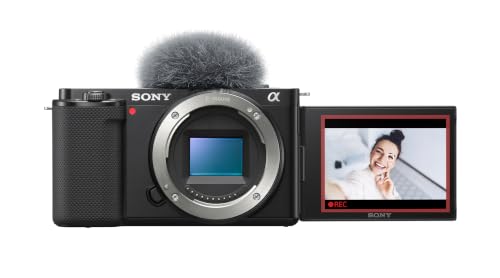


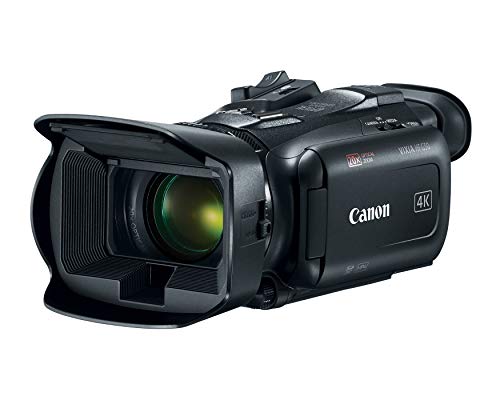
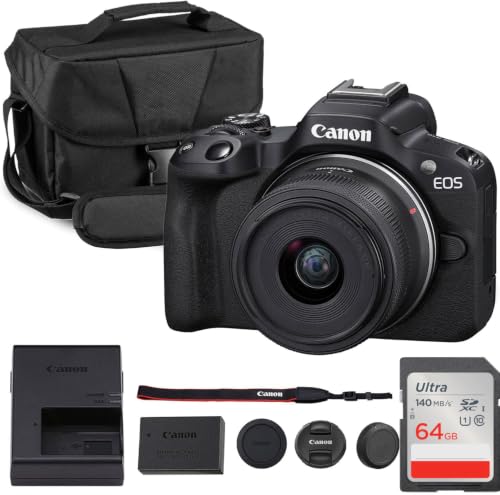



Start With the Output Box, Not the Recording Spec
Put plainly, a streaming camera is judged on the signal it sends to your stream, not on the files it saves to a card. A clean output class matters more than a recording class, because your platform never sees the card file at all. Look for a camera that can send a clean feed without menus, focus boxes or battery icons over the picture.
Check three output points first. Confirm the resolution and frame rate on the live output, because some cameras record higher than they can send out. Confirm the output stays on without a sleep timer you cannot disable. Confirm autofocus and exposure keep working while the output is active.
That feed reaches your computer through a cable or a capture device, and that path shapes the picture as much as the sensor does. When you plan a setup built around best cameras for streaming live video, budget for cable length, the capture device and a spare cable from the start.
Heat and the Duty Class for Long Sessions
Heat is the second buying fact, and it is just as plain. A camera that overheats ends the stream, with no edit point and no second take, so the duty class for long sessions belongs on your criteria from the beginning. Makers rarely publish a simple streaming time rating, so read the manual for thermal warnings and notes about warm rooms. A body with active cooling or a larger shell with room for airflow will usually hold up better than a tiny body pushed to its highest setting.
You can lower heat load yourself. Sending a 1080p feed instead of a 4K feed reduces processor work, and most platforms display 1080p very well. Powering the camera from a mains adapter instead of an internal battery removes one heat source inside the body.
Plan a heat test before your first public show. Run the full setup at your chosen settings for longer than your longest planned stream, with the same lights and power supply. If the camera cannot finish that rehearsal, no lens or sensor advantage can make up for it on show day.
How to Choose: The Main Buying Guide
Features That Matter for Live Streaming
Live work rewards a short list of features. You need reliable autofocus that follows a face without hunting, a microphone input or a clean way to route sound from a separate recorder, and a screen or monitor output that lets you check framing without walking around the camera.
Face and eye detection deserve close attention if you move while you talk. Good systems hold focus on your eyes as you lean toward notes, turn to a whiteboard or hold a product near the lens. Focus that pumps in and out will distract viewers far more than a slightly softer but steady picture.
Sensor Size and Image Quality
Sensor size shapes how your picture handles dim rooms and shallow depth of field. A 1 inch sensor gives a clear step up from a phone or a basic webcam, with cleaner shadows at a desk. An APS C sensor gathers more light again and pairs with many interchangeable lenses, while a full frame sensor offers the strongest low light results and the softest backgrounds at the highest cost and size.
Megapixel counts matter far less for streaming than for stills. Your platform receives about two megapixels at 1080p or about eight at 4K, so a stills count far above that adds little to the live picture. Judge quality instead by skin tones and shadow noise. A modest sensor with good light will beat a large sensor starved of light every time.
Lens and Zoom Range
The objective lens decides what your audience sees before any setting can help. A fixed lens camera suits a single desk position, while an interchangeable lens body lets you match the lens to the room. For a seated presenter, a moderate wide view shows face, shoulders and some background without bending lines at the frame edges. For a stage or a sports hall, optical zoom fills the frame from a distance without the softness digital zoom adds.
Aperture matters as much as focal length. A lens that opens to a low f number gathers more light, which helps in evening rooms and lets backgrounds fall gently out of focus. A very wide aperture also makes focus less forgiving, so many streamers settle on a middle aperture and add light.
Ease of Use for Your Skill Level
Match the camera to the person who will run it. If you stream alone, you need a flip screen or a monitor view, remote or app control for starting and stopping, and automatic exposure you can lock once it looks right. Complexity you cannot manage under pressure will show up on air as long pauses and missed cues.
App support varies more than brochures suggest. Some apps show a live preview and trigger the stream from a phone, while others only move still photos. Check that a wired option exists when wireless fails in a busy room.
Low Light Performance
Most home streams happen in rooms lit for living, not for cameras, so low light behaviour decides how professional the picture feels. A larger sensor, a bright lens and a sensible ISO range work together here. Raise ISO only as far as your camera stays clean, because heavy noise reduction can smear faces. One soft light aimed at your face usually improves the picture more than any menu setting.
Watch mixed light as well. A window on one side and a warm lamp on the other can push skin tones toward orange or blue, and automatic white balance may drift as clouds move. A custom white balance set before the show keeps your face the same colour throughout.
Durability and Weather Sealing
Desk cameras live a gentle life, but cameras that travel to halls, fields and places of worship face dust, knocks and sudden weather. Weather sealing around the body and lens mount helps when a stream starts indoors and finishes outside. Check the rating the maker actually claims. Sealing also depends on the lens, so a sealed body with an unsealed lens is only partly protected.
Cable strain is a quiet durability issue. A heavy cable hanging from a small port can loosen that port over months, so use a cable clamp that takes the weight.
Types of Cameras for the Live Job
Action Cameras
Action cameras are small, tough and built around a very wide view, which makes them useful for sports, workshops and point of view teaching. They handle knocks well, but the wide lens can distort faces at a desk and the small sensor works harder in dim rooms. Check the clean feed before assuming one will run a whole show. For field coverage, readers comparing best cameras for live streaming sports should weigh mounting and weather protection as heavily as resolution.
Vlogging Cameras
Vlogging cameras are compact bodies designed for a presenter who films alone, with flip screens and strong face autofocus. Those traits serve a seated streamer well. The limits appear on long sessions, where heat and battery life can fall short, and on stage work, where a fixed lens cannot reach distant subjects.
Dedicated Web Cameras as a Simple Class
A dedicated webcam connects by USB and needs no capture device, which removes a whole layer of setup. In the passage on best live streaming web cameras, the key checks are sensor quality, autofocus speed and whether the software provides exposure and white balance controls. Good models give a clean desk picture in fair light, but most cannot change lenses or match a larger sensor in a dim room.
Mirrorless Bodies and Compact Cameras
Mirrorless bodies offer the widest lens choice and the largest sensors, at the cost of more setup and more money. Compact cameras with fixed lenses sit between webcams and mirrorless bodies, offering a larger sensor and a zoom lens in one package. Either class can serve for years if the output is clean and the heat duty is proven.
Choosing Cameras for Your Situation
Your situation narrows the field faster than any spec sheet. A solo teacher at a desk, a band on a stage and a congregation in a hall all stream live, yet each needs a different balance of lens reach, automation and duty time. Use the notes below to filter the product table above before you compare smaller details.
Cameras Within One Lens System You Already Own
Shoppers loyal to a single established lens system are usually choosing within a range they already own lenses for. Check that the body offers a clean live output, that autofocus holds faces during long talking segments, and that continuous power options exist for that mount.
Cameras for Live Streaming Videos
When the goal is cameras for live streaming videos that viewers will also watch later as recordings, prioritise a feed that looks good at the platform bit rate rather than the highest headline resolution. Stable exposure, accurate colour and clean sound matter more on replay than extra sharpness compression will remove. A camera that can record a backup copy while it streams is valuable here for later clips.
Best Web Cameras for Live Streaming
For best web cameras for live streaming, judge the software as carefully as the sensor. Exposure, focus and white balance controls that stay where you set them prevent the picture shifting mid sentence, and a standard tripod thread lets you place the camera at eye level. Add light before blaming the webcam for a dull picture.
Cameras for Fast Moving Game and Talk Shows
Fast moving game shows and talk shows on large community platforms place unusual demands on a camera. The picture is often small on screen, placed in a corner over gameplay, so contrast, colour and a tidy background matter more than fine detail. Low delay matters too, because your reactions must line up with the game and with chat.
Best Mounted Cameras for Live Streaming
Best mounted cameras for live streaming stay fixed above a stage, a workbench or a playing area for the whole event. A secure mount, a powered connection that cannot be knocked loose and remote control of zoom and exposure matter more than a flip screen here. In halls and sanctuaries, the same fixed approach behind best live streaming cameras for church shows why a planned mount and a checked cable run beat a handheld setup rebuilt every week.
Best Head Cameras for Live Streaming
Best head cameras for live streaming give viewers the wearer point of view for craft, repair, cooking and outdoor teaching. Weight and balance decide whether you can wear one for a full session, and image stabilization decides whether the picture is watchable when you turn to reach for tools. Battery swaps should be possible without removing the camera from its strap.
Cameras for Live Streaming on a Budget under $500
A careful budget under $500 can still buy a clean stream if you spend on the whole chain rather than on the camera alone. Reserve part of the money for a capture device if needed, for continuous power, and for one decent light. A used mirrorless body with a proven clean output, a new webcam, or a compact camera on sale can each fit this level.
Spending Levels for a Complete Streaming Setup
Price bands make more sense when they include the full chain, not the camera alone. A starter desk arrangement at about $200 to $450 usually means a good webcam or an entry compact, a simple stand and one light.
A middle arrangement at about $600 to $1,200 opens the mirrorless door, with an APS C body, a bright lens, a capture device and continuous power. A growth arrangement at about $1,500 to $3,000 adds full frame options, fan cooled bodies and a second camera angle, which often lifts a show more than a further step up in sensor size.
Platform choice also shapes value, because each service compresses your feed in its own way. Readers focused on best cameras for facebook live streaming will find that a steady 1080p feed with clean sound travels better than a fragile 4K feed. Spend first on the parts your platform actually preserves, which are usually light, sound and stability.
Setup and Care Tips for Streaming Cameras
- Clean the front element with a lens cloth, not your shirt, because grit on fabric can mark the coating that your close up picture depends on.
- Carry a spare battery even when you run on mains power, since a charged spare saves a show when an adapter fails or a venue socket trips.
- Store the camera in a dry, padded bag with cables coiled loosely, because tight bends weaken the very leads your live output travels through.
- Update firmware only between shows, never on show day, and note your working settings first so you can restore them if a menu layout changes.
- Label each cable at both ends with its job and length, which speeds setup in halls where several similar black leads run side by side.
- Keep a short rehearsal checklist taped near the camera position, covering focus, white balance, audio level and the heat test start time.
Care for a streaming camera is mostly care for connections and consistency. A ten minute check before each show, run in the same order every time, catches most problems while they are still private. Write down the settings that worked, including aperture, ISO, white balance and microphone level, so a good show becomes repeatable rather than lucky.
Cameras: Your Questions Answered
What features matter most in cameras for live streaming?
A clean live output, steady face autofocus and continuous power matter most. Those three decide whether the show runs at all, while sensor size and lens choice decide how polished it looks. One point often missed is the tally light or indicator that confirms you are live. Choose a camera where that signal is visible from your seat, because guessing your live status leads to awkward openings.
How long should a heat rehearsal run before a first public stream?
Run the rehearsal for at least thirty minutes longer than your longest planned show. That margin covers a delayed start and a room that warms under lights and people. Keep a log of the time any warning appears, because a warning at the same point each week points to a fixable cause such as a blocked vent. A camera that stays calm past your margin has earned its place.
Is a smartphone enough instead of a dedicated streaming camera?
A current smartphone is enough for short, casual streams and for testing whether you enjoy presenting live. Its limits are heat on long sessions, calls interrupting the feed, and a fixed wide lens that suits only some rooms. Lists of cameras for live streaming often start with phones, since the camera you own teaches you framing and pacing. Move to a dedicated body when session length or reliability starts to limit the show.
What does a clean output mean for a streamer?
A clean output means the camera sends only the picture, with no menus, icons or focus boxes added. That feed is what your software records, crops for vertical clips and sends to the platform, so any overlay burned into it cannot be removed later. Test by recording a short local file and watching it back full screen. Small icons near the edges are easy to miss on a camera screen but obvious on a television.
How much should a first time streamer spend on a camera?
Spend enough to cover the camera, its power supply, its connection path and one light as a single purchase. For many readers searching for cameras for live events on a home budget, that means about $300 to $700 all in rather than the same sum on a body alone. Keep a small reserve for the second month, when experience shows whether a better microphone or a longer cable will help most.
The Bottom Line
Judge every candidate in the same order this guide used. First prove the clean output your viewers will actually see, then prove the heat duty for your longest session, and only then compare sensors, lenses and low light polish. Use the product table above to check which classes meet those first two tests within your budget, and let your situation settle the final choice.
Chosen that way, best cameras for live streaming stops being a label on a box and becomes a working system of camera, cable, power and light that starts on time and stays on air. Run one full rehearsal before your first public show and note the settings that held.
