
Best Dell Laptops for Business: Budget, Midrange, and Premium Picks for 2026
Disclosure: We may earn a commission when you buy through links on this page, at no extra cost to you. As an Amazon Associate I earn from qualifying purchases. Learn more

Dell business laptops by budget: Inspiron 15, Latitude 5550 and 7450, XPS 14 and workstation options.
Dell has long been a default choice for business laptops, but its lineup is broad: affordable Inspiron models, business focused Latitude laptops, premium XPS machines, rugged laptops for field work and Precision and Pro Max workstations for heavy computing. Prices on Amazon range from around $830 to more than $3,000. This guide to the best dell laptops for business shows what each price tier gets you so you can buy the right machine for your work.
We start with three picks by budget, then explain each tier, the features worth paying for, long term costs and common questions. Some Amazon listings come from authorized resellers who open the box to upgrade memory or storage; check who provides the warranty on upgraded parts, and buy from reputable sellers. For company owned devices, confirm requirements with your IT team before buying.





Top 3 Picks by Budget
Our picks are the Dell Inspiron 15 3530 as the budget pick, the Dell Latitude 5550 as the midrange pick and the Dell XPS 14 as the premium pick.
We compared processors, memory, storage, displays, ports, security features, build quality and warranty terms, along with the overall pattern in owner feedback. We did not use these laptops ourselves; notes reflect seller and maker specifications.
Best Budget Pick: Dell Inspiron 15 3530 Business Laptop
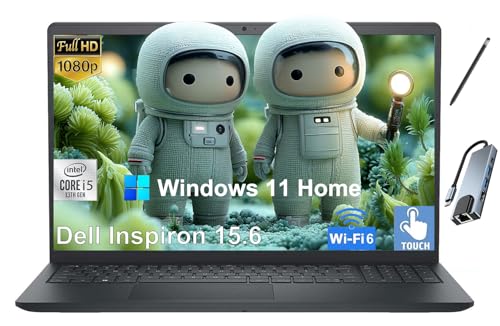
The Inspiron 15 3530 suits small business owners, students and remote workers who need a capable everyday laptop, at around $828. This configuration pairs a 13th generation Intel Core i7-1355U with 16GB of RAM, a 1TB SSD and a 15.6 inch Full HD touchscreen, a combination that handles email, spreadsheets, video calls and web apps comfortably. The larger screen and full size keyboard suit long workdays at a desk.
Its strengths are strong value and plenty of storage.
The limitation is consumer grade build quality compared with business focused Latitude models.
Best Midrange Pick: Dell Latitude 5550
The Latitude 5550 suits professionals and teams who want a true business laptop with modern ports and security, at around $1,250 with 16GB of DDR5 and a 512GB SSD, or around $1,550 with 32GB and 1TB. The listing describes an Intel Core Ultra 5 125U with 12 cores, a 15.6 inch Full HD anti glare display, an FHD HDR webcam with privacy shutter, a backlit keyboard, two Thunderbolt 4 ports, two USB-A ports, HDMI 2.1, Ethernet and a microSD slot, running Windows 11 Pro.
The appeal is business grade ports, Windows 11 Pro and a privacy shutter at a midrange price.
The trade off is that reseller upgraded units split warranty coverage between Dell and the reseller.
Best Premium Pick: Dell XPS 14
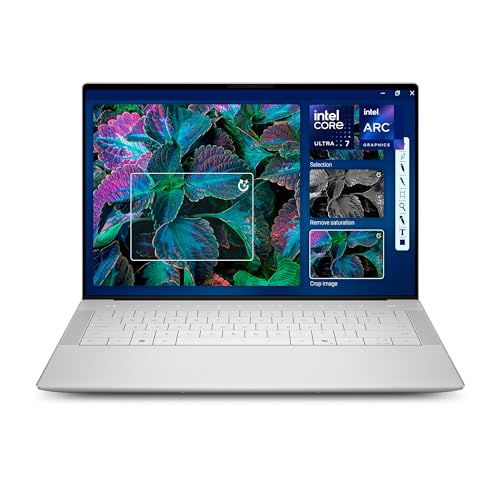
The Dell XPS 14 suits executives, consultants and creatives who want premium design and performance, at around $2,220 to $2,290 with 32GB of memory and a 1TB SSD. Dell lists an Intel Core Ultra 7 255H, Intel Arc graphics, a 14.5 inch 3.2K OLED touch display with a 48 to 120Hz variable refresh rate, a machined aluminum and Gorilla Glass 3 build and a backlit keyboard with fingerprint reader.
The appeal is a stunning display and premium build in a portable size.
The limitation is a high price and fewer legacy ports than Latitude models.
What Your Money Gets You at Each Price Tier
Dell business laptops sold online fall into three broad tiers.
Budget Tier: What to Expect
Around $730 to $840 buys Inspiron 15 models with Intel Core i5 or i7 processors, 16 to 32GB of RAM and large SSDs. These suit small businesses, freelancers and students. Expect plastic builds, Full HD displays and consumer support rather than business service plans. Some listings include third party upgrades or software bundles, so read the details.
Midrange Tier: The Sweet Spot for Most Buyers
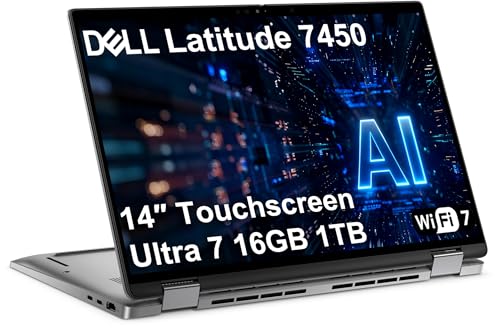
Around $1,250 to $1,550 buys Latitude business laptops. The Latitude 5550 and Latitude 7450 2 in 1, around $1,350, add Windows 11 Pro, Thunderbolt 4, privacy features and business oriented designs. The Latitude 7450 listing describes an Intel Core Ultra 7 165U, a 14 inch FHD+ touchscreen with 100 percent sRGB, Wi-Fi 7, Bluetooth 5.4 and support for 3 external monitors.
Premium Tier: When Spending More Pays Off
Around $1,850 to $3,300 buys premium, rugged and workstation laptops. The XPS 14 costs around $1,850 to $2,290, the Dell Pro Rugged 14 around $2,800 to $3,300, the Dell Pro Max 14 with an Intel Core Ultra 7 265H vPro around $2,995 and the Precision 7780 mobile workstation with an RTX Ada 3500 GPU around $3,300. Spending more pays off for demanding creative, engineering and field work.
Features Worth Paying For (and Ones to Skip) in the Best Dell Laptops for Business
Enough memory, business ports, security and a good warranty are worth paying for. Gaming features and flashy designs are not.
Processor and Memory
Intel Core Ultra processors, used in Latitude, XPS and Pro models, balance performance with battery life and include AI acceleration. For office work, a Core Ultra 5 or Core i5 is enough; analysts and multitaskers benefit from Core Ultra 7. Choose 16GB of RAM as a minimum and 32GB for heavy spreadsheets, virtual machines or creative work.
Display and Webcam
Anti glare Full HD displays, like the Latitude 5550's, reduce eye strain in bright offices. OLED displays, like the XPS 14's 3.2K panel, look stunning for presentations and creative work. A good webcam with a privacy shutter, like the Latitude 5550's FHD HDR camera, matters for remote meetings.
Ports and Connectivity
Business laptops should connect easily to monitors, docks and networks. The Latitude 5550 offers two Thunderbolt 4 ports, USB-A, HDMI 2.1 and Ethernet, which reduces dongle needs. Wi-Fi 7, offered on the Latitude 7450, helps on modern office networks. Premium thin laptops like the XPS 14 often rely on USB-C and a dock.
Security and Management
Windows 11 Pro, included on Latitude and Pro listings, adds BitLocker encryption and business management tools. vPro processors, like the Pro Max 14's Core Ultra 7 265H vPro, add remote management for IT teams. Fingerprint readers and privacy shutters improve everyday security.
Durability and Warranty
Latitude and Pro lines are designed for business use and typically offer longer support options than consumer models. The Pro Rugged 14 suits field work in harsh conditions. Check warranty terms carefully: some reseller listings provide separate warranties for upgraded parts while Dell covers the rest.
Battery Life and Portability
Battery life depends on the processor, display and how you work. Efficient U series chips, like the Core Ultra 5 125U in the Latitude 5550 and the Core Ultra 7 165U in the Latitude 7450, are designed for all day office work.
High performance H series chips, like the Core Ultra 7 255H in the XPS 14 and the 265H in the Pro Max 14, deliver more power for creative and technical work but can drain batteries faster under load. OLED and high refresh screens look great but use more power; the XPS 14's variable refresh rate helps by slowing down on static content. Frequent travelers should favor 14 inch models, which balance screen size and weight, while desk based workers can choose 15.6 inch models for larger screens and full keyboards.
Keyboard, Touchpad and Comfort
You type all day on a business laptop, so comfort matters. Backlit keyboards, found on the Latitude 5550 and XPS 14, help in dim meeting rooms. Larger 15.6 inch models like the Inspiron 15 and Latitude 5550 often include a number pad, which accountants and analysts appreciate. Touchscreens and 2 in 1 designs, like the Latitude 7450, help with signing documents, taking notes and presenting.
Docking and Multiple Monitors
Most office workers connect to external monitors. Thunderbolt 4 ports, found on the Latitude 5550 and 7450, support high bandwidth docks that drive multiple displays, Ethernet and charging through one cable. The Latitude 7450 listing notes support for 3 external monitors. If your company uses a specific dock, confirm compatibility before buying.
Long Term Costs to Factor In
Budget for accessories like a USB-C or Thunderbolt dock, an external monitor, a laptop bag and a backup drive. Extended warranties and accidental damage coverage are worth considering for travelers. Business laptops with Windows 11 Pro and replaceable components often stay useful longer, lowering total cost of ownership. Plan to refresh laptops every 3 to 5 years for most office use.
Choosing for Your Situation
Freelancers and small businesses on a budget should start with the Inspiron 15. Corporate employees and teams who need docks, security and Windows 11 Pro should choose the Latitude 5550 or Latitude 7450 2 in 1.
Executives and creatives who present often benefit from the XPS 14. Field workers in construction, utilities or public safety should consider the Pro Rugged 14. Engineers, designers and data analysts who run heavy software should look at the Pro Max 14 or Precision 7780.
Frequently Asked Questions
Which Dell laptop line is best for business?
Latitude is Dell's core business line, designed for security, manageability and durability. XPS suits premium users who want design and performance, Inspiron suits budget buyers and Precision and Pro Max suit workstation workloads.
How much RAM do I need for a business laptop?
16GB is the minimum for smooth multitasking, and 32GB is better for heavy spreadsheets, virtual machines and creative apps. Many Latitude and XPS configurations offer 32GB.
Is Windows 11 Pro necessary for business?
Windows 11 Pro is recommended for businesses that need BitLocker encryption, domain join and device management. Freelancers can use Windows 11 Home, but Pro adds valuable security features.
Are reseller upgraded Dell laptops safe to buy?
They can be, if the reseller is reputable and the warranty is clear. Some listings note that the reseller warranties upgraded memory or storage while Dell covers the remaining components. Read the disclosure before buying.
How long do Dell business laptops last?
A well maintained Latitude or XPS laptop typically lasts 4 to 6 years. Battery capacity declines over time, so plan for a battery replacement or refresh around year three or four with heavy use.
Should I buy a 14 inch or 15.6 inch business laptop?
Choose 14 inches for travel and 15.6 inches for desk work. A 14 inch laptop like the Latitude 7450 or XPS 14 is lighter in a bag, while a 15.6 inch model like the Latitude 5550 or Inspiron 15 offers a bigger screen and often a number pad. If you mainly work at a desk with a monitor, either size works well.
The Bottom Line
When choosing a Dell laptop for work, focus on three things: enough processing power and memory, the ports and security your workflow needs and a clear warranty. The Inspiron 15 3530 is the budget pick, the Latitude 5550 is the midrange choice and the XPS 14 is the premium pick. The best dell laptops for business keep you productive wherever work takes you.
For more work tech guides, see the best laptops 13 inch, the best desktop computers for business, the best laptop backpack and the best computer desks. Then compare current prices in the product table above.


