
Best Cameras for Game Streaming for 2026: Everything to Know Before Your First Purchase
Disclosure: We may earn a commission when you buy through links on this page, at no extra cost to you. As an Amazon Associate I earn from qualifying purchases. Learn more

New to game streaming? Learn what makes a good stream camera, from low light quality and autofocus to frame rate, setup, and common first time buyer mistakes.
If you are shopping for best cameras for game streaming for the first time, the jargon can feel like a second game to learn. Terms like sensor size, frame rate, and autofocus sound technical, but each one shapes how clear and natural you look on screen. This guide explains those terms in plain English, compares your options, and helps you avoid the mistakes most new streamers make.
Use the comparison table below to see the main camera paths side by side, then work through the specs that matter for a face camera, a desk setup, and a small room. Prices and availability can change, so check the product page before ordering.


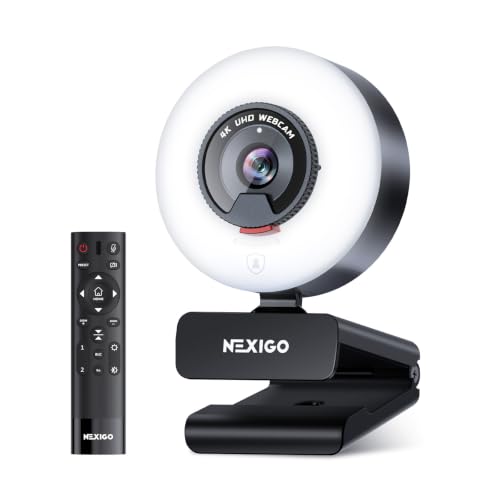


Cameras 101: The Basics
A stream camera captures your face and sends that video to your streaming software, which mixes it with your gameplay and sends the result to your viewers. Most streamers use a camera that sits on top of a monitor or on a small tripod beside the desk, pointed at the face from slightly above eye level. Good lighting matters as much as the camera itself: a simple lamp or ring light in front of you will improve the picture more than a pricey camera in a dark room.
Two broad paths serve new streamers. A webcam plugs in by USB and works right away, which suits a first setup and a tight budget. A larger interchangeable lens camera or a dedicated video camera can deliver a softer background and stronger low light results, but it needs extra gear such as a capture device and a mount. Start with the simpler path unless you already own camera gear and enjoy learning new settings.
Key Specs Explained in Plain English
The specs below sound complex, yet each one answers a simple question: will viewers see your face clearly, smoothly, and naturally? That question separates the best cameras for game streaming from the rest. Read them in order, and you will know which numbers to care about and which ones to ignore for a first camera.
Features That Matter for Game Streaming
Game streaming asks a camera to do one job well: keep a face sharp, bright, and smooth while you talk, laugh, and react to the game. Reliable autofocus that stays on your face beats a high resolution number that stutters or hunts for focus. A wide enough field of view should include your head and shoulders without showing too much of the room behind you. Frame rate matters too: 30 frames per second looks fine for most streams, while 60 frames per second looks smoother for fast reactions.
Sensor Size and Image Quality
The sensor is the part that turns light into a picture, and a larger sensor usually gathers more light with less noise. A 1 inch sensor offers a clear step up from a tiny webcam sensor, an APS C sensor gives a larger step again, and a full frame sensor offers the best low light results at the highest price. Megapixels matter less for streaming than for photography, because most streams show your face at a modest size on screen. For a first camera, favor a larger sensor and clean color over a headline megapixel count.
Battery Life and Charging
Battery life decides whether a long stream ends early or runs to plan. Many small cameras run for an hour or two on a battery, which is fine for short sessions but risky for a marathon stream. A camera that can run on USB power while streaming removes that worry entirely, so check for continuous power before you buy. If you choose a battery powered model, carry a spare battery and keep the charger near your desk. Also confirm the charging port type, since USB C cables are easier to replace than older proprietary leads.
Low Light Performance
Low light performance decides how clean your face looks in a dim gaming room. A larger sensor, a bright lens with a small f number, and a simple light in front of you together make the biggest difference. Look at sensor size, aperture, and how the camera handles higher sensitivity settings without turning your face grainy or waxy.
Size, Weight, and Ergonomics
Size and weight shape where the camera can sit and how long you can leave it set up. A small webcam clips to a monitor in seconds and travels well, while a larger camera needs a tripod or a desk mount and more cable management. Think about your desk space, your monitor stand, and whether you will move the setup between rooms. A camera that is easy to aim, easy to plug in, and easy to leave in place will get used for every stream, not just special ones.
Rookie Mistakes to Avoid
- Buying on megapixels alone, which ignores sensor size, focus, and low light quality that matter more on stream.
- Placing the camera below chin level, which creates an unflattering angle and shows more of the ceiling than your face.
- Streaming in a dark room, which forces the camera to boost sensitivity and makes the picture noisy and soft.
- Forgetting continuous power, which can end a long stream early when a battery runs out mid game.
- Skipping a test recording, which leaves focus problems, framing errors, and background clutter undiscovered until you are live.
Getting Started: Setup and First Use
Start by placing the camera at or slightly above eye level, about an arm length away, and frame your head and shoulders with a little space above. Add a light in front of you, not behind you, so your face stays bright and the background stays calm. Connect the camera, open your streaming software, and set the resolution and frame rate to match your stream settings rather than the camera maximum.
Use a lens cloth, not your shirt, to clean the front glass, since grit on fabric can scratch coatings over time. Carry a spare battery if your camera uses one, and keep cables tidy so they do not pull the camera out of position mid stream. Record a short test clip, watch it back, and adjust the angle, light, and focus before your first live session. Keep the volume of any headset moderate and take breaks during long sessions to protect your hearing.
Cameras: Your Questions Answered
What features matter most in cameras for game streaming?
Reliable face autofocus matters most, because it keeps you sharp while you move, gesture, and react to gameplay. Clean low light performance comes next, since most gaming rooms are dimmer than a studio. A sensible field of view, smooth frame rate, and a mount that holds the camera steady round out the list. Features like exotic resolutions and digital zoom matter far less for a face camera, so spend your budget on focus, light handling, and a stable setup first.
Which is better for low light?
A larger sensor camera with a bright lens is better for low light, because it gathers more light before the picture turns noisy. Adding a simple front light improves any camera more than a small sensor upgrade alone, so treat lighting as part of the purchase. Avoid pointing the camera toward a bright window or lamp behind you, which turns your face into a silhouette. If your room stays dark, favor sensor size and aperture over extra resolution, and test the camera in your real room before streaming live.
Is a smartphone enough instead?
A smartphone is enough to start streaming, especially if you already own one with a good front camera and a steady mount. Phones offer decent autofocus and easy software, but long sessions can overheat the phone, drain the battery, and tie up a device you need for messages. A dedicated camera frees your phone, runs cooler over long streams, and stays aimed at your desk between sessions. Many streamers start with a phone and move to a dedicated camera once streaming becomes a regular habit.
How much should I spend on my first one?
Most first time streamers do well spending about $80 to $300 on a first camera, with simple webcams near the lower end and larger sensor cameras near the upper end. That range buys reliable autofocus, decent low light results, and a mount that stays put on a desk. Spending more mainly buys softer backgrounds, stronger low light quality, and lens choices that matter once streaming becomes serious. Reserve part of your budget for a light, a mount, and cables, since those accessories shape daily results.
What specs matter most for beginners?
Beginners should focus on autofocus reliability, sensor size, frame rate, and continuous power rather than chasing the highest resolution. A camera that stays focused, runs all session on USB power, and looks clean in a dim room will serve you better than a sharper camera that hunts for focus or dies mid stream. Check the mount type, the cable length, and whether your streaming software recognizes the camera without extra drivers. Simple setup and steady performance beat exotic features for a first purchase.
Wrapping Up
For a first stream camera, favor reliable face autofocus, clean low light performance, and a setup you can leave in place. A simple webcam suits most new streamers, while a larger sensor camera suits those who want softer backgrounds and stronger dim room results. Add a front light, frame your head and shoulders from slightly above eye level, and test a recording before going live. Use the product table above to compare the paths once more, then choose the camera that fits your desk, your room, and your budget. With best cameras for game streaming as your guide, steady focus and good light will do more for your stream than any single headline specification.
See our guide to best game cameras for game focused camera options, and our guide to best streaming camera for a broader streaming overview. For webcam choices, read our guide to best web cameras for streaming, and for general advice see our guide to best digital cameras.

