Insta360
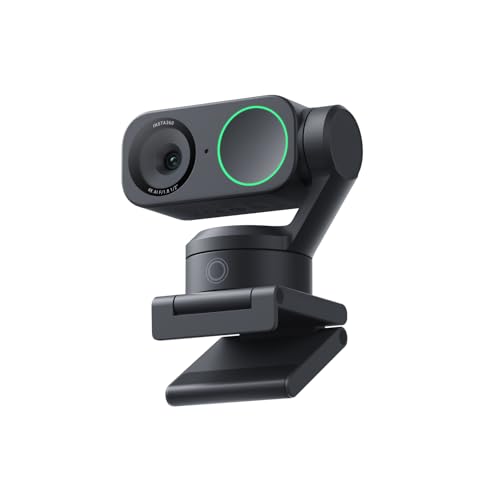
Insta360 Link 2C - 4K Webcam for PC/Mac, 1/2" Sensor, Auto Framing, HDR, AI Noise-Canceling Mic, Gesture Control for Streaming, Video Calls, Gaming, Works with Zoom, Teams, Twitch & More
Disclosure: We may earn a commission when you buy through links on this page, at no extra cost to you. As an Amazon Associate I earn from qualifying purchases. Learn more
Highlights
- Premium Image Quality: Upgrade to Link 2C 4K webcam with a 1/2" sensor. Captures true-to-life webcam 4K visuals with HDR and low-light performance for stunning video in any lighting condition.
- Professional Audio: Experience best-in-class audio with advanced AI noise-canceling algorithms. Filter out unwanted background noise for clear communication, even in busy environments.
- True Focus: Insta360 Link 2C streaming camera with Phase Detection Auto Focus (PDAF). No more blurry shots—this web cam ensures instant focusing and crisp video for every stream.
- Natural Bokeh: Get a DSLR-like look with this Insta360 Link 2C web camera. Replicates natural depth of field straight from the Link Controller, making it a superior camera for computer setups.
- Auto Framing: Insta360 Link 2C automatically zooms and adjusts to keep everyone clearly in sight, whether it's one person or a group.
- Gesture & Remote Smartphone Control: Control your webcam remotely from your smartphone, or use simple hand gestures to start AI Tracking/Auto Framing, zoom in or out and activate Whiteboard Mode.
- Specialized Modes: Features DeskView and Whiteboard modes. Link 2C is ultimate webcam for streaming and creativity, functioning perfectly as a versatile webcam for Mac and Windows.
- Advanced Desktop Software: Fine-tune settings, access advanced features and personalize your experience with the free dedicated Link Controller software.
- Privacy Mode: Insta360 Link 2C has an easy-access privacy switch for privacy whenever you need it.
- Compatibility: Fully compatible with all major video conferencing software and live streaming platforms, including Microsoft Teams, Zoom, Twitch and more, for a seamless experience.Hardware Note: Currently not compatible with ARM-based Windows systems or Windows Hello Face Recognition.
Why You'll Love It
- Large half-inch sensor captures crisp 4K video with HDR in tricky lighting
- Phase Detection Auto Focus locks onto your face quickly to eliminate blur
- AI noise-canceling microphone filters out background distractions in busy rooms
- Auto framing keeps single presenters or entire groups centered automatically
- Hand gestures and smartphone controls let you adjust framing and zoom remotely
- Dedicated privacy switch provides instant physical coverage when you finish calls
Pros
- +Crisp 4K video with HDR
- +Fast phase detection autofocus
- +Built-in AI noise reduction
- +Physical privacy switch included
- +Gesture and smartphone controls
Cons
- -Incompatible with ARM-based Windows systems
- -Lacks Windows Hello facial recognition support
Detailed Review
Upgrading your video setup requires crisp imagery and reliable tracking, and this 4K webcam delivers sharp video for remote workers, teachers, and streamers alike. The Insta360 Link 2C uses a 1/2-inch sensor that captures detailed 4K visuals, balancing bright windows and dim rooms with built-in HDR processing. Whether you attend daily standups or broadcast live on Twitch, the hardware focuses on presenting a clear, lifelike image without requiring external studio lighting.
Focusing speed and background separation set this unit apart during active presentations. Equipped with Phase Detection Auto Focus (PDAF), the camera adjusts focus instantly as you move toward or away from the lens, preventing distracting focus hunting. You can also engage a natural bokeh effect through the dedicated Link Controller software, replicating the shallow depth of field typically produced by DSLR lenses so your background remains tastefully softened.
Meeting dynamics benefit from automated tracking and versatile framing controls. The auto framing system adjusts the digital zoom automatically to center a solo speaker or expand the frame to include a group in a conference room. Hands-free operation is possible through simple hand gestures, which let you start framing, zoom in or out, and toggle Whiteboard Mode. For desk demonstrations or classroom instruction, the camera offers specialized DeskView and Whiteboard modes, while remote smartphone control lets you adjust framing from across the room.
Clear communication depends heavily on audio quality, which the integrated microphone handles using AI noise-canceling algorithms to eliminate ambient room noise. When meetings conclude, an integrated privacy switch allows you to cut the feed immediately without relying solely on software toggles. Software tuning is handled through the free Link Controller application, allowing full image customization on Mac and standard Windows computers.
A few hardware trade-offs are worth noting before purchase. The camera does not support Windows Hello facial recognition, so you cannot use it for biometric logins. It is also incompatible with ARM-based Windows machines, meaning users running Qualcomm-powered PCs will need to look elsewhere. In addition, its framing relies on digital cropping rather than a mechanical motorized gimbal.
Verdict: The Insta360 Link 2C is a capable 4K webcam suited for professionals and content creators who need fast autofocus, smart framing, and noise-canceling audio on standard PC or Mac setups. Shoppers needing Windows Hello biometric logins or support for ARM-based Windows systems should select an alternative device.
Who Should Buy It
A great fit if you:
- Host professional meetings on platforms like Zoom or Microsoft Teams and want sharp 4K resolution with HDR handling.
- Present lessons, tutorials, or brainstorms that benefit from specialized tools like Whiteboard Mode, DeskView, and gesture controls.
- Work in lively household environments where an AI noise-canceling microphone helps suppress unwanted background noise.
- Share your workspace with others and value a physical privacy switch to easily shut off the camera feed.
Consider something else if you:
- Work on an ARM-based Windows system and need a camera that provides verified operating system driver support.
- Rely on facial recognition to log into your computer and require a camera with Windows Hello compatibility.
- Prefer mechanical motorized pan-and-tilt tracking rather than software-based auto framing and digital zooming.
Before You Buy
Confirm on the listing:
- Check your computer processor architecture to ensure your machine is not an ARM-based Windows PC.
- Verify which mounting hardware, monitor clips, or desktop stands are supplied in the package.
- Check the included cable type and length to verify it reaches your computer ports without needing extra adapters.
- Confirm the current operating system version requirements for the free Link Controller desktop software.
How to compare your options: Focus on core imaging hardware like sensor size and focusing technology, since a 1/2-inch sensor and phase detection autofocus offer noticeable advantages over basic fixed-focus lenses. Consider whether you need specialized presentation tools such as DeskView, Whiteboard tracking, or smartphone controls, or if your workflow only demands a simple plug-and-play feed. Finally, verify that your operating system supports all intended features, especially if you rely on platform-specific utilities like Windows Hello.
Getting the Most From It
- Download the free Link Controller desktop software to fine-tune image properties, adjust depth of field, and manage auto framing presets.
- Practice the built-in hand gestures in private before live calls so you can smoothly trigger Whiteboard Mode or zoom adjustments during presentations.
- Experiment with the natural bokeh toggle in the software to find a background blur level that complements your room setup.
- Pair your smartphone with the remote control utility if you present from a distance and need to manage framing without touching your computer.
- Engage the manual privacy switch whenever you finish streaming or conferencing to ensure your workspace remains private.
- Clean the glass lens element gently with a soft microfiber cloth according to the manufacturer guidelines to keep autofocus functioning properly.
FAQ
Can I use this webcam to log in with Windows Hello?
No, the Insta360 Link 2C is not compatible with Windows Hello Face Recognition, so you will need to use a password or PIN to sign in.
Does this camera work on Windows computers running ARM processors?
No, the hardware note specifies that it is currently not compatible with ARM-based Windows systems.
Which video calling and streaming apps work with the Link 2C?
It works with all major platforms, including Microsoft Teams, Zoom, and Twitch, on supported Mac and Windows computers.
How do gesture controls function during calls?
You can show simple hand gestures to the camera lens to activate Whiteboard Mode, start auto framing, or zoom the picture in and out without touching your keyboard.
Does the camera include a physical cover for privacy?
Yes, it features an easy-access privacy switch built directly into the unit for immediate privacy control.
Product Details
| Brand | Insta360 |
| ASIN | B0DDTGY8FG |