OBSBOT
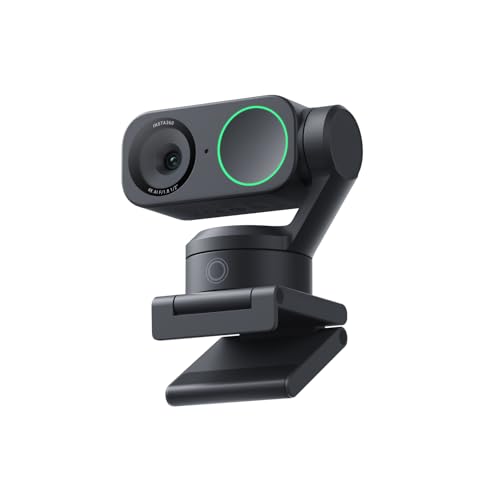
OBSBOT Tiny 2 Lite 4K Webcam for PC, AI Tracking PTZ Streaming Camera
Disclosure: We may earn a commission when you buy through links on this page, at no extra cost to you. As an Amazon Associate I earn from qualifying purchases. Learn more
Highlights
- 【OBSBOT × EWC 2026 Official Partnership】As an Official OBSBOT Partner of the Esports World Cup 2026, OBSBOT powers the future of esports broadcasting with cutting-edge AI imaging technology. From immersive live productions to every defining in-game moment, OBSBOT delivers exceptional precision, clarity, and intelligent camera performance. Beyond the arena, OBSBOT empowers creators and streamers worldwide with professional imaging solutions, helping them capture, create, and share their own esports stories with confidence.
- 【Stay Pro, Stay Productive】The new version Tiny 2 Lite webcam 4K streamlines some streaming features (whiteboard mode and voice control) to prioritize teaching and meeting scenarios. Reasonable price, uncompromised quality. The inherited 4K resolution & 1/2'' CMOS sensor and easier operation make it a more professional business shooting partner.
- 【Your Tracking Mode,Your Rule】The web cam boasts multiple tracking modes (e.g. upper body& hand tracking), to cater to a broader audience with diverse tracking needs. Beyond just these features, the PTZ camera also allows you to customize tracking areas and Non-tracking area, offering unparalleled freedom for personalized tracking.
- 【Customizable Preset Modes】The webcam for PC newly upgraded Preset Position function not only can set multiple preset positions, but also customizes separate parameters and AI tracking modes for each preset position. Even when the scene switches, it reduces adjustment time while still ensuring that every frame is shot at the optimal setting.
- 【Dynamic Gesture Control】 Along with the 2.0 dynamic gesture control, our streaming camera says goodbye to cumbersome manual operation. Simply face the web cam, make an “🖐” gesture to lock the portrait tracking target, and make an “👆” gesture to control the zoom easily.
- 【Multiple Shooting Modes】The web camera not only supports horizontal, portrait, upside-down shooting modes, but also automatically adjusts the screen according to the machine's placement without sacrificing image quality. No matter which mainstream live broadcast platform, or any environment you want to shoot, it can easily cope with.
- 【Apps for Novice and Experienced】Simple plug and play to use our computer camera, no need to download APP, friendly to newcomers. If you are a professional camera enthusiast, great news! Tiny 2 Lite webcam supports SDK, OSC, Stream Deck, and Global Hotkey functions, allowing you to customize your own 4K Webcam experience.
Why You'll Love It
- Delivers crisp 4K visual detail using a dedicated 1/2-inch CMOS image sensor
- Tracks upper body or hands automatically and lets you define custom non-tracking zones
- Changes angles and zooms via simple hand gestures without touching mouse or keyboard
- Saves multiple preset camera angles with distinct tracking modes and individual image settings
- Works right out of the box with plug-and-play setup requiring no software install
- Integrates into advanced broadcast workflows through Stream Deck, SDK, OSC, and global hotkeys
Pros
- +Crisp 4K resolution with 1/2-inch CMOS sensor
- +Automated pan-tilt-zoom AI subject tracking
- +Touch-free hand gesture controls for zoom and target lock
- +Plug-and-play setup without mandatory software
- +Deep customization via Stream Deck, SDK, and hotkeys
Cons
- -Omits whiteboard mode found on other versions
- -Lacks built-in voice control functionality
Detailed Review
A motorized 4K webcam can transform remote instruction and corporate meetings by keeping you centered without manual camera adjustments. The OBSBOT Tiny 2 Lite brings automated motorized tracking into home offices and lecture setups, giving presenters a camera that follows their movements across the room while capturing fine details on a 1/2-inch CMOS sensor.
Targeted framing sits at the heart of daily use. Rather than relying on a rigid field of view, this motorized PTZ unit offers specialized modes such as upper body tracking and hand tracking. Users who want tight control over where the lens wanders can set up custom tracking areas as well as dedicated non-tracking zones, which prevents the sensor from drifting toward unwanted background motion during presentations.
Controlling the camera during a live broadcast or video call is designed around quick hand gestures. Facing the lens and raising an open hand locks the portrait tracking target in place, while raising an index finger adjusts the zoom. For users switching between a seated desk position and a standing presentation area, the preset position feature allows you to store multiple viewing angles, pairing each specific spot with its own unique image parameters and tracking modes.
Mounting versatility supports horizontal setups, portrait framing for mobile viewers, and upside-down orientations. The camera automatically adjusts its screen output based on how it is positioned without compromising image quality. Basic operation is entirely plug and play, so you can join calls immediately without installing an application, while broadcast enthusiasts retain the option to integrate the camera with Stream Deck, OSC, SDK tools, and global hotkeys.
To achieve a streamlined balance for meetings and teaching, this specific edition trims away whiteboard mode and voice control options. If your daily workflow relies heavily on shouting spoken instructions to your camera or using dedicated digital whiteboard captures, those omissions are worth noting.
Verdict: The OBSBOT Tiny 2 Lite is a capable 4K webcam for remote educators, business presenters, and streamers who want hands-free AI tracking and custom preset positions. Buyers who need built-in voice commands or automated whiteboard capture should look at other models instead.
Who Should Buy It
A great fit if you:
- Teach online classes or run business meetings where you regularly stand up, move around, or demonstrate items by hand.
- Want high-definition 4K streaming with touch-free dynamic gesture controls to lock framing and adjust zoom on the fly.
- Rely on Stream Deck, global hotkeys, OSC, or custom software SDK integrations for professional live streaming production.
- Need flexible mounting choices that automatically adapt across horizontal, vertical portrait, and upside-down camera orientations.
Consider something else if you:
- Need native voice control commands to adjust your camera hardware hands-free from across the room.
- Rely specifically on a dedicated whiteboard mode for digital classroom instruction and physical board capture.
Before You Buy
Confirm on the listing:
- Check whether the package includes mounting clips, tripods, or cables suitable for your current computer ports.
- Check the exact physical dimensions and weight to ensure it fits comfortably on your laptop screen or monitor bezel.
- Confirm computer operating system compatibility for advanced utility tools like SDK, OSC, and hotkey software.
How to compare your options: When shopping for motorized streaming cameras, pay close attention to resolution, physical sensor size, and tracking flexibility. This camera combines a 1/2-inch CMOS sensor with 4K output, automated target tracking, and dynamic gesture recognition. Compare whether competing options require mandatory background software to function or if they offer plug-and-play simplicity alongside pro-grade integration tools like Stream Deck support.
Getting the Most From It
Start by plugging the camera into your computer to verify standard video recognition before adjusting any advanced configurations. Because the hardware works as a plug-and-play unit, you can verify your basic framing and video feed inside your preferred meeting or streaming application right away.
If you plan to move around your space, take time to configure your tracking boundaries. Designate non-tracking zones in areas where doorway traffic or background movement might pull the camera away from you. Practice the standard hand gestures, holding up an open hand to lock target tracking or an index finger to adjust zoom, ensuring the lens reads your cues smoothly.
Save distinct preset positions for your primary working postures, such as sitting down for typing and standing up for presentations, assigning tailored tracking behaviors to each spot. When maintaining the unit, keep the lens clean with a gentle optical cloth and avoid manually forcing the motorized PTZ head beyond its natural movement range.
FAQ
Does this camera require special software to work?
No, it offers simple plug-and-play operation for your computer without needing an app download, though advanced users can access SDK, OSC, Stream Deck, and global hotkeys.
How do dynamic gesture controls work on this model?
You make an open hand gesture while facing the lens to lock portrait tracking, and an index finger gesture to easily adjust the camera zoom.
Can the camera shoot vertical video for portrait platforms?
Yes, it supports horizontal, portrait, and upside-down shooting modes, automatically adapting the screen display to its physical placement without losing image quality.
Does this lite version have whiteboard mode and voice control?
No, this model streamlines its features to prioritize teaching and meetings, removing whiteboard mode and voice control.
What kind of tracking modes are available?
The camera offers upper body tracking, hand tracking, customizable tracking zones, and configurable non-tracking areas to match different presentation needs.
Product Details
| Brand | OBSBOT |
| ASIN | B0CZ6XY78Y |