
Best Cameras for Professional Use in 2026: A Clear Buying Guide for First Time Buyers
Disclosure: We may earn a commission when you buy through links on this page, at no extra cost to you. As an Amazon Associate I earn from qualifying purchases. Learn more

Shopping for professional cameras for the first time? Learn sensor, lens and autofocus terms, compare camera types, and avoid common buying mistakes.
Buying your first camera for paid work feels different from buying one for holidays. Clients expect sharp files, steady focus and results delivered on a deadline. The best cameras for professional use give you control, reliability and room to grow, and the comparison table below helps you weigh those points.
This guide starts with the basics, then walks through the specs that matter for client work. You will learn how sensor size, lenses, autofocus and video settings change your results before you spend.
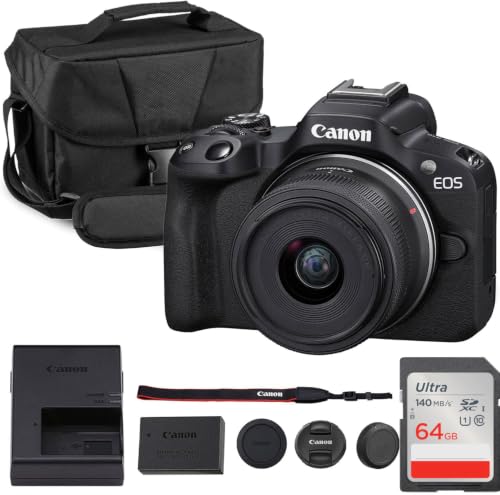


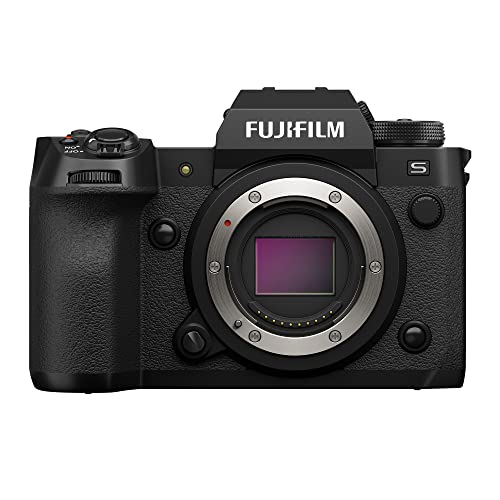
Cameras 101: The Basics for Paid Work
A camera turns light into a file. The lens gathers light and focuses it on the sensor, the sensor records the image, and the processor saves it as a photo or video clip. When people discuss the best cameras for professional use, they usually mean bodies that add manual control, strong file quality and backup options. Those extras protect a paid shoot, since a client moment may not repeat.
If you are still learning the wider category, see our guide to the best digital cameras for a plain overview of how digital bodies differ.
Who Should Buy a Camera for Professional Use?
Professional use is defined by the job, not by a badge on the body. Match the camera to the work you will deliver most often.
Wedding and Event Photographers Working for Clients
You shoot moving people in changing light, often with no second chance. Prioritize fast autofocus, good high ISO results and two memory card slots so every file has a backup copy. A quiet shutter mode helps during ceremonies, and weather sealing matters outdoors.
Studio Portrait and Product Photographers
You control the light, so color accuracy and sharp detail matter more than extreme speed. Choose clean files, a tilting screen and support for tethered shooting to a computer. For stills, see our guide to the best cameras for professional photos for still image needs.
Video Creators Shooting Paid Client Work
You record interviews, events and short films where audio and steady footage decide quality. Look for clean 4K video, a microphone input, a headphone socket and stabilization that smooths small hand movements. A fully tilting screen helps when you film yourself.
Key Features to Compare
Compare the factors below in this order, since they shape image quality and reliability more than small menu extras.
Features That Matter Most for Professional Use
Professional bodies earn their price through dependability. Two card slots let you write a backup as you shoot, and weather sealing helps in rain or dust. RAW files keep more color and brightness data for editing, while a solid mount system gives you lens choices for years. Strong battery life also matters, since a shoot fails fast when power runs out during a key moment.
How Sensor Size Shapes Image Quality on Paid Jobs
The sensor is the light recording surface, and size shapes depth, detail and noise. Full frame sensors gather more light and suit large prints and shallow focus portraits. APS C sensors make bodies and lenses smaller and cost less, with quality that still suits most client work. A 1 inch sensor fits compact bodies for travel. Megapixels count detail, but lens quality and light often matter more.
Autofocus, Stabilization and Ease of Use
Autofocus locks onto your subject, and tracking holds focus as the subject moves. Face and eye detection help with portraits, while touch focus on the screen speeds up video work. Image stabilization in the body or the lens reduces blur from small hand movements. Clear menus, custom buttons and app transfer for quick previews make a complex body faster to learn and use.
Low Light Performance on a Professional Camera
Low light results depend on sensor size, lens aperture and ISO range working together. A wider aperture, shown by a lower f stop number, lets in more light for indoor events. Higher ISO settings raise sensitivity but also add grain like noise, so judge the range you will actually use. A full frame body with a bright lens usually gives the cleanest evening files.
Lens Choice, Optical Zoom and Focal Length
The objective lens decides what your sensor can record, so plan for lenses as carefully as the body. Focal length, measured in mm, sets the view: about 24 to 70 mm covers groups, portraits and events on one zoom. Optical zoom uses glass to magnify the scene and keeps detail, unlike digital zoom, which crops the image. Prime lenses are fixed length and brighter, but you move to reframe.
Size, Weight and Ergonomics for Long Shoots
A camera you hold for six hours must fit your hands, not just your bag. Deep grips, well placed dials and a body that balances with your longest lens reduce fatigue. Smaller APS C kits suit travel and long event days, while larger full frame kits feel steadier with big lenses. Hold the body with your main lens, and check that key dials are easy to reach.
Choosing the Right Camera Type and Video Setup for Professional Use
Body type shapes your lens options, your carrying load and how you work on location.
Mirrorless, DSLR and Compact Cameras Compared for Client Work
Mirrorless bodies are now the common choice for paid work, with strong video and focus tracking in a smaller body. DSLR bodies use an optical viewfinder and older lenses, but most makers now develop mirrorless lines first. Compact cameras have a fixed lens and suit travel or backup duty. If your needs are still broad, see our guide to the best cameras to use for everyday shooting.
Best 4K Cameras for Professional Use: Tips for First Time Buyers
4K video records four times the detail of standard high definition, which helps when clients view work on large screens. Check frame rates, since 60 frames per second gives smoother motion and better slow motion than 24 or 30. Look at recording limits, bit depth and stabilization together, because sharp footage that stops early or shakes still looks unprofessional.
Common Mistakes to Avoid
Most first professional kits disappoint for simple reasons that are easy to prevent.
- Spending the whole budget on the body leaves no money for a good lens, so images look soft despite a strong sensor.
- Choosing a body with one card slot risks losing a full paid shoot if that single card fails.
- Judging a camera by megapixels alone ignores lens quality and light, so files disappoint in real rooms.
- Ignoring total kit weight makes long event days painful, so you rush shots and miss moments.
- Skipping audio gear for video work leaves clear footage with poor sound, so clients judge the whole job harshly.
Getting Started: Setup and First Use of a Professional Camera
Charge the battery fully, format the memory cards in the camera and set the date, time and file naming before your first job. Set your file type to RAW plus JPEG so you keep an editable file and a quick preview. Practice changing ISO, aperture and focus mode until each dial feels familiar.
Clean the lens with a lens cloth, not your shirt, since shirt fabric can hold grit that scratches coatings. Carry a spare battery and a spare card, and test your microphone at home before the shoot day.
Care and Maintenance of a Professional Camera
Keep the body in a padded bag and store it in a cool, dry place away from direct sun. Use a blower to remove dust from the lens mount and screen, and wipe the lens glass gently with a clean cloth. Never touch the sensor with your fingers, since skin oil is hard to remove safely.
Remove the battery during long storage and recharge it every few months. Check strap mounts for looseness before each job, and have the sensor cleaned by a service center if spots appear in every photo at small apertures.
FAQ
What features matter most in a camera for professional use?
Reliability matters most, starting with two card slots, solid build quality and files you can edit with confidence. After that, match autofocus speed and lens choice to your paid work. Buyers often miss service support: a maker with local repair options can return a body to work faster after a fault.
Which sensor size works best for low light on a professional camera?
A full frame sensor generally works best for low light because its larger surface gathers more light at the same settings. Technique can still close much of the gap. Placing your subject near a window or a lamp lets a smaller sensor work at lower ISO settings where its files stay clean.
Is a smartphone enough for professional client work instead of a dedicated camera?
A smartphone is rarely enough as your only tool for paid client work. Its small sensor and fixed lens limit shallow focus portraits, low light quality and print size. Clients also expect backup files and lens choices for different scenes. A phone still works well as a backup for candid clips during a shoot.
What does a 24 to 70 mm lens range mean on a professional camera?
It means one zoom lens can move from a wide 24 mm view to a short portrait length of 70 mm without a lens change. That range covers establishing shots, group photos and tighter portraits at one event. One zoom can also replace two lenses, which lightens your bag on location.
How much should a first time buyer spend on a camera for professional use?
Most first time buyers should plan about $800 to $1500 for a capable APS C kit, or about $1800 to $3000 for a full frame body with one versatile lens. Reserve part of the budget for cards, a spare battery and a bag. If bookings grow, see our guide to the best cameras for professional photography.
Final Thoughts
Start with your paid work, then match sensor size, lens range and reliability features to that work. A smaller kit you understand well will serve clients better than a complex body you hesitate to adjust. Use the product table above to compare bodies on the points covered here.
Chosen that way, the best cameras for professional use become a practical tool rather than a risky expense. Buy the simplest kit that meets your client needs, and add lenses as bookings demand them.


