
Best Cameras for Professional Photos for 2026: A Buyer Checklist
Disclosure: We may earn a commission when you buy through links on this page, at no extra cost to you. As an Amazon Associate I earn from qualifying purchases. Learn more

Run this buyer checklist before choosing the best cameras for professional photos: deliverable size, dual card slots, lens access, service, and total kit cost.
Paid photography changes what a camera has to do. A personal camera only needs to please its owner, but a camera bought for client work must deliver files that print cleanly, edit predictably, and arrive on a deadline. That is why the search for the best cameras for professional photos should start with your assignments, not with a spec sheet.
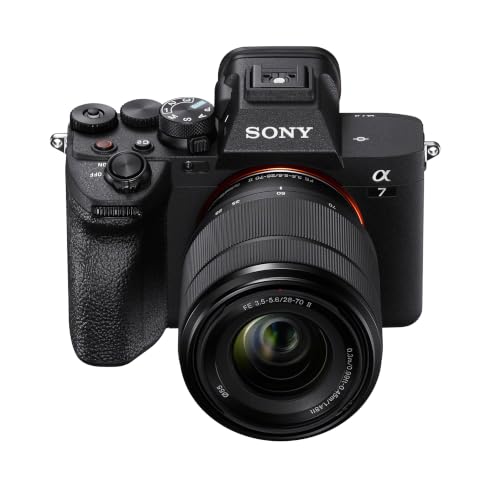
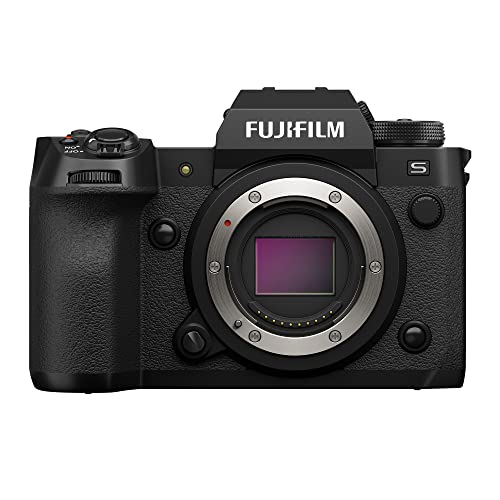
This guide works as a checklist you run in order. First define the deliverable, then verify the reliability features that protect paid work, then check the lens library and service network behind the body, and finally price the whole kit. The comparison table below summarizes the main body classes before the detailed checks begin.





Check One: Define the Deliverable Before You Shop
The deliverable is what the client actually receives: a set of edited files, a printed album, a wall portrait, or a product gallery for a store page. Each one sets a different floor for resolution, color handling, and file format. Write down your two or three most common deliverables before you compare bodies, because that short list eliminates most of the market honestly.
Resolution Follows Print Size, Not Marketing
Megapixels printed on the box are not the quality story, and every maker measures its supporting figures its own way, so badges cannot be compared across brands. What matters is the largest size you deliver. Files for web galleries and small prints ask little of a sensor, while large wall prints and heavy cropping for client revisions ask a lot. Buy resolution for the biggest job you regularly accept, with modest headroom, and put the savings into lenses. The mainstream market for best digital cameras is driven by casual output sizes, which is why consumer resolution claims rarely translate into client work.
Raw Capture and Color Handling Protect Your Edits
Professional delivery usually means editing, and editing needs raw files with room to recover highlights and correct color casts from mixed lighting. Check that the body records full raw files at a usable burst pace, not only a reduced compatibility format. Color depth figures are quoted under ideal conditions, so treat them as rough class signals rather than promises. A body that slows down after a short burst will cost you moments during a wedding processional or against a product deadline. Instant cameras sit outside this workflow entirely; guides to best instant photo cameras cover that keepsake niche, but instant prints are not files a client can reprint or archive.
Check Two: Reliability Features That Protect Paid Work
A missed shot at a paid job is not an inconvenience, it is a refund conversation waiting to happen. The next checks are about removing single points of failure from your working day, one feature at a time.
Dual Card Slots and a Backup Routine
Two card slots recording the same files at once are the cheapest insurance in professional photography. Cards fail rarely, but a wedding, a birth, or a product launch cannot be restaged when one does. Match the backup habit to the slot: copy cards to two separate drives before you format anything, and keep one copy away from the studio. A single slot body can still work as a second angle camera, where the primary body carries the critical frames.
Autofocus and Stabilization as Delivery Insurance
At a paid shoot, your keeper rate is a business number, because every soft frame is a gap in the gallery the client paid for. Eye detection autofocus earns its place at portraits and events, where it holds focus on a moving subject while you compose. Stabilization in the body or the lens helps with static subjects in dim venues, but it cannot freeze a dancing guest or a child mid stride. Judge both features by the failures they prevent in your genre, not by the mode count on a dial.
Battery Systems Decide Long Shoot Days
Maker battery ratings are measured under gentle conditions, so treat the printed shots per charge as a best case figure. What matters is the system around the pack: a grip option for vertical work and doubled capacity, chargers that refill two packs at once, and enough spares that a cold outdoor job never ends on a blinking warning. Bodies that sip power through an optical viewfinder behave very differently from bodies that run a bright rear screen all day, so plan spares around your own shooting style.
Tethering for Studio and Client Preview Work
In studio and commercial work, clients often approve images on a monitor as the shoot happens, and tethering classes differ sharply in speed and stability. Check the port type, the cable locking options, and whether the maker software or common studio programs support the body directly. If studio approval workflows are your main income, our guide to the best professional cameras goes deeper on the flagship class built around that pace.
Check Three: The Lens Library and Service Behind the Body
A camera body is a five year decision wrapped inside a much longer lens decision. The mount you choose decides what you can rent on a Friday afternoon and who can repair your gear in your own city.
Renting and Borrowing Locally Is a Business Feature
Every working photographer eventually needs a lens for one weekend: a long telephoto for a large ceremony venue, or a specialty lens for a property shoot. Systems with deep local rental stock let you bid on those jobs without owning rarely used glass. Before you commit, list the rental houses near you and confirm they stock your candidate mount. A slightly less fashionable system with strong local support often earns more than a celebrated system you cannot service nearby.
Service Turnaround and Loaner Access
Professional service programs exist because downtime is lost income. Compare enrollment cost, typical turnaround, and whether a loaner body is offered while yours is repaired, in general terms, before you buy. Even without a program, a maker with an authorized bench in your region beats one that requires international shipping for every fault. Keep your purchase receipts and serial records in one file, since service desks ask for them before they quote anything.
Check Four: Price the Whole Kit, Not Only the Body
Body prices span a wide ladder. Capable working bodies sell for about $1,000 to $2,500, while flagship bodies built for speed and service programs run about $3,000 to $6,500 and above. Neither figure is the purchase. Two or three working lenses, lighting, spare batteries, cards, storage drives, and a second body as backup commonly double the body price before the kit earns anything.
A practical way to budget is to price the body last. Total the lenses and support gear your deliverables require, then choose the body class that fits what remains. Many professionals also keep a smaller, lighter body for travel and personal projects, and our guide to best photo cameras covers those everyday options if your main kit stays at the studio.
Quick Buyer Checklist
Answer these honestly before you pay:
- Do you know the largest print or display size your clients request?
- Does the body write every frame to two cards at the same time?
- Can you rent the lenses you need within a short drive of your studio?
- Is there an authorized service option in your region for this system?
- Have you priced lenses, lighting, storage, and a backup body, not only the camera?
- Does the battery system cover your longest typical shoot day with spares to spare?
- Will the tethering setup work with the software your clients expect to see?
Red Flags to Watch For
- A body marketed for weddings with only one card slot leaves the only copy of an unrepeatable event sitting on a single card.
- Marketing that leads with megapixel count and says nothing about raw support or buffer depth is aimed at casual buyers, not working ones.
- A mount with no local rental stock turns every unusual job into a purchase decision instead of a weekend hire.
- Vague weather sealing claims, with no sealed lenses anywhere in the system, fail on the first rainy assignment.
- No published service route in your country means a minor fault becomes a long international repair.
Care Habits That Keep a Working Camera Earning
Clean the sensor with the maker approved method or send it to a service bench, and wipe lenses with a proper cloth rather than a shirt, which drags grit across coatings. Rotate spare batteries so no pack sits empty for months, and store the kit in a dry, padded bag away from heating vents. Update firmware when a fix addresses your lenses or your workflow, and log shutter count and service dates so a resale or a repair starts with facts.
Your Questions Answered
How many megapixels do professional photos actually need?
Most client work needs far fewer megapixels than marketing suggests. Album prints, web galleries, and magazine pages are comfortably served by moderate resolution sensors, while very large wall prints and aggressive cropping justify the high resolution class. Viewing distance matters too: a trade show banner is read from several feet away, so it tolerates files that would look thin in a closely held portrait print.
Is a second camera body really necessary for paid work?
For unrepeatable events, yes, a backup body is a professional necessity rather than a luxury. It does not need to match your main camera; an older body that shares your lenses and batteries covers a failure and doubles as a second angle. If a second body is out of reach, price a rental reservation for your biggest dates and treat that fee as part of the job cost.
Should I switch camera systems to chase better specifications?
Switching systems rarely pays, because your lenses, flashes, and working habits are worth more than a modest spec gain. The honest test is rental: hire the rival body for one real job and compare the delivered files and the working pace, not the brochure. Switch only when the new system changes what you can sell, such as rental access, service speed, or a lens your clients repeatedly request.
Do professional photos require a full frame sensor?
No, professional photos require files that meet the deliverable, and smaller sensors meet many of them. Clients judge the finished image, not the sensor badge, and plenty of paid editorial and event work is shot on crop sensor and smaller formats. Full frame earns its price when you work constantly in dim venues, print very large, or need the shallow focus look that smaller sensors only match with much faster lenses.
How long should a professional camera body last?
A working body typically serves several years of paid assignments before repair costs or worn controls argue for replacement. Shutter life figures are maker estimates under test conditions, not guarantees, so a high count alone does not retire a camera that still performs. Budget a small annual service amount for sensor cleaning, mount checks, and grip replacement, and the body will usually tell you through reliability, not a calendar, when it is done.
Final Thoughts
Run the four checks in order and the decision narrows quickly: the deliverable sets the sensor class, reliability features protect the fee, and the lens library plus service network decide whether the system keeps earning for years. Compare your shortlist against the product table above, and choose the best cameras for professional photos for the work you actually deliver, not the work a brochure imagines.


