
Best Cameras for Interior Designers by Budget for 2026
Disclosure: We may earn a commission when you buy through links on this page, at no extra cost to you. As an Amazon Associate I earn from qualifying purchases. Learn more

Compare cameras for interior designers by budget, sensor, lens choice and color accuracy, with a practical checklist for portfolio ready room photos.
Camera prices for design work stretch widely, and the gap is not only about sharpness. Rooms ask for wide views, straight walls, honest fabric color and detail in bright windows and shaded corners. The best cameras for interior designers handle those demands without slowing you down on site, and the comparison table below shows how current options differ.
This guide sorts the decision by budget and by the job you do. You will see which features deserve money first, which extras can wait, and why lens choice often matters more than a small jump in megapixels.



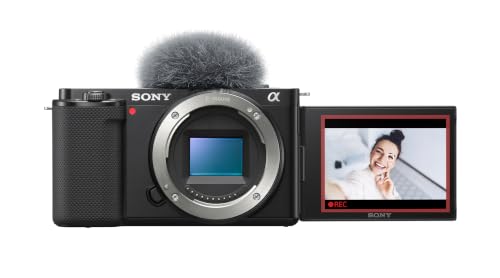


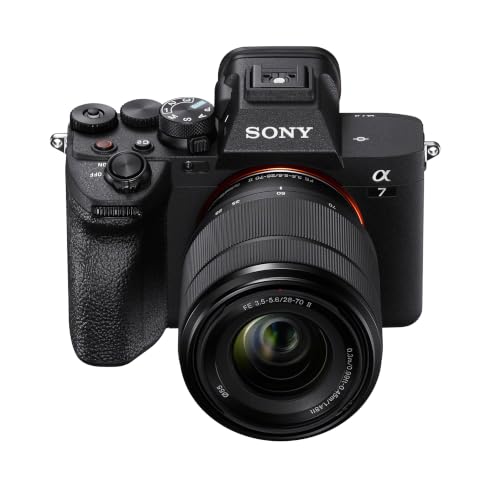
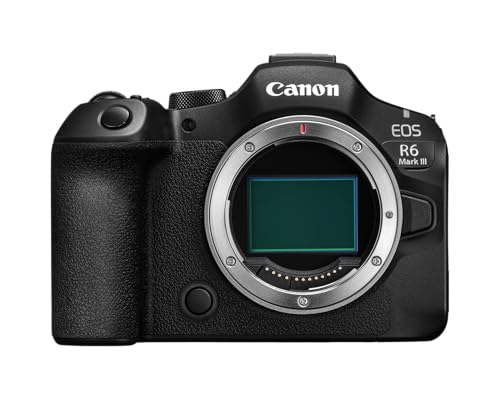

Who Should Buy a Dedicated Camera for Interior Design Work?
Designers Building a First Portfolio on a Tight Budget
You shoot completed rooms for a website and social posts, and you need images that look planned rather than snapped in passing. A modest interchangeable lens body with a wide zoom is enough, provided it shoots raw files and lets you control white balance. Prioritize one good wide lens over a large kit. Clients judge composition and color first, so spend time on straight vertical lines and leave higher resolution for later.
Designers Photographing Finished Projects for Clients and Press
You deliver galleries that clients and editors reuse, so files must hold up when cropped or printed large. You benefit from a larger sensor, stronger dynamic range and fast WiFi transfer for review during the shoot. A second lens for detail shots of joinery and textiles rounds out the set. If this is your group, the best cameras for interior designers are the ones that keep color consistent across a whole home.
Designers Creating Video Walkthroughs and Social Content
You move through finished spaces, narrating layout choices for prospective clients. You need smooth stabilization, reliable autofocus while walking, and clean 4K video that does not overheat on a normal room tour. A screen that flips toward you helps when you appear on camera, and a microphone input improves voice clarity in empty rooms with echo. Choose a lighter body you will carry through a full property.
Key Features to Compare
Wide Lens Range and Control of Vertical Lines
Interiors are shot from corners and doorways, so you need a lens that covers a whole room without a fisheye look. On a full frame body, about 16 to 35 mm covers most rooms, while APS C bodies need roughly 10 to 24 mm for a similar view. Look for lens corrections in camera and perspective control in editing. Tilt shift lenses help on flagship projects, but a good wide zoom plus careful leveling serves most designers well.
Sensor Size and Dynamic Range for Mixed Room Light
A room often holds a bright window and a dark corner in one frame, and dynamic range decides how much detail survives at both ends. Larger sensors in the full frame and APS C classes usually capture that spread with cleaner shadows than small compact sensors. Megapixels matter less, because most portfolio work is viewed on screens or printed at moderate sizes. If you blend exposures, check that the body brackets easily and writes raw files with flexible highlight recovery.
True Color and White Balance You Can Set by Hand
Clients chose those paint, wood and fabric colors on purpose, so the camera must record them honestly under mixed bulbs and daylight. Manual white balance, a custom preset from a gray card, and accurate color profiles in raw files give you a repeatable starting point. Avoid bodies that push saturation hard with no way to tone it down. For a broader look at formats, see our guide to the best digital cameras and note which models save custom color settings.
Low Light Performance for Rooms Away From Windows
Bathrooms, hallways and evening shoots push sensitivity upward, and clean results at higher ISO settings keep textures in tile and upholstery readable. A sensor that holds detail around ISO 1600 to 3200 gives you freedom when flash would flatten the mood the client paid for. Pair that with a lens that stays sharp one stop down from its widest setting. Try any shortlist on a dim interior, because noise shows first in flat painted walls.
Stabilization, Autofocus and Video for Room Tours
In body stabilization steadies handheld clips and low speed stills, while eye autofocus helps when people appear in lifestyle shots. For video, 4K recording, a microphone jack and a screen you can angle matter more than slow motion modes. Continuous autofocus should stay calm and avoid hunting when you pan across a room. If walkthroughs are a small part of your work, treat video as a bonus and put money into the lens instead.
Price Tiers for Room Photography Budgets
Budgets below are for a body with a useful wide lens, because a body alone cannot shoot a room. Treat each range as a planning guide and check the product table above before you decide your ceiling.
Entry Budgets for Daily Site Records and Learning, About $400 to $900
At this level you get APS C or smaller sensors, solid raw files and one kit wide zoom that covers most rooms. Autofocus and video suit site records and early portfolio pieces, though dim rooms will show more noise. Accept a slower lens now, learn leveling and exposure blending, and plan to add a brighter wide lens before you replace the body.
Working Budgets for Portfolio and Client Galleries, About $900 to $1,800
This range brings better dynamic range, cleaner high ISO files and lenses with less distortion at the wide end. Some bodies add dual card slots and easier tethering. Most working designers feel this jump weekly, because files need less rescue in editing. For dedicated room work, see our guide to the best cameras for interior photography.
Pro Budgets for Large Prints and Demanding Light, About $1,800 to $3,500
Higher budgets mainly buy full frame sensors, the widest choice of perspective control lenses, and files that stay clean when printed large or cropped hard. Build quality and weather sealing for dusty renovation sites also improve. This tier pays off when editors or luxury clients reuse your images at large sizes. It does not fix poor composition, so step up only when your files, not your technique, are the limit.
Ongoing Costs of a Working Interior Kit
The body is only part of the bill. Budget for a sturdy tripod you can level quickly, spare cards and batteries, and a wide lens if the kit lens is too narrow for small rooms. Editing software, a calibrated monitor and backup drives add yearly cost, and a color checker pays for itself when a client questions a paint tone. For editing, see our guide to the best laptops for interior designers so your screen does not undo your color care on site.
Common Mistakes to Avoid
- Buying the highest megapixel body and keeping a narrow kit lens, so small rooms never fit in one frame.
- Shooting every room at the widest setting from a corner, so furniture looks stretched and spaces feel dishonest.
- Trusting auto white balance under mixed bulbs, so paint and fabric colors shift from room to room.
- Raising the camera too high or tilting it down, so walls lean and the finished images look unstable.
- Skipping a tripod in dim rooms, so slow shutter speeds blur detail that clients expect to inspect.
- Spending on fast sports autofocus you never use, while leaving no budget for the wide lens you need daily.
Care and Maintenance for Cameras Used on Design Sites
Renovation sites carry dust and loose grit, so keep the body capped when you change lenses and turn the camera off first to reduce static drawing dust to the sensor. Blow loose particles from mounts with a hand blower, wipe the screen with a clean microfiber cloth, and store the kit in a closed padded bag away from tools. Check tripod locks before each shoot. Send persistent sensor spots to a service center rather than pressing harder at home.
Frequently Asked Questions
What features matter most in cameras for interior designers documenting finished rooms?
Accurate color, a wide lens and strong dynamic range matter most for finished rooms. A remote release is a practical extra, because it makes tripod work faster when you bracket exposures for a window view. Prioritize those points over burst speed, since a calm setup produces the consistent gallery clients compare across rooms.
How much should interior designers spend on a first dedicated camera?
Most interior designers should start at about $600 to $1,200 including a wide lens. That range buys raw files and manual white balance without tying up cash needed for staging or samples. Add lighting later only after you see repeat problems in your own rooms, rather than buying a full kit on day one.
Is a smartphone enough instead of a dedicated camera for interior designers?
A smartphone is enough for progress updates, but not for a lasting portfolio. Its small sensor struggles where a bright window meets a shaded seating area, and its fixed wide view can bend straight joinery near the edges. A dedicated camera gives you files that print cleanly for look books and press packs.
Which camera setup is better for low light interiors without flash?
A larger sensor paired with a bright wide lens is better for low light interiors without flash. Keep the camera on a tripod so you can choose a lower ISO and a longer exposure without shake. In occupied evening shots with people, raise ISO instead, because a sharp and slightly grainy frame beats a blurred one.
What specs matter most for beginner interior designers choosing a camera?
Beginner interior designers should check raw file support, manual white balance and the widest focal length of the included lens first. A tilting screen is a useful fourth spec, because it lets you compose in tight bathrooms without lying on the floor. Ignore top burst rates and long telephoto reach, since neither helps a room shoot.
Our Verdict
Choose by output first. Portfolio work calls for dynamic range, honest color and a truly wide lens, while video tours add stabilization and audio inputs. Buy the tier that removes the limit you hit most often, keep money aside for lens and tripod, and let the best cameras for interior designers earn their cost in reusable images. Compare your shortlist in the product table above.

