
Best Cameras for Graphic Designers 2026: Types Compared and How to Choose
Disclosure: We may earn a commission when you buy through links on this page, at no extra cost to you. As an Amazon Associate I earn from qualifying purchases. Learn more

Compare camera types for graphic designers by sensor, color accuracy, lenses and workflow fit, with a clear checklist for print and screen work.
Choosing a camera as a designer feels different from choosing one for travel or family photos. The best cameras for graphic designers must record color faithfully, hold fine detail for cropping, and fit the editing workflow you use every day. Use the comparison table below to match each camera type to the work you actually deliver.
Start with your output. Print work rewards resolution and clean files, while screen work rewards speed, reliable autofocus, and easy transfer. A camera that distorts color will cost you correction time on every project.





Who Should Buy Which Camera for Graphic Design Work?
Your role decides the tradeoffs. A designer who shoots texture references needs less than one who delivers photos or weekly video.
Print and Brand Designers Who Shoot Original Imagery
You photograph packaging, products, or artwork for print, so file quality comes first. Choose a larger sensor, strong RAW files, and a lens that stays sharp at the edges. Color must stay predictable from capture to proof, so if you print in house, see our guide to the best printers for graphic designers for the other end of that workflow.
Digital and Social Designers Who Also Create Motion Content
You design for feeds, sites, and campaigns and you also shoot short clips, tutorials, or product demos. Prioritize clean 4K video, fast autofocus that holds a face or a product, and image stabilization for handheld takes. A tilting screen helps you frame overhead desk shots, while quick WiFi transfer keeps short projects moving without delay.
Studio and Portfolio Designers Who Work at a Desk
You shoot flat lays, mockups, printed pieces, and portfolio pages. A camera that tethers to a computer matters more to you than weather sealing or burst speed. Look for a sharp standard lens, accurate live view, and a stable tripod setup. Consistent light lets a modest sensor perform well, so spend on lenses and lighting control first.
Camera Families Designers Choose Between
Camera bodies fall into a few clear families, each changing cost, size, and lens choice. For the wider category view, see our guide to the best digital cameras.
Mirrorless Cameras for Design Work
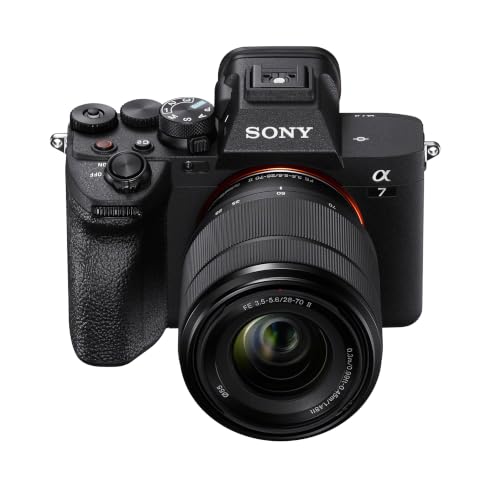
Mirrorless bodies use an electronic viewfinder that shows exposure and color before you press the shutter, which helps you judge a scene. Most offer interchangeable lenses, strong video, and compact bodies, with prices about $600 to $2500 for a body and starter lens. They suit most designers who want one system for most design work.
DSLR Cameras for Design Work
DSLR bodies use an optical viewfinder and a mirror system, and many used lenses remain available at lower prices. They deliver strong still image quality and long battery life, but they are larger and their video tools feel slower. Choose a DSLR if you shoot mainly stills and you value battery life and lens bargains.
Compact Cameras for Reference and Travel
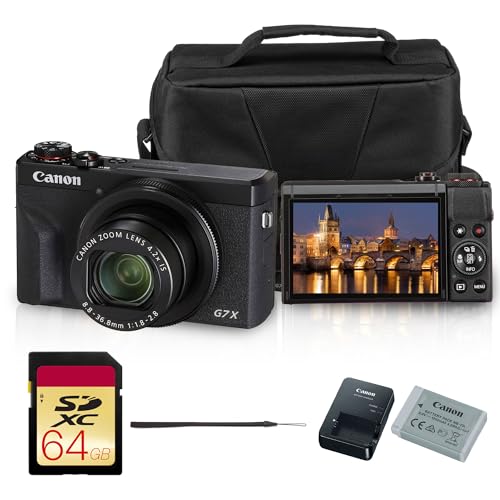
Compact cameras keep the lens fixed to the body, so the whole kit fits a jacket pocket or a small bag. Better models use a 1 inch sensor and a useful optical zoom, and they cost about $400 to $900. They suit designers who gather texture and reference photos and who value speed over lens swapping.
Action Cameras and Vlogging Cameras for Content Capture
Action cameras are small, rugged, and wide angle, built for movement rather than careful print files. Vlogging cameras add a flip screen, strong face autofocus, and better sound options for spoken pieces. Prices run about $250 to $700. Choose these as second cameras for process and social clips, not as your only tool for print work.
Key Features to Compare
Specs only matter when they change your files or your day. That is why the best cameras for graphic designers are judged first on sensor and color, then on lenses, light, focus, and workflow fit.
Sensor Size and Image Quality for Print and Cropping
Sensor size shapes detail, noise, and depth of field more than megapixel count alone. Full frame sensors gather more light and hold cleaner files for large prints, APS C sensors balance quality and cost, and 1 inch sensors suit compact bodies for screen use. Higher resolution helps when you crop a wide shot into a layout, but only with a sharp lens.
Color Accuracy and the Screen You Judge On
Designers depend on color in a way most photographers do not. Look for strong dynamic range so shadows in a product shot keep detail, and check the screen and viewfinder for a neutral image. What you capture must match what you edit, so see our guide to the best monitors for graphic designers when you set up the editing side of the chain.
Lens Choice, Optical Zoom, and Magnification
The lens decides sharpness, perspective, and how close you can work. Interchangeable systems let you pair a standard lens with a macro lens that offers high magnification for textures, paper grain, and small details. Fixed lens models rely on optical zoom, which keeps detail as you frame tighter. Check minimum focus distance on the objective lens if you shoot small objects.
Dim Room Results and Steadier Handheld Shots
Low light performance comes from sensor size, maximum aperture, and usable ISO range together. A lens that opens to a wider aperture lets you keep ISO lower at indoor events, so files stay cleaner. Image stabilization helps handheld stills and video at slower shutter speeds, but it cannot freeze a moving subject.
Autofocus, 4K Video, and Workflow Fit
Autofocus should lock onto eyes, faces, and products without hunting, because missed focus cannot be repaired in editing. If you record tutorials or campaign clips, clean 4K video and a microphone input will matter as much as stills. Workflow fit finishes the picture, so check RAW support, tethering, and card speed, and see our guide to the best laptops for graphic designers if your computer struggles with large files.
How to Choose the Right Camera for Your Design Projects
Use this order when two models both look capable on paper. It keeps the decision tied to delivered work, not to a spec sheet.
- Start with your largest output size, because print dimensions set the resolution you need.
- Download sample RAW files and open them in your editor before you buy.
- Price the body with the lens you will use most, not the cheapest kit lens.
- Check tethering, card type, and battery cost, because extras shape daily use.
- Hold the body if you can, because grip and menus affect long sessions.
Common Mistakes to Avoid
These errors add cost without improving your delivered files.
- Buying on megapixel count alone leaves you with large files that still show weak color and soft corners.
- Choosing a tiny sensor for large print work forces heavy cropping and makes noise visible in pieces.
- Ignoring lens cost locks you into a body whose glass pushes the total far past your budget.
- Skipping a check of RAW support in your editor can strand new files outside your workflow.
- Ordering a camera with no microphone input limits tutorial and interview clips to poor sound.
Keeping a Design Studio Camera Clean and Ready
Use a lens cloth, not your shirt, and clean the lens only when dust or a fingerprint is visible. Keep a spare battery charged for location days, and carry the camera in a dry, padded bag.
Store the camera away from damp rooms and direct heat, and remove the battery during long storage periods. Keep memory cards in a closed case, copy files to two places before you format a card, and check for sensor dust on a plain wall shot before studio sessions.
Cameras for Graphic Designers: Your Questions Answered
What features matter most in cameras for graphic designers?
Color accuracy, sensor size, and lens sharpness matter most. Use the histogram and highlight warnings while you shoot, because a bright rear screen can hide clipped whites in pale packaging or paper. A simple gray card also gives you a neutral reference in mixed lighting, which helps a set of product shots match across a page layout.
How much should a graphic designer spend on a first camera?
Most graphic designers should plan about $700 to $1500 for a first camera kit. Set aside part of that budget for a color calibration tool, because an accurate display protects the value of your files. A used body paired with a better lens often serves print and screen work better than a new body with the weakest kit lens.
What camera specs matter most for graphic designers who are new to photography?
Sensor size, lens aperture, and simple controls matter most if you are new to photography. A phone app that moves a test shot to your tablet in seconds can teach you faster than a manual, because you review attempts on a larger screen at once. Ignore high frame rates, since design subjects usually sit still and reward patience more than speed.
Which camera type is better for low light work for graphic designers?
A mirrorless or DSLR camera with a larger sensor is better for low light work than a compact or action camera. For still subjects, a tripod lets you keep ISO low and the shutter speed slow, which preserves clean detail. Test a body in the actual room where you will work, because showroom light is far brighter than most event spaces.
Is a smartphone enough instead of a dedicated camera for graphic design work?
A smartphone is enough for quick references, mood boards, and social drafts, but it limits large print work. Its small sensor and fixed lens restrict cropping and control of depth of field when a client asks for a banner or cover. Keep the phone as a backup, and use a dedicated camera when files must be retouched heavily or printed large.
Our Verdict
Match the camera to your output first. Print designers need sensor quality and predictable color, digital designers need autofocus, video, and fast transfer, and studio designers need tethering. Use the product table above to compare types against those needs.
When you judge the best cameras for graphic designers by delivered files rather than by spec sheets, the right type becomes clear. Choose the simplest system that protects color and detail, and spend the rest on the lens and screen you use every day.

