
Best Cameras for Gcse Photography in 2026: A Student Guide
Disclosure: We may earn a commission when you buy through links on this page, at no extra cost to you. As an Amazon Associate I earn from qualifying purchases. Learn more

Shopping for the best cameras for gcse photography for the first time? Learn the terms, compare options, and avoid rookie mistakes with this easy guide.
Choosing a first camera for a school course feels different from choosing one for holidays. Your marks come from the ideas you test, the techniques you show and the final images you present, so the best cameras for gcse photography are the ones that let you control exposure yourself. The comparison table below is easier to read once you know which controls your coursework actually needs.
This guide starts with the basics, explains each spec in plain English and then walks through setup, care and the mistakes that cost students time. You do not need the most expensive model in the room. You need a camera you understand well and that works on exam day.

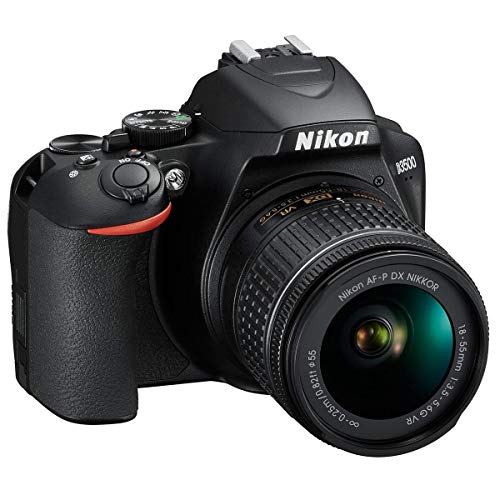




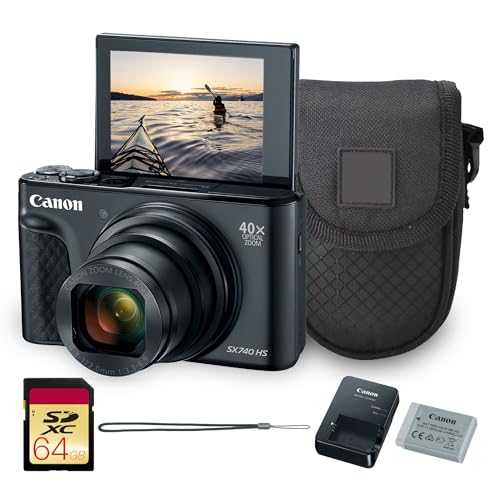
Cameras 101: The Basics for a GCSE Course
A camera records light through a lens onto a sensor, and you shape that light with three settings: aperture, shutter speed and ISO. Aperture changes depth of field, shutter speed changes how motion looks, and ISO changes how sensitive the sensor is to light. GCSE projects ask you to show these effects on purpose and then explain your choices in written notes.
Most students choose between three types. A compact camera is small and simple, but many give you little manual control. A DSLR or mirrorless camera uses interchangeable lenses and full manual settings, which suits coursework best. A phone is always with you, yet its automatic processing hides the techniques your teacher needs to see. For the wider digital picture, see our guide to the best digital cameras.
Who Should Buy Which Camera for GCSE Photography?
Match the camera type to your experience, your budget and what your school can lend you.
Students Starting GCSE Photography With No Camera at Home
Choose a simple mirrorless camera or DSLR with a standard kit lens, clear menus and a mode dial you can reach without hunting. If cost is the main worry, see our guide to the best beginning photography cameras and compare the simplest options first, because confidence in the first term matters more than advanced features.
Students Who Plan to Keep Shooting After the GCSE Course
Choose an interchangeable lens system with a good range of used lenses and room to grow. A body you can add a portrait lens or a wider lens to later will serve further study long after the exam. Prioritize a solid grip and a bright screen, since you will live with this system for years.
Students With a Tight Budget and a School Loan Option
Ask what your school lends before you spend anything, because a loan camera that matches the class teaching can be the smartest start. If you do buy, a used body from a recent generation often beats a new basic model, as long as the shutter and dials work cleanly. Spend the savings on a card, a spare battery and a padded bag.
Camera Specs Translated Into Coursework Needs
Read each spec as an answer to a coursework need, not as a number to win.
Features That Matter Most for GCSE Photography Coursework
Manual mode is the first feature to check, because your projects must show deliberate control of aperture, shutter speed and ISO rather than one lucky automatic result. Look for easy access dials, a screen that shows your settings at a glance and the ability to shoot RAW files for editing later. A hot shoe and a tripod socket add options for flash work and long exposures. For a broader view, see our guide to the best cameras for photography.
How Sensor Size Affects Your Course Photos
The sensor is the surface that captures light, and a larger sensor usually gathers more light and gives cleaner images when light is low. Common sizes run from 1 inch in advanced compacts, through APS C in most student models, to full frame in larger and pricier bodies. About 20 to 24 megapixels already gives sharp prints at coursework sizes and leaves room to crop.
Lens Choice and Zoom for Class Projects
The lens decides what you can frame and how much background blur you can show. A standard kit lens often covers about 18 to 55 mm on APS C bodies, which handles most class projects. Optical zoom uses glass to get closer and keeps detail, while digital zoom only crops the image and loses quality. A wider maximum aperture, shown by a lower f number, helps in dim rooms and suits portrait themes.
Focus Help for Moving and Still Subjects
Autofocus locks onto your subject so you can think about composition instead of focus hunting. For moving subjects in sports or street projects, tracking focus that follows the subject across the frame is worth having. Manual focus still matters for still life, so check that the lens ring turns smoothly. Image stabilization steadies small hand movements at slower shutter speeds, which helps in classrooms and halls.
Battery Life Across a Full School Day
Battery life is listed in shots per charge, and mirrorless cameras often manage about 300 to 400 shots while many DSLR models manage far more, because their viewing system uses less power. A full day of shooting and reviewing can drain a small battery by the final lesson. A spare battery in your bag is the surest plan, so charge the night before any planned shoot.
Video Capabilities for Moving Image Work
Some courses include a short moving image piece, and most current cameras record at least full HD video, which is enough for class playback and editing. 4K video gives sharper frames and more room to crop, but the files are large and slower to edit on school computers.
Unboxing and First Settings Before Lesson One
Open the box at home, not in class, and charge the battery fully before the first lesson. Fit the strap, insert the memory card, set the date and choose RAW and JPEG together so you have an editable file and a quick copy. Then take the same scene in automatic and in manual so you can see what each setting changes.
Build a small daily kit in one bag: the camera, the charged spare battery, a spare card and a lens cloth. Use a lens cloth, not your shirt, because shirt fabric can hold grit that scratches the front glass. If you are still settling in, see our guide to the best cameras for starter photography. Practice each week, because the best cameras for gcse photography students own are the ones they can set up quickly when an idea appears.
Common Mistakes to Avoid
- Shooting every project in automatic mode leaves you with no technique to explain, so your written notes and marks suffer.
- Buying on megapixels alone can leave you with weak manual controls that limit the effects your coursework must show.
- Forgetting to charge the battery or clear the card before exam day can end a timed piece before it starts.
- Deleting weak shots at once removes the contact sheet evidence your teacher uses to credit your development.
- Spending the whole budget on the body leaves nothing for the card, battery and bag that daily school use demands.
Looking After a Camera Through the School Year
School bags are hard on cameras, so carry yours in a padded case with the lens cap on and the screen facing inward. Keep the bag off wet floors and away from drinks, and never leave the camera in strong sun. At home, store it dry if it will sit unused through a holiday.
Clean the lens only when marks show in your images, using a blower first and then a soft cloth in gentle circles. Wipe the body after outdoor shoots, and check the strap each term for wear. If the same dark spots appear on plain scenes, ask a teacher or a camera shop for help rather than cleaning inside the body yourself.
FAQ
What features matter most in a camera for GCSE photography coursework?
Manual control of aperture, shutter speed and ISO matters most in a camera for GCSE photography coursework. Before you buy, ask your teacher for the course checklist, because some schools require a dedicated camera for the timed exam piece and do not allow phones in the exam room. A model that matches your class teaching also makes loan parts easier to borrow.
How much should a student spend on a first camera for GCSE photography?
Most students spend about $250 to $600 on a first camera and kit lens for GCSE photography, and a good used body can sit below that range. Keep money back for printing, because final portfolio prints and mounting boards are a real course cost families often forget.
Which camera type is better for low light GCSE photography projects?
A mirrorless camera or DSLR with a larger sensor is better for low light GCSE photography projects, because it keeps noise lower at high ISO settings. For still subjects, a tripod lets you use a slow shutter speed and a low ISO, which gives cleaner files than any handheld setting. Practice at home first, since tripod work takes longer under timed conditions.
Is a smartphone enough for GCSE photography coursework?
A smartphone is not enough for most GCSE photography coursework, even though it is fine for quick tests and location notes. Phones apply heavy automatic processing, so the manual technique your annotations must describe is hard to prove from the files. Many teachers also ask for full settings data for each image, and a dedicated camera records that data more completely.
Does a camera for GCSE photography need to shoot RAW files?
Yes, a camera for GCSE photography should shoot RAW files, because RAW gives you far more room to correct exposure and colour during editing. RAW files are large, so back up your portfolio folder in two places, such as a school drive and a home drive, from the first term onward.
Wrapping Up
Start with manual control, a sensor size that suits dim classrooms and a lens range that covers your likely projects. Then check battery life, total kit cost and how the camera feels in your hands during a full lesson.
Use the product table above to compare your shortlist, ask your teacher about any school rules, and then commit to one system and learn it well. Chosen that way, the best cameras for gcse photography become a quiet tool for your ideas, and your portfolio shows the thinking that earns marks.

