
Best Cameras for Cooking Videos by Budget for 2026
Disclosure: We may earn a commission when you buy through links on this page, at no extra cost to you. As an Amazon Associate I earn from qualifying purchases. Learn more

Compare cameras for cooking videos by budget and learn which features matter most, from flip screens and focus tracking to mic inputs and 4K quality.
Cooking videos ask a lot from a camera. Your hands stay in frame, steam rises into the lens, and the shot that matters most is often the one pointing straight down into the pan. Prices run from under $100 for simple compact models to well past $1,500 for full frame bodies, and the gap is not only about image quality. This guide sorts best cameras for cooking videos by budget, so you can see which features each tier actually buys and which ones a kitchen channel can skip.
Start with the comparison table below to see how the main camera classes line up, then read the tier notes before you spend anything.

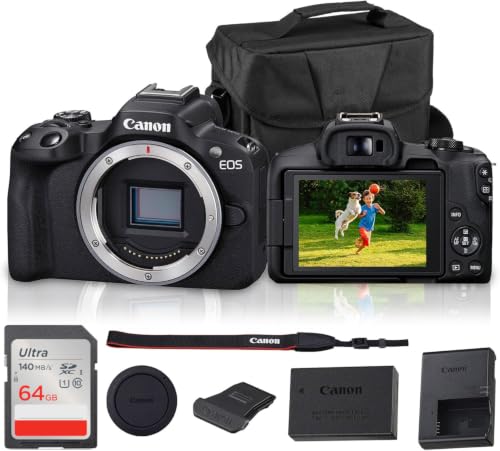


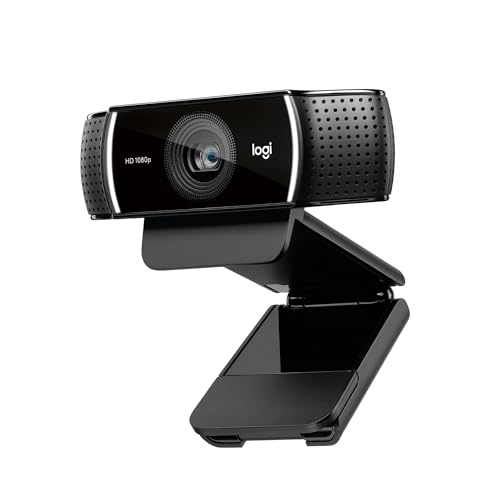
What Your Money Gets You at Each Price Tier
Every tier below can record a recipe. What changes with price is how much help the camera gives you while you cook. If you are still sorting out general video needs, our guide to the best cameras for video covers the wider category, while this page stays focused on the kitchen.
Budget Tier: Simple Cameras That Cover the Basics
Budget models, roughly about $100 to $300, record clean 1080p or basic 4K video and handle a single counter setup well. Expect a fixed screen on many models, basic autofocus that can hunt in steam, and no microphone input, so audio comes from the camera itself. That is workable for short recipe clips filmed in a quiet kitchen. You give up overhead flexibility and low light strength, but for a first channel the picture is honestly good enough.
Midrange Tier: The Working Kitchen Sweet Spot
Midrange cameras, about $300 to $800, add the features cooking creators feel every single shoot. A flip screen lets you frame yourself from the front, and reliable eye and face autofocus keeps you sharp while you move. A microphone input fixes the echo problem that plagues tiled kitchens. Most growing channels land here, and many never need more, because the jump in ease of filming matters more than the jump in raw resolution.
Premium Tier: Bigger Sensors and Room to Grow
Premium bodies, about $800 to $1,800 and up, bring larger sensors, stronger low light video, better color depth for editing, and record time limits that suit long bread and roasting sessions. You also get cleaner overhead rigs support through better mounts and outputs. This tier pays off if you film daily, sell courses, or shoot in a dim kitchen. For a weekly hobby channel, the same money often works harder spent on lights and a good lens.
Features Worth Paying For, and Ones to Skip
Feature lists are long, but a cooking channel leans on a short set of them. Spend on the ones below first. If your format leans toward personality led hosting, the overlap with the best cameras for video blogging is strong, since both reward easy framing and clear speech.
The Overhead Shot Governs Your Setup
The overhead angle is the signature shot of the genre, and it governs more of your purchase than sensor size does. A camera that mounts easily above the counter, on a boom arm or a ceiling style rig, saves you daily frustration. Pair it with a flip screen or a small external monitor so you can check framing without climbing onto a stool. Without a way to see the shot while you cook, you will be guessing at framing.
Focus That Survives Steam and Moving Hands
Focus is the second kitchen specific test. Steam softens contrast, hands dart in and out, and a pan fills the frame one second and empties the next. Look for autofocus with face and eye detection plus a product showcase style mode that locks onto an object you hold up to the lens. Autofocus that recovers quickly after steam passes keeps your close shots usable.
A Microphone Input Governs Your Audio
Kitchens echo. Tile, glass, and steel bounce your voice around, and the built in microphone sits far from your mouth. A microphone input lets you clip on a small lavalier or mount a compact shotgun, and that single upgrade makes budget footage sound professional. Treat the mic input as a hard requirement above the budget tier, since it protects your voice over kitchen noise more than any resolution figure on the box.
Sensor Size and Honest Image Quality
A larger sensor gathers more light, which helps in home kitchens that rarely have studio lighting. One inch sensors in premium compacts are a real step up, and APS C bodies go further. Megapixels matter far less for video than sensor size and lens brightness. Shoppers comparing stills first cameras can cross check the best digital cameras, but for cooking footage, clean 4K from a modest sensor beats a huge stills count every time.
Battery Life, Charging, and Recording Limits
A sauce can simmer for an hour, and some cameras stop recording at short clip limits or overheat in a warm kitchen. Check the continuous record limit before you buy, and favor models that run on USB C power so a wall adapter covers long sessions. Spare batteries run about $20 to $60 each. Heat near ovens is real, so a camera that vents well or records externally earns its place on a serious set.
Features You Can Safely Skip
Weather sealing sounds useful, but a kitchen splash is not a rainstorm, and it should not drive your budget. Extreme slow motion, huge optical zoom ranges, and rugged action styling add cost that a counter setup never uses. Even the best action video cameras suit travel and sports first, and their wide lenses distort close food shots. Skip high frame rate sports modes too, unless your channel films a lot of fast knife work for effect.
Long Term Costs to Factor In
The camera body is only the first purchase. Budget for a tripod and an overhead arm, about $40 to $150 together, a microphone at about $30 to $100, and lighting that often matters more than the camera itself. Memory cards, spare batteries, and a second lens add up across a year of filming. If the total feels steep, the best inexpensive video cameras show how far a lean starter kit can go before you upgrade piece by piece.
Common Mistakes to Avoid
- Buying resolution first and forgetting the flip screen, then fighting to frame every shot.
- Ignoring the microphone input, so clear video carries echoing kitchen audio.
- Mounting the camera where oven heat and steam hit it through every long cook.
- Spending the whole budget on the body and leaving nothing for lights or a tripod.
- Choosing a heavy full frame setup that makes a quick weeknight shoot feel like work.
Care and Setup Tips for a Working Kitchen Camera
Grease travels. Keep a microfiber cloth by your setup and wipe the lens before every session, since a thin film of oil softens footage without you noticing. Store the camera away from the stove, and let it cool before packing it into a closed bag after filming near heat. Clean the mount plate and tripod threads monthly, because flour dust works into everything in a baking kitchen.
Frequently Asked Questions
What features matter most in cameras for cooking videos?
Three features matter most: an easy overhead mounting setup, a flip screen or monitor option for framing, and a microphone input. Autofocus that tracks faces and hands through steam comes next, followed by clean performance in normal kitchen light. A camera that nails those basics at a midrange price will serve most channels better than a premium body missing the mic input, because viewers forgive soft light long before they forgive echoing audio or a shaky top down shot.
How much should I spend on my first cooking video camera?
Most beginners do well between about $300 and $800, the tier where flip screens, dependable autofocus, and mic inputs appear together. Spending less can still work for short clips, but you will likely replace the camera within a year. Keep roughly a third of your total budget back for a tripod, an overhead arm, a microphone, and basic lighting, since those pieces shape your footage as much as the camera itself does.
Is a smartphone enough for cooking videos instead of a camera?
A modern smartphone is enough to start, and many channels begin there. Its limits show up in fixed overhead framing, weaker audio without adapters, and storage that fills during long cooks. A dedicated camera earns its cost when you film weekly and want consistent framing, better low light results, and a microphone worn on your apron. You can also keep the phone as a second angle while the main camera handles the overhead shot.
What specs matter most for cooking video beginners?
Start with 4K recording or clean 1080p, a screen that flips toward you, and autofocus with face detection. Add a microphone input and a record limit long enough for your longest recipe step. Sensor size helps in dim kitchens, but lighting fixes more problems than a sensor upgrade at this stage. Skip spec sheet races over megapixels and zoom range, since neither decides whether a stew looks appetizing on screen.
Which camera type is better for low light kitchens?
Larger sensor cameras handle low light best, because they gather more light per frame and hold detail with less noise. An APS C or full frame body with a bright lens will outperform a small sensor compact in a dim kitchen. That said, one affordable panel light aimed at the counter often improves footage more than a sensor upgrade, and it costs far less than moving up a camera tier.
Final Thoughts
Judge every candidate against the product table above, then weigh three things: how easily it shoots overhead, whether it takes a microphone, and whether its autofocus stays calm in steam. Match those to your tier, keep money aside for lights and mounts, and the best cameras for cooking videos for your kitchen will be the one you actually enjoy setting up every time you cook.


