
Best Cameras for Content Creators in 2026: Every Type Explained Side by Side
Disclosure: We may earn a commission when you buy through links on this page, at no extra cost to you. As an Amazon Associate I earn from qualifying purchases. Learn more

Compare the best cameras for content creators type by type, from mirrorless to webcams, with sensor, autofocus, audio and true total cost facts.
Choosing a camera as a creator is confusing because every class promises the same thing: better video with less effort. The honest starting point is that no single class wins at everything, and the best cameras for content creators are simply the ones matched to the format you publish, the room you shoot in, and the budget you can sustain month after month.
This guide compares each camera type side by side so the trade offs are visible before you spend. The comparison table below lays out the classes, their typical prices, and the jobs each one does well. After that, the guide covers the factors that decide published quality, from sensors and autofocus to sound, recording limits, and the accessory costs most buyers forget.




Types of Cameras Compared
Five classes cover nearly every creator setup, and all of them sit inside the wider family of best digital cameras, separated here by the job each one does for a publishing creator. The table gives the short version, and the passages after it explain how each class behaves in daily work.
| Camera Type | Best For | Strengths | Limits | Typical Price |
|---|---|---|---|---|
| Mirrorless | Long form channels and client work | Large sensors, lens choice, strong autofocus | Highest total cost, longer setup | about $700 to $2,500 |
| Vlogging compact | Solo filming and travel days | Small body, flip screen, simple controls | Fixed lens, small sensor | about $400 to $900 |
| Action camera | Movement, outdoors, mounted shots | Tough body, wide view, strong stabilization | Small sensor, weak indoor sound | about $250 to $500 |
| Webcam | Streaming and desk recording | Always ready, works with your computer | Fixed position, modest image | about $60 to $300 |
| Smartphone | Short form and daily posting | Already owned, instant sharing | Heat and storage limits on long shoots | about $300 to $1,000 |
Mirrorless Cameras
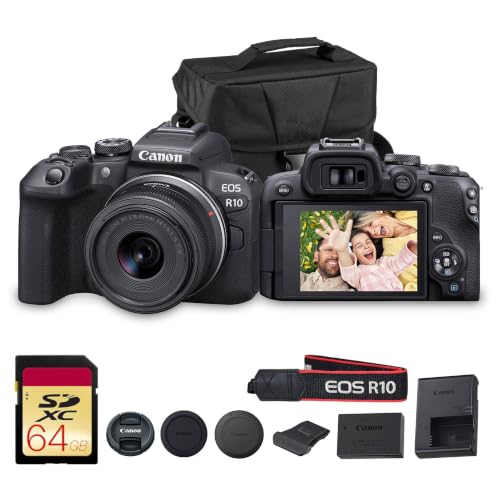
Mirrorless cameras pair a large sensor with lenses you can swap, and that combination is why they anchor most serious channels. A bigger sensor gathers more light, so indoor scenes stay clean at sensitivity settings where small sensors turn grainy. Lens choice matters just as much: a wide lens suits a small room, while a longer lens separates a presenter from a busy background.
The costs are real. Kits commonly run about $700 to $2,500 before extra lenses, setup takes longer than in any other class, and the learning curve is steeper. This class rewards creators who publish long form work on a schedule and want room to grow into new lenses and better light.
Vlogging Cameras
This class covers the compact cameras built for filming yourself: a fixed lens, a screen that flips to face you, and controls simplified for one person working alone. Subject detection autofocus and a forgiving wide lens are the usual selling points, and both genuinely help when nobody stands behind the camera to check focus.
The trade is flexibility. The lens cannot change, the sensor is smaller than a mirrorless sensor, and low light results sit a step behind. For travel days, daily vlogs, and small desks, the size advantage often matters more than the image gap.
Action Cameras
Action cameras are built to be mounted, dropped, rained on, and carried in a pocket. Their very wide view and electronic stabilization keep moving footage steady, and the small bodies go where a mirrorless camera cannot, from a bicycle frame to the side of a kayak.
That wide view is also the limit. Faces near the edges stretch, indoor scenes look flat and noisy next to larger sensors, and the tiny built in microphones struggle in wind. Treat this class as a second camera for movement, or the main camera only when the content is the activity itself.
Webcams: The Desk Class
Creators who publish from a desk can skip the camera hunt entirely and look at best webcams for content creators, the class designed to sit on a monitor and stay ready. A webcam trades image quality for permanence: it is mounted, focused, and connected before every session, so a stream or a recorded call starts in seconds.
Choose this class when the desk is the studio. It cannot follow you into the kitchen or the street, and its small sensor needs more light than a mirrorless camera to stay clean. For talking head formats published from one chair, though, the simplicity is the feature.
Smartphones: The Camera Already in Your Pocket
The phone you own is a real publishing camera. Its processing handles mixed light well, sharing is instant, and short vertical clips need no transfer step at all. For short form posting, a current phone plus a small tripod covers the whole workflow.
Limits appear on long shoots. Phones heat up during extended recording, storage fills with large video files, and the small lenses offer little control over depth of field. Many creators start here, publish consistently, and add a dedicated camera only when a specific limit starts costing them time.
Mirrorless Cameras vs Action Cameras: Which Should You Choose?
These two classes solve opposite problems. A mirrorless camera assumes a controlled space: you choose the lens, the light, and the framing, and it returns the cleanest image and the most control over how a scene looks. An action camera assumes an uncontrolled space: it survives the weather and the motion, and it returns a steady, wide record of whatever happened.
Judge them on four points. Image quality indoors goes to mirrorless by a wide margin. Convenience outdoors goes to action, which needs no case, no lens decisions, and no careful handling.
Sound goes to mirrorless, because external microphone inputs are standard there and rare on action bodies. Cost goes to action once lenses enter the mirrorless budget. If your content happens in one room, buy control; if it happens on the move, buy toughness.
How to Choose the Right Camera
Specifications mislead when they are read alone, so the search for the best cameras for content creators should start with your publishing format rather than a sensor chart. The points below decide whether footage is publishable, and the product table above shows how current models spread across these classes and price bands.
Start With the Format You Publish
A camera is bought for a format. Vertical short form clips are filmed close, published fast, and watched on phones, so a compact or a phone with fast autofocus serves them well. Long form videos are filmed in sessions, edited on a computer, and watched on televisions, so they reward the sensor size and lens choice of the mirrorless class.
Long form work also passes through an editing desk, which is why many creators budget for best laptops for content creators and judge colour on best monitors for content creators rather than the camera screen. Decide the format first and half the catalogue eliminates itself.
Sensor Size and Image Quality
Sensor size is the single most honest specification on a camera. A full frame sensor collects far more light than a phone sensor, which shows up as cleaner shadows and smoother colour indoors. Smaller sensors fight back with processing and price.
Megapixels, by contrast, say little about video quality: a 4K frame needs only about eight megapixels, so resolution past that serves stills, not publishing. Treat maker claims about dynamic range as class figures only, because every brand measures differently and the numbers cannot be compared across brands.
Autofocus and Stabilization
Solo creators cannot watch focus while presenting, so autofocus that finds and holds a face is a publishing feature, not a luxury. Check how a class behaves rather than trusting its marketing name: eye detection in the mirrorless class, reliable subject tracking in compacts, and stabilization strong enough to walk slowly without extra gear. Stabilization has limits in every class, and a small tripod still beats electronics for a locked shot at a desk.
Sound, Recording Limits, and Heat
Viewers forgive soft video sooner than bad sound. The built in microphone on any camera is a starting point for quiet rooms only; the upgrade that matters is an external microphone input, standard on mirrorless bodies and better compacts, rare elsewhere. Long sessions add two more checks: many cameras stop a single recording at a set limit, and compact bodies can overheat during long 4K sessions in warm rooms. Read the recording limit before buying for podcasts, lessons, or events.
Low Light Performance
Low light separates the classes more than daylight does. Larger sensors and faster lenses hold clean images at the sensitivity settings a living room demands, while small sensors lean on processing that can smear detail. The practical test is your own room at night: if your content is filmed there, weight this factor heavily and budget for a simple light, which improves every class more cheaply than a body upgrade.
Lenses, Lights, and the True Total Price
The body is rarely the whole purchase. A mirrorless kit grows by lenses, a compact setup grows by a microphone and a tripod, and every class improves with one decent light. Set the budget as a system: camera, lens or microphone, light, memory cards, and a spare battery.
Guides to best cameras for content creation often stop at the body price; creators should not. A class that looks expensive can be the cheaper system once the accessories each class needs are counted honestly.
How to Make Your Camera Last Longer
Cameras die from neglect more often than from wear. Clean the lens with a proper cloth rather than a shirt, which drags grit across the coating. Carry a spare battery so a flat cell never ends a session early, and rotate batteries so both age evenly. Store the body in a dry, padded bag away from radiators and damp cupboards, and keep memory cards in their cases instead of loose in a pocket where contacts bend and dust collects.
Frequently Asked Questions
What features matter most in cameras for content creators?
Reliable face autofocus matters most, because a solo presenter cannot check focus while filming. Next comes an external microphone input, since clear sound holds viewers longer than sharp video. A screen you can see from in front of the camera, honest recording limits for your session length, and a sensor sized for your room light complete the list. Resolution beyond 4K rarely changes what viewers notice.
How much should I spend on my first one?
A first publishing camera usually costs about $400 to $900 for the body or kit, and the budget should not end there. Add a microphone, a small light, memory cards, and a spare battery, which together often add about $150 to $300. Spending past that range buys low light quality and lens options you may not need yet. It is better to publish for six months on a modest setup than to overspend before you know your format.
What specs matter most for beginners?
Beginners should read three specs and ignore the rest at first: sensor size, which predicts indoor image quality better than any other number; the recording limit, which predicts whether long sessions are possible in one take; and the microphone input, which predicts whether your sound can improve later without replacing the camera. Zoom ranges, burst rates, and weather sealing matter to narrower jobs, and megapixel counts matter least of all for video.
Is a smartphone enough instead?
For short vertical clips, yes: a current phone films, edits, and uploads in one device, and its processing handles mixed light gracefully. The phone stops being enough when sessions run long enough to overheat it, when you need a real lens choice for a room or a stage, or when sound quality starts limiting the channel. Many creators publish on a phone for a year before a dedicated camera earns its place.
Do I need a gimbal to publish good video?
Not at the start. A gimbal smooths walking shots, but most published creator video is filmed from a tripod, a desk, or a steady handheld position, and in body or lens stabilization covers slow movement well. Buy the gimbal when your format is proven to need walking footage in episode after episode. It is an accessory for a style, not a requirement for publishing.
Final Thoughts
Choose the class by your format first: mirrorless for controlled long form work, compacts and phones for fast solo publishing, action cameras for movement, and webcams for the desk. Then spend the remaining budget on sound and light before resolution. The best cameras for content creators are the ones you will actually set up every publishing day, so use the product table above to compare the classes at your price and pick the setup that removes friction from your routine.


