
Best Cameras for Content Creation: A 2026 Buying Checklist
Disclosure: We may earn a commission when you buy through links on this page, at no extra cost to you. As an Amazon Associate I earn from qualifying purchases. Learn more

Compare sensor size, video, audio, autofocus, and ease of use. This guide explains what matters for creators and how to match a camera to your work.
Choosing best cameras for content creation starts with your output, not with a spec sheet. A camera that suits a weekly video channel may feel wrong for a creator who mainly shoots still photos for articles and social posts. The comparison table below can help you weigh the main tradeoffs side by side before you spend.
This guide walks through the features that shape everyday results, from sensor size and sound to battery life and file handling. Use it as a checklist, and let your filming style, your editing setup, and your budget narrow the field.


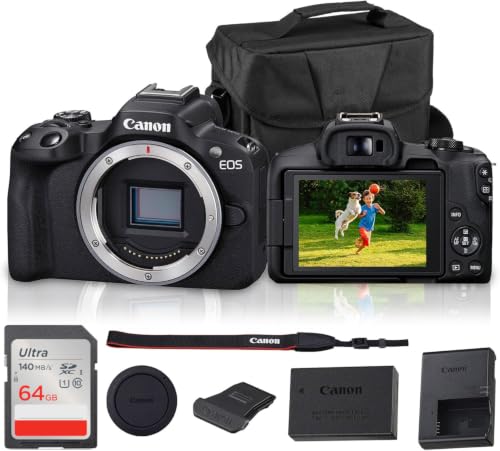


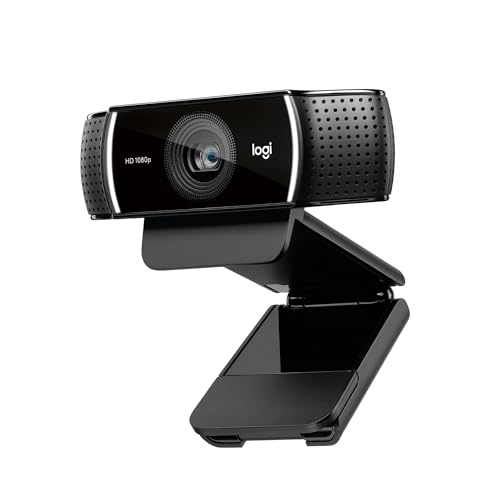
Who Should Buy Which Camera for Content Creation?
Solo Creators Filming at Home
If you film in one room, look for reliable autofocus that holds on your face, clean audio input, and a screen you can see while you record. A tripod mount and steady power matter more than a huge zoom range, since your subject rarely moves far. You may also want simple color settings that need little correction later, so finished videos look consistent from week to week.
Creators Who Film on the Move
If you film outdoors, in shops, or at events, size, weight, and battery life become daily concerns. A lighter body is easier to carry for hours, and good stabilization keeps walking footage watchable. Weather sealing and a secure grip also help when conditions change, and quick access to settings matters when a moment will not wait.
Creators Who Publish Polished Video and Photos
If your work must look sharp on large screens and in print, sensor size, lens choice, and video quality deserve more weight. You may accept a larger body and a higher price in exchange for cleaner low light results and more room to crop or grade footage. A strong lens range also lets you switch from wide room shots to tight detail shots without changing your whole setup.
Key Features to Compare
Sensor Size and Image Quality
Sensor size affects how much light a camera gathers and how much background blur you can get. Larger sensors often give cleaner results in dim rooms and smoother tone in skin and skies. Megapixels still matter for large crops, but they are not the whole story, since lens quality and processing shape the final image too. Match sensor size to where you publish, since small screens forgive more than large ones.
Video Quality and Frame Rates
Look at resolution, frame rate, and recording limits together rather than chasing one number. Smooth motion and a steady frame rate matter for action and for slow motion clips, while a flat color profile can help if you grade footage later. Check how long the camera can record in one take, since some bodies stop early when they heat up. Also confirm the file format works with your editing software before you buy.
Audio Input and Control
Viewers forgive soft video far more readily than they forgive muddy sound. A mic input lets you add a lapel mic or a shotgun mic, and a headphone jack lets you hear problems while you record. Manual audio levels help when a room gets loud or quiet, since automatic levels can pump up background noise. If you record interviews, test how the camera handles two voices at different volumes.
Autofocus and Stabilization
Autofocus should lock on your subject and stay there when you move or when another person walks past. Face and eye tracking help solo creators who cannot watch a monitor the whole time. Stabilization smooths small hand movements, but it cannot fix fast running or rough ground, so a gimbal or a tripod may still help. Try both features in the kind of light you actually film in, since dim rooms test them hardest.
Lens Choice and Zoom Range
A wide lens suits rooms, desks, and group shots, while a longer lens suits detail work and subjects you cannot approach. Optical zoom keeps quality intact, while digital zoom crops the image and can soften detail. Interchangeable lenses add flexibility and cost, while a fixed lens keeps the kit simple and light. Think about the shots you repeat every week, and choose a range that covers those first.
Ease of Use and File Workflow
A camera should fit your editing routine, not fight it. Simple menus, custom buttons, and a flip screen speed up solo shoots, and fast transfer to a phone or computer saves time after filming. Check card type, battery charging, and whether you can charge while recording.
If you publish often, a smooth workflow can matter more than a small jump in image quality. For a broader view of still focused options, see our guide to the best digital cameras.
Size, Weight, and Battery Life
A camera you leave at home cannot help your channel. Balance body size against lens size, since a small body with a large lens may still feel heavy. Battery life varies with video mode, screen use, and temperature, so carry a spare battery for long days. A comfortable grip and well placed controls reduce fatigue during long takes, and a padded bag protects the kit between shoots.
Creators who also need a workhorse computer can compare options in our guide to the best laptops for content creation.
Spending Levels That Make Sense
A Modest Start That Covers the Basics
At a lower spend, about $300 to $700, expect solid video, usable autofocus, and simple controls. You may give up advanced low light performance and pro audio tools, but you can still publish clean, watchable work. Spend the savings on sound and light, since those upgrades often improve results more than a pricier body.
A Middle Step for Regular Publishing
In the middle range, about $700 to $1,500, you gain better sensors, stronger stabilization, and more lens choice. This level suits creators who publish several times a week and need reliable results in varied light. It also opens up better audio monitoring and longer recording times, which reduce reshoots.
A Higher Spend for Demanding Work
Above about $1,500, you pay for larger sensors, advanced video formats, and tougher builds. This level fits creators who grade footage heavily, shoot in difficult light, or need a body that survives daily professional use. Before stepping up, confirm that your editing computer and storage can handle larger files, since heavy footage can slow a whole workflow. For display choices that suit editing, see our guide to the best monitors for content creation.
Quick Buyer Checklist
- Does the autofocus hold on your face in your usual light?
- Can you plug in an external mic and monitor sound while recording?
- Does the recording limit fit your longest typical take?
- Do the files work with your editing software without conversion?
- Is the kit light enough to carry for a full shoot day?
- Can you charge the battery or swap it quickly on location?
- Does the lens range cover your most repeated shots?
- Is there a clear warranty and service path if a fault appears?
Red Flags to Watch For
- Vague specs that never state sensor size, recording limits, or audio inputs.
- Video samples that look heavily edited, with no plain indoor footage shown.
- A warranty that is very short or hard to claim in your country.
- Claims of professional results with no mention of light, sound, or lens needs.
- Required accessories that are sold separately at a high added cost.
Care That Keeps a Camera Working Well
Keep the lens clean with a soft lens cloth, not your shirt, since fabric can trap grit and scratch coatings. Carry a spare battery and a spare card, and store the kit in a dry, padded bag away from dust and damp. Check mounts and lens contacts now and then, and update firmware only when you have time to test the camera afterward. Simple habits like these protect image quality and reduce the chance of a failed shoot.
For creators focused on short form and social video, see our guide to the best cameras for content creators.
Frequently Asked Questions
What features matter most in cameras for content creation?
The features that matter most are the ones tied to your format. For talking head video, autofocus, audio input, and a flip screen usually matter most. For travel or event work, stabilization, battery life, and size move up the list. For photo led work, sensor size and lens choice matter more.
Rank your top three formats first, then judge each camera against those needs rather than against a generic spec list.
Which camera type is better for low light?
Larger sensors usually perform better in low light because they gather more light per pixel, but lens speed matters too. A fast lens lets in more light and can help a smaller sensor keep up in a dim room. Also check usable ISO range rather than the maximum figure, since extreme settings often add noise. Adding a simple video light often improves low light results more than switching bodies.
How much should I spend on my first camera for content creation?
A first camera budget of about $300 to $700 covers most new creators well, especially if you also need a mic and a light. Spending more makes sense once you know which limits hold you back, such as weak autofocus or short battery life. Avoid buying a pro body before you know your format, since its extra features may never get used. Upgrade when a specific limit costs you time or quality.
What specs matter most for beginners?
Beginners should weigh ease of use, autofocus, audio input, and battery life above advanced video formats. Simple menus and reliable automatic modes let you focus on framing and sound while you learn. A flip screen helps solo filming, and a common card type keeps file handling simple. Advanced color profiles and high bit rates can wait until your editing skills catch up with them.
Is a smartphone enough instead of a dedicated camera?
A modern smartphone is enough for many short videos, especially in good light with a separate mic. A dedicated camera pulls ahead when you need optical zoom, low light quality, long recording times, or interchangeable lenses. It also gives more control over audio and focus during longer shoots. Choose a phone setup if you publish short clips daily, and a dedicated camera if your work demands longer takes or larger screens.
Final Thoughts
The right choice balances sensor, sound, autofocus, and workflow against the work you actually publish. Start from your format, test the features that affect every shoot, and let the product table above guide the final comparison. With a clear checklist, best cameras for content creation becomes a practical decision rather than a guess, and your kit can grow as your work grows.


