
Best Cameras for Beginner Bloggers in 2026: Which Type Is Right for You?
Disclosure: We may earn a commission when you buy through links on this page, at no extra cost to you. As an Amazon Associate I earn from qualifying purchases. Learn more

Compare the best cameras for beginner bloggers by sensor size, video, autofocus and price, with a simple checklist for new blogs.
Choosing your first blogging camera feels confusing because every type promises great photos and easy video. The best cameras for beginner bloggers are the ones that match how you actually publish, at your desk, in your kitchen or out on a walk. This guide compares types by use, not by brand, so you can read the comparison table below with a clear short list.
Think about your usual post first. A food or craft blogger mostly shoots still photos and short clips at home, while a travel blogger films while moving and posts from the road. That difference changes the screen, lens, microphone and battery you need far more than a small gap in megapixels ever will.



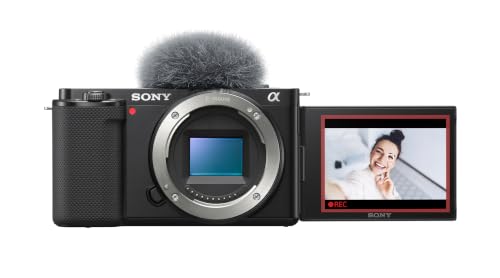


Types of Cameras Compared for Beginner Bloggers
Three main types cover most new blogs. Each trades size, control and price in a different way. Read the type that matches your posts first, then check the feature sections below before you spend.
Point and Shoot Compact Cameras
A compact camera has a fixed lens, a small body and simple controls, so you can carry it in a pocket and start shooting in seconds. Most offer optical zoom of about 3 to 10 times, which helps you frame food, products and street scenes without moving closer. Image quality suits bright light and web size photos well. Limits appear indoors, where a small sensor adds grain, and you cannot swap lenses later. Choose this type for the least fuss and mostly photos and short clips.
Mirrorless Cameras With Room to Grow
A mirrorless camera uses interchangeable lenses and a larger sensor, so it gives cleaner photos indoors and softer backgrounds behind a subject. You see exposure in the electronic viewfinder or on the screen before you press the shutter, which helps you learn faster. Bodies stay fairly small, but lenses add bulk and cost, and menus run deeper. Typical kits cost about $600 to $1,200. Choose this type to grow your skills and keep the camera for years.
Action Cameras for Bloggers on the Move
An action camera is tiny, rugged and usually weatherproof, with a very wide lens that keeps moving footage steady and in frame. Strong electronic stabilization suits walking tours, cycling and travel days when a larger camera would stay in your bag. The trade off is less detailed still photos and small, slow controls. Prices often sit at about $250 to $450. Choose this type if most of your blogging happens outdoors and on the move.
Compact vs Mirrorless Cameras for Beginner Bloggers
Compact and mirrorless cameras overlap for desk based blogging, so compare them on four points. A compact wins on size, price and speed of setup, while a mirrorless camera wins on low light quality, background blur and lens choice. For video, both can record 4K video, but mirrorless models more often add a microphone input and a screen that flips fully toward you.
That is why the best cameras for beginner bloggers are not always the most powerful ones, they are the ones you will set up daily without dread. If you shoot mostly at home, choose mirrorless for room to learn. If you want a bag camera with no lens decisions, choose a compact. For a wider view, see our guide to the best blogger cameras after you settle on a type.
How to Choose the Right Camera for Beginner Bloggers
Once you know your type, check these factors in order. They matter more than headline megapixels, because readers notice missed focus, shaky clips and muffled voice far sooner than fine detail. Readers who care most about file quality can also see our guide to the best quality cameras for beginners.
How Sensor Size Shapes Image Quality for Bloggers
Sensor size controls how much light the camera collects. A 1 inch sensor in a compact beats a phone size sensor indoors, an APS C sensor in most mirrorless cameras does better again, and a full frame sensor gives the cleanest files at the highest cost. More megapixels only help if you crop heavily or print large. For blog and social posts, a clean 20 to 24 megapixel file in soft window light beats a noisy larger file.
Autofocus and Stabilization for Blog Video
Autofocus decides how much footage you can use. Look for face detection and eye detection that hold your face sharp while you talk and move, plus tracking that follows a product or pet across the frame. For stabilization, in body or lens systems smooth small hand shake at a desk, while electronic stabilization helps walking shots but crops the view slightly. Test both at your normal speaking distance, because focus that hunts in quiet indoor light will distract viewers.
Screen, Microphone Input and Features That Matter for Bloggers
A screen that flips to face you lets you check framing, focus and light while you record alone. A microphone input matters just as much, because viewers forgive soft video sooner than echo or room noise. If video is half your blog, see our guide to the best cameras for bloggers and vloggers for a video first view.
Battery Life and USB C Charging
Still photos may reach about 300 to 400 shots per charge, while continuous video often drains a battery in about 60 to 90 minutes. Blogging days mix both, so carry one spare battery and charge the camera over USB C from a laptop or power bank between sessions. Check whether the camera can record while charging if you film long desk sessions. Cold weather shortens runtime, so keep the spare warm in an inside pocket outdoors.
Beginner Friendly Controls and Phone Transfer
Guided menus, a clear auto mode and scene help you publish while you learn. Touch focus on the screen speeds up product shots, and a simple dial layout reduces mistakes during filming. WiFi or Bluetooth transfer sends a photo to your phone for editing and posting, which keeps your routine fast away from a desk. Avoid deep custom menus at first, and change one setting at a time so you learn what caused each result.
Setup and Care Tips
Before your first post, set the date, format the memory card in the camera and turn on grid lines to keep horizons level. Record a ten second test clip at your desk, play it back with headphones and check voice level and background noise before you film a full piece. Save your main settings as a custom mode if offered, so a reset does not ruin a shoot day.
Clean the lens with a lens cloth, not your shirt, because grit in fabric can scratch the coating. Store the camera in a dry, padded bag with the lens cap on, keep it away from bathroom steam and take the battery out during long breaks. Carry a second card in the same bag, and back up your files the same day, because a card can fail without warning.
Common Mistakes to Avoid
Most regret comes from buying for a blog you do not actually write.
- Buying the largest sensor you can afford leaves no budget for a microphone, so your video sounds poor even though the picture looks clean.
- Ignoring the screen angle means you cannot see yourself while recording, so framing errors show up only after the shoot ends.
- Choosing a camera with no microphone input limits your audio options, so busy rooms and outdoor wind stay in every clip.
- Skipping a test clip at home hides focus hunting and room echo, so the first real post needs a full reshoot.
- Carrying no spare battery ends a travel shoot early, so the best light of the day goes unrecorded.
FAQ
What makes cameras for beginner bloggers different from other beginner cameras?
Cameras for beginner bloggers differ because they must handle photos and talking video in one small kit. A stills only camera can skip the flip screen and microphone input, but a blogger uses both weekly. Also check minimum focus distance for small items, because a camera that cannot focus closer than about 12 inches will blur craft steps and labels.
What features matter most in cameras for bloggers who post every week?
The features that matter most are the ones tied to your post format, not a general list. A weekly cook may value remote control from a phone for top down shots, while a weekly reviewer values a silent shutter for quiet rooms. Match one hero feature to your format first, then confirm the basics fit your budget and bag.
Which camera type is better for low light photos and video for beginner bloggers?
A mirrorless camera is usually better in low light because its larger sensor collects more light at the same lens setting. You can improve any type by shooting near a window, adding a small lamp and keeping the camera still on a table. Avoid raising sensitivity to its maximum for faces, because skin tones lose color and look rough.
Is a smartphone enough instead of a camera for beginner bloggers?
Yes, a smartphone is enough if your posts are short, well lit and mostly viewed on phones. Its limits show in optical zoom, indoor grain and battery drain during long filming days. A simple test helps: publish four posts with the phone, then note what blocked you most. That list tells you which camera type, if any, will actually improve your blog.
How much should beginner bloggers spend on a first camera?
Most beginner bloggers should spend about $300 to $600 to start, unless they choose a mirrorless kit at about $600 to $1,200. Leave about 15 percent of the budget for a card, a spare battery and a small bag. Spending the whole budget on the body alone often delays posting, because the missing extras are the items you need on day one.
Final Thoughts
Start with your post format, then choose the type, then check sensor, autofocus, screen and sound in that order. Use the product table above to compare size, video options and total cost with a card and spare battery included.
When you judge best cameras for beginner bloggers by daily ease instead of headline specs, the right choice becomes simple. Pick the camera you will carry, set up and charge without fuss, and your posts will improve because you publish more often.


