
Best Cameras for Bloggers and Vloggers in 2026: Which One Fits the Way You Use It?
Disclosure: We may earn a commission when you buy through links on this page, at no extra cost to you. As an Amazon Associate I earn from qualifying purchases. Learn more

Match the best cameras for bloggers and vloggers to the way you record, from desk setups to travel and live streaming, with the features that matter most.
There is no single camera that suits every creator, because a desk recording, a walking city tour, and a three hour live stream punish a camera in completely different ways. The best cameras for bloggers and vloggers are the ones whose screen, sound options, and stamina match the format you publish most, not the ones with the longest spec sheet. Start from your main use case, and the right shortlist becomes much shorter.
This guide works through four common recording styles first, then the features that actually decide how your footage looks and sounds. Use the comparison table below to see how the main camera types line up on price and strengths, then read the sections that match your style before you spend anything.

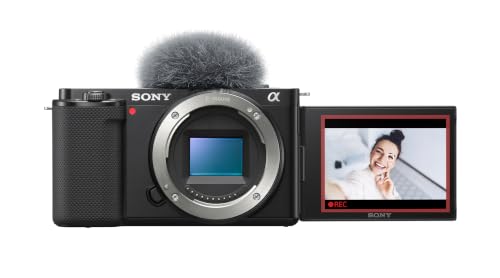
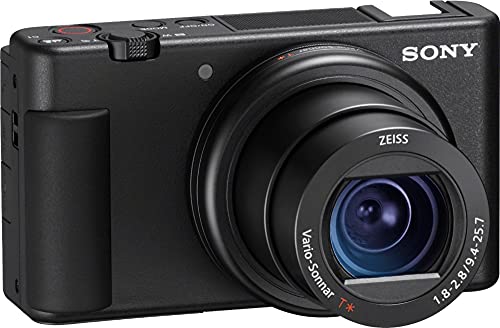


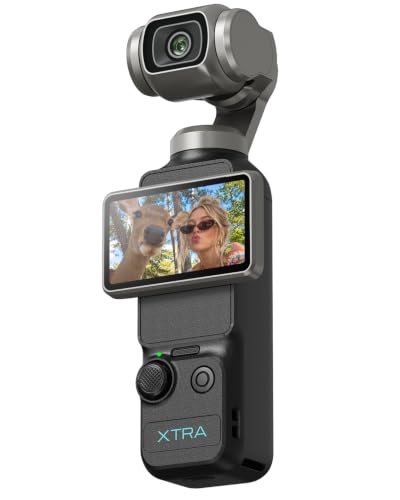
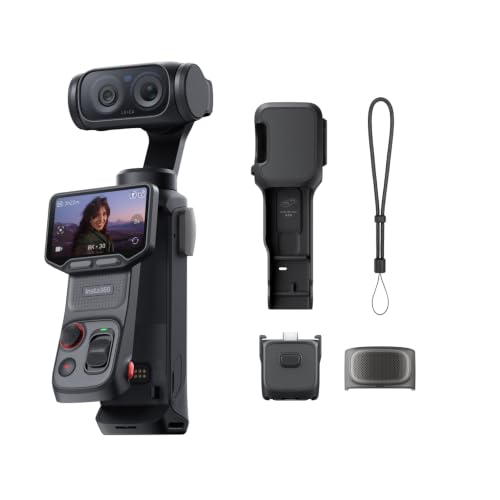

Which Setup Fits the Way You Record?
Most buyers shop by brand or by budget, but your recording position decides more than either. A camera that never leaves a tripod can trade size for image quality, while a camera that lives in a jacket pocket has to start fast and survive being carried daily. Match the style below to your own routine first.
Desk Recording for Remote Workers and Creators
A fixed desk setup is the most forgiving style, because the camera stays in one place and you can control light, background, and distance. A tilting screen still helps during setup, but a fully flipping screen matters less when a monitor or phone app shows you the frame. Prioritize a microphone input and clean, quiet autofocus over raw resolution, because viewers sit close to your voice for the whole video.
Continuous power from a wall adapter or a dummy battery removes the biggest desk headache, which is a battery dying mid recording. If you also take client calls on the same camera, check that it works as a webcam over USB without extra hardware, and read our notes on the best vlogger cameras for more desk friendly options.
Walking and Travel Vlogging
Walking footage exposes every weakness a desk setup hides. Weight matters because you hold the camera at arm length, and stabilization matters because every step shakes the frame. A wide lens keeps your face and the surroundings in shot without a long grip, and strong wind protection on the microphones decides whether outdoor speech stays usable.
Fast startup counts more than deep menus, since travel moments do not wait while a camera boots. Plan on two or three batteries for a full day out, and treat maker battery ratings as optimistic. Creators who publish trip content should also compare the best cameras for travel bloggers, since airline carry limits and charging on the road change which body makes sense.
Live Streaming from a Fixed Setup
Streaming asks for stamina rather than peak image quality. The camera must send a clean video signal over HDMI or USB with no menus or focus boxes drawn on the output, and it must run for hours without a recording limit cutting the feed. Heat is the real enemy here, so a body with a fan or a generous recording rating beats a smaller body with better stills.
Autofocus that locks onto your face and stays there matters more than resolution, because most platforms compress the stream to 1080p anyway. A microphone input is close to mandatory, since stream audio runs through the camera for hours and laptop microphones sound thin by comparison.
Students and Everyday Users on a Tight Budget
A first camera should be simple enough that you actually carry it and cheap enough that a drop is annoying rather than devastating. Look for a compact body with a helpful auto mode, a screen you can flip toward yourself, and a standard memory card you may already own. Skip interchangeable lenses for now, because one fixed lens removes both cost and decision fatigue.
Expect to spend about $250 to $450 for a sensible new compact, and put a little money aside for a small tripod and a memory card. The best cameras for beginner vloggers are a useful next read if this is your first dedicated camera and you want the simplest starting point.
Key Features to Compare
Once your use case is clear, shortlist the best cameras for bloggers and vloggers by comparing features in the order they affect a finished video: screen and sound first, then focus, then image quality, then stamina. The product table above gives the headline numbers, but the notes below explain what those numbers mean when you film alone.
Features That Matter for Bloggers and Vloggers
Bloggers and vloggers film themselves, usually alone, and that single fact reshapes the priority list. You are both the presenter and the camera operator, so the camera must frame you, focus on you, and capture your voice without a crew. That is why a flip screen, a microphone input, and reliable face detection outrank exotic video modes you may never open.
Fast file transfer to a phone matters too, because most creators edit and post on tight schedules. Treat any feature that only helps a second operator, such as complex focus pulling controls, as a bonus rather than a reason to buy.
Video Resolution and Frame Rates
4K recording gives you room to crop a wide shot into a closer one during editing, which is genuinely useful when you film yourself and cannot reframe mid sentence. It also fills memory cards roughly four times faster than 1080p and heats the body up sooner. For talking head videos and streams, clean 1080p with good light usually looks better than 4K shot in a dim room.
Frame rate matters for motion: 30 frames per second suits most speech, while 60 frames per second keeps walking footage and pans smoother. Choose 4K if your computer handles the files comfortably and your format rewards detail, and choose 1080p if speed of publishing matters more.
Flip Screens and Microphone Inputs
A screen that flips to face you is the single most useful hardware feature for solo filming, because it confirms framing, focus, and exposure before you press record instead of after. A screen that only tilts up can still work on a tripod, but it blocks when a microphone sits in the top shoe mount. The microphone input matters just as much: a 3.5 mm jack lets you place a small shotgun or wireless microphone near your mouth, which improves speech clarity more than any camera upgrade. Check whether the camera can power a plug in microphone or whether your microphone needs its own battery, and confirm the headphone jack situation if you want to monitor audio while recording, since many compact bodies leave it out.
Autofocus That Tracks Your Face
Modern face and eye detection autofocus is the feature solo creators feel most in daily use. A good system finds your face when you step into frame, holds focus while you lean, gesture, or hold a product toward the lens, and returns to your eyes when the product moves away. A weak system hunts back and forth, and that pulsing ruins otherwise good takes.
Look for a product showcase style setting if you hold items close to the camera, because it tells the focus system to switch to the object and back again. When you compare bodies, remember that autofocus behavior in video differs from stills mode, so prioritize what maker guides and owner reports say about video tracking specifically.
Sensor Size and Image Quality
Sensor size shapes image quality far more than the megapixel count printed on the box. A 1 inch sensor gathers much more light than the small sensors in budget compacts, which means cleaner indoor footage and a softer background behind you. APS C sensors go further and pair with interchangeable lenses, at the cost of size and money, while full frame bodies sit at the top for low light work and shallow depth of field.
Megapixels mostly decide how large a still photo you can print, and video uses only a fraction of them. Shoppers who also shoot a lot of stills can compare the best digital cameras alongside vlogging focused models, because the strongest photo camera is not always the easiest video camera to live with.
Recording Limits and Overheating
Be skeptical of any camera that promises unlimited long recording in a tiny body. Many compact cameras stop a clip at a set limit, and high resolution modes generate heat that the body must shed. Makers publish recording times from controlled test conditions, often around room temperature with a fresh battery, so treat those figures as a best case rather than a promise.
In a warm room, under bright lights, or while charging over USB, a camera can reach its thermal limit and shut down to protect itself, and that shutdown is real even on well regarded models. If your format needs long takes or streams, favor bodies with active cooling, lower your recording resolution, and run a full length test during the return window before you rely on the camera.
Size, Weight, and Ergonomics
The camera you carry is the camera that earns its cost. A body plus lens that feels fine for ten minutes in a shop can ache after an hour of walking, and a grip that is too small makes one handed filming tiring and shaky. Check the control layout with your own hands if you can: you should reach record, zoom, and exposure controls without shifting your grip.
A standard tripod thread, a cold shoe for a microphone, and a lens that does not extend far when powered on all make daily use simpler. Weight figures on spec sheets exclude the battery and card, so add a little margin when you compare totals.
Total Kit Cost Beyond the Camera Body
The body is only the first line of the bill. A workable kit usually adds a microphone at about $50 to $150, a small tripod or grip at about $20 to $80, a light for indoor filming at about $30 to $100, plus memory cards and at least one spare battery. On a $400 camera, that kit can add half again to the total, and it improves the finished video more than stepping up to a $600 body would.
Also note that maker battery life figures come from gentle test cycles, so budget for spares if you film away from outlets. Price the whole kit before you choose a body, and let the kit, not the badge, decide where the money goes.
Common Mistakes to Avoid
- Buying on megapixels alone. A high megapixel count does little for video and can hide a small sensor that struggles indoors, so judge low light footage and lens quality before the headline number.
- Spending the whole budget on the body. A modest camera with a good microphone and a light beats an expensive body recording echoing room audio, because viewers forgive soft video far sooner than bad sound.
- Ignoring recording limits. A camera that stops at short intervals or overheats under lights will fail a live stream or a long interview, no matter how good a five minute clip looks.
- Choosing a kit too heavy to carry. The most capable setup loses to a lighter one you actually bring, so weigh the full kit with batteries and grip before you commit.
- Skipping the warranty and return terms. Creator gear works hard and travels rough, so check the return window and warranty length before you buy, not after the first fault appears.
How to Make Your Camera Last Longer
Clean the lens with a proper lens cloth rather than a shirt, because grit trapped in fabric can scratch the coating over time. Store the camera in a dry, padded bag with a small silica gel pack, and keep it away from steamy bathrooms and hot car interiors, since heat ages batteries and moisture invites fungus on lens elements. Carry a spare battery and rotate between batteries so they age evenly, and charge them before long storage rather than leaving them fully drained.
Wipe down the body after beach or rain shoots, since salt and grit work into dials and ports. Finally, install firmware updates when the maker releases them, because updates often improve autofocus behavior and fix overheating quirks on creator focused models.
Cameras: Your Questions Answered
What features matter most in cameras for bloggers and vloggers?
Sound capture and self framing matter most, so rank a microphone input and a flip screen above resolution. One factor buyers rarely check is white balance consistency: a camera that shifts color between clips in the same room makes editing slow and skin tones uneven. When you compare two finalists, film a short test under your own indoor lighting and check whether the color stays stable from clip to clip. A body that holds color steady will save you correction time on every video you publish this year.
How much should I spend on my first vlogging camera?
A sensible first purchase is about $250 to $450 for the camera, with a separate share set aside for a microphone, a small tripod, and a memory card. Before buying new, consider borrowing a camera or renting one for a weekend of filming, because two days of real use teaches you more about grip, menus, and battery life than any spec sheet. If you enjoy the process and publish regularly, you can upgrade the body later and keep using the same microphone and tripod.
Is a smartphone enough for blogging and vlogging?
For many beginners, yes, a recent smartphone is enough to start, and it uploads finished clips faster than any dedicated camera. A phone also wins on convenience, since it is already in your pocket and its apps edit and post in one place. A dedicated camera pulls ahead when you need a microphone input without adapters, optical zoom, reliable autofocus during long recordings, or a battery you can swap in seconds. Start with the phone if money is tight, and upgrade when a specific limit, usually audio or low light, keeps costing you retakes.
Which camera type handles low light best for evening vlogging?
A larger sensor paired with a bright lens handles low light best, because the combination gathers more light before the camera raises sensitivity and adds noise. Price complicates the answer: at the same budget, a fast lens on a 1 inch sensor camera can outperform a slow kit lens on a bigger sensor body. The cheapest upgrade of all is a small LED panel, which costs far less than a new body and improves evening footage on any camera. Judge evening performance by the lens and light you can add, not by sensor size alone.
What specs matter most for beginner bloggers and vloggers?
Beginners should care about fast startup, simple menus, and dependable auto exposure more than deep spec lists, because missed moments and confusing controls end more channels than image quality does. Check how quickly the camera powers on and starts recording, and whether the touchscreen lets you tap to focus on your face. Also look at the lens range in practical terms: a lens that covers wide self shots to mild close ups covers most beginner formats. Ecosystem matters too, since common battery and mount standards make spares and accessories cheaper and easier to find locally.
The Bottom Line
Choose by format first: a desk creator needs clean output and continuous power, a travel vlogger needs low weight and stabilization, and a streamer needs stamina without overheating. After the format, spend on sound and light before resolution, and price the whole kit rather than the body alone. The best cameras for bloggers and vloggers are the ones that fit your routine so well that filming feels easy, so use the product table above to compare the shortlist against your main use case, then buy the simplest setup you will genuinely use every week.


