
Best Bags for 15 Inch Laptops: Budget, Midrange, and Premium Picks for 2026
Disclosure: We may earn a commission when you buy through links on this page, at no extra cost to you. As an Amazon Associate I earn from qualifying purchases. Learn more

Learn how to choose the best bags for 15 inch laptops by budget, with padding, fit and carry comfort explained for school, work and travel use.
Prices for laptop bags range from the cost of a pizza to the cost of a nice dinner for four, and the difference is not always obvious in photos. This guide shows you where money actually helps when you shop for the best bags for 15 inch laptops, and where it does not. You will see what each price tier normally delivers, which upgrades protect your computer, and which extras you can safely skip.
Use the comparison table below as your shortlist, then read the tier guidance before you decide. A bag that fits your laptop, your charger, and your daily routine will serve you better than a costly bag built for someone else.


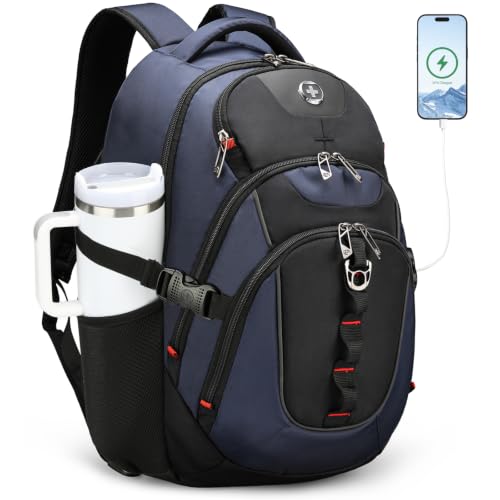

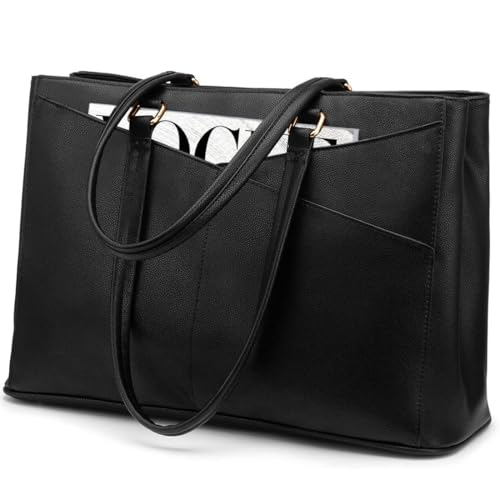


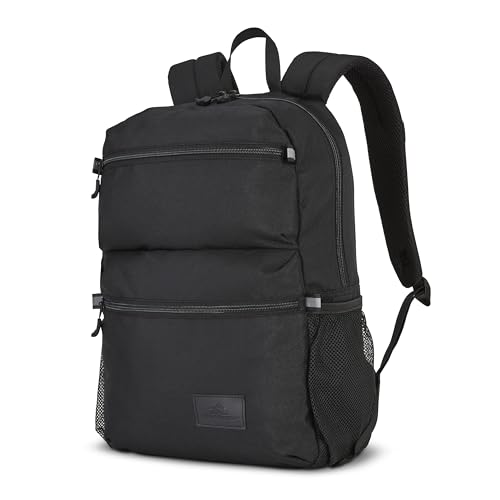
Price Tiers at a Glance
Rather than chasing a single winner, judge each option against what its tier should deliver. The three groups below describe the level of padding, materials, and carry comfort you should expect at each step up in price.
Best Budget Tier: Simple Protection for Light Days
Budget options, often around $25 to $45, suit students and short commutes where the main job is keeping a laptop separate from books and lunch. Expect a padded sleeve section, one or two extra pockets, and basic shoulder straps or handles. Zips and fabric will feel lighter, and water resistance is usually minimal. This tier works if your route is gentle and your load is small. The limit is durability, because thin padding and simple stitching wear faster under daily heavy use.
Best Midrange Tier: Daily Carry Done Well
Midrange options, often around $50 to $100, are the right level for most commuters and office workers. Expect thicker padding, a laptop section that suspends the computer away from the bottom of the bag, stronger zips, and pockets sized for a charger, mouse, and notebook. Straps gain real cushioning and backs gain airflow channels. This tier balances protection, comfort, and price without luxury materials. For a dedicated pack format at this size, see our guide to the best backpacks for 15 inch laptops for strap and load details.
Best Premium Tier: Materials and Comfort for Years
Premium options, often around $110 to $200 or more, add tough outer fabrics, metal hardware, structured frames, and refined organization that stays usable for years. Padding is denser, straps are shaped for long walks, and many designs add a luggage strap for airport travel. This tier pays off if you carry your laptop all day, travel often, or carry costly gear beside it. The trade off is price and sometimes weight, since stronger materials and structure add heft even before you load the bag.
What Your Money Gets You at Each Price Tier
Budget Tier: What to Expect
At the budget level, insist on three basics and forgive the rest. The laptop section must fit your exact machine with the lid closed and no forcing, padding must cover the corners, and the main zip must open and close smoothly without catching. Handles should feel stitched, not glued. Give up separate tech pockets, premium lining, and weather sealing at this price. Measure your laptop in inches and compare with the internal size listed, because a bag sold for this class can still run small for gaming models.
Midrange Tier: The Sweet Spot for Most Buyers
Midrange money should buy you a suspended laptop section, a separate pocket for the charger brick, and straps you can wear for a thirty minute walk without shoulder pain. Fabrics should resist light rain and scuffs from bus floors and office corners. Look for a sternum strap on backpack styles and a padded grab handle on messenger and tote styles. This is also the tier where a repair friendly design appears, with replaceable zip pulls and stronger bar tack stitching at stress points.
Premium Tier: When Spending More Pays Off
Spending more pays off when it buys time and comfort you will feel daily. Premium bags keep their shape when half empty, stand upright beside a desk, and protect corners with dense foam rather than thin padding. Organization becomes genuinely useful, with fleece lined pockets for glasses or a phone and hidden pockets for travel documents. If you fly often, a design that opens flat or slides over a suitcase handle saves real minutes. If you work from home and drive to an office twice a week, this tier is harder to justify.
Features Worth Paying For (and Ones to Skip)
Weight and Portability
The bag itself becomes part of your daily load, so its empty weight matters as much as its capacity. A daily carry bag that weighs under about three pounds empty leaves room for a laptop, charger, book, and water bottle without straining your shoulders. Students crossing a large campus feel every extra pound by the end of the day. Check the listed weight, then think about your full load, not just the computer. A light bag with weak padding is still a poor trade, so balance weight against corner protection.
Carrying Power: Chargers, Cables, and Battery Packs
Your laptop battery life shapes what else the bag must carry. If your machine lasts a full workday, a slim cable pocket may be enough. If it needs a midday charge, the bag needs a roomy pocket for a bulky power brick plus space for a power bank and cable that will not tangle with books. Fast charging bricks for USB C laptops are smaller than older gaming chargers, so match pocket size to the charger you own. A cable pass through opening between pockets is a small feature that prevents pinched cords.
Thin Laptops Versus Performance Laptops
A basic office laptop is thin and light, while a gaming or workstation machine is thicker, heavier, and paired with a much larger charger. That difference changes the bag you need. Powerful laptops need a wider laptop section, stronger bottom padding for extra weight, and storage that lets the machine cool after a hot commute. If you carry a performance model, skip slim fashion bags and check thickness as well as screen size.
Features That Matter for 15 Inch Laptops
This screen class sits in an awkward middle, larger than ultraportables yet smaller than desktop replacements, so fit errors are common. Always check internal length, width, and depth rather than trusting the class label alone. A padded divider between the laptop and books prevents screen pressure, and a false bottom that lifts the computer about an inch above the base protects it when you set the bag down hard. Corner guards, a snug strap inside the laptop section, and a water resistant base round out the features that matter most.
Long Term Costs to Factor In
The purchase price is only part of what a bag costs you. A cheap bag replaced every year can cost more over three years than one solid midrange bag, and a damaged laptop screen costs far more than any upgrade in padding. Factor in a replacement strap, a rain cover if your climate is wet, and a padded sleeve if you often move the laptop between bags. Warranty length matters here, because a maker who covers zips and stitching for several years lowers your total cost and signals confidence in the build.
Frequently Asked Questions
What features matter most in bags for 15 inch laptops?
Exact internal fit, corner padding, and a suspended laptop section matter most. Together they prevent the three common forms of damage: pressure on the screen, drops onto corners, and scratches from other gear. After protection, judge strap comfort with your real load and pocket space for your charger. A bag that nails protection but forces you to crush the charger against the screen has failed at its main job.
How long should a bag last?
A well made daily bag should last about three to five years of regular use. Zips, strap anchors, and bottom corners usually show wear first, so inspect those areas when you shop. Budget bags under heavy daily loads may last one to two years. You can extend any bag life by avoiding overloads, keeping sharp objects in a pouch, and letting a wet bag dry fully before storing it in a closet.
Our Verdict
Match the tier to your routine: budget for light loads, midrange for most daily commutes, and premium for travel and heavy gear. Whatever you spend, exact fit and corner protection come first, and strap comfort comes second. Compare your shortlist in the product table above against those priorities, and the best bags for 15 inch laptops for your budget will stand out clearly. If your next machine may be larger, you can also see our guide to the best bags for 17 inch laptops before you decide on size.

