
Best Backpacks for 15 Inch Laptops 2026 Safe Carry Guide
Disclosure: We may earn a commission when you buy through links on this page, at no extra cost to you. As an Amazon Associate I earn from qualifying purchases. Learn more

Backpacks that fit 15 inch laptops safely: compare padded sleeves, comfort, weather protection and organisation before you buy.
Finding the best backpacks for 15 inch laptops starts with a sleeve that actually fits your machine, not just a label that claims it does. Laptop dimensions vary even within the 15 inch class, so measure your laptop and compare it with the sleeve size, not the screen size alone. A snug, padded sleeve protects against bumps far better than a loose pocket.
The table of picks below lines up the main styles, and this guide explains fit, comfort, weather protection, and organisation. Read it before buying, so your laptop travels safely whether you commute, study, or travel.
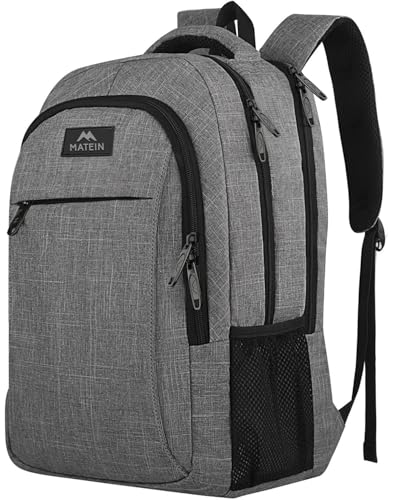


Measuring Fit for a 15 Inch Laptop
Measure your laptop width, depth, and thickness, then compare those figures with the sleeve interior, not the backpack exterior. A sleeve that is too tight stresses zips and corners, while a loose sleeve lets the laptop shift and bang against the pack. A suspended sleeve, raised off the bottom, protects against drops onto hard ground.
Check whether the sleeve loads from the top or the side, and whether it has a securing strap. Top loading suits quick airport checks, while side loading can feel more secure in a crowded commute. A separate laptop compartment also keeps the machine away from books and chargers that could scratch it.
Comfort for Daily Carrying
A laptop backpack should distribute weight across both shoulders and, for heavier loads, the hips. Padded, adjustable shoulder straps and a chest strap keep the pack stable while walking or cycling. A ventilated back panel reduces sweat on warm commutes, which matters if you carry the pack for an hour or more.
Test the pack loaded with your laptop, charger, and books, not empty. Walk, bend, and climb stairs as you would on a normal day, and check for pressure points. A comfortable pack feels balanced, not pulling backward, and it should not bounce while you walk briskly.
Weather Protection and Durability
Rain protection matters for any commuter backpack. Water resistant fabric and covered zips handle light rain, while a rain cover or fully waterproof fabric suits heavy downpours and cycling. Check seams and zip quality, since these fail before fabric does in daily use.
Durability shows in stitching, zip pulls, and base reinforcement. A reinforced base survives being set down on pavements daily, while cheap zips snag and fail under a full load. Spending a little more on build quality usually pays off over years of commuting.
Organisation for Work and Study
Good organisation keeps laptop, charger, documents, and small items separate and easy to find. A dedicated charger pocket prevents cables tangling, while a document sleeve keeps papers flat. External pockets for a water bottle and quick access items save digging through the main compartment.
Avoid over organising: too many small pockets make packing slower and hide items. Choose a layout that matches your daily carry, with one main compartment, one laptop sleeve, and a few well placed pockets. If you fly often, a lay flat laptop compartment speeds security checks.
Security and Travel Features
Lockable zips, hidden pockets, and a luggage strap add security and travel convenience. A hidden pocket against the back suits a passport or wallet, while lockable main zips deter casual theft in crowds. Reflective details help visibility if you cycle or walk at night.
For air travel, check cabin size limits and whether the pack fits under a seat or in an overhead bin. A pack that meets common cabin dimensions avoids checked baggage fees and keeps your laptop with you. Keep valuables in the laptop compartment, close to your back, in busy places.
A Final Check Before You Order
Before ordering, measure your laptop, list your daily carry, and note your commute type. Compare that list with the picks in the table above, and prioritise sleeve fit and carrying comfort over extra pockets. A pack that fits your laptop and your body will serve you daily for years.
Test the pack loaded before committing, if returns allow, and check the warranty on zips and straps. A well chosen backpack protects an expensive laptop and makes commuting noticeably easier. That daily ease is worth choosing carefully.
For nearby sizes and bag styles, see our guides to best backpacks for 17 inch laptops and best bags for 15 inch laptops, covering larger laptop backpacks and bags sized for 15 inch machines.
Laptop Backpacks for Commuting by Bike
Cycling with a laptop demands a pack that stays stable, protects against rain, and does not shift during braking. A pack with a chest strap and hip belt stays put, while a high back panel keeps the laptop away from sweat. Reflective details and a rain cover matter greatly for road visibility and wet weather.
Weight distribution matters more on a bike, since a top heavy pack affects balance. Pack the laptop close to your back and low in the pack, with heavier books balanced around it. Test the loaded pack on a short ride before commuting, checking for bounce, strap slip, and back discomfort.
After cycling, air the pack and laptop compartment, since sweat and rain moisture accumulate. Wipe the laptop sleeve occasionally and check zips for grit, which wears them faster. A cycling specific laptop pack costs more, but it protects an expensive machine through daily rides.
Choosing Between Backpack and Briefcase Styles
Backpacks suit walking, cycling, and long commutes, distributing weight evenly and leaving hands free. Briefcases and messenger bags suit short walks and formal settings, looking professional but concentrating weight on one side. Choose based on your dominant commute, not just office appearance.
Hybrid bags offer backpack straps that tuck away for formal meetings, giving flexibility for varied days. Check that tucked straps do not snag or add bulk when carried as a briefcase. A hybrid suits professionals who walk part of the way and meet clients the rest, without carrying two bags.
Whatever the style, sleeve fit and padding matter most for laptop safety. A stylish bag with a loose sleeve protects poorly, while a plain bag with a snug suspended sleeve protects well. Prioritise protection and comfort, and let style guide choice only among bags that meet those basics.
Laptop sleeve orientation affects both protection and convenience, since a side loading sleeve keeps the laptop horizontal while a top loading sleeve suits quick removal. Side loading generally protects corners better during drops, because the laptop rests on padding rather than sliding toward a zip. Top loading suits frequent airport security checks, where speed matters more than drop protection, so choose orientation based on how often you remove the laptop versus how roughly the bag gets handled daily.
Check that backpack zips operate smoothly when the pack is fully loaded, since a zip that works empty may snag under pressure. Quality zips with large pulls handle full loads reliably, while small, cheap zips fail exactly when the pack is heaviest and most needed.
Frequently Asked Questions
Will every 15 inch laptop fit a 15 inch backpack?
No, laptop dimensions vary by brand and model, even with the same screen size. Always measure your laptop and compare it with the sleeve interior dimensions. A sleeve that is too tight stresses zips, while a loose sleeve lets the laptop shift and suffer impacts.
What is a suspended laptop sleeve?
A suspended sleeve holds the laptop slightly above the bottom of the pack, so a drop onto the ground does not transmit the full impact to the laptop corners. This protection matters for commuters who set packs down hard. Look for a sleeve with padding on all sides and a raised base.
Do I need a waterproof backpack?
Water resistant fabric with covered zips suits light rain and short commutes, while a rain cover or waterproof fabric suits heavy rain and cycling. If you often travel in downpours, choose a pack with a rain cover or fully waterproof construction, and keep electronics in an inner dry bag for extra safety.
How should a laptop backpack fit?
Shoulder straps should sit comfortably without digging, the chest strap should sit across the sternum, and the pack should ride high on the back, not sag to the waist. A hip belt helps with heavy loads. Adjust straps with the pack loaded, since an empty pack fits differently from a working load.
Can a laptop backpack also work as a travel bag?
Yes, if it meets cabin size limits and has enough organisation for clothes and toiletries alongside the laptop. A lay flat laptop compartment helps at security, and a luggage strap secures it to a suitcase. For longer trips, a larger travel pack with a laptop sleeve may suit better than a slim commuter pack.
Final Thoughts
The best backpacks for 15 inch laptops protect your machine with a snug padded sleeve and carry comfortably all day. Use the table above to compare fit and features, and measure your laptop before ordering. A pack that fits well makes every commute easier.

