UGREEN
UGREEN 4K@30Hz Loop Out HDMI Capture Card for 2K 30FPS 1080P 60FPS USB 3.0
Disclosure: We may earn a commission when you buy through links on this page, at no extra cost to you. As an Amazon Associate I earn from qualifying purchases. Learn more
Highlights
- Ultimate HD 2K@30Hz Capture Card: UGREEN capture card for streaming supports capturing up to 2K 30fps. 4K capture is not supported. This high-definition resolution ensures sharp and detailed recordings, making it ideal for gamers, streamers, and content creators who seek top-notch quality
- 4K Input and HDMI loop-out: UGREEN video capture card supports 4K@30Hz (4:4:4) input and 4K@30Hz loop-out. Built with an advanced chip specifically to manage high-bandwidth video and audio signals, support local loop-out for real-time preview and zero-latency monitoring, and ensure instant reactions. Note: PS4 and PS5 support this capture card when HDCP is turned off
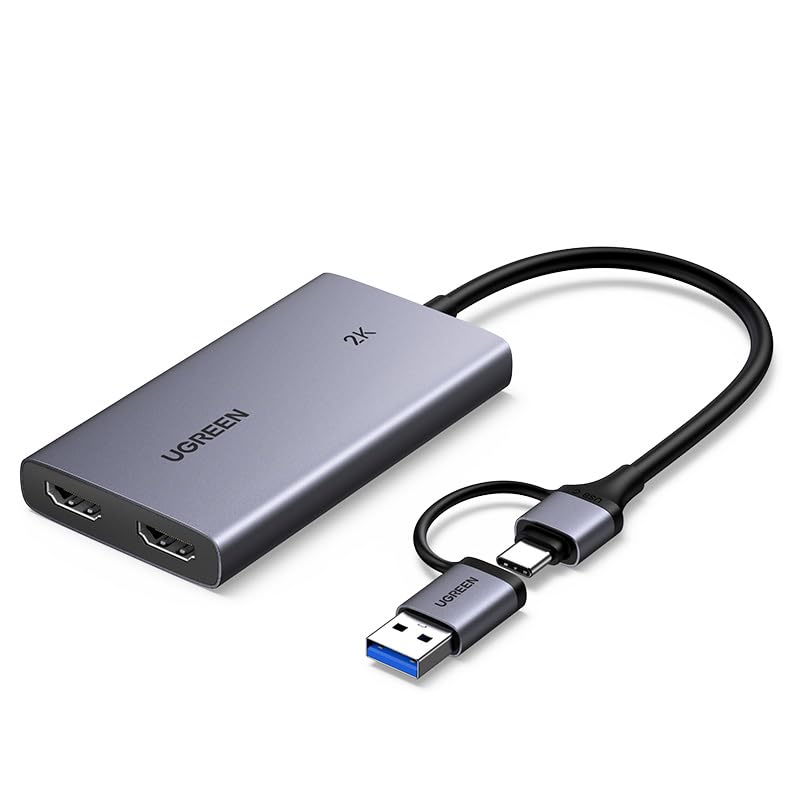
- Versatile USB-A/C Dual Interface: Our HDMI capture card features USB 3.0 Type-C and Type-A ports with low delay for USB-A and USB-C recording devices. It supports MJPEG and YUY2 video formats, users can select between efficient compression and superior clarity, making it perfect for both casual and professional streaming scenarios. iPhone cannot be used as data acquisition devices because they do not support the UVC protocol
- Easy and Durable Design: Plug and Play. No driver installation or external power supply is required. Its sturdy aluminum casing not only boosts durability but also promotes effective heat dissipation, ensuring stable performance during prolonged use. Note: Windows 7 systems require the installation of USB 3.0 drivers
- Universal Compatibility: The game capture card supports Windows, macOS, Linux and Android systems. It allows for effortless recording and streaming of video from devices such as Nintendo Switch, Switch 2, PS4, PS5, Xbox Series X, and Meta Quest 3/2 to iPads, laptops, and PCs. This capture card is ideal for live streaming, recording, editing, and transferring high-resolution video using software like OBS, XSplit, Potplayer, and more. Note: This product is not compatible with Fire TV Stick
Why You'll Love It
- Captures up to 2K at 30fps or 1080p at 60fps for clear video feeds
- Passthrough loop-out supports 4K at 30Hz for real-time monitoring while recording
- Dual USB-A and USB-C connections work across laptops, PCs, and iPads
- Plug-and-play design operates without external power supplies or software drivers
- Aluminum casing aids heat dissipation during lengthy recording and streaming sessions
- Broad compatibility across Windows, macOS, Linux, and Android operating systems
Pros
- +Zero-latency local loop-out up to 4K 30Hz
- +Built-in USB-A and USB-C dual interface
- +Sturdy aluminum casing aids heat dissipation
- +No external power source needed
- +Driver-free plug-and-play setup
Cons
- -Does not record at 4K resolution
- -Not compatible with Fire TV Stick
- -Incompatible with iPhones for video capture
- -Requires disabling HDCP on PS4 and PS5
Detailed Review
Content creators needing a straightforward way to record consoles and external cameras will appreciate what this HDMI capture card brings to a streaming desk. It bridges the gap between your video source and your computer, accepting high-resolution signals and sending them directly into your recording software. For anyone managing a gaming channel or hosting live broadcasts, it removes the complexity of internal capture cards by operating entirely over an external USB connection.
Video handling centers on practical resolution choices. The unit accepts a 4K 30Hz (4:4:4) input and provides a matching 4K 30Hz HDMI loop-out port. This passthrough feature allows zero-latency local monitoring on an external display, so you can play your game on a television or monitor in real time without lag. For the actual recording feed, the card outputs up to 2K at 30 frames per second or 1080p at 60 frames per second. Users can toggle between MJPEG and YUY2 formats, giving you the choice between compressed efficiency or uncompressed clarity depending on your workflow.
Hardware design emphasizes convenience and heat management. The dual USB-A and USB-C interface uses a USB 3.0 standard, providing low delay whether you plug into a modern USB-C laptop, an iPad, or a standard USB-A desktop port. The exterior housing is constructed from aluminum, which adds physical durability while serving as a heatsink to dissipate warmth during long streaming sessions. Because it requires no external power adapter, your desk setup stays tidy without extra wall plugs or power bricks.
There are several hardware limitations to keep in mind before plugging in. While the card accepts a 4K signal and passes it through to your screen, it does not support 4K recording. Users on PlayStation 4 or PlayStation 5 consoles must manually turn off HDCP in their system settings before the card will receive a picture. Furthermore, the unit does not work with the Fire TV Stick, and iPhones cannot be used as recording devices because iOS does not support the required UVC protocol. Older computers running Windows 7 will also need manual USB 3.0 driver installation.
Verdict: The UGREEN HDMI capture card is a dependable, portable choice for gamers and streamers who want 1080p60 or 2K30 capture alongside 4K passthrough. It suits console players on Switch, Xbox, or PlayStation who want quick setup without power cords, but those demanding true 4K capture or smartphone recording should look elsewhere.
Who Should Buy It
A great fit if you:
- Stream console games from a Nintendo Switch, Switch 2, Xbox Series X, PS4, or PS5 and need real-time zero-latency passthrough.
- Work across multiple computers and need a dual USB-A and USB-C connection without carrying separate adapters.
- Record gameplay or external camera feeds into streaming programs such as OBS, XSplit, or Potplayer on PC, Mac, Linux, or Android.
- Want a compact, bus-powered capture device with an aluminum body that requires no separate wall power plug.
Consider something else if you:
- Need to record or broadcast directly in native 4K resolution rather than 2K or 1080p, requiring a dedicated 4K capture card.
- Plan to capture video directly onto an iPhone, which does not support the required UVC protocol.
- Want to stream content directly from a Fire TV Stick, which is not supported by this device.
Before You Buy
Confirm on the listing:
- Check which cables are included in the package, such as an HDMI cable or USB extension, to ensure you have what is needed on day one.
- Check the physical dimensions and weight of the dongle to ensure it fits comfortably alongside your computer ports.
- Confirm the operating system version of your computer, especially if running older platforms like Windows 7 that require separate drivers.
- Verify that your intended input device allows you to disable HDCP if it uses copy protection, as required by gaming consoles like PS4 and PS5.
How to compare your options: Focus on the difference between input, passthrough, and capture resolutions. Some cards only match capture to input, whereas this model accepts and loops out 4K at 30Hz while encoding up to 2K at 30Hz or 1080p at 60Hz. Consider connector flexibility as well, since having both USB-A and USB-C on a single device saves you from buying extra adapters.
Getting the Most From It
Follow these practical practices to achieve stable recordings and smooth video feeds:
- Disable HDCP on your PlayStation 4 or PlayStation 5 before connecting the card, or your recording software will receive a blank screen.
- Connect the HDMI loop-out port directly to your gaming monitor so you can play with zero latency while your PC handles the capture stream.
- Choose between YUY2 and MJPEG video codecs within software like OBS or Potplayer based on whether you prioritize video clarity or lower processing load.
- Leave adequate airflow around the aluminum casing during extended recording sessions so heat can dissipate naturally from the internal chip.
- Ensure you plug the card into a genuine USB 3.0 port on your computer to avoid bandwidth restrictions or unexpected input delay.
FAQ
Can this device record video in 4K resolution?
No, 4K capture is not supported. It accepts a 4K 30Hz input and provides a 4K 30Hz HDMI loop-out, but recording is limited to a maximum of 2K at 30fps or 1080p at 60fps.
Does it require external power or driver installation?
No external power supply or software drivers are required for modern systems. It is plug and play on Windows, macOS, Linux, and Android, though Windows 7 systems require USB 3.0 drivers.
Why is there a black screen when connecting my PlayStation console?
PlayStation 4 and PlayStation 5 systems require you to turn off HDCP in their system settings. Once HDCP is disabled, the capture card can receive and display the signal.
Can I use an iPhone to record video with this card?
No, iPhones cannot be used as data acquisition devices with this card. This limitation exists because iOS does not support the necessary UVC protocol.
Will this capture card work with a Fire TV Stick?
No, this product is specifically noted as not compatible with the Fire TV Stick.
Product Details
| Brand | UGREEN |
| ASIN | B0DGXJS6BF |