Elgato
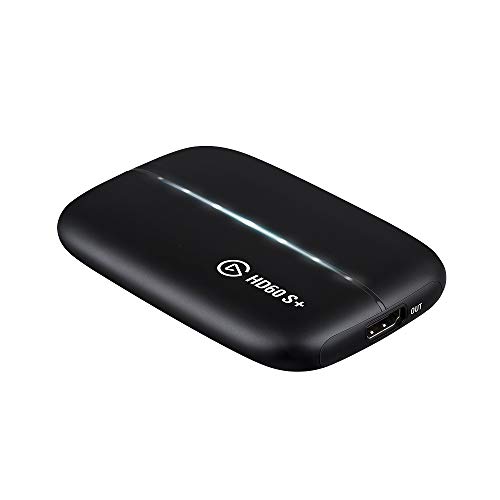
Elgato HD60 S+, External Capture Card, Stream and Record in 1080p60 HDR10 or 4K60 HDR10 with ultra-low latency on PS5, PS4/Pro, Xbox Series X/S, Xbox One X/S, in OBS and more, works with PC and Mac
Disclosure: We may earn a commission when you buy through links on this page, at no extra cost to you. As an Amazon Associate I earn from qualifying purchases. Learn more
Highlights
- 1080p60 HDR10 Capture: share your gameplay in superb viewing quality.
- 4K60 HDR10 Zero-Lag Passthrough: play your high-fidelity Xbox Series X/S, Xbox One X, PS5 and PS4 Pro games in original format.
- Instant Gameview: power your workflow with ultra-low-latency technology.
- Unlimited Capture: record hours of footage directly to your hard drive.
- Flashback Recording: slide back in time to save epic moments retroactively.
Why You'll Love It
- Record gameplay in 1080p60 HDR10 directly onto your computer hard drive
- Play console games in full 4K60 HDR10 with zero-lag video passthrough
- React smoothly on stream with low-latency Instant Gameview technology
- Save past gaming moments retroactively using Flashback Recording
- Broadcast easily from consoles to PC or Mac using OBS and other apps
Pros
- +4K60 HDR10 passthrough keeps gameplay sharp
- +Records directly to hard drive with no time limits
- +Compatible with both Windows PC and Mac systems
- +Low-latency Instant Gameview aids real-time workflow
- +Works smoothly with streaming software like OBS
Cons
- -Capture resolution is limited to 1080p60
- -Higher initial investment than basic capture cards
Detailed Review
Console streamers looking to broadcast recent systems without downgrading their display setup will appreciate what an external capture card like the Elgato HD60 S+ provides. It bridges the gap between home consoles and computer workflows, letting you route your gaming signal straight into streaming applications on either PC or Mac. Built for creators who prioritize reliable video ingest without unnecessary complexity, it handles both modern consoles and standard broadcasting software smoothly.
The standout feature is the video pass-through capability, which supports 4K60 HDR10 with zero lag. This means you do not have to compromise your personal visual experience while gaming on hardware like the PS5, PS4 Pro, Xbox Series X/S, or Xbox One X. You can play your games in high fidelity on your primary monitor or television, while the device independently feeds a crisp 1080p60 HDR10 signal to your computer for live broadcasting or local recording.
Workflow responsiveness is handled by Instant Gameview, an ultra-low-latency feed that cuts down display delays inside your capture setup. For archiving playthroughs, the hardware supports unlimited capture, writing video directly to your computer hard drive so you are not constrained by built-in memory blocks. Additionally, Flashback Recording lets you scrub back in time to retrieve clutch moments or unexpected achievements that occurred before you pressed record.
Because the unit records in 1080p60 rather than capturing at full 4K resolution, creators who specifically require native 4K recorded files will need to note that limitation. The hardware focuses on high-grade 1080p content creation alongside 4K passthrough, which aligns with standard broadcast requirements but limits archival fidelity for pure 4K production.
Verdict: The Elgato HD60 S+ is a capable external capture card for console gamers who want zero-lag 4K pass-through on their main screen alongside steady 1080p60 streaming. Buyers seeking to produce native 4K recorded archives should look for a dedicated 4K capture model instead.
Who Should Buy It
A great fit if you:
- Stream console games from a PS5, PS4 Pro, or modern Xbox while still viewing 4K HDR visuals on your primary display.
- Rely on OBS or similar desktop production software on either a PC or Mac workstation.
- Want the flexibility to pull retrospective gameplay clips using retroactive recording tools without constantly monitoring clip lengths.
- Need to record long sessions directly onto an external or internal computer storage drive without strict duration caps.
Consider something else if you:
- Require native 4K capture files rather than downscaled 1080p recordings, in which case a dedicated 4K capture device is better suited.
- Play exclusively on systems that do not need an external video capture interface to broadcast directly.
Before You Buy
Confirm on the listing:
- Check which connection cables, such as HDMI or USB cords, come included in the retail packaging.
- Confirm the minimum operating system versions and hardware specifications required for your specific PC or Mac.
- Check whether your television or monitor supports 4K60 HDR10 inputs to take full advantage of the zero-lag passthrough.
- Verify that your desired streaming software, whether OBS or another broadcast tool, is supported on your setup.
How to compare your options: When evaluating video capture devices, compare the passthrough resolution, the captured recording resolution, and system latency. Models that offer zero-lag 4K60 HDR10 passthrough allow you to maintain top visual fidelity during play, whereas simpler alternatives might restrict your gameplay monitor to lower refresh rates or standard dynamic range. Ensure the balance between passthrough clarity and recording capability fits your specific console and computer configuration.
Getting the Most From It
To ensure consistent performance during long gaming sessions, place the device in a well-ventilated space on your desk where airflow is unrestricted around the chassis. If the package includes setup instructions, review the recommended connection sequence between your console, the capture hardware, your monitor, and the host computer before powering everything on.
Configure your capture software profile to take advantage of 1080p60 HDR10 video encoding, adjusting bitrates to suit your hard drive write speeds and broadcast bandwidth. Make use of the Flashback Recording feature by familiarizing yourself with its timeline controls before starting a live stream, ensuring you can quickly grab highlights without interrupting your gameplay. Keep cables neatly routed to avoid accidental disconnections during active gaming.
FAQ
Can I play my games in 4K while using this device?
Yes, the unit features 4K60 HDR10 zero-lag passthrough, allowing you to play games on your display in original fidelity while capturing at 1080p60 HDR10.
Does this card work on Apple computers?
Yes, the hardware works with both PC and Mac operating environments.
Which consoles are compatible with this hardware?
The listed compatible systems include PS5, PS4, PS4 Pro, Xbox Series X/S, and Xbox One X/S.
Does it have a time limit on recorded gameplay?
No, it features unlimited capture, allowing you to record hours of video directly to your computer hard drive as long as you have available storage space.
Can I use it with OBS?
Yes, the device is designed to work in OBS as well as other compatible streaming and recording applications.
Product Details
| Brand | Elgato |
| ASIN | B07XB6VNLJ |