Best Wireless Keyboard and Mouse: Our 2026 Checklist and Top 3 Picks
Disclosure: We may earn a commission when you buy through links on this page, at no extra cost to you. As an Amazon Associate I earn from qualifying purchases. Learn more

The best wireless keyboard and mouse combos: Logitech MX Keys S, Logitech MK270 and Redragon picks plus buying checklist.
A wireless keyboard and mouse combo clears cable clutter from your desk, lets you push the laptop back to a comfortable viewing distance and makes a living room PC or work station easier to use from anywhere in the room. Combos range from about $20 basic office sets to around $200 premium setups with backlit keys, multi device switching and ultra fast scroll wheels, plus gaming combos with RGB lighting and high DPI sensors. This guide to the best wireless keyboard and mouse explains the checklist we use, the specs that matter and the red flags to avoid, then shares three picks that pass it.
We walk through how we evaluate wireless keyboard and mouse combos, share our picks, then cover a quick buyer checklist, red flags, choices for different uses, setup tips and answers to common questions. Every combo in the table above is sold new on Amazon US. Take regular breaks from typing, keep wrists neutral and talk to a doctor or occupational therapist if you develop persistent hand, wrist or arm pain.


How We Evaluate the Best Wireless Keyboard and Mouse Combos
We judge wireless combos on connection type and reliability, ergonomics and size, battery life and charging, key and sensor performance, customization software, compatibility and durability and warranty. We relied on maker specifications and the overall pattern in owner feedback, not our own use. Here is what each criterion means.
Wireless Connection (2.4GHz, Bluetooth, Wired)
Most combos connect with a small USB receiver on the 2.4GHz band, which is plug and play and very reliable. Logitech says the MK270's receiver provides a wireless connection up to 33 feet.
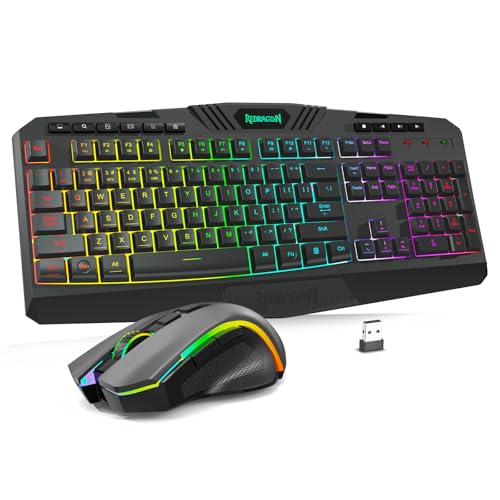
Bluetooth connects without a receiver, which suits laptops and tablets with limited ports. Multi mode combos, like the Logitech MX Keys S Combo with Bluetooth Low Energy or a Logi Bolt receiver, and the Redragon S101M-KS with wired, Bluetooth and 2.4GHz modes, offer flexibility. Wired mode is useful for charging while you play.
A single shared receiver, like the ones in the MK270, EDJO and RedThunder combos, saves a USB port and makes setup faster. If your laptop only has USB-C ports, check for Bluetooth or plan on a small adapter.
Ergonomics, Size, and Grip Style
Full size keyboards include number pads and suit spreadsheets and data entry. Compact keyboards, like the Logitech Pebble 2 and the RedThunder 60% keyboard, save desk space and keep the mouse closer to your body. Ergonomic combos, like the ProtoArc EKM01 Plus and Logitech Wave Keys MK670, use curved or split layouts and palm rests to keep wrists neutral. Mouse shape matters too: Logitech says the MK270 mouse is equally comfortable for left and right hands, while the MK345 mouse is contoured for right handed users.
Adjustable tilt legs, like those on the MK270 and EDJO keyboards, let you fine tune typing angle, though many ergonomics experts recommend a flat or slightly negative tilt to keep wrists straight.
Battery Life and Charging
Battery life varies widely. Logitech lists up to 36 months of keyboard battery life and 12 months for the mouse on the MK270, and up to 3 years and 18 months on the MK345. EDJO lists up to 365 days and auto sleep after 10 minutes of inactivity. Rechargeable combos, like the RedThunder with an 1,850mAh keyboard battery and 500mAh mouse battery and the Amazon Basics Ultra Premium combo, avoid buying batteries but need regular charging.
Backlit keyboards use more power. The MX Keys S keeps lighting efficient by turning on only when your hands approach, which helps stretch time between charges.
Key and Sensor Performance
Keyboards use membrane, scissor or mechanical style switches. Low profile scissor keys, like the MX Keys S's spherically dished keys, feel fast and laptop like.
Membrane keys, like the MK270's, are quiet and affordable. Mouse sensors are measured in DPI. Office mice work well at around 1,000 to 1,600 DPI, like EDJO's 1,600 DPI mouse, while the Redragon gaming mouse offers 800 to 4,800 DPI and the MX Master 3S mouse in the MX Keys S Combo uses an 8K DPI sensor that tracks even on glass, according to Logitech.
Quiet click mice, like the Pebble 2 Silent, suit shared spaces and late night work.
Customization and Software
Software lets you remap keys, create shortcuts and adjust lighting. Logitech's Logi Options+ app supports Smart Actions that run multiple steps with one keystroke on the MX Keys S Combo. Redragon's software customizes keys, backlighting, mouse DPI, polling rate from 125 to 1,000Hz and remaps the seven mouse buttons. Basic office combos skip software and work instantly.
If you work in shared or managed computers where you cannot install software, choose a combo that works fully without an app.
Compatibility (PC, Mac, Tablet, Console)
Most combos work with Windows, and many support macOS, ChromeOS and Linux. Logitech lists Windows, macOS and ChromeOS for the MK345 and nearly any operating system for the MX Keys S Combo, which pairs with up to 3 devices. Logitech sells Pebble 2 versions for Mac and iPad. Console support varies; check the listing before buying for a game console.
Smart TVs and streaming boxes may accept USB receivers too, which makes a compact combo handy for a living room PC or TV browsing.
Durability and Warranty
Spill resistant keyboards, like the MK270 and MK345, survive minor accidents. RedThunder lists a 10 million keystroke lifetime, and Redragon provides a 36 month warranty. Logitech's MK270 uses 49% and 54% certified post consumer recycled plastic in the mouse and keyboard.
Keyboards with printed keycaps can wear off over time, while two color molded keycaps, like RedThunder's, keep legends crisp.
3 Picks That Pass Our Checklist
Our picks are the Logitech MX Keys S Combo as the best overall, the Logitech MK270 Wireless Keyboard and Mouse Combo as the best value and the Redragon S101M-KS Wireless Gaming Keyboard and Mouse as the best for heavy use and gaming.
Best Overall: Logitech MX Keys S Combo
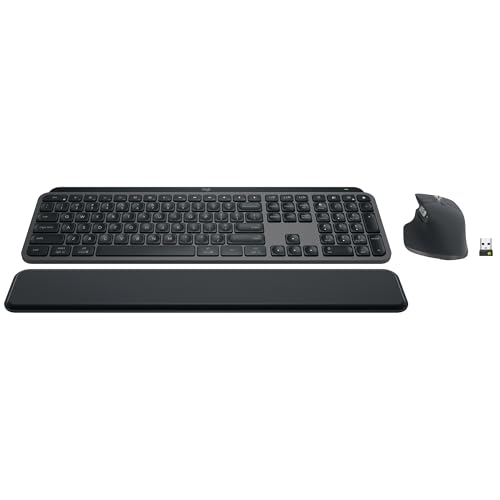
The Logitech MX Keys S Combo suits professionals, creators and anyone who works at a computer all day, at around $200. Logitech lists a low profile keyboard with spherically dished keys for fast, quiet typing, the MX Master 3S mouse with MagSpeed scrolling up to 1,000 lines per second and an 8K DPI sensor that tracks on glass, smart backlighting that turns on as your hands approach, Smart Actions in Logi Options+ and pairing with up to 3 devices via Bluetooth Low Energy or the Logi Bolt receiver.
Two strengths stand out: comfort and precision for long workdays and seamless switching between a laptop, desktop and tablet. The mouse is sculpted for better wrist posture.
The limitation is price. Skip it if you only need a simple combo for email and browsing.
Best for: remote workers, designers, programmers and anyone juggling a laptop and desktop who wants one premium setup for both.

Best Value: Logitech MK270 Wireless Keyboard and Mouse Combo
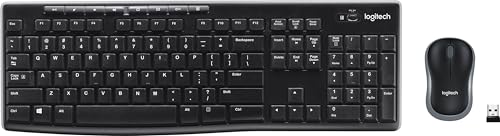
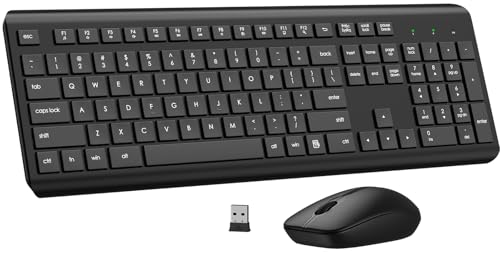
The Logitech MK270 is for students, home offices and anyone who wants a dependable combo at a low price, at around $27. Logitech lists a plug and play USB receiver with range up to 33 feet, a full size keyboard with low profile quiet keys, a number pad and 8 multimedia hotkeys, a spill resistant design with adjustable tilt legs, up to 36 months of keyboard battery life and 12 months for the mouse and a compact ambidextrous mouse.
Its strengths are reliability, long battery life and a familiar full size layout.
The trade off is a basic mouse and no backlighting. Skip it if you type in the dark or want multi device switching.
Best for: home offices, students, family computers and anyone replacing a worn out wired set on a budget.

Best for Heavy Use: Redragon S101M-KS Wireless Gaming Keyboard and Mouse
The Redragon S101M-KS suits gamers and power users who want RGB lighting, programmable keys and a high DPI mouse, at around $49. Redragon lists tri mode wired, Bluetooth and 2.4GHz connections, RGB backlighting with 8 patterns, a mouse with 5 DPI levels up to 4,800 DPI, 10 independent multimedia keys, software to remap keys and mouse buttons and adjust polling rate from 125 to 1,000Hz and a 36 month warranty.
The appeal is a full featured gaming combo at a budget price with flexible connectivity.
The limitation is a gaming look that may not suit an office. Skip it if you prefer a quiet, minimal setup.
Best for: PC gamers on a budget, streamers and anyone who wants customizable lighting and macro keys.

Quick Buyer Checklist
Before you buy, run through this checklist. Does it connect the way you need, with a USB receiver, Bluetooth or both? Is the keyboard size right for your desk and work? Does the mouse fit your hand and grip?
How long do batteries last, or is it rechargeable? Is it compatible with your operating system? Do you need backlighting, multi device switching or programmable keys? Is the keyboard spill resistant, and what is the warranty?
The best wireless keyboard and mouse for you will answer yes to the questions that matter most for your work. A writer might prioritize keyboard feel and quiet keys, a designer might prioritize mouse precision and a gamer might prioritize DPI, polling rate and programmable buttons.
Red Flags to Watch For
Watch for combos with no stated battery life or vague compatibility claims. Be skeptical of extreme DPI numbers on cheap mice, since sensor quality matters more than the highest number.
Keyboards with mushy, uneven keys or wobbly bodies make typing tiring. Avoid combos that require separate receivers for the keyboard and mouse if you have few USB ports. Finally, check whether the receiver can be stored in the mouse, like EDJO's, so it does not get lost.
Be wary of combos with no clear way to reconnect if pairing is lost, and of rechargeable sets that cannot be used while charging.
Picking the Best Wireless Keyboard and Mouse for Different Uses
Match the combo to where and how you work. Here is what to check for common setups.
For Laptops and Small Desks
Compact, slim combos keep laptop setups tidy. The Logitech Pebble 2 Silent Compact Combo, at around $60, offers quiet clicks and a small footprint, and Bluetooth connection frees up laptop ports. Look for multi device switching if you also use a tablet.
Pair a compact combo with a laptop stand to raise the screen to eye level, which helps your neck and shoulders during long sessions.
For Mac and iPad Users
Choose combos with Mac key layouts and Bluetooth, like the Logitech Pebble 2 for Mac and iPad or the MX Keys S Combo, which works with macOS and pairs with multiple devices.
For Gaming
Gamers should look for adjustable DPI, high polling rates and programmable buttons, like the Redragon S101M-KS. Compact 60% combos, like the RedThunder at around $49, leave more room for wide mouse movements, and RedThunder lists a lightweight honeycomb mouse.
Rechargeable gaming combos should list battery life clearly; RedThunder says its batteries allow long continuous use, but plan to charge regularly during heavy play.
For Full Size Office Work
Office workers who enter numbers benefit from full size combos with number pads, like the Logitech MK270 and MK345 at around $31. Logitech says the MK345 adds a palm rest and a contoured right handed mouse. Arteck's ultra slim stainless steel combo, at around $36, offers a sleek full size option.
Full size keyboards with dedicated media keys, like the MK270's 8 hotkeys, save time on everyday tasks.
For Ergonomic Comfort
People with wrist strain should consider ergonomic combos like the ProtoArc EKM01 Plus at around $100 or the Logitech Wave Keys MK670 at around $90, which use curved layouts and cushioned palm rests to keep hands in a more natural position.
Ergonomic keyboards take a week or two to get used to, so give yourself time to adjust before deciding.
Setup and Care Tips
Plug the USB receiver into a port with a clear line of sight to your keyboard and mouse, or use a USB extension cable for desktops under desks. Install the maker's software for shortcuts and battery alerts.
Keep spare batteries on hand or charge rechargeable combos weekly. Clean keys with compressed air and wipe surfaces with a slightly damp cloth. Turn off devices with power switches when traveling.
If the mouse lags, move the receiver closer, replace batteries and keep metal objects and other wireless devices away from the receiver.
Wireless Keyboard and Mouse: Your Questions Answered
Does a wireless keyboard and mouse work with Mac and consoles?
Many combos work with Mac through Bluetooth or a USB receiver, especially those listing macOS support like Logitech's MK345 and MX Keys S. Console support varies by model and game, so check the product listing and console settings first.
On Mac, check that the keyboard includes Command and Option keys or supports remapping in software.
What DPI do I need?
For office work, 1,000 to 1,600 DPI is plenty. Gamers often prefer adjustable DPI, like Redragon's 800 to 4,800 range, to switch between precise aiming and fast movement. Higher DPI is not always better; comfort and tracking accuracy matter more.
Many people find a moderate DPI with a slightly higher pointer speed in system settings feels the most natural.
Are mechanical keyboards worth it?
Mechanical keyboards offer satisfying feedback and long life, which typists and gamers enjoy, but they are louder and pricier. Low profile and membrane keyboards are quieter and suit shared spaces.
If you share an office or type during calls, a quiet membrane or low profile keyboard is the more considerate choice.
Wired or wireless: which is better for gaming?
Modern 2.4GHz wireless combos have very low latency and suit most gamers. Competitive players sometimes prefer wired connections for zero battery concerns; tri mode combos like Redragon's let you choose.
Keep the receiver close to the mouse for the most stable connection during play.
Final Thoughts
The best wireless keyboard and mouse fits your desk, work and hands. The Logitech MX Keys S Combo is our best overall pick for productivity, the Logitech MK270 offers outstanding value and the Redragon S101M-KS suits gamers and heavy users. Choose the connection, size and ergonomics that match your routine.
Whatever you choose, set up your desk so your elbows rest at about 90 degrees and your wrists stay straight while typing.
For more home office guides, see the best desk lamp, the best laptop stands, the best wireless gaming mice and the best ergonomic office chair. Then compare current prices in the product table above.