Best Cloud Cameras: Reviews and Buying Guide for 2026
Disclosure: We may earn a commission when you buy through links on this page, at no extra cost to you. As an Amazon Associate I earn from qualifying purchases. Learn more
Shopping for the best cloud cameras? This buying guide covers storage plans, video quality, smart alerts, and power options in plain, clear terms.
A cloud camera records video and sends that footage to online storage, so you can watch live views and past clips from your phone wherever you are. Shoppers looking for the best cloud cameras usually want the same things: clear video, alerts that arrive fast, and clips that stay saved even if the camera itself is damaged or taken. The catch is that the camera and the storage plan work as a pair, and a great camera with the wrong plan can disappoint you.
This guide walks through the features that matter most, the main camera types, and the mistakes that waste money. Use it alongside the comparison table below, and pay as much attention to storage terms and app quality as you do to the camera hardware itself.

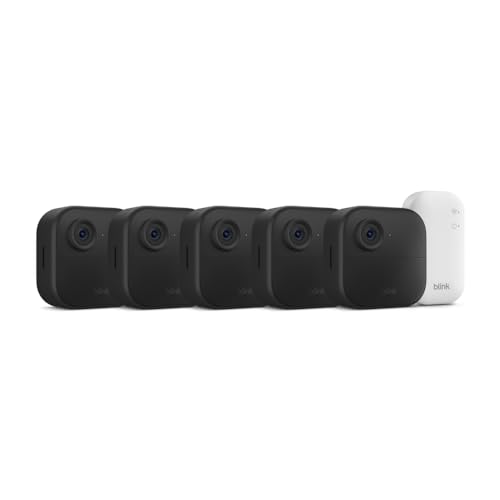


Who Should Buy a Cloud Camera?
Cloud cameras suit people who want recorded proof of what happened, not just a live view. Because clips live online rather than only on a card inside the camera, you can check an event from last week while you are away from home. Different households lean on that ability in different ways.
Homeowners Who Want Footage They Can Reach From Anywhere
If you travel for work or spend weekends away, cloud recording means a package theft or a broken window is still on record when you get home. You open the app, scroll the event timeline, and download the clip you need for a police report or an insurance claim. Look for generous clip retention and clear night video. If your main goal is guarding the house itself, see our guide to the best cloud security cameras for models built around that job.
Renters Who Cannot Run Wires or Drill Holes
Renters often cannot drill into walls or run cable through a building, so a camera that works on WiFi and battery power is the practical route. You can mount one with adhesive strips, set it on a shelf, and take it with you when you move. Cloud storage helps here too, because there is no recorder box to install or hide. Check your lease for camera rules, and favor cameras that you can remove without leaving marks.
Small Business Owners Watching More Than One Spot
Shop owners and landlords often need eyes on a register, a stockroom, and a parking area at once. Cloud systems let you group cameras from several locations inside one app and give a manager access without sharing your personal login. Per camera plan pricing matters at this scale, so compare what five or ten cameras cost each month, not just one.
Key Features to Compare
The product table above gives you the headline specs, but the details below decide how a camera feels to live with day to day. Work through each factor before you buy, because returning a camera after the free trial ends is harder than choosing well once, and these are the points that separate the best cloud cameras from the rest of the shelf.
Video Resolution and Field of View
Resolution tells you how much detail the sensor captures, and 1080p is the baseline for reading a face across a room. Stepping up to 2K or 4K video helps when you need to zoom into a saved clip and read a license plate or a name badge. Field of view matters just as much: a wider lens covers more of a yard or room from one mounting point, though very wide views can make people at the edges look small.
Cloud Storage Plans and Retention
Every cloud camera depends on a storage plan, and the free tier is usually limited to a day or a few days of short clips. Paid plans commonly keep footage for 30 or 60 days and record longer events, and a typical plan costs about $10 per camera each month. Ask what happens when your internet drops, whether clips are saved in full or only when motion triggers them, and whether you can download and keep important clips forever. For a deeper look at plan types and pricing models, read our guide to the best cloud storage for security cameras before you commit to a brand.
Motion Detection and Smart Alerts
A camera that alerts you for every swaying branch trains you to ignore it within a week. Better systems tell people, pets, vehicles, and packages apart and let you draw activity zones so only the areas you care about trigger a recording. Sensitivity settings matter too, especially outdoors where insects and headlights cross the frame at night.
Night Vision and Low Light Performance
Most incidents worth recording happen after dark, so night performance deserves real weight in your decision. Infrared night vision gives clear black and white video in total darkness, and the stated range tells you how far that clarity reaches. Some cameras add a small spotlight and record color at night, which helps describe clothing or a car color, but the light can bother neighbors if it fires often. Check sample night footage when you can, since it shows real clarity better than any stated range.
Power Options and WiFi Connectivity
Battery cameras are the easiest to place, and many run for weeks or months between charges depending on how much motion they record. Plug in models never need charging but need an outlet within cord reach, and a few cameras accept a small solar panel that keeps the battery topped up. For the connection, dual band WiFi support helps in homes where the 2.4 GHz band is crowded, and a camera placed far from the router may need a mesh node nearby. Weak WiFi is the most common cause of choppy live views and missing clips.
Types of Cloud Cameras
Cloud cameras come in a few shapes, and each shape fits a different spot in or around your home. Start with the location you need to cover, then pick the type built for it.
Indoor Cloud Cameras
Indoor models are small, plug in powered, and made for rooms, nurseries, and pet watching. Many include two way audio so you can speak through the camera, and some pan and tilt to follow motion across a room. They are the least expensive way to try cloud recording, but they should never be placed where guests expect privacy, and a physical lens cover or a privacy mode is worth having.
Outdoor Cloud Cameras
Outdoor models carry a weatherproof housing that shrugs off rain, dust, and summer heat, and they add stronger night vision for driveways and yards. Mounting height matters here: place the camera high enough to deter tampering but low enough that faces stay recognizable, usually around eight or nine feet. Outdoor cameras also benefit most from smart detection, since yards produce far more harmless motion than any room.
Video Doorbells and Specialty Cameras
Video doorbells are cloud cameras shaped for your front door, adding a chime button, package alerts, and a view angled at visitors. Floodlight cameras combine a camera with bright lights for dark driveways, and small stick up cameras split the difference for renters. Note that a cloud camera is a monitoring tool, not a photography tool: if you mainly want still photos and creative control, look at the best digital cameras or the best cameras for photography instead.
Choosing Cloud Cameras for Your Situation
The secondary labels on listings can blur together, so here is what each one actually changes about your choice.
Best Wireless Cloud Cameras
When you shop for the best wireless cloud cameras, wireless means the camera reaches your router and the cloud without a network cable, and often runs on battery power too. The trade off is upkeep: you will recharge batteries and you depend fully on signal strength at the mounting point. Check your phone WiFi speed where the camera will sit before you buy, and choose models with a battery you can remove and charge indoors during winter.
Best Outdoor Cloud Cameras
Shoppers comparing the best outdoor cloud cameras should rank weather sealing, night range, and alert accuracy above small gains in resolution. A sealed housing with a proper weather rating survives storms that kill indoor cameras used outside, and a spotlight model records color evidence after dark. Also think about power before you mount: a battery camera over a busy street may need charging every few weeks, so a solar panel or a wired model can save you ladder trips.
Best WiFi Cloud Cameras
The best WiFi cloud cameras stand out through connection quality rather than camera specs. Dual band support, a strong antenna, and an app that reconnects on its own after an outage all reduce the gaps in your footage. If your router sits far from the camera, a mesh system or a camera that works with a plug in chime hub can stabilize the link. Remember that upload speed matters more than download speed here, since the camera sends video out all day.
Common Mistakes to Avoid
- Buying the camera first and reading the storage plan terms later, so you end up paying more each month than the camera cost within a year.
- Mounting an outdoor camera where your WiFi signal is weak, which leads to missed clips and live views that freeze.
- Turning motion sensitivity to maximum, so passing cars and moving shadows flood your phone until you mute the alerts that matter.
- Using an indoor only camera outside under an eave, where humidity and temperature swings quietly ruin it.
- Sharing one account login with the whole household instead of using the app member invites, which makes it impossible to control who can view or delete clips.
- Skipping the free plan trial period, so you never learn how short the free clip retention really is before the return window closes.
How to Make Your Cloud Camera Last Longer
- Wipe the lens with a soft lens cloth every few weeks, since dust and spider webs scatter infrared light and turn night video hazy.
- Update the camera firmware through the app when prompted, because updates often improve detection accuracy and patch security flaws.
- Recharge battery models before they run completely flat, and bring batteries indoors to charge in very cold weather so they take a full charge.
- Check outdoor seals and mounting screws twice a year, and clear leaves or nests that block the view or trap moisture against the housing.
- Store a spare camera or a camera you are not using in a dry padded bag with its battery partly charged, and check it before you rely on it again.
FAQ
Do cloud cameras keep recording when the internet goes down?
No, most cloud cameras pause uploads during an outage, though some keep recording to a memory card and send the footage once the connection returns. If outages are common where you live, choose a model with that local backup and check whether the backup clips merge into your cloud timeline. Also ask your internet provider about outage frequency before blaming the camera for gaps in your history.
How much should you spend on your first cloud camera?
Most first time buyers do well spending under $100 on the camera itself and treating the storage plan as the real long term cost. A modest camera with a plan you can afford beats a premium camera whose plan you cancel, because a cloud camera without its plan loses most of its recording value. Start with one camera on a front door or main room, live with the app for a month, and expand only if the alerts and clip quality earn your trust.
Is a smartphone enough instead of a cloud camera?
No, a spare smartphone can stream video, but it is not a substitute for a purpose built cloud camera. Phones overheat in sunny windows, lack proper night vision, and stop working when calls or updates interrupt the camera app. A basic dedicated camera costs little, mounts securely, and records on motion around the clock without supervision.
What specs matter most for a first cloud camera?
Start with night vision range, smart person detection, and a storage plan with at least 30 days of clip history. Those three decide whether the camera catches useful evidence and whether you can still view it when you need it. Resolution above 1080p, optical zoom, and color night vision are nice extras once the basics are covered. Also confirm the app supports simple sharing, because a clip you cannot send to someone quickly loses much of its value.
How long do battery powered cloud cameras last between charges?
Most battery powered cloud cameras run from about one to six months per charge, and your own usage decides where yours lands in that range. A camera over a quiet side gate lasts far longer than one facing a busy street, because every motion event wakes the camera and uses power. Cold weather shortens battery life further, so favor a removable battery pack or a solar panel if charging means climbing a ladder.
Final Thoughts
The right choice balances clear video, alerts you can trust, and a storage plan whose monthly cost still feels fair a year from now. Compare the options in the product table above against the spots you actually need to cover, and let plan terms weigh as heavily as camera specs. Chosen that way, the best cloud cameras quietly record what matters and stay out of your way the rest of the time.