Best Cameras for Vlogging under 500 in 2026: What Your Money Really Gets You at Every Price
Disclosure: We may earn a commission when you buy through links on this page, at no extra cost to you. As an Amazon Associate I earn from qualifying purchases. Learn more

Compare cameras for vlogging under 500 by price tier, with clear guidance on screens, stabilization, audio, lenses, heat limits and long term costs.
Prices for vlogging cameras stretch from pocket money to pro budgets, and the middle hides the best value. The best cameras for vlogging under 500 pair a screen you can see while filming yourself with steady autofocus and clear sound. Use the comparison table below to match each tier to your filming style.
This guide skips model by model scoring and focuses on what each price step buys you. You will see which features change your footage, which extras to skip, and what ownership costs sit beyond the camera.




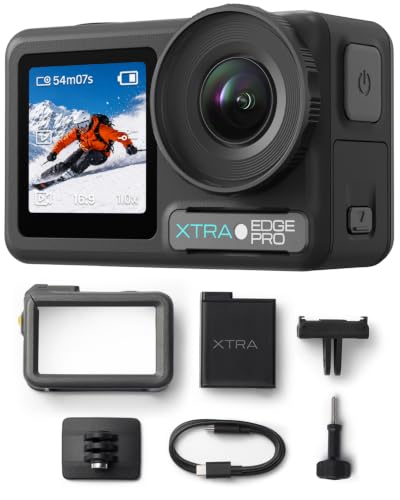

Who Should Buy a Vlogging Camera at This Budget?
Your filming routine decides which body style and lens setup fits. Match yourself to one group below, then use the tiers section to set your limit.
Daily Vloggers Who Film Themselves at Home
You film at a desk, in a kitchen or in a small bedroom, often alone. Put a fully turning flip screen first, since you need to check framing and focus without help. A wide lens suits tight rooms, and a microphone input matters because rooms add echo to built in mics. Stabilization matters less here, since a tripod holds most shots.
Travel Creators Who Walk and Talk
You record while moving through streets, markets and trails, so weight and stabilization lead your list. Choose a compact body you can hold at arm length without strain. Strong image stabilization smooths your steps, and fast face tracking keeps you sharp as backgrounds change. Weatherproof sealing is rare here, so plan on a simple cover for rain.
New Creators Moving Beyond a Phone
Your phone films well in bright light, but calls, alerts and full storage interrupt long sessions. A dedicated camera gives you a flip screen, a better grip and files kept separate from your phone. Simple auto modes and WiFi transfer help you publish fast.
How the Three Price Bands Differ Under 500 Dollars
Prices on Amazon US move with sales, so treat these bands as guides rather than fixed lines. Each step up should buy a visible gain in screen, sound or low light quality.
Entry Tier, About $150 to $300: Usable Basics for Bright Days
Expect a fixed lens compact or an older mirrorless body with a basic kit lens. Video is often 4K at lower frame rates or clear full HD, with digital stabilization that crops the frame. Screens may only tilt up rather than turn fully forward. This tier suits bright outdoor filming and learners who accept softer indoor footage.
Middle Tier, About $300 to $450: Better Sound and Self Filming Tools
Here flip screens that face forward, microphone inputs and reliable eye tracking become common. Sensors grow larger, so indoor clips look cleaner with less noise. Many models add stronger stabilization and faster app transfer. For most solo creators this is the sensible ceiling, since higher gains come in smaller steps.
Upper Tier, About $450 to $500: Cleaner Low Light and Room to Grow
Near the cap you find larger sensors, brighter lenses and bodies that accept a second lens later. Autofocus tracks faces with fewer slips, and 4K video holds detail better when you crop in editing. This tier suits creators who film at night or keep cameras for years. Compact shoppers can also see our guide to the best compact cameras under 500 for smaller bodies.
Key Features to Compare
Compare the best cameras for vlogging under 500 on the points that change your daily filming, not on spec sheet length. The five factors below explain what to check and where this budget forces trade offs.
Sensor Size and Image Quality for Vlogging
Sensor size shapes how clean your footage looks away from bright windows. One inch sensors are common in compact vlogging models and handle indoor light fairly well. APS C sensors in mirrorless cameras gather more light, so faces stay clearer at dusk. Very high megapixel counts matter little for video, so judge by sensor size and lens brightness instead.
Flip Screen and Autofocus You Can Trust Alone
A screen that turns to face you lets you check framing, exposure and focus while you talk. Touch focus helps you tap a product and have the camera hold it sharp. Eye tracking autofocus follows your face as you move, which saves retakes when no one can help you. Test the screen angle with a microphone fitted, since some top mounted mics block the view.
Image Stabilization for Walking Shots
Image stabilization decides whether walking clips feel watchable or shaky. Lens based and in body systems smooth small hand movements, while digital systems crop the image and can look soft at the edges. Wider lenses hide shake better, so film walking segments at the wide end. If you mostly film on a tripod, accept basic stabilization and spend on sound instead.
Microphone Input and Clear Voice Recording
Viewers forgive soft video sooner than muffled speech, so audio deserves real budget. A microphone input lets you add a shotgun mic or a wireless set that keeps your voice clear as you step away. Check for a headphone port if you record interviews, since it lets you hear problems while filming. Built in mics suit quiet rooms only, and wind quickly ruins them outdoors.
Lens Choice and Field of View for Vlogging
Your lens sets how much of the room viewers see and how natural your face looks. A wide view around 20 to 28 mm in full frame terms fits filming at arm length in small spaces. Brighter apertures around f/1.8 to f/2.8 help in dim rooms and soften backgrounds. Long optical zoom sounds flexible, but vlogging rarely needs distant reach, so skip paying for extreme zoom.
Picking the Right Camera for Different Budgets and Uses
If you can stretch past this cap, see our guide to the best cameras for vlogging for the wider field. Inside the cap, the two lower bands below serve different buyers.
Best Cameras for Vlogging under 100: What Tight Money Still Buys You
Searches for best cameras for vlogging under 100 lead to entry webcams and simple action style cameras rather than true vlogging bodies. Expect fixed focus, modest low light results and no microphone input on most options. Choose this band only for bright rooms and seated practice while you learn framing.
Best Cameras for Vlogging under 250: The Step Where Quality Jumps
Guides to best cameras for vlogging under 250 describe the first band where used mirrorless bodies and better compacts appear. A tilting screen, cleaner 4K video and steadier handheld clips become realistic here. Prioritize a front visible screen and a wide indoor lens, and accept that a separate microphone may wait.
Long Term Costs and Care for Your Vlogging Camera
The body is only part of the spend. Budget for fast memory cards, a spare battery, a small tripod or grip, a bag and the microphone your style needs. Most owners land at about $60 to $150 beyond the body in the first year. If you compare general stills and video models too, see our guide to the best cameras under 500.
Care is simple and cheap. Wipe the lens with a microfiber cloth, use a blower to clear dust before swapping lenses, and store batteries partly charged on long breaks. Format cards in the camera after copying files, and install firmware updates from the maker, since updates often improve autofocus and heat handling.
Common Mistakes to Avoid
These errors cost money or footage without adding quality.
- Judging a vlogging camera by megapixel count alone leads to noisy indoor video.
- Buying a camera with no front facing screen leaves solo filming to guesswork and repeated retakes.
- Skipping a microphone input locks you into echoing built in sound for every future video.
- Spending your budget on the body leaves nothing for the cards, battery and grip you need on day one.
- Choosing a long zoom lens first makes small rooms feel cramped and faces look distant.
Frequently Asked Questions
Can you get a good vlogging camera for under $500?
Yes, a good vlogging camera for under $500 is realistic, and the middle tier covers most solo creators well. You get a flip screen, capable autofocus and a microphone input. One extra route is a recent model bought on sale when its replacement launches, since last season bodies often drop into this range.
What features matter most in a vlogging camera under $500?
A front facing flip screen, dependable face tracking and a microphone input matter most, because they shape every solo session. Stabilization follows for anyone who walks while filming. Also check vertical video support with framing guides if you cut short vertical clips from the same session.
Which vlogging cameras under $500 handle low light best?
Mirrorless cameras with APS C sensors and bright lenses handle low light best in this range, since the larger sensor gathers more light per frame. Compact one inch models follow closely in small rooms. A small LED panel or a seat near a window improves faces more cheaply than a spec upgrade.
Is a smartphone enough instead of a vlogging camera under $500?
A smartphone is enough for bright, short clips, and many creators start there. A dedicated camera earns its cost when you film long sessions, need a microphone input or want your phone free. It also removes the storage clash and alert pop ups that interrupt takes.
How much should I spend on my first vlogging camera under $500?
Most first time buyers should spend about $300 to $450 on the body and keep the rest for a microphone, card and spare battery. That band buys the screen and autofocus that make solo filming calm. Spend near the cap only if you already film weekly and know low light is your main limit.
The Bottom Line
Set your tier first, then judge screens, stabilization and sound before sensor bragging rights. A camera you can frame alone and hear clearly will serve your channel better than a longer feature list.
Use the product table above to compare the best cameras for vlogging under 500 against your tier, your rooms and your filming style. Buy the simplest setup that removes your biggest filming frustration, and keep a little budget aside for sound.