Best Cameras for Photogrammetry: A 2026 Checklist for Sharp 3D Models
Disclosure: We may earn a commission when you buy through links on this page, at no extra cost to you. As an Amazon Associate I earn from qualifying purchases. Learn more

Compare sensor size, lens sharpness and capture settings for cameras for photogrammetry, with a checklist for sharp, accurate and repeatable 3D models.
Photogrammetry software builds a 3D model from many overlapping photos, so small flaws in each frame multiply across the set. The best cameras for photogrammetry keep detail sharp from center to corner, hold exposure steady across a full orbit, and record files you can process without surprises. Judge each camera against your planned work with this checklist, then compare shortlisted bodies in the comparison table below.
Your subject decides what matters most. A building survey rewards dynamic range and stamina, while a small artifact rewards close focus and controlled light. If you want a broader view of general stills cameras, see our guide to the best digital cameras, but keep your choice tied to sharpness and repeatable settings, not headline megapixels.



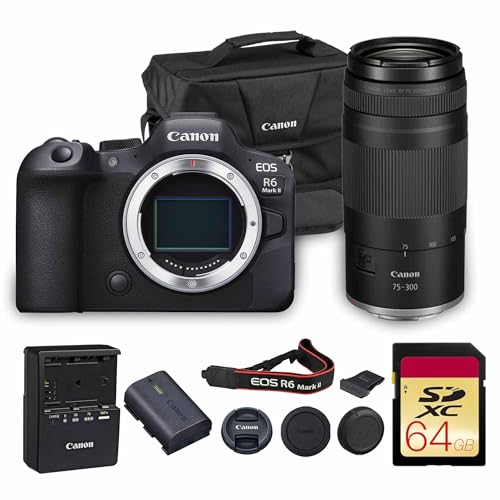


Who Should Buy Which Cameras for Photogrammetry?
Match the camera to your subject size, capture setting and the accuracy your model must reach.
Survey and Construction Teams Recording Large Sites
You walk long orbits around buildings, trenches or stockpiles, often in bright sun and dust. Choose a weather sealed body, a wide angle lens with low distortion and battery life for a full day of capture. GPS tagging helps you sort thousands of frames later. A heavier body is acceptable if your team already carries tripods and survey targets.
Museum and Heritage Staff Recording Artifacts
You capture objects at close range under controlled light, and color must stay true across every angle. Choose strong color depth, tethered shooting to a computer and a lens that can focus close enough to fill the frame with small details. Weight matters less here, because most work happens on a copy stand or a sturdy tripod.
Students and Creators Building Their First 3D Models
You need a camera that teaches good habits without overspending on features you will not use. Choose a simple menu system, clear manual controls and affordable lenses with strong sharpness. If you are new to interchangeable lens cameras in general, see our guide to the best starter cameras for basic handling advice. Then judge your shortlist by the photogrammetry factors below, not by burst speed or sports tracking.
Key Features to Compare
Score each camera on the same five factors, in this order, before you look at price. The best cameras for photogrammetry pass all five without slow menus or fragile workarounds.
Sensor Size and Detail for Accurate 3D Models
Sensor size shapes how much fine detail and tonal range each frame holds. Full frame sensors gather more light and usually keep noise lower, which helps on large sites and in dim interiors. APS C sensors give a smaller, lighter kit and still record ample detail for most models at about 24 to 26 megapixels. Extra megapixels help only when lens sharpness and focus stay exact, because soft frames waste the added resolution.
Lens Sharpness, Distortion and Optical Zoom
The lens decides how much sensor detail survives in the file. Prime lenses with a fixed focal length, often about 35 mm to 50 mm on full frame, usually show low distortion and even sharpness across the frame. Zoom lenses add framing freedom, but optical zoom changes focal length as you compose, which can alter distortion across a set. Whichever type you choose, stop the aperture down to about f/8 for deeper focus and cleaner corners.
Focus Control, Autofocus and Image Stabilization
Photogrammetry rewards focus that stays exactly where you set it for the whole orbit. Many users focus once with autofocus, then switch to manual focus so later frames cannot drift onto a nearer edge. Focus peaking and a magnification view on the rear screen help you confirm that point. Image stabilization helps for handheld capture on foot, but turn it off on a tripod, because the system can shift the image slightly between frames.
Manual Control, RAW Files and Locked Settings
You need full manual control of exposure, focus and white balance, with nothing changing on its own between frames. RAW files preserve more highlight and shadow detail for processing software than compressed files, and they let you correct color in one consistent batch. Auto HDR, auto lighting corrections and scene modes should switch off, because each one can treat frames differently. For broader context on image quality across bodies, see our guide to the best quality cameras.
Battery Life, Storage and 4K Video
A large site can demand hundreds of frames, so check shots per charge, spare battery cost and whether USB C charging works during a break. Fast cards matter too, because a slow card stalls your rhythm and invites missed angles. Size and weight shape how steadily you hold a level orbit late in a long day. Clean 4K video can support a quick reference orbit clip, but still photos remain the safer base for accurate models.
Camera Types Compared: A Quick Buyer Checklist
Three body types cover nearly every kit. Pick your type first, then run the checklist below before you order.
Full Frame Mirrorless Bodies for Large and Dim Sites
These bodies pair the strongest low light files with the widest choice of sharp prime lenses, at the highest cost and weight. Expect body prices of about $1500 to $3500 before lenses. Choose this type when clients pay for accuracy or when interiors limit your light.
APS C Mirrorless Bodies for Balanced Field Kits
These bodies cost less, weigh less and still deliver sharp files for most sites and mid sized objects. Expect body prices of about $600 to $1500, with strong lens choices at fair prices. Choose this type for mixed indoor and outdoor work where you carry the full kit yourself.
Compact Cameras With Fixed Lenses for Small Objects
A compact camera with a fixed lens removes lens swaps and keeps setup simple for tabletop subjects. Expect prices of about $700 to $1300, and check close focus distance before you buy. Choose this type when portability matters more than lens choice. For everyday stills beyond scanning, see our guide to the best cameras for photography to compare broader priorities.
Before you order, answer yes to each question below.
- Can the camera lock exposure, focus and white balance for a full set?
- Does the lens stay sharp at the corners at about f/8?
- Can you buy a spare battery and a fast card within budget?
- Does the body feel steady in your hands for a full orbit?
- Will the files open in your processing software without extra steps?
- Are warranty and return terms stated in clear writing?
Common Mistakes to Avoid
Each mistake below ruins a capture session in a way that software cannot fully repair.
- Letting auto exposure change between frames creates patches that stitch into visible seams across the model.
- Shooting with too little overlap leaves gaps that the software fills with warped geometry or holes.
- Changing focal length midway through a set breaks the lens calibration the software builds from your frames.
- Trusting a vague spec sheet with no stated warranty invites a body that fails early with no support.
- Holding the camera at uneven heights around a subject produces mixed angles that weaken the final mesh.
Care and Maintenance for Photogrammetry Cameras
Clean the front lens element with a soft lens cloth before each session, because a single smear can soften every frame in a set. Use a blower on the sensor and mount with the body facing down, so dust falls away instead of settling again. Never touch the sensor with cloth or fingers.
Carry a spare battery and store the kit in a dry padded bag between sites, away from site dust and rain. Check the lens mount and tripod socket for looseness each month, and update body firmware only between projects. Store cards in a hard case and copy every set to two drives the same day.
Frequently Asked Questions
What features matter most in a camera for photogrammetry?
A sharp lens, locked manual settings and consistent files matter most in a camera for photogrammetry. Place a color reference card beside the subject for the first frame of each set, then remove it for the clean capture frames. That step gives your software a fixed color target and saves correction work when you merge sets shot hours apart.
Which sensor size is better for low light photogrammetry?
A full frame sensor is better for low light photogrammetry because its files hold less noise at high ISO settings. Static subjects give you a better option than raising ISO, though. Put the camera on a tripod, lengthen the shutter time and add a small LED panel, and an APS C body can match the cleaner look at lower cost.
Is a smartphone enough for photogrammetry instead of a dedicated camera?
A smartphone is enough for learning photogrammetry and for rough models of large, textured subjects. Its automatic sharpening and blended exposures can bend straight edges and smooth fine detail, though, which limits accuracy on paid or archival work. Use a phone to practice your orbit routine, then move to a dedicated camera when measurements or clean surfaces matter.
How much overlap does a photogrammetry photo set need?
Plan for about 70 to 80 percent overlap between neighboring frames in a photogrammetry set. Shoot one ring at a level height, then a second ring from higher up, keeping that same overlap as you move. Subjects with smooth or shiny surfaces need the higher end of that range, because the software finds fewer natural points to match.
How much should I spend on a first camera for photogrammetry?
Most first time buyers should plan on about $800 to $1800 for a body and one sharp lens. Spend on the lens and a sturdy tripod before you pay for extra megapixels, because support and glass shape your early results more. Test your full routine on one textured household object before a real project, so weak settings show up while mistakes cost nothing.
Final Thoughts
Start with the type that fits your subjects, then judge bodies by sensor, lens sharpness and locked control before price. The product table above lets you compare those basics side by side.
When you compare best cameras for photogrammetry with those points in mind, the right choice is usually clear. Buy the simplest kit that meets your accuracy needs, then spend your time on careful capture.