
Best Cameras for Makeup Videos for 2026: What Actually Matters Before You Buy
Disclosure: We may earn a commission when you buy through links on this page, at no extra cost to you. As an Amazon Associate I earn from qualifying purchases. Learn more

Compare the best cameras for makeup videos by true color, eye autofocus, flip screens and clean audio, with a checklist for solo tutorial filming.
Makeup looks different on camera than it does in a mirror, because a sensor can shift foundation shades, flatten blush, and sharpen skin texture in ways your eyes never would. The best cameras for makeup videos are the ones that keep color honest, hold focus on your eyes while your hands move, and let you check framing without leaving your seat. The comparison table below gives you a quick starting point for comparing types side by side.
This guide uses a checklist built for beauty filming rather than general video specs. You will see why close focus distance matters as much as resolution, why a flip screen changes your workflow, and which audio and power details decide whether a long tutorial stays smooth or falls apart halfway through.
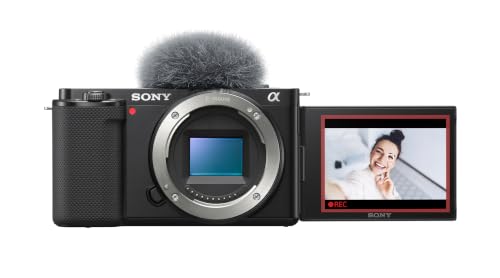


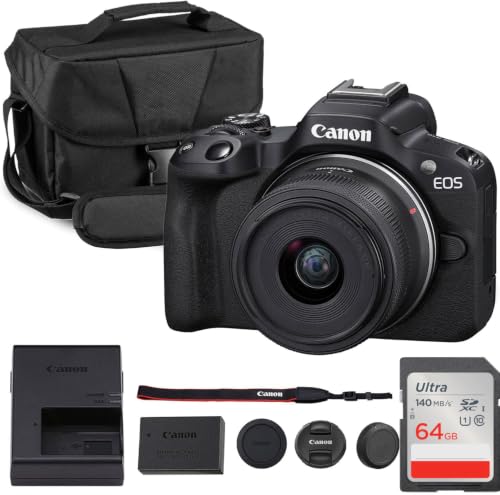
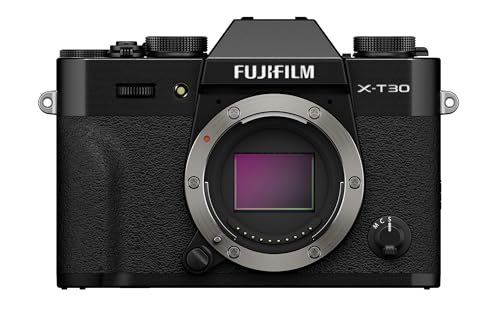


Who Should Buy a Camera for Makeup Videos?
Solo Tutorial Creators Filming at a Vanity
You film alone, so you are the subject, the camera operator, and the editor at the same time. Prioritize a screen that flips fully toward you, face tracking that reacquires after you lean in with a brush, and controls you can reach without standing up. A compact body suits a crowded vanity, and continuous power from a wall outlet matters more than battery size, because your sessions run long and stay in one place.
Beauty Creators Who Film Close Detail Work
Your viewers judge eyeliner wings, lash placement, and blending at the edge of a crease, so detail capture is your main need. Look for a lens that focuses close enough to fill the frame with one eye, autofocus that does not pulse while you hold still, and a screen bright enough to confirm sharpness. If this close work is your focus, see our guide to the best cameras for makeup.
Live Streamers and Short Clip Creators
You publish live sessions and short vertical clips, often straight from the camera with little editing. You need clean output to a computer, dependable WiFi or USB streaming, and audio that stays clear while you talk through each step. A camera that marks a vertical frame inside a horizontal recording saves you reframing every platform version by hand later.
Key Features to Compare
Color Accuracy and Skin Tone Rendering
Color decides whether viewers see the shade you applied or a shifted version of it. Look for white balance you can lock, so the camera stops drifting as warm vanity bulbs mix with window light. Picture settings that soften contrast slightly tend to flatter skin while still showing pigment honestly.
Eye Autofocus and Face Tracking for Makeup Filming
Autofocus built for faces and eyes does the work your hands cannot do while they hold brushes and palettes. Good systems lock onto the nearer eye, hold it through small head turns, and return quickly after a hand passes in front of your face. Check listings for eye detection in video mode, not only in photo mode, because some cameras limit their best tracking to still images.
Flip Screen and Close Focus Ability
A screen that turns to face you lets you check exposure, stray hairs, and whether both eyes sit level in the frame. Pair it with a lens whose closest focus distance is short enough for lash and brow work, since a sharp sensor cannot rescue a lens that blurs at your working distance. Touch focus also helps, because tapping the eye you are lining is faster than using buttons.
Resolution, Frame Rates, and Cropping Room
Recording in 4K gives you room to crop tighter for a detail insert, then return to a wider shot, all from one take. Standard frame rates suit talking tutorials, while higher rates help only if you slow down fast hand movements for effect. Higher settings create larger files and more heat, so a camera that records long sessions without stopping protects full routine videos. For broader background, see our guide to the best cameras for video.
Sensor Size, Lens Brightness, and Indoor Light
A larger sensor gathers more light, which helps skin look smooth and clean in a bedroom setup where you cannot add big lights. A brighter lens, shown by a lower f number, adds the same benefit and softens the background behind you. Smaller sensors can still work well when your lighting is strong and even, so match sensor size to your room first, and spend on lights before chasing the largest format.
Microphone Input and Clean Output for Streaming
Clear speech carries a tutorial, because viewers follow your voice while they watch your hands. A microphone jack lets you place a small mic near your mouth, away from mirror reflections that make rooms sound hollow. Clean output over HDMI, with menus hidden, matters for live work. If live sessions are central to your plan, see our guide to the best cameras for video blogging.
Quick Buyer Checklist for Makeup Video Cameras
Work through these questions before you buy, and treat a no answer on the first four as a reason to keep looking. The best cameras for makeup videos should earn a yes on color, focus, screen, and sound for your own setup, not just in a showroom demo filmed under perfect lights.
- Can you lock white balance so foundation shades stay stable under your lights?
- Does eye autofocus stay active while recording video, not only for photos?
- Does the screen flip fully toward you and stay visible in bright vanity light?
- Can the standard lens focus close enough for single eye detail shots?
- Can the camera run from wall power for a full tutorial without stopping?
- Is there a microphone jack and a headphone jack or audio levels on screen?
- Does the body stay cool enough for sessions lasting an hour or longer?
Your answers also reveal what you can skip. A creator who never streams can ignore output options, while a creator who never films outdoors can place less weight on weather sealing.
Common Mistakes to Avoid
- Choosing resolution first and color second, so crisp footage still shows foundation shades that look wrong to buyers watching at home.
- Ignoring minimum focus distance, so the camera cannot sharpen on lashes or liner at the distance your vanity allows.
- Trusting autofocus in photo mode only, so eye tracking switches off the moment you press record for a tutorial.
- Filming with mixed light temperatures and auto white balance on, so skin tone shifts slowly throughout a single look.
- Relying on the built in microphone across the room, so echo and mirror reflections make your instructions hard to follow.
- Skipping a test recording before a full look, so you discover soft focus or overheating only after the makeup is finished.
Care and Maintenance for Makeup Video Cameras
Makeup rooms are dusty in a specific way, since loose powder, setting spray, and foundation mist settle on everything near your seat. Keep the lens cap on between sessions, wipe the lens with a clean microfiber cloth before filming, and store brushes away from the camera body so pigment does not reach the glass. A small hand blower clears powder from dials and the hot shoe.
Leave deeper sensor cleaning to a service shop if spots remain on footage. Store batteries partly charged when you will not film for several weeks, update firmware from the maker site, and format memory cards in the camera after you have copied your files. If you want a simpler second body for travel, see our guide to the best digital cameras.
FAQ
What features matter most in a camera for makeup tutorial filming?
Color accuracy, eye autofocus, and a flip screen matter most for makeup tutorial filming. Beyond the body sections, consider tripod height, because a camera placed slightly above eye level and tilted down tends to show both eyes evenly and reduces shadows under the brow. Test your setup with one short practice look before filming a full routine.
Can a camera for makeup videos show fine eyeliner and lash detail clearly?
Yes, a camera for makeup videos can show fine liner and lash detail clearly when the lens focuses close and the light is strong. Use a plain dark cloth behind your eye area during close views, since a busy background can pull focus away from the edge you want viewers to study. Keep sharpening settings moderate, because heavy sharpening adds harsh edges around lashes.
Do makeup video cameras need 4K recording for online platforms?
No, makeup video cameras do not need 4K, although it helps creators who reframe often. Platforms compress uploads heavily, so clean focus and even lighting usually matter more than pixel count alone. If you choose 1080p to save storage and reduce heat, sit a little closer to the lens and fill more of the frame with your face.
How far should a makeup video camera sit from your face?
A makeup video camera usually works best about 2 to 4 feet from your face. At that distance a moderate focal length keeps facial proportions natural and leaves room for your hands and tools to enter the frame. Move closer only for planned detail inserts, and mark your chair and tripod positions with small pieces of tape on the floor, so every session starts with the same framing without guesswork.
Can a makeup video camera connect to a computer for live beauty streams?
Yes, most recent makeup video cameras can connect to a computer by USB or HDMI for live streams. Check that the maker lists streaming support for your system, since some models need extra software while others appear as a webcam right away. Run a private test stream first and check audio sync, because a delay between lip movement and sound distracts viewers quickly.
The Bottom Line
Start with honest color, eye autofocus that works during recording, and a screen you can see from your seat, then add close focus ability and clean audio for the way you actually publish. Compare the product table above against your checklist answers, and choose the best cameras for makeup videos for the room, lighting, and session length you already have, rather than for a studio you may never build.
