
Best Cameras for Makeup: A Buying Guide for 2026
Disclosure: We may earn a commission when you buy through links on this page, at no extra cost to you. As an Amazon Associate I earn from qualifying purchases. Learn more

Compare the best cameras for makeup by true color, eye autofocus, flip screens, lenses and sound, with common mistakes to avoid before you spend.
Makeup is unforgiving on camera. A foundation that looks smooth in the mirror can turn orange, flat or patchy on screen, and a soft eye look can vanish under weak focus. The best cameras for makeup keep skin tones true, hold focus on your eyes and show detail without harsh sharpening. Use the comparison table below to match those strengths to your format.
This guide covers tutorial filming, portfolio photos and short beauty videos only.
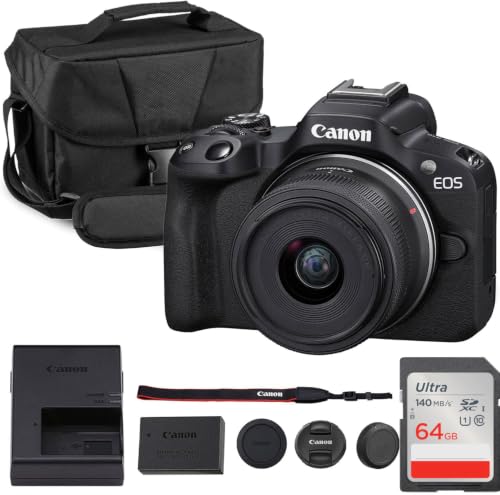

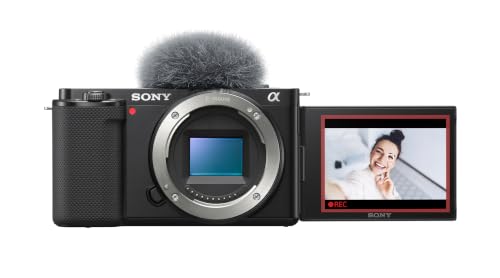


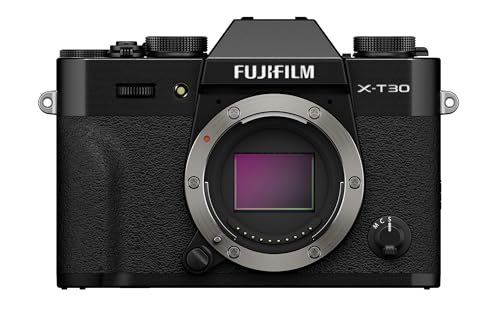


Who Should Buy a Camera for Makeup Work?
Your format decides what matters most, so start with your group.
Tutorial Creators Who Film Themselves Alone
You sit in front of the lens, apply products and talk through each step without a camera operator. You need a screen that flips to face you, autofocus that stays on your eyes while you move, a recording limit long enough for a full routine, and a microphone input, because viewers forgive soft light sooner than muffled speech.
Makeup Artists Building a Photo Portfolio
You shoot finished looks on clients in salons and homes where you cannot control the light. You need faithful color, clean files at higher ISO settings for dim rooms, and a lens that renders skin texture honestly without exaggerating pores. Consistent results across skin tones carry real weight, because your camera is a business record.
Short Video Creators and Live Presenters
You film vertical clips, product demos and live sessions where viewers ask questions. You need reliable autofocus during fast product swaps, color that stays stable when you hold a palette close to the lens, and quick file transfer to your phone. A late clip often loses its audience, so speed matters as much as sharpness.
Key Features to Compare
Compare these six factors in order: color and focus shape every frame, while screens, lenses and sound decide daily ease of use.
Color Accuracy and True Skin Tones
Color accuracy decides whether a warm bronzer reads as warm or turns muddy on screen. Look for adjustable white balance, including a manual setting you can lock, because mixed window and lamp light shifts color through the day. Picture profiles that soften contrast help skin look natural, while heavy saturation can push red lipstick toward orange. RAW files give room to correct color later, but strong default colors save you that work.
Autofocus That Finds Faces and Eyes
Eye autofocus tracks your eyes and holds focus while you lean in, turn to a mirror or raise a brush between your face and the lens. For makeup work this matters more than burst speed, because soft focus looks unprofessional even in high resolution. Check that face detection works at close range and does not jump to a backdrop behind you. Product showcase modes, which shift focus smoothly to an item held forward, help if you demo products often.
A Flip Screen for Filming Yourself
A screen that rotates to face forward lets you check framing, focus and powder shine without standing up or guessing. A fully rotating screen folds flat for safe storage in a kit bag, while a tilt only screen limits low and high angles. Brightness matters near strong vanity lights, because a dim screen hides the shine you are checking. Touch focus lets you tap a palette on screen and pull focus to it mid routine.
Video Resolution, Frame Rates and Recording Limits
Most makeup video is watched on phones, so clean 1080p footage with good color often beats noisy 4K in weak light. Choose 4K if you crop in editing or film close detail shots. Rates of 24 or 30 frames per second suit standard tutorials, while 60 frames per second smooths fast hand movement. Check the recording limit before you buy, because some bodies stop at about 30 minutes, mid routine.
Lens Options and Close Up Detail
The lens decides how close you can show liner work, lash placement or skin texture. A kit zoom covering about 24 to 70 mm handles a full face frame and a tighter crop from one chair position. For true detail shots, a macro lens focuses close enough to fill the frame with one eye. A lens that opens to about f/2.8 gathers more light and softens a cluttered background, while smaller apertures need brighter lights.
Sound, Connections and Battery Life
Clear speech sells a tutorial, so a microphone input and a headphone jack are worth more than extra photo modes. A hot shoe lets you add a small light or microphone without a cage. Many mirrorless bodies record for about one to two hours per charge, so a spare battery suits long sessions. WiFi transfer speeds up short clips, while an HDMI port gives a cleaner live feed than an adapter.
Types of Cameras for Makeup Work
Three camera types cover nearly every makeup setup. Pick by whether photos or video lead your work.
Mirrorless Cameras for Photos and Video
Mirrorless bodies offer interchangeable lenses, larger sensors and the strongest eye autofocus, so they serve artists who shoot stills and tutorials. They cost more, about $600 to $1,500 before lenses, and their menus ask more of you at first. Choose one if image quality is your priority.
Compact Cameras With a Forward Facing Screen
Compact cameras pair a fixed lens with a small body and simple controls, and suit creators who film alone.
They usually cost about $300 to $700, start fast and keep a vanity setup tidy. The trade off is a smaller sensor that struggles in dim rooms and a fixed lens, so choose one if you film at a set desk with decent light.Camcorders for Long Recording Sessions
Camcorders record for hours without the recording caps and heat limits of many stills cameras, and their zooms cover wide and tight framing from one seat. Their smaller sensors produce a flatter look with less background softness. Choose one if you stream long sessions and rarely take portfolio photos.
Choosing a Camera for Your Main Format
Still photos and video reward different strengths, so let your main format settle close calls.
Best Video Cameras for Makeup
The best video cameras for makeup hold focus while you move, keep color stable under a locked white balance and record without a time cap. If you publish filmed routines, see our guide to the best cameras for makeup videos for more on video first setups.
Common Mistakes to Avoid
These errors waste money or quietly ruin footage that looked fine on a small screen.
- Buying on megapixel count alone leaves you with sharp footage whose colors misrepresent every shade.
- Leaving white balance on auto lets color shift mid routine, so each side of your face grades differently.
- Using digital zoom instead of moving closer softens detail and smears skin texture.
- Ignoring the recording limit means the camera stops silently during the step viewers need most.
- Sitting too close to a wide lens stretches your features and distorts the look you are teaching.
- Skipping a focus check means finding soft footage after the makeup is removed.
How to Make Your Camera Last Longer
Makeup work exposes a camera to powder, spray and sticky fingers. Wipe the lens and screen with a clean microfiber cloth after each session, because foundation residue builds into a haze that lowers contrast. Use a blower, never your breath, to clear powder from the lens mount and dials, and keep a cap on the lens.
Store the camera in a dry bag away from setting spray and steam, since fine mist settles on glass and inside seams. Charge batteries before they run fully flat, keep one spare in rotation, and format cards in the camera after backing up files. Photograph a plain white wall a few times a year to spot sensor dust.
Cameras for Makeup: Your Questions Answered
Is 4K video necessary for a makeup tutorial channel?
No, 4K is not necessary for a makeup tutorial channel. Most viewers watch on phones, where clean 1080p footage with accurate color looks better than noisy 4K. The strongest reason to choose 4K is cropping: you can zoom into an eye or lip shot in editing and keep a sharp 1080p result. If your light is weak, spend on light first.
How can I keep makeup colors true without heavy editing?
You can keep makeup colors true by locking white balance and filming under one light source type. Mixed light, such as a window plus a warm lamp, forces the camera to average two colors and pleases neither. Film a white card and a red lipstick first: if the card looks neutral, your shades will sit close to reality.
Which focal length flatters a face in makeup portraits?
A focal length of about 50 to 85 mm on a full frame camera flatters a face in makeup portraits. These lengths keep facial proportions natural from a comfortable working distance, while wide lenses used close up enlarge nearby features. On smaller sensors the same view comes from about 35 to 56 mm. Step back first and crop second.
Do I need a separate microphone for makeup tutorials?
Yes, a separate microphone improves makeup tutorials more than most camera upgrades. Vanity rooms echo, and a camera across the desk places its built in microphone far from your voice while it picks up brush taps and packaging sounds. A small lavalier or shotgun microphone close to you keeps speech clear.
How long can a camera film a full makeup routine in one take?
Recording time depends on the body: some cameras stop at about 30 minutes per take, while others record until the card fills or the battery ends. Heat is the hidden limit, since compact bodies in warm rooms may shut down sooner than the stated cap. Test your full routine length at home before an important session.
Final Thoughts
Start with color you can trust, then demand focus that holds on your eyes while you work alone. Match screen, lens and recording time to your format, and use the product table above to compare finalists.
When you judge the best cameras for makeup by how faithfully they show your work, the right choice becomes clear. Buy the simplest camera that keeps your colors honest, and spend what remains on light.

