
Best Cameras for Hairstylist: A Practical Checklist for Salon Photos for 2026
Disclosure: We may earn a commission when you buy through links on this page, at no extra cost to you. As an Amazon Associate I earn from qualifying purchases. Learn more

Choose the best cameras for hairstylist work with this buying guide covering true color, sharp detail, steady video, and simple photo sharing.
Your photos sell your work before a client ever sits in your chair. Blonding that looks brassy on screen or braids that lose their detail can cost you bookings even when the hair itself is perfect. Choosing among the best cameras for hairstylist work means judging color, detail, and speed in real salon light, not chasing the longest spec list.
This guide uses a simple checklist built around the shots you take every week. Note where your current phone struggles, then use the comparison table below to match those needs to a camera style and budget.



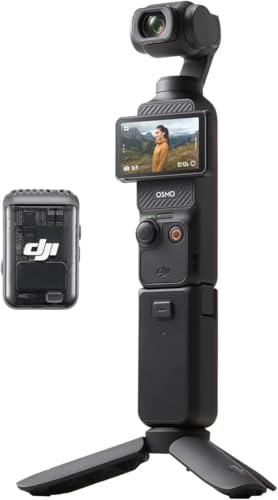
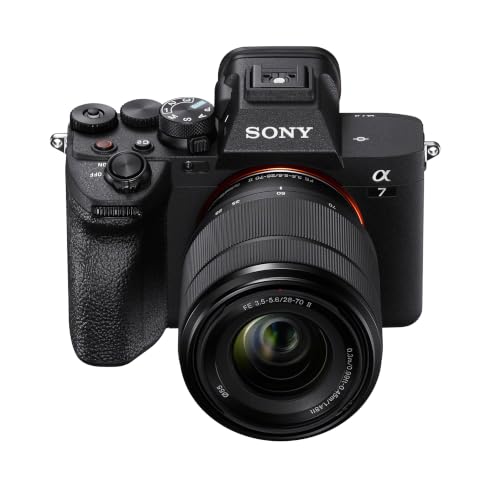
Key Features to Compare
As you scan the product table above, score each camera against the same six points. A model that slows you down between clients will gather dust, while a modest camera with accurate color and fast sharing can lift your portfolio from day one.
Features That Matter Most for Hairstylist Work
Hairstylist photos live or die on color truth. A camera needs reliable white balance under mixed salon lighting, pleasing skin tones next to bold fashion color, and enough detail to show a clean fade line or fine baby lights. Autofocus that locks onto eyes through loose strands matters too, as does a tilting screen for overhead braid shots. If you are comparing formats broadly, see our guide to the best digital cameras for how the main camera types differ.
Sensor Size and Image Quality
Sensor size shapes detail, depth, and dim light results more than the megapixel count does. Small sensors in basic point and shoot compacts can look fine in bright daylight but often smear fine hair texture indoors. A 1 inch sensor is a clear step up, APS C sensors give cleaner files and softer background blur, and full frame sensors offer the most control at the highest cost and size. Look for natural color you can leave on default, plus RAW capture for careful edits. Readers who place image quality first can also see our guide to the best quality cameras for what the extra money buys.
Lens and Zoom Range
The lens decides how your client fills the frame from the tight space behind the chair. A zoom range around 24 to 70 mm in full frame terms covers wide views of the whole style, classic portraits, and closer detail without swapping lenses. Optical zoom keeps that detail sharp, while digital zoom simply crops the image and should be ignored in comparisons. A bright maximum aperture, shown as a low f number, helps in dim corners, softens busy backgrounds, and pairs with image stabilization to keep handheld shots and video steady.
Ease of Use for Your Skill Level
Between clients you may have two minutes to capture the result, so controls must feel obvious. Full auto modes should give a usable shot with no setup, while simple dials for brightness and background blur let you grow at your own pace. Touch focus, face detection, and quick WiFi transfer to your phone all save real time. If this is your first dedicated camera, see our guide to the best starter cameras for models built around guided menus.
Video ease counts just as much. One button recording, a tilting screen for self filmed tutorials, and a microphone input shape how often you actually post. Readers who want to study the wider craft can see our guide to the best cameras for photography for ideas beyond salon work.
Battery Life and Charging
Manufacturers rate battery life in shots per charge, but video, screen use, and WiFi transfer drain power far faster than stills alone. For a busy salon day, look for a rating of around 300 shots or more, and treat any camera as a two battery tool if you film reels. USB C charging is a genuine convenience, since the camera can top up from the same cable and power bank you already carry for your phone.
Low Light Performance in the Salon
Salons mix daylight from windows, warm ceiling spots, and colored accent lights, often with darker corners away from the front desk. Good low light performance means clean images at higher ISO settings without waxy skin or lost hair detail, plus autofocus that still finds the eye when light drops. A bright lens and a larger sensor help most here. Direct flash is rarely the answer, since it flattens shine and creates harsh hot spots on glossy strands, so plan final photos near a window or a large soft light source.
Durability and Protection From Salon Products
A salon camera lives around hairspray mist, loose powder, water, and color chemicals, so build and handling matter even indoors. Weather sealing on higher tier bodies helps resist dust and light moisture, but only when doors and caps sit closed properly, and it never means a camera can be rinsed under a tap. Grippy controls, a protective filter on the lens, and a solid strap reduce the small accidents that end camera life early.
Choosing a Camera Style That Fits Your Work
Fixed picks make little sense here, because lists of the best cameras for hairstylist shoppers mix very different needs. Match the camera style to the way you earn instead, using the three groups below and the product table above.
Solo Stylists Who Post Every Day
If you rent a chair or a suite and post daily, speed beats ultimate image quality. A compact camera with a 1 inch sensor, fast autofocus, and quick phone transfer gives a clear lift over a phone without slowing your routine. You will shoot more often, and that consistency builds a portfolio faster than a complex camera you avoid. Budgets here often sit at about $400 to $800 once a spare battery and a small case are included.
Color Specialists Who Need True Color
Color work demands the strictest standards, because clients judge subtle tone differences from your photos. A mirrorless camera with an APS C or full frame sensor, RAW capture, and custom white balance control gives you the most faithful blondes, coppers, and vivid shades. Pair it with one bright zoom and a simple gray card for setting white balance under your salon lights. Expect to spend about $800 to $2,000 for body and lens, and allow time to learn basic editing.
Salon Teams and Content Creators
Salons that film tutorials and transformations should weight video features heavily. Look for 4K video, reliable autofocus while a subject moves, image stabilization for handheld clips, a tilting screen, and a microphone input for clear spoken audio. A shared mirrorless body with two lenses can serve several stylists if you agree on one house style for backgrounds and crops.
Quick Buyer Checklist
Run through these questions before you order. Every no points to a feature to check again or a cost to add to your budget.
- Does the camera record accurate color under your salon lighting without heavy editing?
- Can you frame a full style and a close detail from your normal shooting spot?
- Does autofocus lock onto faces quickly, even with strands of hair in front?
- Can you send a photo to your phone in under a minute between clients?
- Will one battery last your longest shooting day, or have you budgeted for a spare?
- Does the screen tilt for overhead, low, and self filmed shots?
- Have you included a memory card, case, and spare battery in the total price?
- Can you return or exchange the camera if the color disappoints in your space?
Red Flags to Watch For
Camera listings aimed at casual buyers often hide weak points behind bold numbers. These warning signs should slow you down, even when the price looks tempting.
- Advertising digital zoom or inflated megapixels as the headline feature, because both hide a small sensor and weak real detail.
- Promising 4K video without naming the frame rate or autofocus behavior, because soft and hunting focus ruins transformation clips.
- Showing only bright outdoor sample photos, because they tell you nothing about color or noise under salon lighting.
- Offering a very short or unclear warranty with no easy returns, because a color problem may only appear in your own salon.
- Selling bundles stuffed with cheap tripods and bags, because the extras inflate the price while the camera itself stays entry level.
One sign alone does not prove a camera is poor, but two or more together usually mean your money works harder elsewhere.
Tips to Get the Most From Your Camera
Clean the lens with a proper lens cloth, never your shirt or an apron, because fabric that has touched hair product can smear the coating and scratch over time. Wipe the body with a dry cloth after shoots near spray or color services, and wash your hands before handling the camera so residue never builds up on the dials and grip.
Carry a spare battery and a backup memory card so a full card never costs you a client result. Store the camera in a dry padded bag away from color chemicals, steam, and heat from styling tools, with the lens cap on. Check the front element weekly for loose hairs, since a single strand can soften a whole set of photos before you notice it.
Frequently Asked Questions
What features matter most in a camera for hairstylist work?
Accurate color, fast face autofocus, and quick phone transfer matter most in a camera for hairstylist work. Together they decide whether a blonde looks true, a portrait looks sharp, and the photo gets posted while the client still feels excited. A tilting screen ranks next, since it makes overhead and detail angles far easier in tight salon spaces.
What camera specs matter most for hairstylist beginners?
Hairstylist beginners should focus on sensor size, a simple auto mode, and a versatile zoom range first. Those three specs shape nearly every photo while you learn, and they are harder to fix later than missing advanced menus. Add one new manual control at a time as your confidence grows, starting with brightness compensation on a backlit chair.
Which camera type is better for low light salon photos?
A mirrorless camera with a larger sensor and a bright lens is better for low light salon photos than a basic compact. The larger sensor gathers cleaner detail and the bright lens keeps shutter speeds safe without flash. One extra tip is to set a maximum ISO limit in the menu, so the camera favors a slightly darker file over a very noisy one.
How much should a hairstylist spend on a first salon camera?
A hairstylist should expect to spend about $400 to $900 on a first salon camera that clearly beats a phone. That range covers strong compacts and entry mirrorless kits with a useful zoom, a spare battery, and a card. Spending more mainly helps color specialists and regular video creators rather than everyday portfolio shots, so buy for your services, not for status.
What lens length works best for hairstylist portraits?
A lens length around 35 to 85 mm in full frame terms works best for hairstylist portraits. Shorter settings suit full views of long hair and small rooms, while the longer end flatters faces and separates the style from a busy background. Stand a little farther back at the longer end, because crowding the client can distort features and make them tense.
Is a smartphone enough instead of a camera for hairstylist photos?
A smartphone is enough instead of a camera for hairstylist photos when your light is good and you post only casual daily content. Phones struggle more with true color under mixed lights, fine detail in dark hair, and flattering background blur. A dedicated camera becomes worthwhile when bookings depend on your portfolio.
Final Thoughts
Start with color truth, autofocus speed, and a lens range that fits your space, and let those three tests filter every listing. Match the style to your group above, run the yes or no checklist, and watch for the red flags before price tempts you. When you compare the best cameras for hairstylist work through that lens, the right choice becomes clear, so review the comparison table above and order the camera you will use daily.

