
Best Cameras for Hair Photos in 2026: A Checklist for Sharp, True Color Shots
Disclosure: We may earn a commission when you buy through links on this page, at no extra cost to you. As an Amazon Associate I earn from qualifying purchases. Learn more

Find cameras for hair photos that hold true strand color and fine detail, with clear guidance on sensors, lenses, autofocus, salon light and price.
Hair is one of the hardest subjects to photograph well. Fine strands blur easily, dye shades shift under salon lighting, and shine can hide the texture you worked to create. The best cameras for hair photos solve those three problems with sharp detail, honest color and focus that stays on the hair. This guide turns those needs into a simple checklist you can use while reading the comparison table below.
Start by thinking about where you shoot most. A stylist working under mixed salon lights needs different strengths than a creator filming tutorials at home. The sections below match each kind of hair work to sensor, lens, focus and budget choices.




Who Should Buy Which Camera for Hair Photos?
Pick by the hair work you repeat most often. Your usual room, lighting and posting routine matter more than a long spec list.
Salon Stylists Building a Portfolio
You shoot finished cuts all day, often minutes before the next client sits down. Choose a camera that starts fast, focuses quickly and sends images to your phone without a cable. Consistent color matters most, since your portfolio is proof of your work. Readers who also take paid bookings beyond the salon can see our guide to the best cameras for professional photos for a wider view.
Colorists Recording Before and After Work
Your photos must show shade changes honestly, from root growth to fresh toner. Choose a camera with reliable white balance controls and a screen that shows color close to real life, because a screen that flatters can hide a brassy tone until the client sees it at home. Shoot each client from the same chair and angle so pairs stay comparable.
Creators Filming Hair Tutorials at Home
You work alone, often with the camera on a tripod and your hands in frame. Choose a model with a fully turning screen, dependable face and eye focus, and a microphone input if you narrate steps aloud. Good 4K video shows strand movement when you turn a head or run fingers through a style.
Key Features to Compare
Compare these factors in the same order each time, so a low price cannot hide weak color or soft focus.
Sensor Size and the Detail in Fine Strands
The sensor is the light gathering surface inside the camera, and its size shapes how much fine detail and depth your images hold. A 1 inch sensor in a compact camera already beats most phones on strand texture. APS C sensors gather more light and give cleaner files for cropping close on braids or curls, while full frame sensors offer the most control over background blur. Megapixels matter less than sensor size once you pass about 20 megapixels, because larger sensors render strands with cleaner edges.
Color Accuracy for True Dye and Skin Tones
Color accuracy decides whether a copper shade reads copper or orange on screen. Look for cameras with adjustable white balance, a Kelvin setting for fixed salon lighting, and picture profiles you can tone down, because strong default saturation can push reds and blondes too far. A custom white balance set from a plain gray card in your usual chair gives the most repeatable results.
Autofocus That Holds Faces and Flying Strands
Autofocus speed and tracking decide how many shots survive a head turn or a hair flip. Face and eye detection keeps the near eye sharp while loose strands move, and touch focus lets you tap a braid or fringe area on the screen when the detail sits away from the face. For still portraits, single point focus placed on the hairline gives precise control.
Lens Choice and Aperture for Hair Detail
The lens shapes your portrait more than the camera body does. Focal lengths around 50 to 85 mm in full frame terms flatter faces and keep heads in natural proportion, while shorter lengths can stretch features near the frame edge. A wide maximum aperture such as f/1.8 or f/2.8 separates hair from a busy salon background and helps in soft light. Sharpness at the focus point matters most, because hair texture is the subject.
Low Light Performance Under Salon Lighting
Salons mix daylight, ceiling panels and warm accent bulbs, and that mix tests a camera hard. A sensor that stays clean at higher ISO settings lets you raise shutter speed enough to freeze a swishing ponytail without grain swallowing fine strands. Choose a camera with a usable ISO range up to at least 6400, and keep a fast lens as your main tool for dim corners.
Screen, Controls and Fast App Transfer
A tilting or fully turning screen lets you frame self portraits, check a back of head view and shoot above a seated client without guesswork. WiFi or Bluetooth transfer to a phone app matters daily, because most hair photos are posted within the hour. USB C charging adds convenience, since one cable can serve the camera, phone and lights on a crowded station.
Camera Types Compared for Hair Work
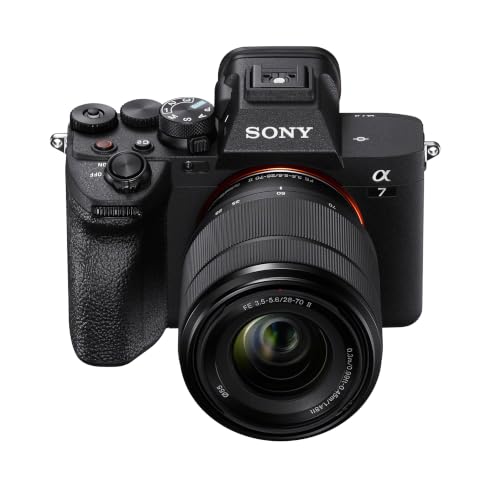
Mirrorless cameras with changeable lenses give you the most growth room. You can start with one portrait lens and add a wider lens later for full salon scenes. They cost more and need more learning, but their sensors and focus systems suit serious portfolio work best. That balance is what defines the best cameras for hair photos in daily use. If you are comparing broad options first, see our guide to the best photo cameras for the wider landscape.
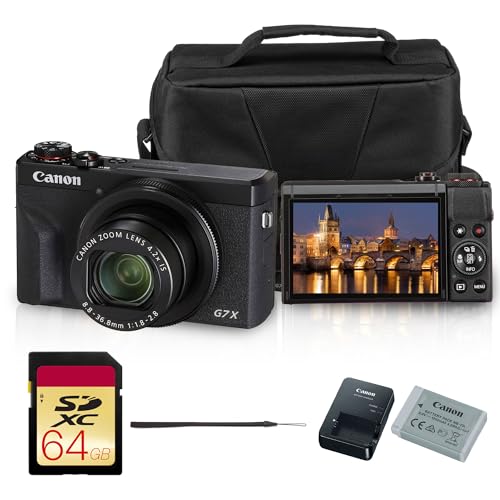
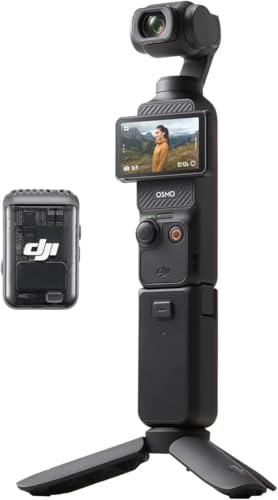
Compact cameras with a fixed lens trade flexibility for ease. The better ones pair a 1 inch sensor with optical zoom and a flip screen. Action and vlogging cameras favor video and wide views, which suits tutorials but can distort faces at close range. For a plain overview of everyday models, see our guide to the best digital cameras. Choose the type that matches how often you shoot, not the longest feature list.
Before you buy, run through this quick checklist. Can you set white balance by hand? Does the screen turn for self framing? Does focus track a moving head? Will it send photos to your phone in minutes? Does the lens range cover close portraits? Two or more no answers mean keep looking.
Common Mistakes to Avoid
These errors cost hair photographers sharpness and clients more often than any missing spec.
- Trusting the salon screen preview alone ships photos whose dye shades look wrong on client phones.
- Using a very wide lens close to the face stretches the forehead and makes the hair shape look odd.
- Letting shutter speed drop too low blurs moving strands even when the face looks sharp.
- Counting megapixels only buys files that are large but still soft, noisy and poorly colored.
- Shooting every client from a different chair and angle makes before and after pairs impossible to compare.
- Skipping a spare battery ends a booking day early when a long color session runs over.
Care and Maintenance for Your Camera
Clean the lens with a soft lens cloth, never your shirt, because fabric grit can scratch the coating that keeps hair detail crisp. Use a blower first to lift loose dust and salon hair clippings off the glass and sensor cover. Wipe the body after shoots, since hairspray mist settles on dials and screens and turns sticky over time.
Store the camera in a dry, padded bag away from color chemicals and heat from styling tools. Carry a spare battery and a second memory card, and format cards in the camera after you back files up. If you shoot outdoors for a lookbook, basic weather sealing on a body and lens helps against light rain, but dry the kit fully before storage so moisture stays out of the bag.
FAQ
What features matter most in a camera for detailed hair portraits?
Sharp focus, honest color and a portrait friendly lens matter most for detailed hair portraits. One practical addition is a remote shutter or phone app release, which lets a stylist trigger the camera from beside the chair without jogging the tripod.
What camera specs matter most for beginners taking hair photos?
A beginner taking hair photos should value a helpful auto mode, a clear touchscreen and guided menus over raw spec numbers. Add one new skill at a time, such as setting white balance, before paying for advanced bodies or extra lenses.
Which camera setup works better for hair photos in dim salon light?
A fast aperture lens on a larger sensor works better for hair photos in dim salon light. Position the client facing your brightest steady light source, even a large window, before raising ISO. A chair placed two steps nearer the window often gains more quality than any setting change on the camera.
How much should you spend on a first camera for hair photos?
Most first time buyers do well spending about $400 to $900 on a camera and lens for hair photos. Below that range, phones often match the results. Hold back part of the budget for a simple light and a tripod, because both improve hair images immediately.
Is a smartphone enough for hair photos instead of a dedicated camera?
A smartphone is enough for quick hair photos when light is bright and you post at social sizes. A dedicated camera pulls ahead for print portfolios, dim salons and close crops on braid or curl detail.
Is 4K video useful for hair photos and tutorials?
Yes, 4K video is useful when hair movement sells the style, such as a swinging bob or loose waves. You can also pull a sharp still frame from 4K footage when a flip happens too fast for a photo burst.
Final Thoughts
Judge every candidate by three things first: color you can trust, focus that holds a moving head, and a lens that flatters faces. Use the product table above to compare sensor size, screen style and price against those three tests. When you choose best cameras for hair photos by that standard, your portfolio starts showing the work exactly as your clients saw it in the chair.

