
Best Cameras for Basketball in 2026: Every Type Explained Side by Side
Disclosure: We may earn a commission when you buy through links on this page, at no extra cost to you. As an Amazon Associate I earn from qualifying purchases. Learn more

Compare the best cameras for basketball by type, with the lens, burst, and low light features that matter in a gym, plus typical prices for each class.
A school gym is one of the toughest rooms a camera will ever work in. The light is dim and often yellow, the players never stop moving, and your seat decides how much of the court you can reach. Most shoppers start by comparing resolution, but anyone researching best cameras for basketball soon learns that sharp action shots come from focus speed and lens brightness far more than from megapixels.
This guide compares the main camera types side by side, with the honest limits of each one stated plainly. The comparison table below sums up the types, their strengths, and their typical prices, and the sections after it explain how to choose once you know where you will sit and what you will shoot.





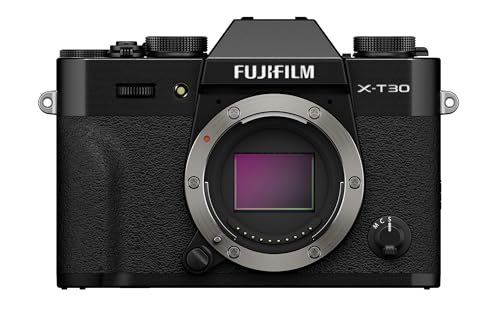
Types of Cameras Compared
Three camera types cover nearly every basketball buyer, and they differ most in reach, low light strength, and how much gear you carry. All three sit inside the wider family of best digital cameras, yet the gym narrows the field quickly.
| Type | Best For | Pros | Cons | Typical Price |
|---|---|---|---|---|
| Point and Shoot Compact | Parents and casual fans in the stands | Long zoom, small body, simple controls | Weak in dim gyms, slower focus | about $150 to $400 |
| Vlogging Camera | Fans who film and narrate games | Flip screen, strong video, mic input | Stills depth and burst are thinner | about $400 to $900 |
| Mirrorless Camera | Serious hobbyists and team media | Fastest focus and burst, lens choice | Largest cost and carry weight | about $600 to $1,500 |
Point and Shoot Compacts
A compact carries a fixed lens, and its party trick is reach. Optical zoom in this class runs long enough to pull a far basket close from the top rows, while the body still fits in a jacket pocket. The trade is light: the small sensor and modest lens opening struggle once the gym lights take over, and focus can hunt when players cross. Choose this type when your seat is far away, your budget is firm, and simple controls matter more than perfect files.
Vlogging Cameras
A vlogging camera is built video first. You get a screen that flips toward you, stabilization tuned for walking shots, and on many bodies a microphone input for clearer commentary. Stills are perfectly usable, but burst depth and subject tracking sit a step behind a true stills body. This type suits the fan who films whole quarters, talks to the camera between plays, and wants the footage ready to share the same night with little fuss.
Mirrorless Cameras
A mirrorless camera is the strongest tool here and the biggest commitment. Interchangeable lenses let you match the glass to your seat, subject tracking holds a driving guard in focus, and the larger sensor keeps files clean at the high sensitivity settings gyms demand. The cost is real money and real weight, since the lens you add often matters more than the body. Choose this type when basketball is a season long habit and you plan to shoot other sports too.
Point and Shoot Compacts vs Vlogging Cameras: Which Should You Choose?
These two types overlap in price, so the choice comes down to your main job. The compact wins on reach: its long optical zoom frames a far basket without cropping, and it asks almost nothing of you while it works. The vlogging camera wins on video polish: the flip screen, steadier footage, and microphone input make game films easier to watch and easier to narrate.
Pick the compact if you mostly want stills and short clips from the stands with zero setup. Pick the vlogging camera if full game video is the point and your own voice is part of the coverage. Readers whose interests run wider than sport can cross check both against broader guides to best cameras for photography before deciding.
How to Choose the Right Camera
Four checks decide whether the best cameras for basketball survive a season of gym light, and they matter in the order below.
Features That Matter for Basketball
Start with the honest fact of indoor sport: it is a low light and fast subject class, so burst rate and autofocus tracking outrank resolution every time. A player crossing the lane gives the focus system a fraction of a second, and a dim gym forces sensitivity up where small sensors fall apart. Treat headline burst figures with care, because maker burst figures are recorded in bright light with the fastest card the body accepts. In a real gym, with an ordinary card, expect the working rate to sit lower, and judge a camera by how well it tracks rather than by the number on the box.
Lens and Zoom Range
Your seat decides the lens class before anything else does. From court side, a short and bright zoom covers the near action and gathers the light the gym withholds. From the stands, reach becomes the whole purchase, and you want a long optical zoom or a telephoto lens that still opens wide at full stretch. Court side and stand seats are simply different purchases, so be honest about where you will sit most games, and spend on the lens class that matches that seat instead of splitting the difference.
Sensor Size and Image Quality
Sensor size sets the ceiling on clean files in gym light. A 1 inch sensor is the compact step up, APS C is the mirrorless middle ground, and full frame gathers the most light of the three. Bigger sensors hold detail at the sensitivity settings basketball demands, while megapixels matter far less than the marketing suggests. Readers who rank file quality above all else can compare the finalists against guides to best quality cameras for a wider view.
Video Capabilities
For game film, look for 4K recording at 60 frames per second, which keeps fast breaks smooth, plus stabilization that calms a handheld quarter. Check the record limit and cooling as well, since a body that stops mid game is worse than a plainer one that runs the full clock. A microphone input lifts commentary above the gym echo. If filming complete games is your main job, the dedicated guide to best cameras to record basketball games goes deeper on that single task.
Setup and Care Tips
Wipe the lens with a proper lens cloth rather than your shirt, which drags grit across the coating. Carry a spare battery and a fast memory card, because burst shooting drains both sooner than a normal day out. Store the camera in a dry, padded bag away from gym dust, and arrive a few minutes early to set white balance under the lights so skin tones start clean instead of orange.
Frequently Asked Questions
What features matter most in a camera for basketball games?
Focus tracking and shutter speed matter most, because a sharp frame of a moving player beats a detailed frame of a blur. Set a shutter speed of about 1/500 of a second or faster to freeze a layup, and let sensitivity rise to hold it. A burst mode then gives you several frames of the same drive, so one of them lands at the peak of the jump.
What specs matter most for beginners filming basketball?
Beginners should value strong automatic modes and a simple menu over headline specs. A camera that sets exposure and focus well on its own lets a new shooter watch the game instead of the screen. Add one habit from the start: format the memory card in the camera before each game, which cuts the risk of card errors and keeps burst writing fast when the action peaks.
Which camera type is better for low light basketball games?
A mirrorless camera with a bright lens is better in low light, because its larger sensor and wide lens opening gather more of the dim gym light. Compacts raise sensitivity and smear detail sooner. Accept some grain in the file when the choice is grain or blur, since noise can be softened later while a blurred drive to the basket cannot be recovered.
Is a smartphone enough for recording basketball games?
A smartphone is enough for short clips near the court, where its wide view and instant sharing are genuine strengths. It falls short from the stands, where digital zoom crops away detail, and long recordings can heat the phone until it stops. Treat the phone as a fine second angle for the bench and the crowd, and let a real camera carry the game itself.
How much optical zoom do you need for basketball from the stands?
From the stands, look for optical zoom that reaches the far basket with room to spare, roughly a 20x compact range or a lens of about 200 mm equivalent and beyond. One practical trick helps any camera: sit near half court rather than behind a basket, which halves your longest distance and keeps both ends of the floor within easy reach of the same lens.
Final Thoughts
Match the type to your seat first, then judge burst and focus before resolution, and let the lens class follow the distance you shoot from. The product table above gathers the types and prices in one place for a final comparison. Chosen with those checks in mind, the best cameras for basketball for your routine will keep working long after the first game ends.


