Best Bluetooth Studio Monitors Made Simple: A Clear Buying Guide for 2026
Disclosure: We may earn a commission when you buy through links on this page, at no extra cost to you. As an Amazon Associate I earn from qualifying purchases. Learn more

A plain English first guide to the best bluetooth studio monitors: what they are, driver sizes, wired and wireless inputs, placement and price bands.
If you are new to home recording, the name causes the first mix up: a studio monitor is a speaker, not a screen. The best bluetooth studio monitors are powered speakers voiced for honest sound, with a wireless input added so a phone or laptop can play music and reference tracks without a cable. This guide starts with the plain basics, explains each spec in everyday words, and ends with the mistakes that waste money for first time buyers. You can compare the main sizes and price bands in the comparison table below.
Bluetooth is the easy part of this purchase. The speaker underneath it decides whether your mixes travel well to other rooms and other systems, so treat the wireless link as a bonus input and judge the cabinet, the driver and the wired inputs first.




Bluetooth Studio Monitors 101: The Basics
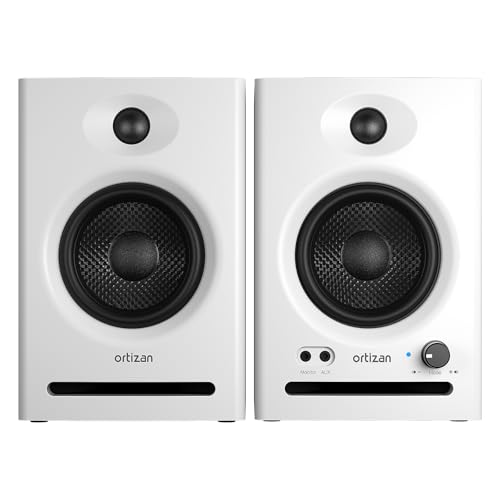
A studio monitor is a powered speaker built to play sound as it is, without the extra bass and sparkle that home speakers add for fun. That honesty is what lets you judge a recording while you work on it, because flaws stay audible instead of being covered up. Most are sold in pairs and used at close range, a setup called near field listening, with the speakers on the desk aimed at your ears. Bluetooth versions add a wireless receiver to that same powered speaker, so you can stream a reference song or check a mix from the couch without moving a cable.
Three terms explain most listings. The driver is the cone that moves the air, and its size sets how much low end the cabinet can make. The amplifier is built in, so there is no separate amp to buy or match. A flat response means no part of the sound is pushed forward on purpose.
If you arrived here shopping for a screen instead, guides to best bluetooth monitors cover display panels, and players comparing screens will want best gaming monitors rather than speakers.
Key Specs Explained in Plain English
Inputs: Bluetooth for Convenience, Wires for Timing
Bluetooth earns its place for casual listening, reference tracks from a phone, and quick checks of a finished mix. Treat it as a convenience input, because the wireless link carries a small delay. Recording and video work still belong on a wired input, where sound and picture stay locked together and what you play arrives when you play it. Look for a wired input sitting alongside the wireless one, so the same pair serves both jobs.
A wired link also holds steady in rooms crowded with other wireless signals.
Driver Size and Your Room
Driver size governs how much low end a monitor can produce honestly in your room. Small rooms and desks suit drivers of about 3 to 5 inches, which stay clear at close range and keep bass under control near walls. Larger rooms can use drivers of about 6 to 8 inches, which reach lower but can overwhelm a small space with boomy bass. Buy the size your room can support, not the biggest cone on the shelf.
| Driver size | Best room fit | Low end character |
|---|---|---|
| About 3 to 4 inches | Small desk, bedroom studio | Light bass, clear speech and vocals |
| About 5 inches | Small to medium room | Balanced bass for most home work |
| About 6.5 to 8 inches | Medium to large room | Deep bass, needs space from walls |
Frequency Response and Honest Tuning
A frequency response figure describes how evenly a speaker plays low, middle and high sounds. Flatter is the goal for studio work, because boosted bass or a sharp top end teaches you to mix against the speaker instead of against the recording. Small switches on the back of many models trim the bass for desks pushed against a wall, and those switches matter more in real rooms than a long spec list does. For a wider tour of voicing styles, our guide to the best sounding studio monitors compares how flat and coloured models differ.
Power and Headroom
Power is quoted in watts and buys clean volume rather than loudness for its own sake. At a desk you listen quietly, so a modest powered pair is plenty for most first studios. Extra power mainly keeps short peaks clean when a mix gets busy. What matters more is that both speakers match, since the pair shares the stereo picture between them.
Placement and Listening Distance
Monitors are built for close listening, roughly an arm length to about 4 feet away. Set the pair at ear level, angled in toward your head, with the small high frequency drivers level with your ears. Foam pads or small stands lift them off the desk and stop the surface from adding its own buzz. Corners and bare walls colour the sound more than any cable choice, so placement is the cheapest upgrade you own.
Rookie Mistakes to Avoid
- Shopping for these speakers as if they were screens, then comparing panel terms that a studio monitor does not have.
- Buying the largest driver for a tiny room, then fighting boomy bass that the room itself creates.
- Judging a pair only over Bluetooth, when the delay in the wireless link can hide timing problems in a mix.
- Sitting the speakers flat on the desk at chest height, then blaming them for a dull and muddy sound.
- Overspending on the first pair, when the starter bands in our guide to best bluetooth studio monitors under 200 serve most beginners well.
Getting Started: Setup and First Use
Setup takes about fifteen minutes, and the order matters more than any single step. Shoppers who want the speaker only view of this category can also read our guide to best bluetooth studio monitor speakers before they start.
- Place the pair on stands or foam pads at ear level, angled toward your chair.
- Connect the wired input to your computer or audio interface and confirm both speakers play.
- Pair your phone over Bluetooth and play a song you know well.
- Set a modest volume and check that speech sounds centred between the speakers.
- Use the back panel switches to trim bass if the desk sits against a wall.
Your Questions Answered
Should I record over Bluetooth or use a cable?
Use a cable for recording, because the wireless link adds a short delay between playing a note and hearing it back. That delay also pushes dialogue out of step when you edit video, so picture work belongs on the wired input too. Bluetooth stays useful for playing reference songs and for relaxed listening after the work is done. Keeping the computer wired and the phone wireless gives you both paths with no fuss.
Do I need a pair of monitors, or is one enough?
You need a pair, because music and mixes are built in stereo, with sounds placed between left and right. A single monitor folds everything into the middle, so you cannot judge width or spot a part that hides on one side. Pairs are also voiced and sold to match each other. If the budget is tight, buy a matched starter pair rather than one larger speaker now and a different one later.
Do bluetooth studio monitors need a subwoofer?
Most first time buyers do not need one, because small drivers already cover the bass that home mixes rely on. A subwoofer helps in a larger room if you work on dance or film music with very low notes. In a small desk room a sub often adds boom and neighbour trouble instead of clarity. Learn your pair first, check mixes on headphones, and add a sub only if low notes keep surprising you elsewhere.
Can I connect a phone and a computer at the same time?
Most pairs accept one Bluetooth source at a time, so the phone and the computer take turns on the wireless link. The simple fix is to leave the computer on the wired input and keep the phone on Bluetooth, then switch inputs with the source control. That way no pairing again is needed when you move between work and listening. Check the listing if two wireless sources matter to you, since a few models handle more.
How long do studio monitors last?
A powered pair kept out of heat and dust lasts many years of daily use, because there are no parts that wear quickly in normal listening. Keep the rear vents clear, since the built in amplifier needs air flow to stay cool. Foam pads under the cabinet also cut the small knocks that loosen desk setups over time. If one speaker of a pair ever fails, replace the pair rather than mixing old and new.
Final Thoughts
First time buyers should keep the order straight: pick the driver size your room supports, insist on a wired input beside the wireless one, and set the pair at ear level before judging the sound. Do that, and the best bluetooth studio monitors in your price band will teach you more about your mixes than any spec sheet can. Check the product table above to compare sizes and price bands side by side.