
Best Big Gaming Mouse of 2026: Complete Buying Guide
Disclosure: We may earn a commission when you buy through links on this page, at no extra cost to you. As an Amazon Associate I earn from qualifying purchases. Learn more

Learn how to choose the best big gaming mouse for large hands by checking shell size, grip, sensor, weight, polling and wireless options for comfort.
A mouse that is too small forces your fingers to curl tightly and leaves your palm unsupported. Choosing the best big gaming mouse starts with fit, because a longer and wider shell lets a large hand rest naturally. This guide shows how to measure your hand and compare the features that matter most.
You will learn which dimensions suit each grip, how sensor and polling choices affect tracking, and what weight feels balanced in a large frame. Use the product table to check sizes and connection types before you order.


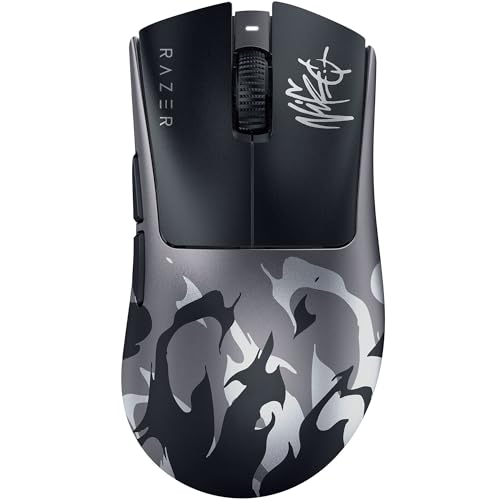


Who Should Buy a Big Gaming Mouse?
Size only helps when it matches your hand and grip. The groups below cover why a standard shell often feels too small.
Palm Grip Players With Long Hands
If your whole palm rests on the shell and your fingers lie flat, you need length most of all. A shell around 125 to 135 mm long lets your fingers reach the front without bending sharply. Look for a hump toward the middle or rear, because that fills your palm.
Claw Grip Players Who Need Room to Curl
Claw grip players keep the rear of the palm on the shell while the fingers arch onto the buttons. Extra width gives your ring finger and little finger a place to sit without dragging on the pad. Prefer gentle sides and a place for your thumb to brace.
Relaxed Grip Players Who Play for Long Sessions
Some players hold the mouse loosely, move mostly from the arm, and play slower paced games for hours. An ergonomic shape with a sloped side and a thumb rest can reduce the need to squeeze the shell to keep hold of it. If pain, numbness, or tingling in your hand continues, stop and rest, and talk with a clinician about personal needs.
Key Features to Compare
Compare these features in order. Size and shape decide comfort, the sensor and connection decide how faithfully the mouse follows your hand, and weight and buttons decide how it feels hour after hour. Start with how the best big gaming mouse options differ in dimensions, because the same length can feel different once width and hump height change.
Shell Size and Hand Measurement
Measure from the tip of your middle finger to the crease at the base of your palm, and across the knuckles without the thumb. Hands around 19 to 22 cm long and around 9 to 11 cm wide usually suit a large shell best. Length controls finger reach, width controls how much your outer fingers fold inward, and height controls palm support.
Shape, Hump and Thumb Room
A rear hump supports palm grip, a central hump supports claw grip, and a low even curve suits a relaxed hold. Check that the thumb buttons sit where your thumb rests, not so far forward that you stretch for them. Leave a ledge for your ring finger too, because a finger that slips off the side can pull the mouse off line. Most ergonomic models suit the right hand only, so left handed players need a symmetrical shell.
Sensor, DPI and Tracking Accuracy
The sensor turns movement into cursor movement. DPI describes how far the cursor moves for each inch you move the mouse, and most players settle around 800 to 1600 DPI for shooters. High headline DPI matters less than clean tracking at the setting you use and a low lift off distance, because a low distance keeps the cursor steady when you lift and reposition the mouse.
Polling Rate and Connection Latency
Polling rate tells you how often the mouse reports its position, in hertz. A rate of 1000 Hz is the common gaming standard, while some wired models and wireless models offer higher rates that can feel smoother on fast displays. Higher polling can use more battery, so treat it as a bonus. A dedicated 2.4 GHz receiver usually gives lower wireless latency than Bluetooth, while Bluetooth is handy for a second computer.
Weight, Balance and Glide
Large shells often weigh about 75 to 110 grams, though some light designs weigh less. Balance matters more than weight alone, because a rear heavy mouse feels planted for palm grip, while an even balance suits claw grip. Wide smooth feet help a big mouse glide without catching on the pad, and worn feet can make it feel slow.
Buttons, Scroll Wheel and Switch Life
Count the buttons you will actually reach. Two side buttons suit most shooters, while extra buttons help in strategy and role playing games. Mechanical switches under the main buttons should feel crisp and even on both sides, and many models list click ratings in the tens of millions. The scroll wheel should be wide enough for a large fingertip, with clear steps and a firm middle click.
How to Measure Your Hand and Check Fit for a Big Gaming Mouse
Good sizing takes about five minutes. You need a tape measure or ruler, a piece of paper, and your current mouse for comparison.
- Mark the tip of your middle finger and the base of your palm on the paper, and measure that distance.
- Measure across your knuckles without the thumb, keeping the tape flat and not pulled tight.
- Note your grip style by watching where your palm touches during play.
- Compare your numbers with the shell length, width, and height of each model.
- Check pad size, because low sensitivity play needs room for wide sweeps.
After the mouse arrives, test fit at once. Your fingertips should reach the main buttons without stretching, your thumb should rest on the side without pressing a button, and your palm should feel supported without your wrist bending upward. Try wide turns and small corrections, and check that a sweep stays on the pad.
Wired models never need charging and suit a fixed desk. Wireless models remove cable drag across a large pad during wide sweeps. If low latency wireless matters most, see our guide to the best wireless gaming mouse for big hands.
Common Mistakes to Avoid
- Buying by length alone and ignoring width and height, so your outer fingers still fold tightly around the sides.
- Choosing a shell so large that your fingertips cannot reach the front buttons, so clicks feel late during fast play.
- Picking the highest DPI setting because the number looks impressive, so tiny movements send the cursor too far.
- Using a small pad with a large mouse and low sensitivity, so you run out of space mid turn.
- Ignoring thumb button placement, so you trigger side buttons by accident every time you lift the mouse.
- Assuming every ergonomic shape suits both hands, so left handed players end up with a shell curved the wrong way.
Care and Maintenance for a Big Gaming Mouse
Clean the sensor lens with a dry cotton swab, because dust around the lens can cause uneven tracking. Wipe the shell with a soft cloth slightly damp with water, and avoid harsh cleaners that can damage the coating. Brush the scroll wheel edges and button gaps, because dust collects there first.
Check the feet every few months and replace them if the edges curl or the glide feels scratchy. For wireless models, charge through USB C before the battery is fully empty when you can, and keep the receiver in its slot. Keep a wired cable free of sharp bends, because tight bends can damage it. For shapes beyond size alone, see our guide to the best mouse for gaming.
Frequently Asked Questions
Is a wired or wireless big gaming mouse better for competitive play?
Both can work well for competitive play, so choose by desk setup rather than by old assumptions about delay. Wired models remove battery checks, while a good 2.4 GHz wireless model removes cable drag. Many players miss receiver placement, because a receiver under a desk can struggle, while one close to the pad stays stable.
How much DPI does a big gaming mouse need for most games?
Most players need far less than the maximum on the box, and around 800 to 3200 DPI covers most games and display sizes. Start low and raise the setting in small steps only if turns feel too slow. Test first in a calm practice area, because a setting that feels fine on the desktop can feel different once you aim under pressure.
Can a big gaming mouse work with Mac and console systems?
Yes, a big gaming mouse can work with Mac and console systems for basic pointing and clicking, but extra features depend on the system. Many setup apps are made for Windows, so on a Mac you may need to set DPI first on a Windows computer and save the settings to the mouse memory. On consoles, only certain games support mouse input, so check the game itself.
How do I know if a big gaming mouse is too big for my hand?
A big gaming mouse is too big if you must stretch to click, if your thumb cannot reach the rear side button, or if you must squeeze hard to lift it. Small corrections also feel clumsy when your fingers sit too flat. If two signs appear in the first hour, a medium shell with a tall hump may give palm support without the extra length.
Does a heavier big gaming mouse slow down aiming for large hands?
Not always, because a heavier shell can feel steadier for large hands that apply more force when stopping. Extra weight slows you mainly when you lift the mouse often or use fast arm movements. Judge weight with the pad too, because a heavier mouse on a fast pad can glide as easily as a lighter mouse on a slow grippy pad.
The Bottom Line
Start with hand measurement and grip, then check sensor behaviour at the DPI you will use, and then choose wired or wireless by your desk. That order stops headline numbers from hiding a poor fit. If you are torn between two shapes, see our guide to the best mouse for gaming big hands and our guide to the best gaming mouse for people with big hands. When those checks line up, the best big gaming mouse for you should feel natural from the first session, so use the product table above to confirm size and connection before you buy.


