
Best Bang for Your Buck Studio Monitors: Value Picks by Budget
Disclosure: We may earn a commission when you buy through links on this page, at no extra cost to you. As an Amazon Associate I earn from qualifying purchases. Learn more

Studio monitors that give the most accuracy per dollar, from desk-sized pairs to bigger room models, with notes on size and connections.
Studio monitor speakers promise a "flat" sound, yet prices run from under $100 a pair to well over $1,000. This guide to best bang for your buck studio monitors shows where extra money buys real accuracy and where it only buys a bigger cabinet or a nicer finish.
The picks in the product table cover compact desktop pairs through larger room-filling models. Use the sections below to match woofer size, connections, and room to your own setup before you compare prices.




What Makes Studio Monitors Good Value
A studio monitor is built to reveal what is in a recording, not to flatter it. A good value pair has a fairly even frequency response, low distortion at moderate volume, and enough control over tone to cope with a real room. It does not need a long feature list or a high wattage figure.
Powered (active) monitors have the amplifier built into each cabinet, so one pair is all you need beyond a cable. Passive monitors need a separate amplifier, which adds cost and complexity. For nearly every home studio, desk setup, or editing corner, active monitors are the better value.
Woofer Size and Room Size
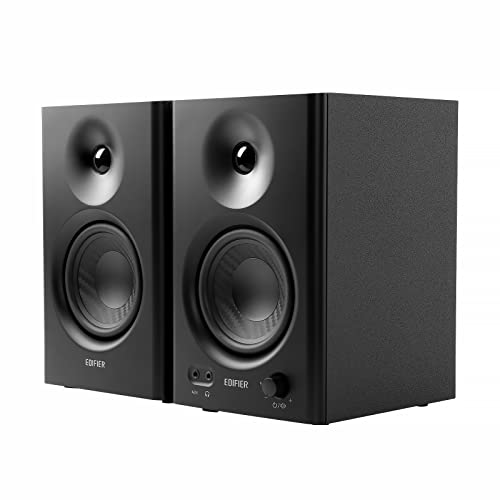
Woofer size should follow the room. Models with 3 to 4 inch woofers suit small desks and bedrooms, where you sit about two to three feet away. A 5 inch woofer is the most common choice for a spare room or a bedroom studio, balancing bass depth and clarity. Pairs with 7 or 8 inch woofers reach lower, but in a small untreated room they tend to boom and hide mix problems rather than reveal them.
Near-Field Placement
Most value monitors are designed for near-field listening, meaning you sit close and the room has less influence on the sound. Place the two speakers and your head at the points of an equal triangle, with the tweeters at ear height. Keep the speakers a few inches away from the wall behind them, and use stands or isolation pads so the desk does not carry vibration into the cabinets.
Best Bang for Your Buck Studio Monitors by Budget
Under $150 a Pair
This tier is the entry point for music production, podcast editing, and general desktop listening. Expect 3.5 to 4.5 inch woofers, balanced and RCA inputs, and a headphone output on the front. Bass is limited, so these suit small rooms and detailed mid-range work better than bass-heavy genres. Some pairs add Bluetooth, which is handy for casual listening but not needed for mixing.
$150 to $400 a Pair
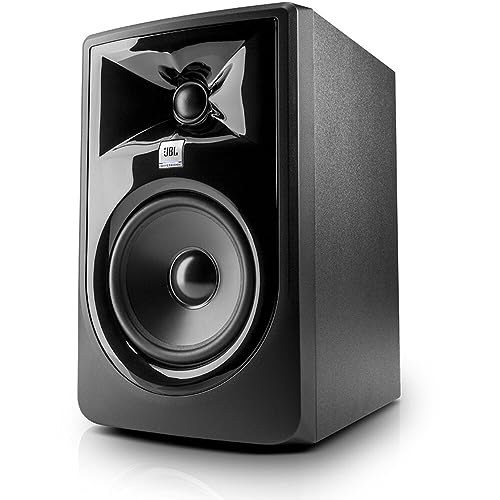
Most buyers get the best return here. A 5 inch woofer with separate amplifiers for woofer and tweeter delivers clearer separation, more bass control, and cleaner high frequencies at the same volume. Room-matching switches for low and high frequencies appear in this tier and are worth having, since they help correct for a desk or wall that exaggerates bass.
Above $400 a Pair
Larger 7 and 8 inch models and well-known reference designs live in the top of this range. The gains are lower distortion, deeper bass, and louder clean output. They make sense for dedicated rooms and professional work. In a small bedroom they can sound worse than a well-chosen 5 inch pair, so buy them for the room you have, not for the specification sheet.
Features That Matter Most
Connections
Balanced TRS or XLR inputs reject noise over longer cable runs and are the standard in studio work. RCA and 3.5 mm inputs make it easy to connect a laptop, phone, or turntable. A front headphone jack is a quiet but useful extra, because you can switch between speakers and headphones without reaching behind the cabinets.
Room Controls and Tuning
Low-frequency roll-off, high-frequency trim, and boundary switches let you adjust the speakers for a desk, a shelf, or a corner. A few current pairs include a companion app with an equalizer. These controls will not fix a bad room, but they correct enough of the typical problems to make mixing decisions more reliable.
Bluetooth and Everyday Listening
Bluetooth is convenient but does not belong in a critical mixing chain, because wireless links compress audio and add delay. Treat it as a bonus for background music, and use a cable when you are producing, editing video, or checking a mix.
Setting Up Monitors for Better Sound
Good placement improves sound more than a price jump. Keep the speakers equal in distance from your ears and angled slightly inward. Avoid placing them directly in a corner or flush against a wall, because bass builds up and muddies the mix. Foam isolation pads or desk stands decouple the cabinets from the surface and tighten the low end.
Basic acoustic treatment also pays off. Thick absorbers on the first reflection points at the side walls and behind the speakers reduce echo and make small details easier to hear. Even bookshelves and a thick rug help.
Cables and Accessories
Buy balanced cables that match your inputs, and keep power cables apart from audio cables to avoid hum. A pair of stands or isolation pads is a small cost compared with the improvement in clarity. If your audio interface has a headphone output, you can often skip a separate preamp or headphone amplifier at the start.
Common Mistakes to Avoid
Buying the biggest woofer is the most common one, because a large monitor in a small room exaggerates bass and leads to mixes that sound thin elsewhere. Another is judging by price alone: a well-reviewed pair at a moderate price will often serve you better than a famous model that does not fit your space. Finally, avoid skipping calibration. Play a few familiar songs on the new speakers before you begin mixing, so you learn how your room colors the sound.
Frequently Asked Questions
What features matter most in studio monitors?
Accuracy, a balanced response, and a woofer size that fits the room matter most. After that, look for balanced inputs, a front headphone output, and room-matching switches. Wattage and finish matter far less than they appear to on a listing.
Are studio monitors better than regular speakers?
For production and editing, yes, because they aim for a neutral sound and show flaws in a recording. For pure enjoyment, some listeners prefer regular speakers that add warmth or bass. Many studio monitors work well for daily listening too, so a single pair can do both jobs.
Do I need a subwoofer?
Not at first. A good 5 inch pair covers the useful range for most home studios. Add a subwoofer later if you produce bass-heavy music or want to check low-frequency content, and expect to spend time setting it up so it blends with the monitors.
What size should I get for my room?
For a desk or a small bedroom, 3 to 5 inch woofers are plenty. For a larger dedicated room with some treatment, 6.5 to 8 inch woofers deliver more headroom and lower bass. When in doubt, choose the smaller size and place it well.
Do I need an audio interface?
If you record or mix, yes. An interface sends clean, balanced audio to the monitors and handles microphones and instruments. If you only listen from a computer or phone, a direct cable or Bluetooth is enough.
How long do studio monitors last?
A decent active pair typically lasts many years with normal use. The amplifier and woofer surround are the parts that age first. Keep the speakers dry and ventilated, and switch them off when not in use.
Our Verdict
For most readers, a 4 to 5 inch active pair in the middle price range gives the strongest mix of accuracy, bass control, and value, and the product table above helps you compare models. Choose smaller and cheaper pairs for desks and bedrooms, and go bigger only when the room can handle it. Judged that way, best bang for your buck studio monitors are the pairs that fit your space and workflow rather than the loudest or most expensive. For general listening, see our guides to the best bang for your buck speakers and the wider best bang for your buck overview.


