
Best At Home Studio Monitors for Every Need in 2026: How to Pick the Right One
Disclosure: We may earn a commission when you buy through links on this page, at no extra cost to you. As an Amazon Associate I earn from qualifying purchases. Learn more

Compare the best at home studio monitors by driver size, flat tuning, inputs and room fit, with clear guidance for mixing and recording at home.
There is no single speaker that suits every home studio, because your room, your desk and the music you make all change what you need to hear. The best at home studio monitors tell you the truth about your mix at the distance you actually sit. Use the comparison table below to match driver size, tuning and connections to your space.
Start with honesty about your room. A small bedroom rewards a compact speaker placed well, while a larger treated room can support deeper bass and more power. The sections below sort buyers by task, then explain the audio factors that matter most.

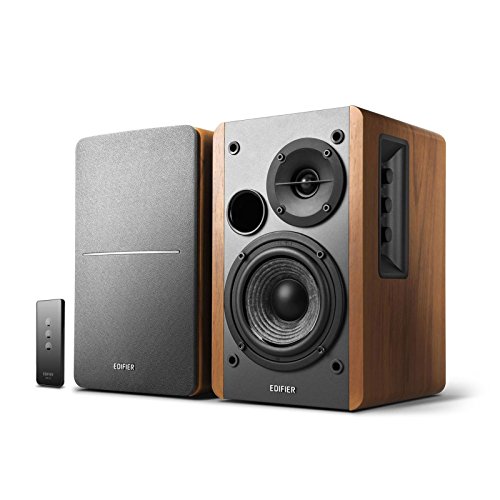


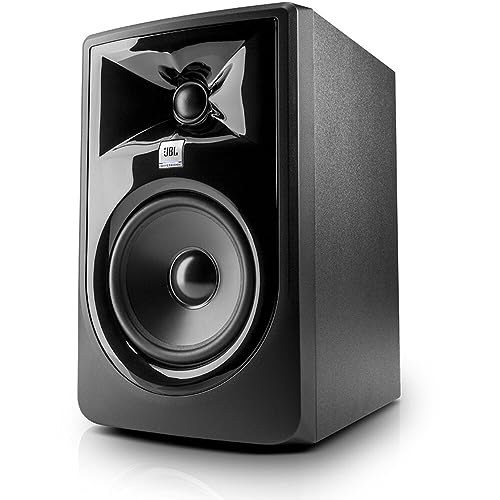
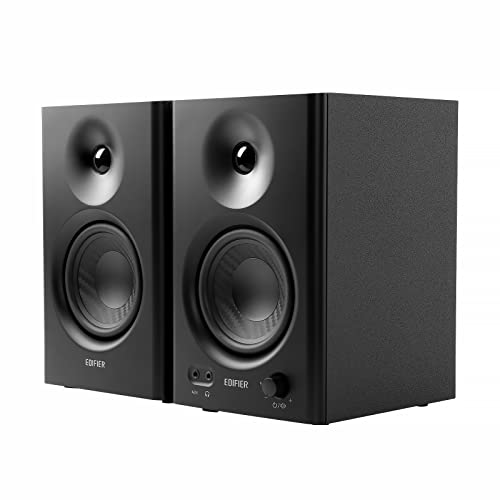
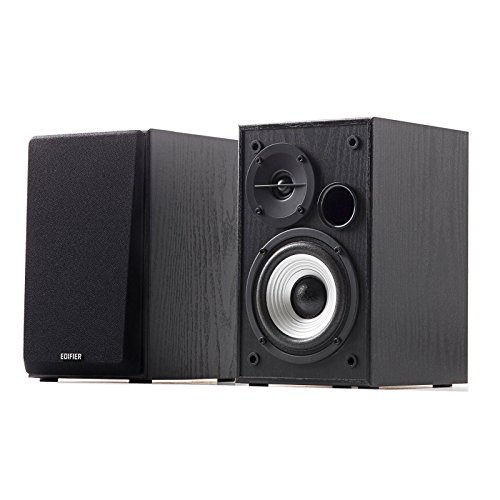

Who Should Buy Which At Home Studio Monitors?
Choose by the work you do most weeks. Your main task decides how much bass detail, volume and input flexibility you truly need.
Bedroom Producers and Beat Makers
You build tracks at a desk, often at modest volume and often late in the day. Prioritize a flat response, clear midrange and a front bass port if your desk sits close to a wall. A 5 inch woofer usually gives enough low end for beats in a small room without exciting every corner.
Singers and Home Recording Musicians
You record vocals and instruments, then judge takes and simple mixes on the same speakers. Prioritize low noise at idle, balanced inputs from your audio interface and a tweeter that shows sibilance without sounding harsh. If your room doubles as a tracking space, see our guide to the best studio monitors for home recording for microphone based setups.
Podcasters and Video Creators Who Mix Sound
You edit speech more than music, so clarity in the voice range matters most. Prioritize smooth midrange, modest size and simple controls you can reach during an edit. Deep bass matters less for dialogue, though a speaker that reaches low enough to reveal rumble from a desk mic helps you clean recordings.
At Home Studio Monitors for Specific Needs
Most home models are powered, but powered and active are not quite the same design. The difference affects clarity and price.
Powered Home Studio Monitors: What to Prioritize
When you shop for powered home studio monitors, you are choosing speakers with an amplifier built into the cabinet, so no separate amp is needed. Prioritize amp power that suits your room, low hiss at your listening distance and a volume control you can match across the pair. Setup stays simple, and the amp is matched to the drivers by the maker.
Active Home Studio Monitors
Active home studio monitors go one step further, with a separate amplifier for the woofer and for the tweeter and an electronic crossover that splits the signal before amplification. Prioritize clean crossover behavior and detailed highs. This design can sound more precise at higher volume, though it often costs more than a simpler powered pair of the same size.
Key Features to Compare
Compare sound and fit for your room in this order. A speaker that fits your space poorly will mislead your mixes.
Driver Size and Room Size
Woofer size shapes how much bass a speaker can produce and how much room it needs to do it well. Models with 3 to 5 inch woofers suit desks in small rooms, where you sit about 3 to 4 feet away. Models with 6 to 8 inch woofers move more air and suit larger rooms, but in a tiny bedroom they can overload corners and blur the low end. Match size to space first.
Frequency Response and Flat Tuning
Studio monitors aim for a flat response, meaning no part of the range is pushed far above the rest. That honesty helps a mix travel well to cars, phones and living room speakers. Read the stated range with its tolerance, such as plus or minus 3 dB, because a wide range with a loose tolerance tells you less. Avoid models that advertise boosted bass, since extra low end hides balance problems.
Bass Port Position and Wall Distance
Many cabinets use a port to extend bass output. A front port vents toward you and tolerates placement closer to a wall, which helps on shallow desks. A rear port needs more open space behind the cabinet, often about 8 to 12 inches, or bass can build up and sound boomy. If your desk stands against a wall, front port models or sealed cabinets give you fewer problems.
Audio Inputs and Balanced Connections
Look for the inputs that match your audio interface or mixer. Balanced XLR and balanced TRS connections reject hum over longer cable runs, which matters when power cables share the same desk. Unbalanced RCA inputs work for short runs from a controller or a simple interface. When you shortlist the best at home studio monitors for a noisy desk setup, balanced inputs can save hours of fault finding later.
Room Controls and Tone Switches
Small switches on the back panel let you adjust bass and treble for your placement. A bass trim helps when speakers sit near a wall or in a corner, and a treble trim helps in rooms with hard bare surfaces. These controls fix placement problems, not bad mixes, so set them once with music you know well and then leave them alone.
How to Place At Home Studio Monitors in a Small Room
Placement is free performance. Form a triangle with the two speakers and your head, with each side about the same length, often 3 to 5 feet in a home room. Raise the tweeters to ear level with stands or firm foam pads, angle each cabinet toward your ears and keep the pair the same distance from side walls.
Keep speakers off the bare desk when possible, because the surface reflects sound and adds a boxy color to voices and guitars. Simple isolation pads also reduce vibration into the desk. For broader layout ideas, see our guide to the best studio monitors home studio setups and our notes on the best at home studio speakers for shared rooms.
Common Mistakes to Avoid
- Buying 8 inch monitors for a tiny untreated bedroom makes bass build up in corners and hides the balance of your mix.
- Placing rear port speakers flat against a wall makes low notes boom and leads you to cut bass that is not really there.
- Setting the two speakers at different distances or heights shifts voices and instruments away from the center of your mix.
- Mixing at very high volume for long sessions tires your ears and pushes you toward dull, lifeless balances.
- Judging monitors only with your favorite songs leads you to choose a flattering sound that hides faults in your own recordings.
- Running long unbalanced cables beside power leads invites hum that you may chase through your interface for days.
How to Make Your At Home Studio Monitors Last Longer
Dust the cabinets and cones with a soft dry cloth and keep liquids and cleaning sprays away from the drivers. Leave space behind powered cabinets so heat from the amplifier can escape, and switch the pair off during long breaks. Avoid steady clipping, heard as harsh distortion at high volume, because that strain can damage tweeters over time.
Check cables now and then for loose plugs or cracked insulation, and support heavy cables so they do not pull on the sockets. If one speaker develops a buzz or a drop in volume, have it checked by a qualified audio technician rather than opening a powered cabinet yourself, since internal parts can hold a charge.
At Home Studio Monitors: Your Questions Answered
What size at home studio monitors should I get for a small bedroom studio?
A 5 inch woofer is the safest start for most small bedroom studios. It gives usable bass for mixing without overwhelming corners the way larger cabinets can. If your room is very small or your desk is shallow, a good 4 inch model at close range can be more accurate. Leave budget for stands or pads.
Do at home studio monitors need a subwoofer for mixing?
No, at home studio monitors do not need a subwoofer for most home mixing. A sub helps only if you make music with deep bass content and your room can handle those low notes well. In a small room a sub often creates more problems than it solves. Learn your monitors with reference tracks first, and check low end on good headphones.
How far should at home studio monitors sit from my ears?
At home studio monitors should usually sit about 3 to 5 feet from your ears. That near field distance lets direct sound dominate over room reflections, which keeps detail clear at moderate volume. Keep both speakers the same distance from your head and test with a mono voice recording, which should seem to come from a point midway between the cabinets.
Can at home studio monitors work for everyday listening as well as mixing?
Yes, at home studio monitors work well for everyday listening if you enjoy a clear and honest sound. Music, films and games all play through them without extra setup. What you will not get is the boosted bass and softened highs that many living room systems add. Readers comparing plainer speaker options can also see our guide to the best speaker monitors for home studio use.
How long do at home studio monitors usually last?
At home studio monitors usually last about 7 to 10 years or longer with normal home use. The drivers and cabinets age slowly, while amplifier parts and switches tend to fail first. Heat, dust and repeated clipping shorten that span, so ventilation and sensible volume matter. Keep the original boxes if you can, for safe packing during a move or a repair.
The Bottom Line
Match driver size to your room, demand a flat and honest response, and place the pair at ear level the same distance from your seat. Balanced inputs and a few room controls solve most home desk problems. Use the product table above to compare size, inputs and price with those points in mind.
Chosen that way, the best at home studio monitors stop being a guess and become a tool you trust. Buy the pair that fits your space and your main task, and learn them with music you know well.


