
Best 16 Channel Mixers: A First Time Buyer's Guide for 2026
Disclosure: We may earn a commission when you buy through links on this page, at no extra cost to you. As an Amazon Associate I earn from qualifying purchases. Learn more

A plain-language guide to the best 16 channel mixers: key terms, specs, and rookie mistakes to avoid before you buy.
Buying your first 16 channel mixer can feel like reading a flight panel: rows of knobs, unfamiliar words, and prices that jump from modest to serious. The good news is that the logic behind a mixer is simple once someone explains it in plain language. This guide covers the best 16 channel mixers for first time buyers.
This guide starts with the basics, translates the key specs, and shows you the mistakes new buyers make most often. By the end you will know what the channels, preamps, and effects actually do, and you can use the product table with real confidence.
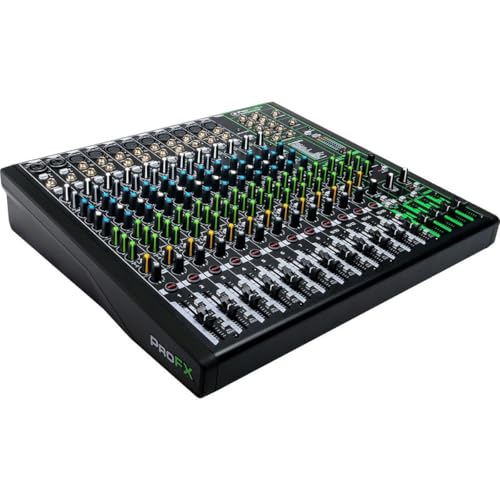
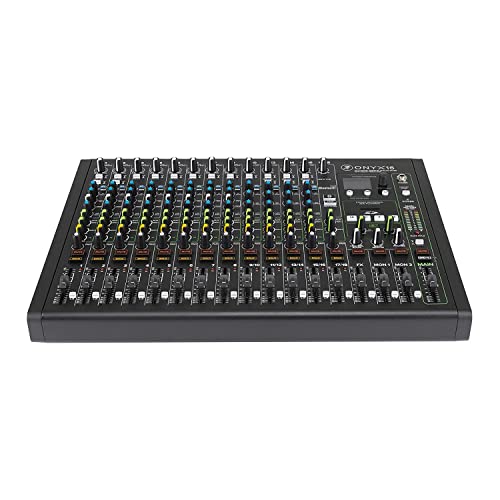


Best 16 Channel Mixers 101: The Basics
A mixer takes several sound sources, such as microphones, keyboards, guitars, and playback from a phone, and blends them into one balanced output for speakers or a recording. Each vertical strip on the surface is one channel, and each channel handles one source. Sixteen channels means you can run a full band, a small choir, a podcast panel with music, or a church service with room to spare.
One detail confuses many new buyers: not every channel accepts a microphone. Some channels are stereo line channels meant for keyboards or media players, so count the microphone inputs, called mic preamps, rather than the headline number. A board with sixteen channels might offer ten or twelve mic inputs, which is still plenty for most bands. Signal flows from the input through gain, equalization, and the channel fader, then to the main output. Once you picture that path, the rows of knobs stop looking random.
Two more terms appear on nearly every board. Aux sends route a custom blend of channels to stage monitors or to an external effects unit, so each performer can hear a personal mix. Built in effects, most often reverb and delay, add space to vocals without extra gear. Neither feature changes the main mix directly, yet both shape how polished and comfortable a performance feels for the people on stage.
Key Specs Explained in Plain English
Specs decide whether a mixer fits your group, your room, and your plans for recording. Work through the five areas below before you compare prices.
Intended Use and Who It's For
Start by naming your main job. A gigging band needs enough mic inputs for vocals and drums plus monitor sends so each singer hears themselves. A house of worship needs simple operation for volunteers and plenty of inputs for a choir. A streamer or home studio owner needs a clean USB connection for recording. Sixteen channels suits groups of roughly five to ten performers, event speakers covering panel discussions, and venues that host varied acts. If your act is just two people, a smaller board may serve you better and cost far less.
Ease of Use and Setup
Analog boards show every control on the surface, so what you see is what you get, and a volunteer can learn the basics in one rehearsal. Digital boards hide features in menus but add saved scenes, remote control by tablet, and more processing per channel. For a first purchase, clear labeling, color coded knobs, and a sensible layout matter more than exotic features. Also check the manual quality and whether the maker offers plain language setup videos, since good guidance shortens your first sound check.
Price vs Value
Budget boards, often around $200 to $400, cover small bands and speaking events with basic equalization and a few effects. Mid range boards, often around $400 to $900, add more mic preamps, better faders, more monitor sends, and sturdier construction. Premium boards above that range bring digital processing, motorized faders on some designs, and recording of separate channels to a computer. Value means paying for the inputs and sends you will use weekly, not for channels that will sit empty. If budget is tight, our guide to the best 4 channel mixers shows what a compact board can still handle for duos and solo acts.
Build Quality and Materials
A mixer that travels needs a metal chassis, knobs that feel firm rather than wobbly, and faders that move smoothly without crackling. Check the weight: very light boards can feel fragile, while road ready models use thicker panels and protected corners. The power supply matters too, since an internal supply avoids a bulky external brick that is easy to lose. Read the warranty terms, and look for makers with service centers in your country, because a board is a long term tool rather than a disposable gadget.
Size, Weight, and Fit for Your Space
Sixteen channel boards are wide, so measure your desk, booth shelf, or rack before ordering. Some models mount in a standard rack with optional ears, which keeps them safe in a venue install. For mobile use, add the size of a padded case or a hard case to your car space math. Weight ranges from under ten pounds for compact analog boards to far more for large digital consoles. Place the mixer where the operator can see the stage and reach the main faders without stretching across other gear.
Rookie Mistakes to Avoid
- Counting channels instead of mic inputs. A board can advertise sixteen channels yet offer far fewer microphone preamps, which is what singers and drum kits actually need.
- Forgetting monitor sends. Without enough aux sends, band members cannot hear themselves, and the live mix suffers no matter how good the board is.
- Skipping phantom power. Condenser microphones and some direct boxes need phantom power, usually labeled as plus 48V, so confirm the board provides it.
- Buying for a fantasy band. Extra channels for members you may never recruit add cost, size, and setup time to every show.
- Ignoring recording needs. If you plan to record, check whether the USB output sends only the main mix or each channel separately, because upgrading later is costly.
Getting Started: Setup and First Use
Read the manual before first use, even if you only skim the signal flow diagram and the gain setting steps. Connect speakers last and keep the main fader down while you plug in microphones, which prevents loud pops. Set each channel gain so the loudest moment lights the meter near the top without hitting the red peak light, then balance the band with the faders.
Save or photograph your settings after a good sound check so the next setup starts close. Clean and inspect regularly: wipe dust from faders, check cables for crackle, and store the board covered so sliders stay grit free.
FAQs
How long does a 16 channel mixer last?
A well kept mixer often lasts ten years or more. Faders and knobs wear first, especially in dusty venues, while the electronics usually keep working long after. Boards that travel in cases and get gentle handling outlast boards left uncovered in humid rooms. Budget models may show wear sooner, but careful storage and occasional cleaning extend the life of almost any board.
How much should I spend on a 16 channel mixer?
Most first time buyers land between around $300 and $800. That range covers boards with enough mic preamps for a band, useful effects, and solid construction. Spend toward the top if you gig weekly or record often. Spend less if the board stays in one room for rehearsals and small events, and put the savings into microphones and cables, which shape your sound just as much.
Are expensive 16 channel mixers worth it?
They are worth it when the added features solve real problems. Digital recall, per channel compression, and multi track recording save time for busy venues and engineers. A small band playing monthly may never use those tools, so the premium buys little. Judge by your calendar and your recording plans, not by the fear of missing out. A mid range board used well beats a flagship board used badly.
How do I maintain a 16 channel mixer?
Keep it dry, covered, and dust free. Wipe the surface with a dry cloth, work each fader through its full travel now and then to clear grit, and never spray cleaner directly onto controls. Use proper cases for transport and coil cables loosely so connectors are not strained. If a channel crackles, note which one and describe it clearly when you contact service, which speeds up any repair.
What features matter most when buying 16 channel mixers?
Mic preamp count, monitor sends, and equalization matter most for live sound. After those, weigh USB recording, built in effects, and build quality. Phantom power and a high pass filter on each channel quietly solve common problems like stage rumble. If your needs shrink later, a compact option from our guide to the best 2 channel mixers can cover solo speaking or a single microphone plus music playback.
The Bottom Line
Choose by mic preamp count, monitor sends, and honest build quality, and the rest falls into place. The best 16 channel mixers for you are the ones your whole group can set up calmly and run without guesswork. Compare your shortlist in the product table, picture your next event channel by channel, and buy the board that fits that picture.


