Best Colour Printers for Home 2026: Made Simple, A Clear Buying Guide
Disclosure: We may earn a commission when you buy through links on this page, at no extra cost to you. As an Amazon Associate I earn from qualifying purchases. Learn more
Find a colour printer for home that fits your space and budget. Compare inkjet, laser and tank models, running costs and setup so home printing stays simple.
If you are shopping for best colour printers for home for the first time, the goal is usually simple. You want school work, photos, forms and occasional office pages without fuss or surprise ink costs. This guide explains the home friendly choices in plain language.
The comparison table below gives you a quick overview, and the sections that follow explain what matters in a home setting. A home printer does not need office speed or heavy duty trays. It needs to fit your space, connect to your devices and print well when you need it.



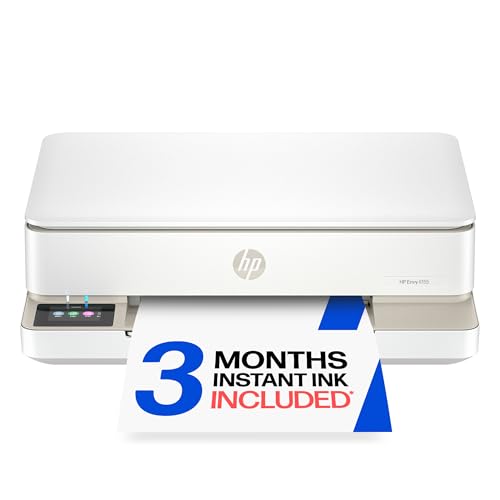

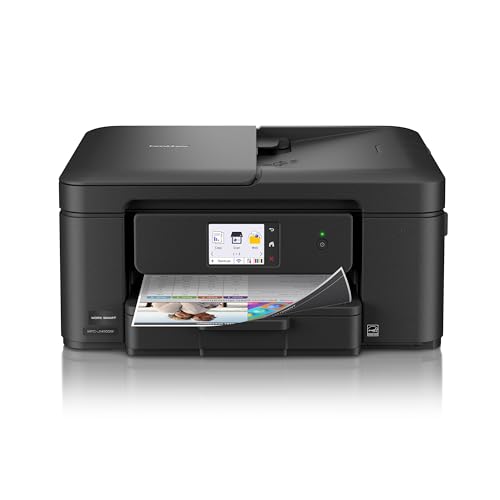
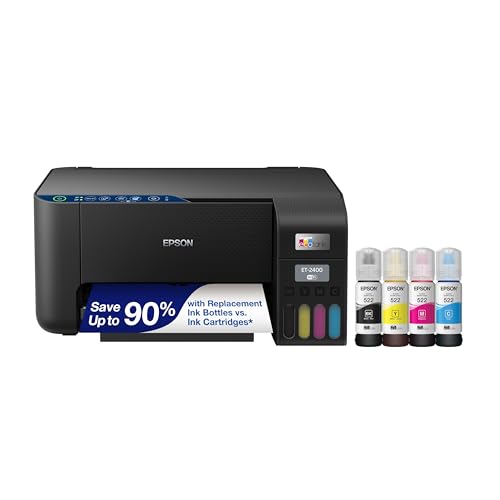
Start with your household. Who prints, what do they print and how often? A family with school children, a remote worker and a photo hobbyist will use a printer very differently. Your answers will point to the right type faster than any brand claim.
Colour Printers for Home Basics Explained
A home colour printer usually uses inkjet or laser technology, and many models also scan and copy. Inkjet models spray ink for photos and mixed pages, laser models fuse toner for fast text, and tank models refill from bottles for heavy colour use. All three can work at home, but size, noise and running costs differ.
Home terms worth knowing include wireless setup, mobile printing, duplex printing and ink yield. Wireless setup lets phones and laptops print without cables, mobile apps add scanning and photo printing, duplex printing saves paper, and yield estimates how many pages a cartridge should cover. Treat yield as a guide, since photos use more ink than text pages.
Key Features to Compare
Printer Type for Home Rooms
Inkjet printers suit most homes because they handle photos, school work and forms in one compact body. Laser printers suit homes with heavy text printing, such as a remote office, because they print fast and toner lasts well. Tank printers suit homes that print colour daily, such as homework and craft projects. Choose by volume and page type, not by size of the discount alone.
Space, Noise and Placement
Measure the space where the printer will live, including room to open trays and change cartridges. A printer in a bedroom or study should run quietly and not dominate the desk. Check whether the output tray extends far and whether paper loads from the front, since rear loading needs clearance behind the machine. A printer that fits its spot gets used more happily.
Connectivity for Phones and Laptops
Most homes print from several devices, so wireless printing matters. Look for stable WiFi, a clear mobile app and support for the devices your household uses. USB printing is a useful backup when WiFi drops. Read how buyers describe the setup process, not just the feature list, since a hard setup can sour the whole purchase.
Running Costs and Ink Habits
Home ink costs surprise many buyers, so estimate them before you buy. Check cartridge price and yield, and consider whether a tank model or a subscription plan suits your volume. Print regularly to keep ink flowing, and avoid frequent cleaning cycles, which use ink. A printer with honest running costs beats a cheap printer with pricey refills.
Matching the Choice to Your Routine
Families with school children need reliable colour for worksheets, projects and photos, plus scanning for homework. Remote workers need sharp text, duplex printing and a tray that holds a decent stack of paper. Photo lovers need good colour on photo paper and easy mobile printing from a phone.
Small flats benefit from compact inkjet models that tuck into a shelf or cabinet. Larger homes can fit a laser or tank model in a dedicated office corner. Match size and noise to the room, and let the noisiest or largest option lose if the room is shared.
Budget Tiers and What Changes
Budget home printers print well for light use but may cost more per page. Midrange models usually add duplex printing, better wireless features and larger trays. Premium home models add tank ink, faster speeds or better photo quality, but they only pay off if your volume or photo habit justifies them.
For light home use, a simple inkjet with affordable cartridges often wins. For daily colour printing, a tank model can save money over a year or two. Write down your monthly pages, then compare total cost, not just the price on the box.
Care, Fit and Common Mistakes
Keep paper dry, use the printer at least weekly and store spare ink sealed and cool. Run a test page if colours look off, and clean print heads only when needed. Keep the paper path free of dust, and do not force curled or damp paper through the machine.
A common mistake is placing a printer where cables and trays cannot open fully. Another is buying a high volume model for a few pages a month. Measure the space, count the pages and choose the simplest model that covers your household well.
Related Options to Compare
For a related angle, see best computer printers for home. For a related angle, see best reviewed home printers. For a related angle, see best colour laser printers for home use. For a related angle, see best quality photo printers for home. For a related angle, see best picture printers for home. Each of these guides covers a nearby choice, so you can check how it differs before you settle on one option. The comparison table above can help you keep the main differences in view while you read.
Before You Buy Checklist
Before you commit to colour printers for home, write down your three most important needs in order and check each option against that list. This simple step stops a single attractive feature from outweighing the needs you will live with every day. It also makes comparison easier, since you can score each option on the same three points rather than on a shifting set of impressions.
Picture the first week of ownership before you order. Where will the printer sit, which outlet will it use, and who will refill the paper tray on a school night? Check the printed dimensions with the trays open, the weight if you will lift it onto a shelf, and the cartridge type so you know where spare ink will come from.
Check the practical details that surround the purchase, including warranty length, return policy and the cost of parts you may need later. A clear warranty and a fair return window reduce risk, especially for a first purchase. Keep the receipt and the manual together, since both help if you need support or a replacement part later.
Getting the Most From a Home Printer
Keep a small box with spare paper, a set of spare cartridges or an ink bottle, and the setup sheet that lists your WiFi details. Printers tend to run out of paper or ink at exactly the wrong moment, such as the night before a school project is due, so having the basics close by saves a rushed trip.
Give each family member a clear habit: print in draft mode for rough pages, choose duplex for long documents, and use the phone app for quick scans of receipts and forms. Those small habits cut ink use and keep the printer from becoming a source of arguments at home.
Frequently Asked Questions
What type of colour printer suits a family home?
A compact inkjet with scanning usually suits a family best, because it handles photos, school work and forms. If the home prints many text pages daily, a laser model may be better. Tank models suit families that print colour every day and want lower ink costs.
How much space does a home printer need?
Allow room for the body plus tray extension, lid opening and cartridge access. Front loading models need less rear clearance than rear loading ones. Measure your shelf or desk before you buy, and check the full footprint with trays open, not just the closed size.
Is wireless printing reliable at home?
It usually is when the printer sits within good WiFi range and the app is set up correctly. Keep the printer firmware updated and use USB as a backup for important jobs. If your WiFi is weak in the printer room, a wired or USB option can save frustration.
Do I need a printer that scans and copies?
Many homes find scanning useful for school forms, receipts and old photos. Copying helps for quick duplicates without a computer. If you rarely scan, a print only model can save space and money, but multifunction models are common and often cost little extra.
How can I keep home printing costs down?
Print in draft mode for internal pages, use duplex printing, and buy ink based on yield, not just cartridge price. Print regularly to avoid cleaning waste, and consider a tank model if colour volume is high. Small habits add up over a year of home printing.
Final Thoughts
The right home colour printer fits your room, connects to your household devices and keeps running costs predictable. Use the comparison table above to compare types, then measure your space and count your pages before you commit.
A simple, well placed printer that everyone can use beats a powerful model that crowds the room or drinks ink. Choose for your household today, and home printing will stay easy rather than becoming a recurring hassle.