Best Choice Keyboards 2026: Which Type Is Right for You
Disclosure: We may earn a commission when you buy through links on this page, at no extra cost to you. As an Amazon Associate I earn from qualifying purchases. Learn more

Confused by keyboard types? Compare wired, wireless, and gaming models by switches, layout, and feel so you pick the right keyboard first time.
Keyboards look similar at a glance, but switches, layouts, and connection types change how they feel every day. When you compare best choice keyboards, you are choosing a tool for typing, gaming, or both, and the right match depends on your hands, your desk, and your noise tolerance. The product table below shows the main types side by side, so you can see the trade offs quickly.
This guide compares wired, wireless, and gaming models, explains layouts and switches in plain terms, and helps you avoid the common mistake of buying for looks alone. Comfort over long sessions matters more than any single feature, so start with how you actually use a keyboard.


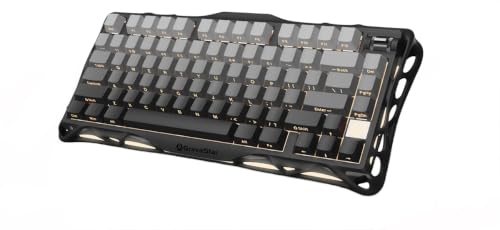

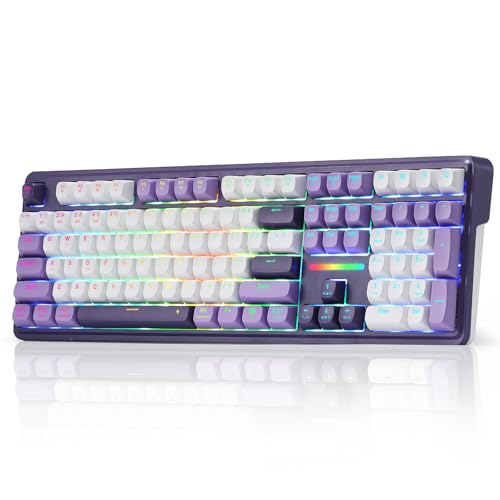
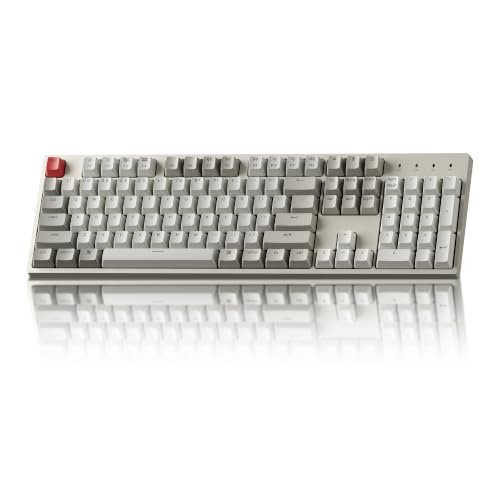
Types of Keyboards Compared
Wired keyboards connect by USB, offer the lowest latency and no battery worries, and suit gamers and office workers who keep a fixed desk setup. They cost less for the same quality and never drop a connection, but the cable needs managing. Wireless keyboards use Bluetooth or a USB receiver, freeing desk space and suiting laptops, living rooms, and shared spaces, but they need charging or batteries and can lag slightly.
Gaming keyboards add features such as mechanical switches, programmable keys, and per key lighting, which suit fast paced games and custom setups. They cost more and can be loud, so they suit gamers more than quiet offices. General purpose keyboards balance typing comfort, price, and simplicity, making them the safest default for most buyers.
Layouts, Size, and Ergonomics
Layout shapes desk space and comfort. Full size keyboards include a number pad and suit data entry and accounting, while tenkeyless models drop the pad for a compact footprint that brings the mouse closer. Compact 75 percent and 60 percent layouts save more space but move or remove keys, which takes adjustment.
Ergonomics matter for long sessions: a keyboard that keeps wrists neutral reduces strain, and a slight tilt or a wrist rest helps many typists. Split and tented designs suit users with wrist discomfort, but they need adaptation time. Try layouts in person when possible, and check that key spacing suits your hand size rather than assuming one size fits all.
Switches, Feel, and Noise
Switches decide how each key feels and sounds. Membrane keyboards use a rubber layer, feel soft and quiet, and cost less, but they can feel mushy over time. Mechanical switches use individual springs, feel crisp and consistent, and last longer, but they cost more and vary in noise by switch type.
Linear switches move smoothly without a bump, tactile switches give a bump at activation, and clicky switches add sound as well. Quiet offices suit linear or silent tactile switches, while gamers often prefer linear speed. If you share space, test noise levels or choose a silent variant, since a loud keyboard annoys coworkers and family quickly.
Connectivity, Battery, and Compatibility
Connectivity should match your devices. USB wired models work with almost any computer, while Bluetooth models pair with laptops, tablets, and phones but need pairing management. Some wireless models include a USB receiver for lower latency, and multi device models switch between computers with a key press, which suits users with a desktop and a laptop.
Battery life varies from weeks to months depending on lighting and use, so check the rating and whether the keyboard charges by USB. Backlighting drains batteries fastest, so turn it off when unneeded. Confirm operating system compatibility too, since key legends and shortcuts differ between Windows and Mac layouts.
Build Quality, Durability, and Price
Build quality shows in the case, keycaps, and stabilizers. A sturdy case resists flex, double shot keycaps resist legend wear, and good stabilizers keep large keys like spacebar from rattling. Cheaper keyboards often flex and develop squeaky keys within months, while well built models last years of daily use.
Prices span a wide range: basic membrane keyboards cost around $20 to $40, quality wireless and mechanical models run $60 to $150, and premium custom models cost more. Spend on switches and build first, since those affect every keystroke, and treat lighting and extra keys as secondary. A midrange mechanical keyboard usually offers the best balance for most typists and gamers.
Related Guides Worth Reading Next
Gamers should also check best gaming keyboard, which focuses on speed, switches, and features built for competitive play.
If key sound matters to you, best sounding keyboards compares keyboards by acoustics, from quiet office models to thocky custom builds.
For Windows focused options, best pc keyboards covers PC keyboards by layout, switch type, and price.
iPhone and iPad users can explore best keyboards for iphone, which covers compact Bluetooth keyboards for mobile devices.
For cable free desks, best wireless keyboards compares wireless models by battery life, latency, and multi device support.
Wired Versus Wireless: Which Should You Choose
Choose wired if you game competitively, keep a fixed desk, or want the lowest latency without battery worries. The cable is a small price for reliability and lower cost. Choose wireless if you move between devices, value a clean desk, or use a laptop and tablet often, and accept charging as part of the routine.
Many users end up with one of each: a wired mechanical keyboard for the main desk and a compact wireless model for travel or the living room. That split covers both needs without compromise. Whichever you choose, test the switches and layout first, since feel matters more than specs on paper.
Keyboards for Shared Desks and Hot Desking
Shared desks demand keyboards that adapt quickly to different users, so look for simple layouts, adjustable tilt, and easy cleaning. A standard full size or tenkeyless layout suits most people without a learning curve, while exotic compact layouts frustrate occasional users. Wireless models with multi device pairing help when several people share one desk across shifts.
Hygiene matters on shared desks, so choose keycaps that wipe clean and a case that resists staining. Avoid fabric wrist rests that absorb spills and odors, and wipe the keyboard regularly with a suitable cleaner. A keyboard cover can protect against dust and spills in shared spaces, though it slightly changes key feel.
Noise is another shared desk concern, since a loud mechanical keyboard annoys neighbors in open offices. Choose quiet switches or membrane models for shared spaces, and save clicky switches for private rooms. A considerate keyboard choice keeps shared workspaces pleasant for everyone, which matters as much as typing speed.
Frequently Asked Questions
Are mechanical keyboards better than membrane keyboards?
Mechanical keyboards usually feel crisper, last longer, and offer switch choices, while membrane keyboards cost less, run quieter, and suit light use. Heavy typists and gamers often prefer mechanical feel and durability, while casual users may find membrane perfectly adequate. The best choice depends on your typing volume, noise tolerance, and budget. Try both types in person before deciding, since feel is personal.
What keyboard layout should I choose?
Full size suits data entry and number pad users, tenkeyless suits most desk users by saving space and bringing the mouse closer, and compact layouts suit small desks and travel. If you rarely use a number pad, tenkeyless is a strong default. If you enter numbers often, keep the pad. Try the layout with your actual tasks, since a missing key you need daily quickly becomes annoying.
Do wireless keyboards lag for gaming?
Modern wireless keyboards with a dedicated USB receiver lag very little and suit most gaming, while Bluetooth can lag slightly more and suit casual play better. Competitive gamers who need the lowest latency usually choose wired models for certainty. For single player and casual multiplayer games, a good wireless keyboard performs well. Check the connection type, not just the wireless label, before buying for gaming.
How loud are mechanical keyboards?
Noise varies by switch type: linear switches are quieter, tactile switches add a soft bump sound, and clicky switches are loud by design. Case material, keycaps, and desk surface also affect sound. Silent switch variants and dampening foam reduce noise further for shared spaces. If you work near others, choose linear or silent tactile switches and test the keyboard in a quiet room first.
How long do keyboards last?
Membrane keyboards often last 2 to 4 years of daily use before keys feel mushy or legends wear, while mechanical keyboards often last 5 to 10 years with replaceable switches and keycaps. Build quality, use intensity, and care all matter. Clean regularly, avoid spills, and replace worn keycaps to extend life. A well built keyboard is a long term tool, not a disposable accessory.
Final Thoughts
Choosing a keyboard comes down to use, feel, and layout matched to your desk and hands. Wired suits fixed desks and competitive play, wireless suits mobility and clean setups, and gaming models suit fast paced play with custom features. The product table above can help you compare types before you decide.
Test switches, check layout, and prioritize comfort over lighting and extras. A keyboard you enjoy typing on will serve you for years. That hands on approach matters most among best choice keyboards.