Best Chroma Keyboards at Every Price for 2026: What Your Money Really Gets You
Disclosure: We may earn a commission when you buy through links on this page, at no extra cost to you. As an Amazon Associate I earn from qualifying purchases. Learn more

Compare the best chroma keyboards by price tier, with clear guidance on switches, per key RGB lighting, keycaps, polling rate, and wireless options.
Chroma keyboards promise glowing per key color, reactive effects, and game profiles that light up the keys you actually need. Prices run from under $40 to well over $200, and the difference is not just brightness. Switch feel, keycap quality, software depth, and build materials all change as you climb tiers. The best chroma keyboards for your desk depend on whether you game competitively, type all day, or simply love a lit setup.
This guide explains what each price tier delivers and which upgrades are worth paying for. Compare the table below for sizes and switch types, then use the tiers that follow to set a sensible budget.
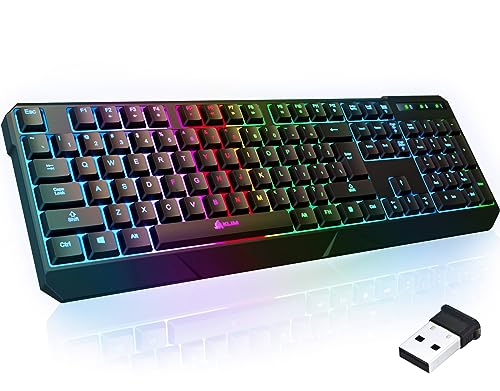


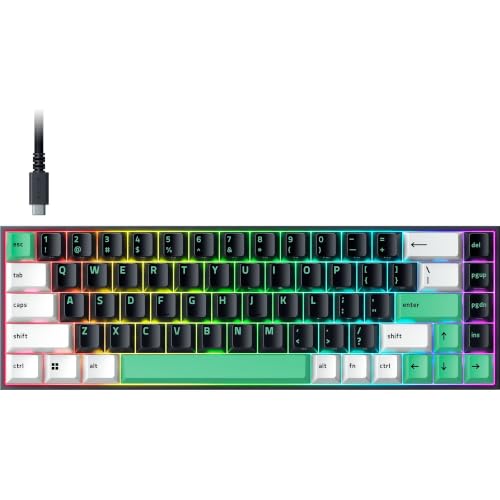


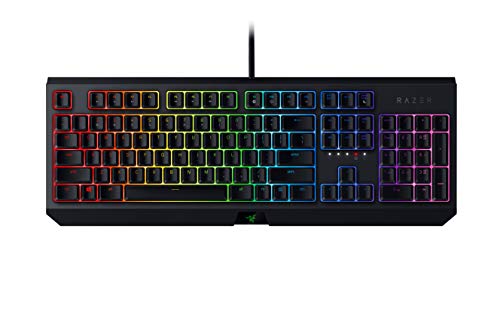
Three Budget Tiers at a Glance
The Budget Profile
Budget chroma boards, around $40 to $70, deliver bright RGB lighting and decent membrane or entry mechanical switches in a plastic case. Effects are usually controlled through simple onboard shortcuts, with a handful of preset waves and reactive modes. They suit first gaming desks, spare setups, and younger players who want the look without the cost. Expect single color zones on the cheapest models rather than true per key control, and keycaps that shine through unevenly. For casual play and homework, this tier already feels like a big step up from a plain office board.
The Midrange Profile
Midrange boards, around $80 to $130, are where chroma lighting gets serious. You gain true per key RGB, proper mechanical switches with a choice of feel, shine through PBT or quality ABS keycaps, and software that saves profiles to onboard memory. Cases gain metal top plates and a firmer, quieter typing sound. This tier suits gamers and typists who use one board for everything. Most buyers should start here, because the jump in switch quality and lighting control is the largest in the whole range.
The Premium Profile
Premium boards, around $150 to $250, add gasket mounted plates for a softer key feel, hot swappable sockets across the board, fast optical or magnetic switches, and wireless modes with low latency. Lighting engines support layered effects, per game integrations, and reactive ambient modes that mirror screen colors. The trade offs are price and software weight, since flagship apps can feel bloated. Buy this tier if you notice switch feel deeply, compete online, or plan to customize keycaps and switches for years rather than replace the board.
What Your Money Gets You at Each Price Tier
Budget Tier: What to Expect
At this level, lighting is the headline and typing feel is basic. Boards often use membrane domes or low cost mechanical switches with a gritty or uneven press. You still get media keys and a few effects, which is plenty for casual games and late night homework. Check whether lighting is per key or zoned, because zoned boards cannot highlight individual ability keys. Also confirm a wired connection you trust, since cheap wireless at this price can lag. Treat a budget board as a one to two year starter.
Midrange Tier: The Sweet Spot for Most Buyers
Midrange money buys the features people actually keep using: satisfying switches, per key lighting, onboard profile memory, and a USB C cable that detaches for travel. Keycaps resist shine longer, and stabilizers on big keys rattle less. Gamers comparing broader options can also browse our guide to the best gaming keyboard for non chroma rivals. Software at this tier usually balances depth with stability. If you type essays by day and play shooters at night, this is the tier that serves both without apology.
Premium Tier: When Spending More Pays Off
Premium spending pays off in feel and speed. Magnetic switches with adjustable actuation let you set rapid triggers for games and deeper presses for typing on the same board. Wireless links approach wired latency, polling rates climb, and cases feel dense and quiet. Lighting software syncs with games and other desk gear for one unified look. Typing sound also improves, a point explored in our guide to the best sounding keyboards. If none of those gains excite you, midrange boards will feel just as joyful.
Features Worth Paying For (and Ones to Skip)
Customization and Software
Good software lets you remap keys, record macros, and save lighting profiles to the board itself, so your setup travels between computers. Onboard memory for three to five profiles is a practical sweet spot. Per key effect editors matter for players who color code abilities or work shortcuts. Skip bloated extras you will never open, like cloud profile sharing, if the core editor is clunky. A board whose basic functions work without any app at all is a quiet advantage worth valuing.
Wired vs Wireless Connections
Wired USB C remains the safest choice for zero charging worries and the lowest latency. A 2.4 GHz wireless dongle comes very close for gaming and frees the desk, while Bluetooth suits typing across a tablet and laptop at lower polling rates. Battery life with full brightness RGB often runs 20 to 60 hours, far less than with lighting off, so heavy light users should expect weekly charging. General shoppers comparing office use can see our guide to the best pc keyboards for calmer alternatives.
Ergonomics, Size, and Layout
Full size boards include a number pad for data work but push the mouse far to the side. Tenkeyless and 75 percent layouts free desk space and keep shoulders relaxed during long sessions, while 60 percent boards suit minimal desks and travel. Wrist angle matters too, so a slight case tilt and an optional wrist rest help during long typing days. Take breaks and adjust chair height before blaming a board for sore wrists. Layout is personal, so count the keys you use daily before downsizing.
Switch Type and Performance
Mechanical switches come in linear, tactile, and clicky families. Linear switches press smoothly and suit fast games, tactile switches add a bump for typing feedback, and clicky switches announce every press to the whole room. Polling rate describes how often the board reports to the computer, with 1000 Hz standard and higher rates on premium gaming models. Most players cannot feel gains beyond 1000 Hz, so spend on switch feel first. Hot swappable sockets let you change switch types later without soldering, extending the boards life.
Picking the Right Fit for Different Uses
Best Mechanical Chroma Keyboards
The best mechanical chroma keyboards pair genuine mechanical or optical switches with per key lighting and sturdy keycaps. Prioritize switch choice, since linear, tactile, and clicky feels change the board more than any lighting effect. Look for PBT keycaps if you type daily, because they resist the shiny wear that makes legends fade. A mechanical board in the midrange tier serves most gamers and writers better than a membrane board at any price.
Long Term Costs to Factor In
Ownership costs stay modest but real. A fresh keycap set runs around $25 to $60, spare switches around $15 to $30, and a coiled or replacement USB C cable around $10 to $20. Wireless models eventually need battery care, and heavy RGB use means more charging cycles. Factor in a wrist rest at around $15 to $25 if your desk setup needs one, plus desk mat upgrades many buyers add for looks. Shoppers who also type on phones can compare our guide to the best wireless keyboards for portable options. A hot swappable premium board can absorb small upgrades for years, lowering total cost over time.
Frequently Asked Questions
Wired or wireless: which is better for gaming?
Wired is still the simplest and most reliable choice, with no charging and no interference worries. A quality 2.4 GHz wireless board now feels nearly identical in fast games, so competitive players can cut the cable safely. Bluetooth is the weak option for gaming because its polling rate is low. If you play ranked matches, choose wired or 2.4 GHz, and keep the cable nearby for charging either way.
What DPI do I need on a chroma keyboard?
DPI is a mouse spec, not a keyboard spec, so no keyboard has a DPI rating to chase. The keyboard measures that matter instead are polling rate, switch actuation point, and key rollover, which describes how many keys register at once. Full key rollover is standard on gaming boards. If a listing boasts DPI on a keyboard page, it is likely a bundle description mixing in a mouse, so check the specs carefully.
Are mechanical keyboards worth it?
Yes, for most gamers and heavy typists, because mechanical switches feel more consistent, last far longer, and can be replaced one at a time. A rated life of 50 million presses or more per switch is common. Membrane boards feel softer and quieter, which some offices prefer. The worth shows up after months, when a mechanical board still feels crisp while a cheap membrane board turns mushy.
Does a chroma keyboard work with Mac and console?
Most wired and Bluetooth chroma boards type fine on Mac and consoles, but lighting software is often Windows only, so Mac users set effects through onboard shortcuts. Consoles accept keyboards for text chat and supported games, though menus may still need a controller. Check the listing for Mac layout support if you need Command key legends. A board with onboard memory keeps your lighting profile across every device.
Final Thoughts
Decide your tier first, then choose switch feel, then enjoy the lighting. Midrange boards give most people per key color, real mechanical switches, and software that behaves. Compare the product table above before you buy, and the best chroma keyboards for your desk and budget will be easy to spot.