
Best Chairs for People with Back Pain Made Simple: A Clear Buying Guide for 2026
Disclosure: We may earn a commission when you buy through links on this page, at no extra cost to you. As an Amazon Associate I earn from qualifying purchases. Learn more

Learn how to choose the best chairs for people with back pain with plain English specs, sizing help, and clear setup tips for first time buyers.
If sitting leaves your back aching by midday, choosing among the best chairs for people with back pain can feel confusing. Product pages throw around terms like lumbar support and tilt tension without explaining what they change for your body. This guide starts with the basics, then walks through sizing, adjustments, and setup in plain English.
You do not need to become an ergonomics expert to choose well. You need a chair that fits your body, supports your lower back, and lets you change position during the day. Use the comparison table below to see how models differ on the basics, then read on for what each spec means in daily use.
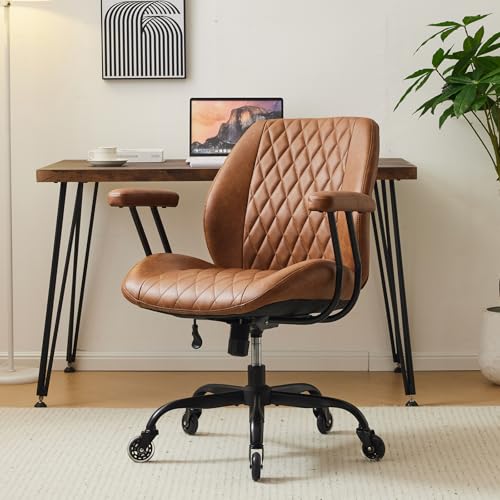



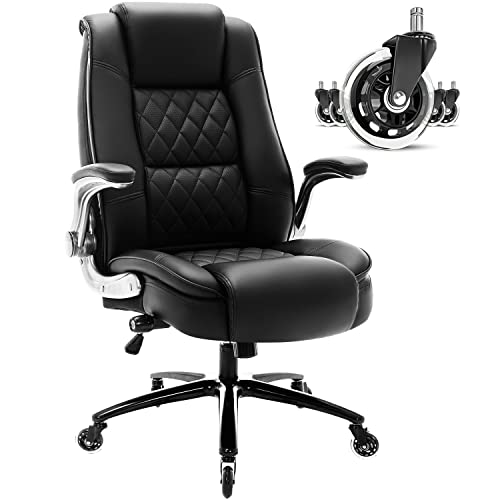
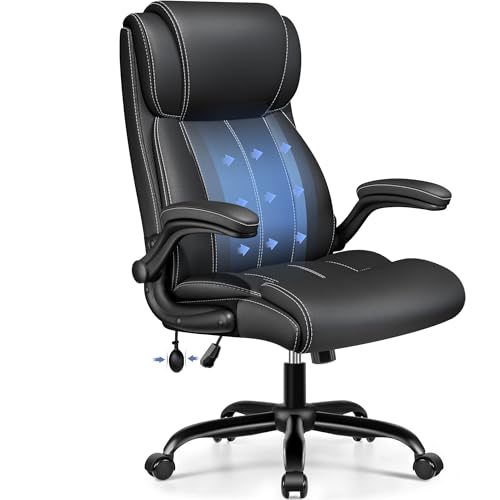
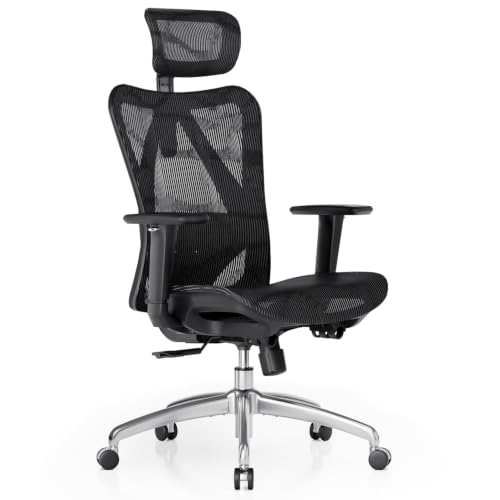


Chairs 101: The Basics
A chair built for back comfort is usually a task chair with a shaped backrest, a supportive seat, and several adjustments. The seat carries your weight, the backrest supports the natural curve of your spine, and a gas lift raises or lowers the whole chair. When those parts fit you, your muscles do less work to keep you upright.
A good chair supports better posture, but it cannot diagnose or treat a back condition. See a doctor promptly for new weakness or numbness in a leg, loss of bladder or bowel control, back pain with fever, or pain after a serious fall. Talk with your clinician or physical therapist about your personal needs, especially if pain keeps spreading or fails to ease with rest.
Sitting is only part of your day, and support at night matters too. If you often wake up stiff, your sleep surface may be adding to that strain. For that side of the picture, see our guide to the best mattresses for people with back pain.
Key Specs Explained in Plain English
Most listings for the best chairs for people with back pain use the same spec language, so the sections below translate each term into what you will actually feel. Read them in order and you will know which numbers deserve your attention.
Features That Matter for People
Back pain changes your priorities, since a small misfit repeats for hours every day. Lumbar support matters most, and the useful kind moves up and down or in and out so it meets the curve above your belt line. Seat depth matters next, since a seat that is too deep pushes you into a slouch. Look for about 1 to 2 inches of space behind your knees when your back touches the backrest. For the cushion, high density foam holds its shape longer than soft foam, while a mesh back lets air move on warm days.
If your discomfort centers on your lower back rather than your whole spine, lumbar fit deserves even more weight in your decision. Shoppers in that situation can see our guide to the best chairs for lower back pain for a closer look at lumbar focused designs.
What a Chair Built for Back Pain Does Differently
Unlike a fixed dining chair, a chair built for back pain lets you set the support where your body needs it. That adjustability helps you sit with your spine in a neutral curve instead of rounding forward as you tire. A slight recline also shifts some load off your lower back and onto the backrest. The limit is simple to state. No chair removes the need to stand, walk, and stretch, and an expensive model with the wrong seat size will still feel wrong.
Ergonomics and Adjustability
Ergonomics is the fit between you, the chair, and your desk. Seat height should let your feet rest flat with your knees near a right angle, and most adults do well with a range of about 16 to 21 inches. Adjustable armrests should support your forearms without lifting your shoulders, and 4D armrests also move side to side and front to back. A tilt lock lets you hold a reclined angle, while tilt tension sets how hard you must push to lean back.
Adjustment ranges vary a lot between ergonomic models, even when listings use similar words. If you want to compare those ranges in more depth, see our guide to the best ergonomic chairs for back pain.
Warranty and Return Policy
Warranty terms tell you what the maker expects to last. Frame and base coverage is often the longest, while the gas lift, foam, and fabric usually carry shorter terms. Read whether coverage pays for parts only or parts and shipping, and what counts as wear rather than a defect. Return policy matters just as much for a first purchase, since a chair can feel fine for ten minutes and ache after two hours. Favor a trial window long enough for several full workdays, and keep the box until you are sure.
Assembly and Delivery
Most chairs arrive in one large box with the backrest, seat, base, arms, and gas lift packed separately. Delivery weight can surprise new buyers, so plan a clear path to the room and ask for help moving the box if stairs are involved. Assembly usually takes about 20 to 40 minutes with the included hex key, and the backrest bolts are the awkward part for most people. Keep the manual, since it lists bolt sizes and part numbers you may need later.
Best Chairs for Specific Needs
Your daily setting shapes which chair makes sense, so think about where and how long you actually sit. A home office, a shared family desk, and a gaming corner place different demands on size, fabric, and recline. The product table above groups models by these basics.
Best Office Chairs for People with Back Pain: Tips for First Time Buyers
Shoppers comparing the best office chairs for people with back pain should start with desk fit. Measure your desk height first, since your elbows should rest near desk level once the seat and armrests are set. Check that the armrests slide under or level with the desktop without bumping it, and choose casters that suit your floor, with softer wheels for hard surfaces. A calmer style also matters in shared rooms, where a bulky racing look may feel out of place.
Office use usually means six to nine hours of sitting with short breaks, so breathable fabric and a firm seat earn their keep. If your work is mostly typing and calls, see our guide to the best desk chairs for back pain for options framed around desk work.
Gaming and Long Leisure Sessions at a Desk
Gaming sessions often run longer than planned, and many players lean back between matches. A taller backrest and a deeper recline can suit that pattern, but check how the lumbar cushion behaves when you recline, since a loose pillow can slide out of place. If this sounds like your routine, see our guide to the best gaming chair for back pain for designs built around long sessions.
Rookie Mistakes to Avoid
Most first purchase regrets come from a few repeat errors rather than bad luck. Read this list before you order, and check each point against the chair you are considering.
- Buying for looks alone can leave you with a fixed lumbar bump that presses in the wrong spot all day.
- Ignoring weight capacity can strain the gas lift and frame, so the chair starts sinking or wobbling far too soon.
- Choosing the widest seat in the store can leave shorter users perched on the edge without back contact.
- Raising armrests as high as they go can push your shoulders up and create neck tension by evening.
- Staying in one perfect posture for hours can stiffen your back, since even good support cannot replace movement.
Getting Started: Setup and First Use
Start by opening the box on a soft surface and matching every part against the parts list first. Fit the casters and gas lift first, then attach the arms and backrest while the seat sits on the box for height. Leave each bolt slightly loose until all bolts in a group have started, then tighten them in turn so parts pull together evenly.
Once the chair rolls and lifts smoothly, set it up in this order.
- Raise or lower the seat until your feet rest flat and your thighs sit level.
- Slide the lumbar support until it fills the curve just above your belt line.
- Set the armrests so your forearms rest lightly with your shoulders relaxed.
- Adjust tilt tension so you can lean back with gentle pressure, not a shove.
- Sit for an hour, then change one setting at a time until aches ease.
During the first week, small daily tweaks teach you more than one long setup session. Recheck the main bolts after the first month, and again every few months, since normal rolling slowly works them loose. Wipe dust and hair from the casters so the chair keeps rolling straight.
Frequently Asked Questions
What features matter most in a chair for back pain?
Adjustable lumbar support and correct seat depth matter most in a chair for back pain. If your budget forces tradeoffs, protect those two features first and accept simpler armrests or fabric. A useful order is fit, then lumbar adjustment, then recline control, then extras like headrests. Many new buyers reverse that order, which is why a clear priority list saves money.
Is an expensive chair for back pain worth the cost?
An expensive chair for back pain is worth the cost when the extra money buys fit and durability you will use daily. Higher prices, often around $400 or more for premium executive models, usually bring stronger frames, longer warranties, and smoother adjustments. They do not buy a medical benefit, and a costly chair in the wrong size is still the wrong chair. Spread over years of daily work, though, a well fitting chair can cost less per month than replacing a worn budget model twice.
How long should a chair for back pain last?
A chair for back pain should last about five to eight years with daily use, depending on build quality and hours seated. Foam that stays dented in the morning, a lift that sinks while you sit, and a new wobble at the base are common end of life signs. Heavier daily use shortens that span. Replacing worn casters or a gas lift can sometimes extend a sound frame.
How do you choose the right size chair for back pain?
You choose the right size chair for back pain by matching seat width and depth to your own measurements. Sit against a wall and measure from the wall to the back of your knees, then pick a seat depth a little shorter than that number. Measure your hip width while seated and leave a small gap on each side. Finally, check the lowest seat height against the length of your lower leg, since a chair that cannot drop low enough will leave your feet dangling.
What features help most in a chair for back pain during long hours?
A chair for back pain during long hours helps most when it makes small position changes easy. Beyond the usual adjustments, a simple timer habit adds real value, since standing for a few minutes each hour resets your posture better than any single setting. A small footrest can also help shorter users keep their feet supported when the desk forces a higher seat. Treat the chair as one part of a movement routine and long days become far more manageable.
Wrapping Up
Three checks will carry a first time buyer through most of the decision. Confirm the chair fits your body, confirm the lumbar support adjusts to your curve, and confirm you can shift position without fighting the controls. Then compare your shortlist against the comparison table above and favor the model that passes all three checks for your setting.
Take your time during the trial period and judge the chair after full days, not first impressions. If pain persists or worsens, a clinician can help you look beyond furniture for answers. With fit first and features second, the best chairs for people with back pain become a simple, sensible purchase.

