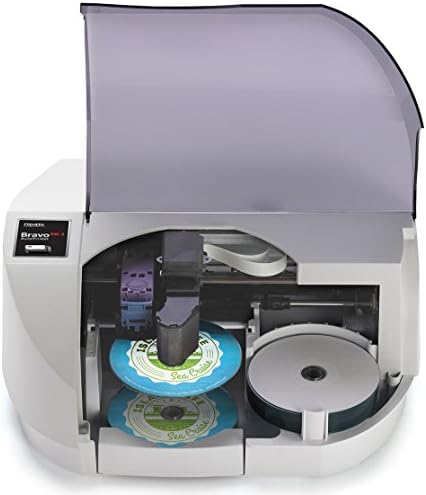
Best Cd Dvd Printers: Our 2026 Checklist and Guide
Disclosure: We may earn a commission when you buy through links on this page, at no extra cost to you. As an Amazon Associate I earn from qualifying purchases. Learn more

Use this checklist to choose the best cd dvd printers, covering disc trays, printable media, ink costs, print quality, and setup for home or studio use.
Printing directly on a disc sounds simple until you learn that only certain printers accept a disc tray, only certain discs take ink, and a smudged label can ruin an otherwise perfect burn. This guide gives you a clear checklist for the best cd dvd printers so you can check tray design, ink system, and software before you spend anything.
Work through the criteria below, compare your short list with the comparison table below, and you will know which questions to ask about any model, whether you print a few discs a month or a stack every week.


How We Evaluate Disc Printers
Printer Type and Disc Tray Design
Direct disc printing is an inkjet feature. The printer pulls a rigid tray holding the disc through a straight path, which keeps the disc flat and centered. Laser printers do not print on discs, because their heat and rollers are built for paper. If a listing does not name a disc tray and printable disc support in plain words, assume it cannot do the job.
Look at how the tray loads. A front loading tray is easier to align than a rear slot on a crowded desk, and a tray with clear guides reduces off center prints. Some models also print on small card discs or disc shaped media, but standard 120 mm discs are the core need for most buyers. For a focused look at the inkjet side, see our guide to the best cd dvd inkjet printer options and tray styles.
Reliability and Support
A disc printer is a long term tool, so driver support matters as much as hardware. Check that the maker offers current drivers for your operating system and a disc label design app that still gets updates. Older models often lose software support first, which can strand a working printer.
Read the warranty terms and note whether the print head is user replaceable or built into the machine. A strong user community helps too, because tray alignment tricks and ink settings for discs are often shared by owners rather than manuals. Prefer a maker with a clear support page, spare tray availability, and ink that is easy to buy in your region.
Print Speed
Disc printing is slower than paper printing because the tray feeds carefully and photo quality modes lay down more ink. A single full coverage disc can take one to several minutes depending on quality settings. Paper speed, quoted in pages per minute, tells you little about disc throughput.
If you print in batches, ask how the workflow handles a stack. Most home models print one disc at a time, so your real speed includes swapping discs and checking alignment. Studios that print hundreds of discs should look at dedicated disc publishers with auto loading, which cost far more but remove the manual swapping step.
Footprint and Noise
A disc printer needs clear space in front of the tray path, plus room to open any rear support. Measure your desk with the tray extended, not just the closed body. Compact models suit a home office, while wider photo printers need a dedicated corner.
Noise is modest on inkjet models, mostly tray movement and head passes, so most home users can print in a shared room without complaint. Place the printer on a flat, stable surface. A wobbly stand can shift the tray mid print and blur fine text near the hub, where space is already tight.
Print Quality and Resolution
Resolution, stated in dots per inch, affects how crisp small text and fine lines look on the disc face. In practice, ink spread on the printable coating matters just as much. A good disc print shows smooth gradients, deep blacks, and no banding across large color areas.
Use the maker disc setting rather than a plain paper setting, because it controls ink volume for the coating. Let prints dry fully before stacking, usually at least several minutes and longer in humid rooms. Test one disc with your sharpest artwork before a full run, and check the inner ring area where many designs place titles. If you also print covers and booklets, compare paper quality in our guide to the best quality printers for broader context.
Connectivity and Mobile Printing
Most disc design work happens on a computer, because label software needs precise control of text, images, and the center hole mask. A USB connection is therefore enough for many buyers and is the most reliable path for the design app.
WiFi and mobile printing still help for everyday paper jobs on the same machine, such as covers, invoices, or photos. Check whether disc printing itself is supported over WiFi or only over USB, since some models limit the disc function to a wired link. AirPrint and similar tools are for paper, not for the disc tray workflow.
Price Tiers That Pass Our Checklist
Midrange Tier
The middle tier, often about $200 to $400, usually combines a sturdy disc tray, a multi color ink system with separate cartridges, and current software support. These models print sharp disc faces and double as capable photo and document printers for a home office or a small studio.
Choose this tier if you print discs every month and want consistent color without fussing over settings each time. The main cost beyond purchase is ink, so check cartridge yields and whether a higher capacity option exists before you buy.
Value Tier
Value models, often about $120 to $200, cover the basics: a working disc tray, decent resolution, and simple label software. They suit occasional use, such as family video discs, music backups, or school projects, where a few minutes per disc is acceptable.
Expect slower printing, smaller ink cartridges, and fewer paper features. The risk in this tier is discontinued trays or software, so confirm spare tray availability and driver support for your system first. If your needs are mostly DVD labels, compare the focused options in our guide to the best dvd printers as well.
Heavy Use Tier
Heavy use points you toward either a higher end photo printer with a robust tray, often about $400 to $700, or a dedicated disc publisher that loads many discs on its own. The first suits a creator who prints discs alongside photos and art. The second suits a studio, church, or school producing runs of dozens or hundreds.
At this level, judge cost per disc, tray durability, and service options. A publisher with a worn loader can waste more time than it saves, so warranty length and local service matter more than a small speed gain.
Quick Buyer Checklist
- Does the listing name a disc tray and direct printing on printable discs in plain words?
- Do you own or plan to buy inkjet printable discs with a white or silver printable surface?
- Are current drivers and disc label software available for your operating system?
- Can you buy spare trays and the correct ink easily in your region?
- Does your desk have clear space for the tray path with the tray fully extended?
- Is the total ink cost per disc acceptable for the number of discs you print each month?
- Do you need the same machine to handle everyday paper printing, scanning, or copying?
- Does the warranty cover the print head, and for how long?
Red Flags to Watch For
The biggest red flag is vague wording. A printer that says it handles many media types but never names discs cannot print on discs, no matter how the seller phrases it. Another warning sign is a missing or oddly cheap replacement tray market, which hints the model is old or discontinued.
Watch for software that has not been updated in years, ink that only comes in costly combined cartridges when you print mostly one color family, and listings that confuse adhesive labels with direct disc printing. Labels can unbalance a disc and peel in a hot player, so they are not a substitute. Finally, be wary of very short warranties on a machine you plan to run weekly, and of sellers who cannot confirm which printable disc brands the tray accepts. Readers who only need CD faces can cross check our guide to the best cd printers for a narrower short list.
Setup and Care Tips
Print a test page and one test disc after setup to confirm alignment before a real job. Keep the tray clean and flat, and store it inside the printer or in its slot so it does not warp. Use genuine or reputable ink, because poor ink can clog nozzles and shift colors on the disc coating. Print something at least once a week to keep ink moving, wipe dust from the disc surface with a soft dry cloth before printing, and let each disc dry flat before you stack or sleeve it.
FAQs
Are ink tank printers worth it?
They can be, but only if the specific model includes a disc tray, which many tank models do not. A tank lowers ink cost for heavy paper printing and can help if you print many covers and booklets. For disc faces alone, a cartridge model with a good tray often makes more sense. Always confirm the disc feature first, then compare ink economics, never the other way around.
Inkjet or laser: which is cheaper long term?
For disc printing the question settles itself, because laser printers cannot print directly on discs at all. For paper, laser usually costs less per page for text, while inkjet handles photos and mixed color work better. If one machine must do discs and daily paper, an inkjet with separate color cartridges or a supported tank system usually gives the lowest total cost for mixed use.
What does cost per page mean?
Cost per page is the ink or toner cost divided across the number of pages a cartridge can print, giving you a running cost for each sheet. For discs, think in cost per disc instead: estimate how many full coverage discs one ink set produces, then divide the set price by that count. Light designs with much white space cost far less than full bleed photo designs.
Can any printer print on CDs and DVDs?
No, only models built with a disc tray and a straight media path can print directly on a disc. The disc itself must be an inkjet printable type with a special coating that holds the ink. A standard data disc with a shiny top will smear and can damage expectations for the job. Check both sides of the match, printer and media, before you buy either one.
The Bottom Line
Start with the tray, confirm software and ink support, and only then compare speed and price. Those checks protect you from the most common mistake in this category, buying a fine paper printer that cannot print a disc at all. Compare your finalists in the product table above, and the best cd dvd printers for your desk will be the ones that pass every item on this checklist at a running cost you can live with.