
Best Cardboard VR Headsets by Budget: A Buying Guide for 2026
Disclosure: We may earn a commission when you buy through links on this page, at no extra cost to you. As an Amazon Associate I earn from qualifying purchases. Learn more

Compare the best cardboard vr headsets by budget, lens clarity, phone fit, strap comfort and glasses space to choose a simple viewer for your phone.
Cardboard viewers look almost identical in photos, yet the viewing experience varies a lot once your phone slides in. Prices run from about $10 to $50, and that small gap pays for clearer lenses, better padding, and a strap that stays put. This guide to the best cardboard vr headsets shows where the extra money helps and where it does not.
Your phone supplies the screen, the sound, and the motion sensing, so the viewer itself is a simple holder with two lenses. Start with the product table below, then use the budget tiers and checklists that follow to match a viewer to your phone size, your glasses, and how long you plan to watch at one time.


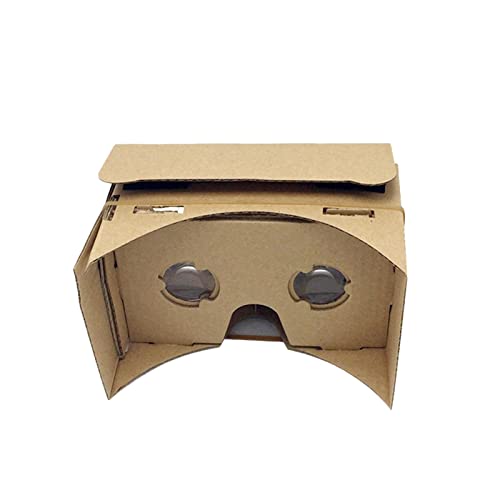
Who Should Buy a Cardboard VR Headset?
Curious First Time Viewers Trying VR at Home
You want a low cost way to watch 360 degree videos, try simple VR apps, and look around virtual tours without buying a dedicated device. A basic viewer is enough for short sessions on the couch. Choose a model that folds together in minutes and has a simple top button.
Families Sharing One Viewer With Children
A shared family viewer needs an adjustable strap and padding that wipes clean. Keep sessions short, stay seated, and supervise children the whole time. Stop right away if a child reports dizziness, nausea, a headache, eye discomfort, or blurred vision, and let those feelings pass fully before anyone tries again. If such symptoms keep returning or do not fade after rest, talk with your clinician about whether VR viewing is suitable for your child.
Viewers Planning Longer Sessions or a Later Upgrade
If you expect to watch full travel films or play simple games for 20 to 30 minutes at a stretch, comfort features stop being extras. Look for a firm strap, thicker face padding, and room to keep your phone case on. If you treat a viewer as a trial run before a dedicated device, see our guide to the best vr headsets to understand what the next step up adds.
Key Features to Compare
Phone Fit and Compatibility
Phone fit decides whether a viewer works at all, so measure your phone width and thickness, including its case, before you order. Most viewers accept phones with screens from about 4.7 to 6.2 inches, held by a flap, elastic band, or spring clip. A loose hold lets the phone shift and blurs the picture, so a centered, padded grip is the option most people should choose.
Lens Quality and Field of View
The lenses are the whole optical system, so their clarity shapes everything you see. Larger resin lenses, often around 34 to 42 mm across, usually give a wider and cleaner view than small thin lenses, and a field of view near 90 degrees feels broad for phone video. Look for lenses polished on both sides with no blue or purple tint in the middle. For films, favor edge clarity over sheer width.
Lens Spacing and Focus Adjustment
Lens spacing, often called IPD, is the distance between the two lenses, and it should sit close to the distance between your pupils. If text looks doubled or your eyes feel pulled inward after a minute, pick an adjustable model that slides each lens sideways. That is where the best cardboard vr headsets separate from the cheapest folds of board, because small adjustments remove strain that no app setting can fix.
Strap, Padding, and Nose Comfort
Without a strap, you hold the viewer to your face the entire session, and your arms tire long before a film ends. A three point strap that runs over the top of your head spreads weight better than a single side band. Foam padding blocks stray light and softens the board edge, while a deep nose cutout keeps the viewer off the bridge of your nose. For sessions past 15 minutes, treat the strap and padding as required.
Button Control and Viewer Profile Setup
Most apps need one simple input, provided by a conductive button or lever that taps the phone screen for you. Check that the button sits where your finger rests naturally and works through your screen protector. Each viewer should also carry a printed QR code for its viewing profile. Scanning that code tells the app how to space and bend the image for those exact lenses, and skipping it is the most common cause of a warped picture.
What Each Viewer Price Band Adds
If you want a viewer made only from folded board with no added padding, see our guide to the best cardboard headsets for that plainer style.
Entry Tier: Simple Viewers for a First Try
Viewers under $15 usually arrive flat, fold together with tabs or hook and loop pads, and skip the strap or include only a thin one. Lenses are smaller, padding is minimal, and the board is thinner. This tier suits buyers who value low price over comfort and accept replacing the viewer if the folds soften.
Middle Tier: Clearer Lenses and a Real Strap
Viewers at about $15 to $30 add the upgrades most people actually feel, including larger lenses, foam face padding, and an adjustable strap you can wear through a full film scene. The board is thicker, the holder grips more firmly, and lens spacing adjusts on many models. For weekly household use, this tier balances price, comfort, and edge clarity best.
Top Tier: Sturdier Builds for Regular Viewing
Viewers at about $30 to $50 use reinforced board or board bonded to a tougher shell, wider straps, and thicker padding that survives regular use. Some add focus adjustment and larger viewing windows for glasses. This tier suits teachers, frequent travelers, and anyone who has worn out a basic viewer. If you shop at this level often, see our guide to the best inexpensive vr headsets to check what a little more buys in plastic.
Common Mistakes to Avoid
- Ordering by price alone without measuring your phone, so the screen sits off center and one eye sees a dark edge.
- Skipping the QR profile scan for your viewer, so the app draws the image for different lenses and the scene looks bent.
- Buying a viewer with no strap for long films, so your raised arms ache and you rush through the content.
- Choosing the smallest lenses to save money, so the view feels like looking through a tunnel.
- Letting children watch for long stretches while standing, so dizziness combines with poor balance and leads to a fall.
- Leaving the viewer assembled in a damp bag, so the board absorbs moisture and loses its shape.
Care and Maintenance for Cardboard VR Headsets
Cardboard and water do not mix, so keep the viewer dry and store it flat or fully assembled in a dry drawer. Wipe dust off the board with a dry cloth only. Store it away from heavy stacks, since pressure along the folds can warp the front panel and move the lenses out of line.
Clean the lenses with a dry microfiber cloth in small circles, and never use window cleaner or tissues, which can scratch resin and leave fibers behind. Brush lint off the foam padding monthly so it keeps sealing out light. Once the board feels soft at the folds or the lenses stay cloudy after gentle cleaning, the viewer has reached the end of its useful life.
Cardboard VR Headsets: Your Questions Answered
Can I wear glasses inside cardboard VR headsets?
Yes, many viewers leave enough eye relief for standard glasses. Measure your frames across the front and compare that figure with the viewing window width the seller lists. Wide frames can press the foam and let light leak in at the sides. If your frames do not fit, a model with focus adjustment may let you view without glasses for mild prescriptions.
Are cardboard VR headsets safe for children?
Cardboard viewers are safe for most older children in short, supervised sessions. Seat your child, clear the floor space nearby, and set a timer for about 10 to 15 minutes per session. One point parents often miss is that children report motion sickness later than adults, so ask directly about stomach comfort and eye tiredness at every break instead of waiting for a complaint.
Do cardboard VR headsets need a gaming PC?
No, a cardboard viewer needs only a smartphone and never connects to a computer or console. Your phone runs the app, shows the split screen image, and senses head turns through its own motion sensors. Picture quality follows your phone, so an older phone will look softer in any viewer. Download apps over WiFi before a trip, since large VR videos can use a lot of mobile data.
How long can you use a cardboard VR headset before a phone gets warm?
Most phones feel noticeably warm after about 20 to 30 minutes of VR video, because the screen and processor work hard throughout. If the phone gets hot to hold, stop and let it cool. Removing a thick phone case before longer sessions helps heat escape.
How do you set up a cardboard VR headset with a new phone?
Setup starts before the phone goes in, so install a VR app first. Fold the viewer, scan its QR profile code from inside the app settings, then place the phone with the screen center line matched to the mark on the holder. Close the front flap, lift the viewer, and use the app recenter option while looking straight ahead so the horizon sits level.
Wrapping Up
Start with phone fit, then judge lenses and strap comfort. A viewer that centers your screen, matches your lens spacing, and stays comfortable for a full session will always beat a cheaper one you stop using. The best cardboard vr headsets for you are the ones matched to your phone and your viewing habits, so compare your shortlist against the product table above before you order.


