
Best Cardboard Headsets: Simple Buying Guide for 2026
Disclosure: We may earn a commission when you buy through links on this page, at no extra cost to you. As an Amazon Associate I earn from qualifying purchases. Learn more

Compare the best cardboard headsets by lens clarity, phone fit, straps and controls, with setup and care tips for 360 degree video on your phone.
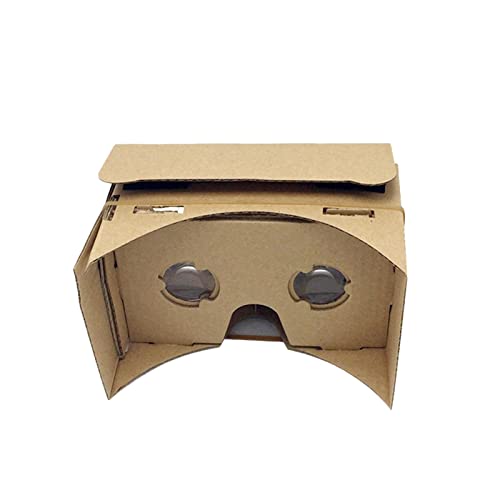
A cardboard headset turns the phone you already own into a simple viewer for virtual reality clips, 360 degree videos and classroom apps. The best cardboard headsets cost little, fold flat for storage and still give you clear lenses and a steady fit. This guide shows you how to judge lens quality, phone fit and comfort before you read the product table below.
Your phone supplies the screen, the sound and the motion sensors, while the body holds the lenses at the right distance from your eyes. Because the phone does most of the work, details like strap padding, lens alignment and a working touch button matter more than fancy packaging.


Who Should Buy a Cardboard Viewer?
Start with how you plan to watch. A viewer that suits a classroom demo may feel loose during a home movie night, and a snug padded viewer may be more than a casual user needs.
Students and Teachers Trying VR in Class
Class sets need viewers that fold fast, survive many hands and work with a mix of phone sizes. Look for sturdy board, simple assembly and a profile code that students can scan without help. Choose kits sold in multi packs if you need spares.
Families Sharing 360 Degree Videos at Home
Families need a viewer that several people can pass around and adjust in seconds. Look for face padding you can wipe clean, a strap that adjusts without tools and lenses wide enough for different eye spacing. A touch button helps younger viewers pause clips without removing the phone.
First Time Buyers Curious About VR
If you own a phone with a gyroscope and you only want to sample VR travel clips, concerts and museum tours, a cardboard viewer is a sensible first step. You spend about $10 to $30. If you later want a viewer with its own screen and tracking, see our guide to the best vr headsets to understand what that step up adds.
Key Features to Compare
Judge each viewer by how it handles your phone and your eyes. The sections below explain the factors that separate the best cardboard headsets from flimsy kits, and each one points to a simple check you can do before you buy.
Lens Size, Clarity and Field of View
Lenses do the visual work in a cardboard viewer. Common lens diameters run about 34 to 42 mm, and larger lenses usually show a wider field of view with less tunnel effect at the edges. Look for smooth, clear lenses without scratches or cloudy spots. Biconvex lenses are standard here.
Phone Size Fit and Tray Design
Your phone is the screen, so fit decides whether the image lines up at all. Most viewers accept phones with screens of about 4.7 to 6.5 inches, but check the listed maximum phone width as well, because cases change the fit. A spring tray or sliding tray should grip the phone firmly without pressing side buttons.
Focus and Eye Spacing Adjustment
Sharp focus depends on two distances, the gap between lens and screen and the gap between your two eyes. Some viewers let you slide the lenses or move the phone tray to match your eye spacing, while fixed models suit only average spacing. If you often share the viewer, choose an adjustable model so each person can sharpen the image.
Touch Button, Viewer Profile and App Fit
Most cardboard apps expect a single screen tap to select menu items and pause clips. Better viewers include a capacitive touch button or lever that taps the screen for you, so you do not open the tray for every choice. Each viewer should also carry a printed profile code. Scanning it tells the app your lens spacing and screen distance, and a missing code can leave the image warped. For more on this app system, see our guide to the best google cardboard headsets.
Face Padding, Nose Support and Head Straps
A cardboard edge against your face gets uncomfortable within minutes, so padding matters even on a budget viewer. Foam around the eye area spreads pressure and blocks stray light, while a soft nose piece stops the viewer resting on one sore spot. A three point strap system, with one strap over the top of your head, holds the viewer far steadier than a single side strap. Glasses wearers should look for a wide face opening.
Board Strength, Coating and Light Sealing
The body is mostly folded board, so thickness and finish decide how long it lasts. Thicker board holds its shape after many folds, and a smooth coating resists skin oil and light moisture on the face side. Check that flaps close fully, because gaps at the corners leak light and wash out dark scenes.
Types of Cardboard Headsets and How Setup Works
Setup takes a few minutes. Fold the flat sheet along its crease lines, fit the lens unit into its slots and secure the flaps so the body feels rigid. Scan the printed profile code, start a Cardboard app, place the phone in the tray with its screen center line matched to the viewer center mark, then close the front.
Flat Pack Kits You Fold Yourself
These classic kits arrive as a single scored sheet with lenses and a touch piece packed inside. They cost the least, store flat and suit classrooms that need many units. Refolding weakens the creases over time, so treat them as light duty viewers for occasional sessions. To compare kit styles by name, see our guide to the best cardboard vr headsets before you order class sets.
Prebuilt Viewers With a Rigid Body
Prebuilt models arrive already folded and glued, often with thicker board and a finished outer coating. They suit home users who watch weekly and want to start at once. They cost more than flat kits and take more shelf space, but they hold lens alignment better.
Cardboard Viewers With Added Comfort Features
Some cardboard viewers add foam face pads, wider straps and adjustable lenses while keeping the light folded body. They suit longer clips and frequent sharing, because each new user can adjust fit instead of holding the unit by hand.
Common Mistakes to Avoid
Small setup errors cause most blurry or tiring sessions.
- Buying a viewer without checking phone width leaves the screen off center and cuts off the image edges.
- Skipping the profile code scan leaves the app set for a different viewer and makes straight lines look bent.
- Holding the viewer by hand for a whole clip strains your arms and lets the image drift.
- Wearing the strap too tight presses the board edge into your face and shortens every session.
- Using a viewer with a scratched lens makes the image uneven and can leave your eyes tired.
- Storing a damp viewer in a closed bag softens the board and leaves a musty smell.
Care and Maintenance Tips for Cardboard Viewers
Clean lenses only with a dry microfiber cloth, using light circular strokes from the center outward. Never use household glass spray, because liquid can seep into the board layers and soften the body. Keep the viewer out of direct sun when empty, since bare lenses can focus sunlight onto nearby surfaces and damage them.
Let face padding dry fully after use and store the viewer in a dry place where nothing heavy rests on it. Check straps and flaps before each session, and retire a viewer whose body no longer holds its shape.
FAQ
Do cardboard headsets work with both iPhone and Android phones?
Yes, cardboard headsets work with both iPhone and Android phones when the phone fits the tray and has a gyroscope. The gyroscope tracks head turns, and phones without one show only fixed or drifting scenes. Before you buy, open a free 360 degree video and turn in a circle. If the view follows smoothly, your phone has the needed sensor.
Can you wear eyeglasses while using a cardboard headset?
Yes, you can wear eyeglasses inside many cardboard headsets if the face opening is wide and deep enough. Measure your frame width and compare it with the listed inner width before you order. If pressure builds at your temples, loosen the top strap first, since much of the weight can rest there instead of on your frames.
Why does the image look blurry in a cardboard headset?
The image looks blurry in a cardboard headset most often because the phone sits off center or the lens spacing does not match your eyes. Remove a thick phone case before you load the phone, since extra case depth shifts the screen away from the focus point. Then look at a line of on screen text and adjust until letters in the center sharpen for both eyes.
Can cardboard headsets play VR games or only videos?
Cardboard headsets can play simple VR games, but they suit videos and short experiences best. These viewers track head rotation only, so games that need you to walk forward, grab objects or dodge will not work as designed. Look for games built for a single touch button and seated play. Puzzle tours and simple target games fit this format well.
How long should you use a cardboard headset in one session?
You should use a cardboard headset for about 10 to 20 minutes at a time, then take a break. Stop at once if you feel dizzy, sick or unsteady, and do not use the viewer while standing near stairs. If dizziness or eye pain keeps returning across sessions, stop using VR viewers and talk with a clinician about your symptoms.
Our Verdict
Choose your viewer by lens clarity, phone fit and strap comfort first, and treat extra accessories as a bonus. Use the product table above to check phone size limits and price before you order. With the right fit, the best cardboard headsets give you an easy taste of VR from a phone you already own, for little money and storage space.


