
Best Cameras for Instagram: A First Time Buyer's Guide for 2026
Disclosure: We may earn a commission when you buy through links on this page, at no extra cost to you. As an Amazon Associate I earn from qualifying purchases. Learn more

Buying your first camera for a photo feed? Compare sensor size, lens speed, low light skill and phone transfer across the best cameras for instagram.
Buying your first dedicated camera is a different job from choosing a phone, because the choices are about sensors, lenses and files rather than apps. If you post stills and short clips most days, the best cameras for instagram are the ones whose files look clean after the feed has finished with them and reach your phone in seconds. This guide starts with the basics, then explains each spec in plain English. The comparison table below lines the main camera classes up side by side.
One fact shapes every choice ahead. The platform crops and compresses every upload, so the file your camera makes is only the starting point. A huge, noisy file loses its detail on the way in, while a smaller file shot in good light often posts sharper. Judge each feature below by what survives that squeeze, not by the biggest number printed on the box.



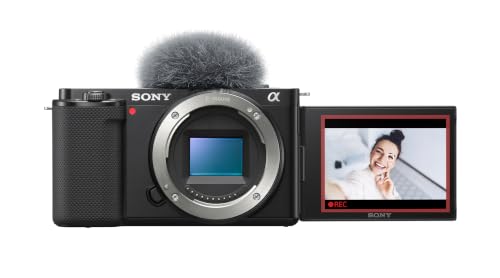


Cameras 101: The Basics
A camera is a light recording tool: a lens gathers the scene, a sensor turns it into a file, and the processor decides how that file looks. First time buyers meet three classes. Compact cameras keep the lens fixed and the body small, while mirrorless cameras let you swap lenses as your subjects change.
A phone camera is a separate class again, always connected and always in your pocket, and our guide to best phone cameras for instagram covers that class on its own terms.
The file matters as much as the hardware. Every camera here saves finished pictures you can post at once, and most also save raw files that hold extra detail for editing apps. A memory card stores the files and a battery powers the body, so both belong in your first budget. Nothing in this guide needs studio gear to make sense; a window, a table and a clean lens cover most first shoots.
Key Specs Explained in Plain English
Features That Matter for Instagram
The feed shows stills in square and tall portrait crops, so a camera that previews those framings on its screen saves guesswork at the moment of shooting. Video posts lean on steady footage and clean sound, while selfies live or die by a screen that flips around to face you. These three format classes, stills, video and selfies, split the platform work between them, and few cameras lead at all three. Decide which format you post most before you compare sensors, because that order changes the right pick.
Sensor Size and Image Quality
Sensors come in steps: small 1 inch chips in compacts, larger APS C sensors in most mirrorless bodies, and full frame sensors at the top. A bigger sensor gathers more light, which means cleaner files in dim rooms and softer backgrounds behind a subject. More megapixels only add cropping room; past a modest count they add file size the feed throws away. For most first time buyers, an APS C body is the honest middle: clearly better files than a compact, at a price that leaves money for a lens.
Low Light Performance
Cafes, concerts and evening streets are where feeds are won, and low light skill comes from three places. A wide aperture lens, shown by a small f number such as f1.8, lets in the most light per shot. A sensor that stays clean as sensitivity rises keeps colors true, and stabilization steadies your hands so slower shutter speeds stay sharp. Judge low light by lens speed first; a fast lens on a mid size sensor beats a slow kit lens on a bigger one.
Lens and Zoom Range
Optical zoom uses glass to move closer, so detail survives; digital zoom only crops the file, and the feed crops it again. A moderate range, roughly equal to 24 to 70 mm in full frame terms, covers food, portraits and travel scenes for most posters. A fixed focal length lens, called a prime, trades that flexibility for a wider aperture and a smaller size. If your feed is mostly people, a prime around 35 or 50 mm is the classic starting point.
Autofocus and Stabilization
Modern autofocus can find and follow an eye, which keeps portraits sharp even when the subject laughs or turns. Pet and vehicle tracking modes exist too, and they help more than extra megapixels ever will. In body image stabilization, often shortened to IBIS, smooths handheld video and stills at slow speeds. For clips, a small gimbal is the next step up, but start with the built in system and learn its limits before spending more.
Picking the Right Cameras for Different Uses
Most accounts mix formats, yet one usually leads. If still images carry your feed, the classes compare closely in our guide to best cameras for instagram photos, which weighs sensors and lenses for stills alone. Video first and selfie first buyers should weight the specs above differently.
Rookie Mistakes to Avoid
- Chasing megapixels: past a modest count, extra pixels only grow files that the feed compresses away.
- Buying a camera that fights your phone: slow or fussy transfer means the camera stays home while the phone does the posting.
- Spending the whole budget on the body: a mid price body with a fast lens posts better than a costly body with a slow kit lens.
- Ignoring the flip screen: if half your posts are selfies or solo video, a fixed screen turns framing into a guess.
- Forgetting the small costs: a spare battery, a fast card and a case belong in the first budget, not the second one.
Getting Started: Setup and First Use
Charge the battery fully, format the card inside the camera, and set the file size to a level the feed keeps, with the taller portrait framing in mind. Then pair the camera with your phone before your first real shoot. The transfer class is the daily class of this purchase: a camera that fights your phone loses to it, so practice sending a photo until the steps feel automatic.
Use a lens cloth, not your shirt, to clean the front glass. Carry a spare battery, because video and wireless sending drain a pack faster than stills alone.
Frequently Asked Questions
What features matter most in cameras for Instagram?
Transfer speed, a lens matched to your subjects and clean low light files matter most. A camera that sends a photo to your phone in seconds gets used daily, while a sharper camera with clumsy sending stays in a drawer. One point the spec sections skip: set a custom frame guide for the tall portrait crop if your camera offers one, so faces and products sit inside the safe area before you press the shutter.
Is a smartphone enough instead of a dedicated camera for Instagram?
For bright daylight snapshots, yes, a current phone is genuinely enough. A dedicated camera pulls ahead when you zoom across a room, shoot in dim light, or want backgrounds to melt away from the subject. It also lets you print a favorite shot large without the file falling apart, something the feed never asks for but a framed gift does. Buy the camera for the shots your phone keeps missing, not for the badge.
Which camera class handles low light best for Instagram photos?
The class with the fastest lens handles low light best, whatever the sensor size. A compact with an f1.8 lens can outshoot a larger body wearing a slow f3.5 to f5.6 kit zoom in the same cafe. If you often shoot at night, compare the widest aperture first and the sensor second. Also brace the camera against a wall or table when you can; support keeps files cleaner than raising sensitivity does.
How much should a first time buyer spend on a camera for Instagram?
Plan on about $300 to $700 for a first camera that clearly beats a phone. The lower end buys a good compact or an older used mirrorless body; the upper end adds a fast prime lens, which changes low light shots more than a newer body would. Keep about $50 aside for a card, a spare battery and a case. Spending past this band mainly buys speed and build, which a new poster rarely feels.
Should I shoot raw or JPEG for Instagram?
JPEG is fine if you post straight from the camera, because the files are small and transfer to your phone quickly. Raw gives more room to fix exposure and color in an editing app, but the files are large and need an extra step before posting. Many cameras save both at once, so keep raw plus JPEG on while you learn, and delete the raw files you never edit.
Final Thoughts
A first camera for a daily feed is a habit purchase as much as a hardware one. Put transfer speed and lens choice at the top of your list, let sensor size follow, and the best cameras for instagram become the ones you carry without thinking. Compare the classes in the product table above, pick the format you post most, and start shooting this week.

