
Best Cameras for Home Use: A Checklist for Confident Buying for 2026
Disclosure: We may earn a commission when you buy through links on this page, at no extra cost to you. As an Amazon Associate I earn from qualifying purchases. Learn more

Compare the best cameras for home use with a simple checklist covering sensor size, autofocus, low light results, video, lenses, and everyday ease of use.
Choosing a camera for birthdays, family visits, pets, hobbies, and everyday moments at home is easier when you judge every model against the same checklist. The best cameras for home use are not always the ones with the longest spec list. They are the ones you will actually pick up, learn quickly, and trust in the lighting your home really has.
This guide walks through that checklist in plain language, from sensor size and autofocus to battery life and lens choices. Use it alongside the comparison table below, and you will be able to explain why one camera suits your household better than another before you spend anything.




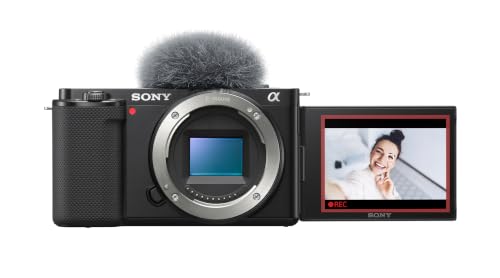


How We Evaluate Cameras for Home Shooting
Think of the sections below as a scoring sheet you can apply to any model in the product table above. A camera does not need to win every category. It needs to be strong in the categories that match how your household actually takes photos and video.
Sensor Size and Image Quality
The sensor is the part of the camera that records light, and its size shapes detail, color, and performance in dim rooms. Compact models often use a 1 inch sensor, mid range and enthusiast models use APS C, and the largest common format is full frame. Larger sensors generally gather more light and give you cleaner files and softer backgrounds. Megapixels matter less than many listings suggest. A modest pixel count on a larger sensor often looks better indoors than a huge pixel count squeezed onto a tiny one.
Ease of Use for Your Skill Level
A home camera should invite use, not demand study before every shot. Look for a clear auto mode, menus you can understand without a manual open beside you, and simple controls for flash, zoom, and scene choices. Fast transfer to your phone through a companion app matters too, because photos that stay trapped on a card rarely get shared.
Low Light Performance
Most home photos happen in the evening, near windows, or under warm lamps rather than in bright sunshine. A lens with a wide maximum aperture, written as a low f number, lets in more light and helps the camera keep shutter speeds fast enough to avoid blur. Higher usable ISO settings also help, because they let the sensor work in dimmer rooms.
Size, Weight, and Ergonomics
A camera that feels awkward will stay in a drawer, so handling is a real buying factor. Point and shoot compacts slip into a pocket and suit quick snapshots, while larger bodies offer a firmer grip, bigger buttons, and a viewfinder that helps in bright light. Consider who will hold the camera most. Smaller hands may prefer a lighter body, and anyone shooting long family events will appreciate a grip that does not tire the fingers.
Video Capabilities
Many households want one device that handles both stills and clips of school plays, first steps, and holiday gatherings. 4K video gives crisp detail and room to crop later, while good 1080p remains fine for sharing online. A screen that flips forward helps anyone recording themselves, and a microphone input lets you add clearer sound for interviews or music practice.
Autofocus and Stabilization
Autofocus decides how reliably the camera locks onto moving kids, pets, and guests instead of the sofa behind them. Systems with face and eye detection hold focus on people even as they turn or walk, which removes a whole category of ruined shots. Image stabilization is the partner feature. It steadies small hand movements at slower shutter speeds and smooths handheld video.
Battery Life and Charging
Battery ratings are usually given as shots per charge, and video recording drains a battery far faster than stills do. For a busy household, look for ratings that cover a full day of mixed use, or budget for a spare battery from the start. USB C charging is a genuine convenience because the camera can top up from the same cables and power banks you already own.
How to Match a Camera to Your Budget and Habits
Rankings alone cannot choose for you, because the right choice among the best cameras for home use depends on your rooms, your subjects, and your patience for learning controls. Use the decisions below with the comparison table above as your shortlist.
Setting a Realistic Budget for Home Shooting
Start with the total you can spend on the whole kit, not just the body or the compact itself. Memory cards, a spare battery, a case, and a basic tripod can add about $50 to $150 to the starting price. Simple compacts often cost under $300, while advanced interchangeable lens kits can reach about $2,000. Spending more mainly buys low light strength, faster focus, and better video, so decide which of those you will notice weekly.
Choosing Between Fixed Lens and Interchangeable Lens Models
A fixed lens camera, including the objective lens built into the body, is the simplest path. You charge it, point it, and shoot, and optical zoom on many compacts covers family scenes well. An interchangeable lens model lets you change lenses for portraits, wide room shots, or distant subjects, and it can grow with your skills. The tradeoff is size, cost, and more decisions before each outing.
Planning for Lenses, Cards, and Extra Costs
If you choose an interchangeable lens camera, the kit lens is a sensible start for general home scenes. Add a fast prime lens later if portraits in dim light become your favorite subject, rather than buying several lenses on day one. Buy memory cards with enough speed for your video settings, and keep at least one spare formatted and ready.
Quick Buyer Checklist
Run through these questions before you order. A camera that earns a yes on the points that matter to you is a safer buy than one with a longer feature list and several no answers.
- Does the sensor size suit mostly indoor and evening shooting in your home?
- Can every regular user in the household handle the size and weight comfortably?
- Does the autofocus track faces and eyes for moving kids and pets?
- Is the stabilization strong enough for handheld photos and video?
- Does the video quality and screen design match how you record family events?
- Can the battery last a full day of your typical use, or is a spare affordable?
- Does your total budget still work after cards, a case, and a spare battery?
- Is the camera weatherproof enough if you plan to shoot in gardens or light rain?
Red Flags to Watch For
Some listings look impressive until you read them closely. Walk away or dig deeper when you spot these warning signs.
- Huge digital zoom numbers are presented as the headline feature, because digital zoom simply crops the image and loses detail.
- The listing hides the sensor size or states it in confusing terms, because makers of strong cameras state it plainly.
- Megapixels are the only image quality claim, because sensor size and lens quality shape your results far more.
- The warranty is very short or the seller is unclear, because repairs and returns become your problem later.
- Reviews mention overheating, slow focus, or app connection failures again and again, because repeated complaints point to real flaws.
Choosing Cameras for Your Situation
Best Video Cameras for Home Use
If video is your main reason for buying, the priorities shift. Look first at clean 4K video, reliable autofocus that follows a face without hunting, and stabilization that keeps walking shots watchable. A flip screen and a microphone input move from nice extras to core needs if you film tutorials, music, or family messages.
Best Document Cameras for Home Use: What to Check
Document cameras serve a different job, presenting papers, books, artwork, or small objects to a screen or an online class. For the best document cameras for home use, check the arm design first, because it must hold the camera steady above a page without sagging. Resolution and autofocus should keep text sharp edge to edge, and a built in light helps in dim rooms. Confirm the camera connects easily to your computer and works with the meeting and classroom apps your household already uses.
When You Want to Watch Your Home, Not Just Photograph It
Some readers arrive here hoping to check on a pet, a doorway, or an elderly relative rather than take portraits. That is a different product category, and it pays to read dedicated guidance before mixing the two. Start by comparing the best security cameras for home use if alerts and night viewing top your list. For wider property coverage and recording options, see our guide to the best surveillance cameras for home use. If running cables is impractical, our roundup of the best wireless cameras for home use explains battery and WiFi tradeoffs.
Any camera that records people raises questions about consent and local law, so read the rules for your state before placing one. Never record guests, carers, or tenants in ways your local rules forbid, and keep bedrooms and bathrooms camera free.
Care and Maintenance Tips
Good habits keep a home camera ready and extend its working life. Clean the front element of the lens with a proper lens cloth, never your shirt, because fabric grit can leave fine scratches. Wipe the body with a soft dry cloth after outings, and keep the camera in a dry padded bag away from bathroom steam and kitchen grease. Carry a spare charged battery and rotate both batteries so neither sits empty for months.
Frequently Asked Questions
Can a Smartphone Replace a Dedicated Camera for Home Use?
For casual snapshots in good light, a recent smartphone is often enough. A dedicated camera pulls ahead in dim rooms, at longer zoom ranges, and when you want shallow background blur or long video recordings without draining your phone. Battery life is another edge, because a camera can shoot all afternoon while your phone stays free for calls and messages. Many households keep both and reach for the camera at gatherings.
How Much Should a First Time Buyer Spend on a Home Camera?
A sensible first budget is about $300 to $700 for the camera itself, with extra set aside for a card, case, and spare battery. Below that range you often give up sensor size and focus speed, which are the two things home shooters notice most. Above it, gains are real but narrower, mostly in video features and build quality. Buying a mid priced camera you understand beats stretching for an advanced model whose menus discourage you.
What Specs Matter Most for Beginner Home Photographers?
Beginners should rank sensor size, autofocus reliability, and simple controls above everything else. Those three decide whether everyday photos come out sharp and well exposed without effort. Optical zoom range comes next if you shoot school stages or sports from a distance. One point many new buyers miss is screen brightness outdoors, so check that the display stays readable on a sunny porch. Skip spec sheet contests over megapixels until these basics are covered.
What Does Optical Zoom Mean on a Home Camera?
Optical zoom means the lens physically moves to make distant subjects appear closer, and the image keeps its full detail. A rating like 10x means the longest setting frames a subject roughly ten times larger than the widest setting. Digital zoom, by contrast, only enlarges the middle of the image and softens it. For home use, judge zoom together with stabilization, because long zoom settings magnify hand shake as much as they magnify the subject.
Which Camera Features Matter Most for Low Light Home Photos?
A wide aperture lens, a larger sensor, and effective stabilization matter most, in that order for most homes. Together they let you avoid flash and keep the warm look of lamplight in evening portraits. Also look for focus that still works in dim conditions, sometimes listed as low light autofocus sensitivity. A practical bonus is a quiet shutter option, which helps during sleeping baby photos and evening recitals when noise would distract everyone nearby.
Final Thoughts
Sensor size, autofocus, and honest low light ability decide most home photos, so weigh those before zoom numbers or megapixel claims. Match the body size and controls to the people who will actually use the camera, and keep your total budget honest by including cards and a spare battery. Work through the product table above with this checklist beside you, and the best cameras for home use for your household will be the ones that fit your rooms, your subjects, and your habits.


