
Best Cameras for Beginners Video: Types and Features for 2026
Disclosure: We may earn a commission when you buy through links on this page, at no extra cost to you. As an Amazon Associate I earn from qualifying purchases. Learn more

Compare the best cameras for beginners video by type, autofocus, stabilization, sound and recording limits, with budget guidance.
Video asks different things from a camera than photos do. Your clips need steady footage, sharp focus on a moving face and sound that does not echo. The best cameras for beginners video make those basics easy so you can think about your story, not your settings. Use the product table to compare the main options, then read the sections that match how you plan to film.
This guide explains the camera types, the handful of features that decide video quality, what each budget level buys and the beginner mistakes that waste money. Start with where you will film most often, because a desk setup, a walk outdoors and a school event all ask for different strengths.

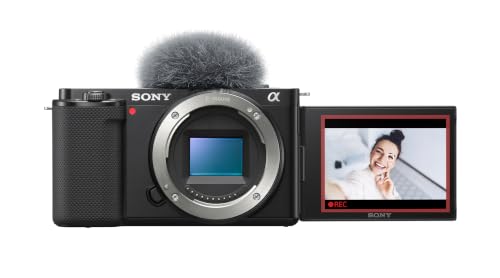
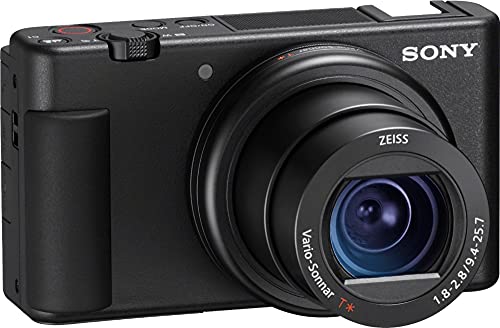




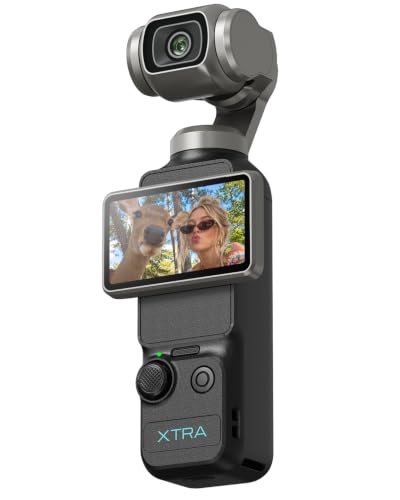

Best Cameras for Beginners Video by Type
Four camera types cover most first video purchases. Pick the one that matches your main use, then compare models inside that type.
Vlogging Cameras for Filming Yourself
Vlogging cameras are built for creators who film alone. They offer a screen that flips to face you, autofocus that holds on your face, built in stabilization and often a microphone input. Sensors are usually one inch in size, which beats a phone in dim rooms. The limits are a fixed lens and fewer manual controls than a larger camera. Choose this type for talking videos, tutorials and travel clips.
Mirrorless Cameras for Growing Into Video
A mirrorless camera has a larger sensor and interchangeable lenses, which gives cleaner low light footage and softer backgrounds. It costs more and takes longer to learn, but it grows with you as you add a wider lens, a brighter lens or a microphone. Choose this type if you plan to keep making videos for years.
Action Cameras for Movement and Rough Conditions
Action cameras are small, rugged and often waterproof, with very wide lenses and strong stabilization. They suit sports, cycling, travel and any shot where a normal camera would be at risk. Small sensors limit dim light quality and the wide view stretches faces up close, so many beginners use them as a second camera.
Camcorders for Long Recordings
Camcorders are made for video. They offer a long optical zoom, comfortable handling and recording that can run for hours. They suit school events, sports from the sidelines and anyone who films long sessions. Their background blur and low light quality are usually weaker than a mirrorless camera.
Key Features to Compare for Video
Check these features in order, because the first ones affect every clip you record.
Autofocus That Follows Faces
Face and eye detection keep you sharp when you move, lean in or hold a product toward the lens. Hunting focus is the most common reason beginners abandon clips. Look for smooth refocusing and a touch screen that lets you tap to choose a subject.
Image Stabilization
Stabilization smooths small hand movements. In body or lens systems are gentle, while electronic stabilization crops the frame slightly for extra smoothness during walking shots. A small grip or gimbal helps if you move a lot.
Audio Inputs and Built In Microphones
Viewers forgive soft video sooner than harsh sound. A 3.5 mm microphone input lets you add a clip on or shotgun microphone, which improves speech more than any camera upgrade. A headphone jack lets you hear problems while you record.
Resolution, Frame Rate and Recording Limits
4K video gives you room to crop and reframe in editing, while 1080p files are smaller and easier to edit on an older computer. Thirty frames per second suits most speech and 60 frames per second smooths action. Check the recording time limit and heat behavior, because some cameras stop a clip after about 30 minutes or when they warm up.
Sensor Size and Low Light
A larger sensor gathers more light and keeps indoor video cleaner. One inch sensors suit bright rooms, APS C sensors give a clear step up in dim light, and full frame costs the most. A small LED light near your face often helps more than a bigger sensor.
Screen, Size and Battery Life
A fully turning screen makes self filming easy. Compact bodies are easier to carry, but video drains a battery fast, so plan on a spare battery and USB C charging for long days.
What Each Budget Level Buys
At about $100 to $300 you find basic compacts and action cameras that record clear 1080p or 4K in good light but struggle in dim rooms. At about $400 to $900 you reach vlogging cameras and entry mirrorless bodies with reliable autofocus, flip screens and microphone inputs, which is where most beginners should look. Above about $1,000 you gain larger sensors, richer color options and better low light results, which matter most if you film in the evening or earn money from your videos. Keep roughly a fifth of your budget for a microphone, a tripod, a memory card and a spare battery.
Common Mistakes to Avoid
- Buying on megapixels alone ignores autofocus, stabilization and sound, which decide whether footage is watchable.
- Skipping a microphone input leaves you with echoing audio that no editing fixes.
- Choosing a screen that does not face you makes solo framing a guess.
- Ignoring recording limits risks a camera that stops in the middle of a long take.
- Spending the whole budget on the body leaves nothing for a tripod, memory card or light.
Care and Setup Tips
Charge the battery, format the memory card in the camera and record a short test clip before an important shoot. Play it back with headphones to check sound, focus and framing. Clean the lens with a lens cloth, not your shirt, because grit in fabric can scratch the coating. Store the camera in a dry, padded bag and keep a spare battery in your pocket.
Frequently Asked Questions
What makes a camera for beginners different from an advanced camera?
A beginner camera focuses on clear menus, reliable automatic modes and simple controls, while an advanced camera adds deeper manual settings and professional formats. Beginner models record excellent video, so the difference is guidance, not quality.
What features matter most in cameras for video?
Autofocus on faces, stabilization, a microphone input and a screen you can see while filming matter most. Sensor size and resolution come next.
How much should I spend on my first video camera?
Most beginners do well with about $400 to $900 for the camera, plus a small budget for a microphone, tripod and spare battery. Spend less if you only film casual clips in good light.
Which camera type is better for low light video?
A mirrorless camera with an APS C or full frame sensor and a bright lens is better in low light than a compact or action camera. A small LED light improves any camera.
Is a smartphone enough instead of a video camera?
A smartphone is enough to start, and many creators begin there. A dedicated camera adds a microphone input, optical zoom, longer recording and better dim light results. For more on camera choices for video makers, see our guide to the best video cameras for beginner filmmakers.
Final Thoughts
Choose the type that matches your main filming situation, then check autofocus, stabilization, sound and recording limits before you compare resolution. Use the product table to line up the options, and keep a little budget for a microphone and a tripod. The best cameras for beginners video buyers pick are the ones that are easy to set up, so you film more often and learn faster.


