
Best Cameras for Beginner Youtubers in 2026: A Clear Buying Guide Made Simple
Disclosure: We may earn a commission when you buy through links on this page, at no extra cost to you. As an Amazon Associate I earn from qualifying purchases. Learn more

Shopping for the best cameras for beginner youtubers for the first time? Learn the terms, compare options, and avoid rookie mistakes with this easy guide.
Your first YouTube camera has one main job. It must record you clearly while you think about your topic, not about settings. The best cameras for beginner youtubers start easily, keep your face in focus while you film alone, and record clean sound. This guide covers the basic terms, then shows you how to use the comparison table below.
Begin with how you plan to film. A desk setup in one room asks for different things than walks, travel days or lessons where your hands do the talking. The sections below match each style to the specs that matter for it.
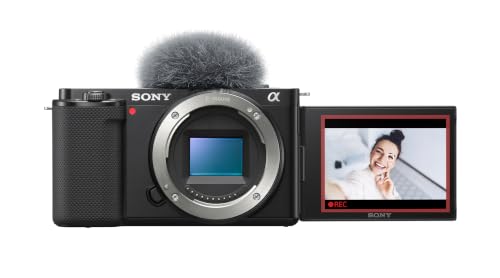


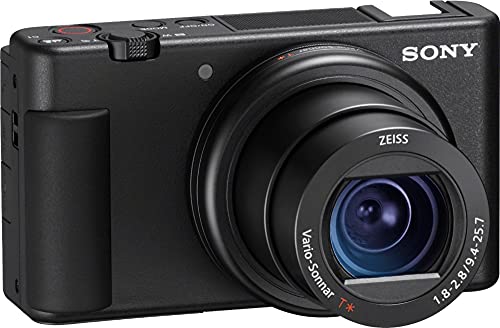


Cameras 101: The Basics for a First YouTube Camera
A camera turns light into a video file. Light passes through the lens and reaches the sensor, and the camera measures brightness, sets focus and writes the result to a memory card. A good beginner camera can handle exposure for you while you learn framing and speaking on camera.
Four broad types cover most new channels. Compact cameras have a fixed lens, and many creators start with this kind of model, so see our guide to the best digital cameras beginners can learn on for that route. Mirrorless cameras accept changeable lenses and give you room to grow. DSLR cameras use a mirror and an optical viewfinder, and our guide to the best dslr cameras for beginners covers that older style. Action cameras are tiny and tough, built for bikes and helmets rather than desk filming.
Who Should Buy Which Type of Camera for YouTube?
Pick the type that matches the videos you will record most often in your first six months, not a format you may try one day.
Solo Creators Filming at a Desk or Table
You film yourself alone, usually seated, with nobody behind the camera to check focus. Choose a mirrorless or compact camera with a screen that flips toward you, reliable face detection and a microphone input. You work close to the lens, so a wide view matters more than a long zoom.
New Creators Filming Walks and Daily Life
You record while moving through streets, parks and trips, and the camera must keep up without a heavy bag. Choose a light compact or action style camera with strong stabilization and controls you can reach with one hand. Weather sealing helps in light rain, and power bank charging suits long days out.
Beginners Filming Lessons, Crafts and Cooking
You show your hands as much as your face. Choose a camera that focuses at close range, fits an overhead mount and records long sessions without stopping early. A tilting screen lets you check the work surface while you stand beside it, and clear sound matters because your voice often comes from off camera.
First Camera Specs Explained in Plain English
Only a handful of spec sheet items change how your first videos look and sound. Work through the factors below in order, and the best cameras for beginner youtubers become much easier to sort.
Beginner Friendly Features That Matter
A beginner friendly camera starts fast, shows a simple menu and explains its modes in plain words on screen. Look for an auto mode that handles brightness and focus while you learn, plus guided scene options for common subjects. A record button you can find by touch also matters, because you often start the camera while looking at the lens.
Features That Matter for Youtubers
YouTube filming adds needs that photo cameras can skip. Face and eye autofocus must hold focus when you move, lean or hold an item toward the lens. A microphone input lets you add a small external microphone, and a headphone socket on some models lets you catch sound problems early. If video comes first for you, our guide to the best video cameras for beginner youtubers looks at video first models in more depth. A product showcase setting that keeps a held item sharp also helps solo presenters.
Sensor Size and the Picture Quality It Gives New Creators
Sensor size shapes picture quality more than the megapixel count does. A 1 inch sensor is common in compact cameras and gives clean video in normal indoor light in a small body. APS C sensors are larger and gather more light, and full frame sensors are larger still and cost the most. Judge a camera for YouTube by its sensor and video features first.
Autofocus, Stabilization and 4K Video
Autofocus decides whether you stay sharp while filming alone. Face and eye tracking suits presenters best, and focus should shift smoothly, not jump, when you move. Image stabilization steadies small hand movements, which helps walking and handheld shots. 4K video records four times the detail of full HD and lets you crop a little in editing without a soft picture. Rates of 24, 30 or 60 frames per second cover most channels.
Battery Life and Charging
Battery ratings often count still photos, so video drains a battery faster than the headline number suggests. Plan on about 60 to 120 minutes of recording from one charge on many beginner models. USB C charging is worth having, because you can top up from a laptop or power bank between sessions. A spare battery is the simplest safeguard for filming days.
Low Light Performance
Low light performance decides how clean your video looks in the evening or in a room with one lamp. A lens with a wide maximum aperture, shown by a low f number such as f/1.8 or f/2.8, lets in more light. Higher ISO settings raise brightness but add grain, so cleaner high ISO output gives you more freedom. For more on picture quality, see our guide to the best quality cameras for beginners.
Rookie Mistakes to Avoid
Most first camera regrets come from buying for the wrong format or skipping a small accessory, not from choosing the wrong brand.
- Buying a camera with no microphone input leaves you stuck with thin room sound that viewers notice within seconds.
- Choosing a fixed screen you cannot see from the front makes solo framing a guess and wastes takes.
- Paying for a long optical zoom you never use adds size and cost while desk videos need a wide view instead.
- Ignoring record time limits and heat warnings can stop a long lesson in the middle of a take.
- Forgetting the cost of a tripod, a memory card and a spare battery leaves the camera hard to use on day one.
Setting Up Your First Camera for Your First Video
Charge the battery fully and format the memory card in the camera before your first real session. Mount the camera on a tripod at about eye level, sit in your filming spot and check the frame on the flip screen. Record a short test clip at your normal speaking volume, then play it back with headphones to check focus, framing and sound together. Write down the settings that worked for next time.
Use the auto or program mode for your first week and change only one setting at a time after that. Place a soft light in front of you rather than behind you, because a bright background makes the camera darken your face.
Care and Maintenance for Your First Camera
Clean the lens with a soft lens cloth, not your shirt, because shirt fabric can hold grit that scratches the coating. Keep the camera in a padded bag away from damp rooms, and take the battery out if you will not film for several weeks. Wipe the body after outdoor shoots, check the tripod screw for looseness, and store memory cards in a case.
Cameras: Your Questions Answered
What makes a camera for beginners different from an advanced camera?
A camera for beginners differs mainly in guidance and control depth. Beginner models lean on auto modes, on screen guides and simpler menus, and they often limit manual sound levels and custom picture profiles in exchange for that simplicity. Advanced models add dials and finer control that help only once you know each setting. Starting simple lets you publish sooner.
What features matter most in a first camera for a YouTube channel?
Focus you can trust, a screen you can see from the front and a microphone input matter most in a first YouTube camera. One small detail adds real value here: a record lamp on the front of the body confirms at a glance that the camera is rolling. That lamp prevents presenting a full segment to a camera that never started.
Which camera type is better for low light filming on YouTube?
A mirrorless camera with a larger sensor is usually better for low light filming on YouTube. Its sensor gathers more light, and changeable lenses let you add a wide aperture lens later. Before paying more for a bigger sensor, try a small LED panel near your filming spot, because added light often fixes dim video for far less money.
How much zoom does a beginner YouTube camera need?
Most beginner YouTube cameras need very little zoom. Desk filming calls for a wide view, roughly what a 24 mm to 35 mm lens gives on a full frame camera. Optical zoom uses the lens and keeps detail, while digital zoom crops the picture and softens it. Travel filming is the main case for a longer zoom range.
Is a smartphone enough instead of a camera for a new YouTube channel?
Yes, a smartphone is enough to start a new YouTube channel. Phones record sharp video in good light, and a phone can later serve as a second angle or backup recorder. Its limits show up in dim rooms, in sound picked up from across a space, and when calls or storage warnings interrupt a long recording session.
Wrapping Up
Choose by format first. Match the camera type to your main videos, then check the short list that decides daily use: face tracking autofocus, a flip screen, a microphone input, honest battery life and low light strength that suits your room. Simple controls you understand will serve a new channel better than advanced settings you never touch.
Compare best cameras for beginner youtubers with those points in mind, use the product table above to check the details side by side, and pick the camera you will set up gladly each week. Steady practice will improve your videos faster than any single spec.


