
Best Cameras for Beauty Videos in 2026: Which Type Is Right for You?
Disclosure: We may earn a commission when you buy through links on this page, at no extra cost to you. As an Amazon Associate I earn from qualifying purchases. Learn more

Compare the best cameras for beauty videos by type, autofocus, color, screen and sound for makeup, skincare and tutorial filming.
Beauty filming asks more of a camera than ordinary video does. Skin must look natural, foundation shades must read true, and focus must hold while you lean in or lift a brush toward the lens. The best cameras for beauty videos handle those jobs without constant correction, and the comparison table below helps you sort the main types quickly.
Start with how you film most often. A tutorial at a desk needs a different camera from a routine filmed at a mirror or a live chat with viewers.
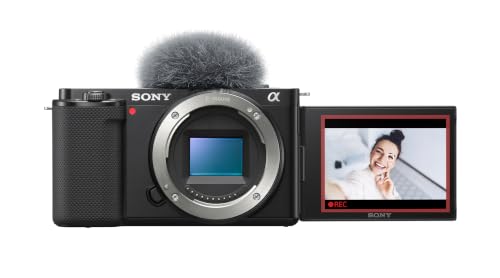
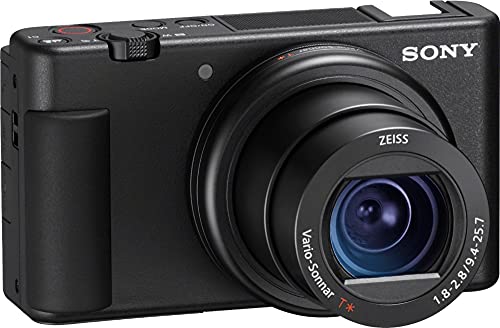



Who Should Buy Which Cameras for Beauty Videos?
Match the camera to your format first. A body that feels simple for seated tutorials can feel clumsy for overhead shots or live sessions.
Makeup Tutorial Creators Who Film at a Desk
You sit in one place, work through steps in order and check each blend on screen as you go. Choose a camera with a screen that turns toward you, reliable eye autofocus and a lens that keeps your face natural at arm length. A remote or phone control helps you start each take without leaning across your products.
Skincare Creators Who Show Texture Up Close
You need viewers to see gloss, flakes, pores and how a cream spreads, often from only a few inches away. Choose a lens with a short minimum focus distance and autofocus that does not hunt when a jar moves in front of your face. Steady indoor color matters more for you than very high frame rates.
Live Streamers and Short Form Beauty Creators
You film often, publish fast and may record vertical clips and live sessions in one sitting. Choose a camera that connects cleanly to a computer, runs through a long chat and sends clear sound from a desk microphone. If you also record daily routines, see our guide to the best cameras for video blogging for setups that cover more rooms.
Key Features to Compare
Compare these factors in order, because beauty work fails on color and focus long before it fails on headline resolution.
Autofocus That Holds Eyes and Faces
Autofocus for beauty work must track eyes while you look down at a palette, close one eye to apply liner or hold a product beside your cheek. Good systems find the nearer eye again after you turn away and do not jump to a bright window behind you. Choose a camera that lets you tap the screen to focus on a product, then returns to your eye when you lower it.
Color, White Balance and Skin Tones
Color decides whether a foundation shade in your video matches the shade in the bottle. Look for manual white balance that you can lock for a whole session, because auto settings can drift as you add warm blush or cool shadow and shift your skin tone with them. Natural color out of the camera saves editing time, and a flat profile only helps if you enjoy careful color work later.
Sensor Size and Indoor Light Performance
Sensor size shapes how clean your image looks under room lamps. A one inch sensor suits bright desks, while APS C and full frame sensors gather more light and keep shadow areas cleaner when you film in the evening. Larger sensors also soften backgrounds more easily. Megapixels matter less here, because clean light and steady exposure shape skin detail more than a large still photo count.
Lens Choice, Close Focus and Flattering Perspective
Your lens decides how your face is shaped on screen. Very wide views stretch the edges of your face and make a brush look larger than it is, while a moderate view at a little more distance keeps features in natural proportion. Check the minimum focus distance before you buy, because a lens that cannot focus on a lipstick tip from your usual seat will frustrate every detail shot.
A Screen You Can See and Stabilization You Can Trust
A screen that flips forward or swings to the side lets you check framing, flyaway hair and shine without standing up between takes. Touch control should let you set exposure and focus from your seat. Image stabilization matters most when you hold the camera for a moving clip, because small hand shake grows obvious on a large monitor.
4K Video, Audio Inputs and Useful Connections
4K video gives you room to crop a wide tutorial shot into a close view of one eye during editing while keeping detail. A microphone input and a headphone socket matter more than extra effects, because viewers forgive soft focus sooner than echo or harsh room sound. For live work, look for clean output over HDMI or a direct USB webcam mode. If you also film broader lessons, see our guide to the best cameras for video.
Types of Cameras for Beauty Videos Compared
The three types below cover almost every beauty setup. In every type, the best cameras for beauty videos share steady eye focus, honest color and a screen you can check without leaving your seat.
Mirrorless Bodies for Lens Freedom and Soft Backgrounds
Mirrorless cameras give you the most control over lens, light and background softness. Start with a standard zoom for full tutorials, then add a brighter lens for evening filming or a lens with closer focus for texture shots. A working kit often costs about $700 to $1500. Choose this type if beauty is your main channel and you plan to grow your lens kit over time.
Compact Cameras Built for Self Filming
Compact cameras pair a fixed lens with a small body, a forward facing screen and menus built for creators who film alone. They start fast, fit a small desk and need no lens decisions, and many cost about $500 to $900. Their smaller sensors ask for better room light, and you cannot change the lens if its closest focus limits you. For this narrower group, see our guide to the best beauty cameras.
Smartphones and Action Cameras as a Second View
A recent smartphone can be a sound main camera for short clips, with strong autofocus, easy vertical framing and instant sharing. Action cameras suit a wide overhead or travel view, but their very wide lens distorts faces at desk distance and their color controls are limited, so use them as a second angle. Our guide to the best digital cameras helps if you are choosing a first camera of any kind.
Common Mistakes to Avoid
These errors are common in first beauty setups and each one costs you retakes.
- Filming with a very wide lens close to your face stretches your features and makes makeup look uneven.
- Leaving white balance on auto lets your skin tone shift during one tutorial as face colors change.
- Buying for still photo megapixels instead of video autofocus leaves you with hunting focus in every clip.
- Sitting with a bright window behind you turns your face into a dark shape.
- Recording room sound with no microphone check gives viewers echo and appliance hum.
- Choosing a lens that cannot focus at your detail distance makes texture shots blurry.
How to Make Your Beauty Video Camera Last Longer
Makeup dust is the quiet enemy of a desk camera. Keep powder and spray products away from an open lens mount, put the cap back on between sessions and wipe the grip with a dry cloth after filming, because foundation builds up on dials. Clean the lens with a lens cloth, not your shirt, since shirt fabric can hold grit that scratches coatings.
Carry a spare battery so a low battery never forces an awkward charging position. Store the camera in a dry, padded bag away from bathroom steam, and check the tripod plate and strap lugs each month for looseness.
FAQ
What features matter most in a camera for beauty videos filmed at a desk?
Eye autofocus, locked white balance and a screen you can see from your seat matter most at a desk. One point many new creators miss is desk depth: measure the space between your chair and the wall behind the camera, because a moderate lens needs that distance to frame your head and shoulders without distortion.
How much should you spend on a first camera for beauty videos?
About $400 to $800 covers a capable first camera for most new beauty creators. Spend the rest of your budget on light and a simple microphone before you chase a larger sensor. A modest camera in soft, even light looks better than a costly body under a single ceiling bulb.
Which camera type is better for beauty videos in low indoor light?
A mirrorless camera with an APS C or full frame sensor is better in low indoor light. Its larger sensor keeps shadow areas cleaner and holds skin detail with less grain at higher sensitivity. A bright lens helps just as much as the body, so pair that sensor with a lens that opens wide rather than the standard zoom in the box.
Is a smartphone enough for beauty videos instead of a dedicated camera?
Yes, a recent smartphone is enough to start beauty videos and learn your format. Its screen, autofocus and editing apps remove most setup friction for short clips. Move to a dedicated camera when you need closer focus, a microphone input with monitoring, or longer sessions where the phone heats up, fills its storage or interrupts filming for calls.
What camera specs matter most for beginners filming beauty videos?
Beginners should read the video autofocus description, the screen movement and the minimum focus distance first. Those three specs decide daily filming comfort more than top frame rates do. Also check the recording limit in the manual, because some cameras stop each clip at a set length that can cut into a long, single take tutorial.
Final Thoughts
Put focus, color and your screen first, then choose the type that fits your room and your budget. Mirrorless cameras offer the most growth, compact cameras offer the simplest desk setup and a good phone offers the fastest start. Use the product table above to check screen type and microphone input.
Chosen that way, the best cameras for beauty videos are the ones that let you film a full tutorial without fighting focus or fixing color for hours. Start with the type that matches your most common video, and add light before you add cost.


