
Best Cameras for Airbnb: Matching the Right Model to Your Routine for 2026
Disclosure: We may earn a commission when you buy through links on this page, at no extra cost to you. As an Amazon Associate I earn from qualifying purchases. Learn more

Compare cameras for an Airbnb by sensor, lens, low light skill, and battery life, with clear guidance on shooting wide rooms, video tours, and daily care.
There is no single model that suits every Airbnb routine, because photographing a dim studio, filming a video tour, and documenting scuffs between guests all ask for different strengths. The best cameras for airbnb use are the ones that match your rooms, your lighting, and how often you shoot. A compact that lives in a drawer near the front door may serve a small listing better than a large kit you dread setting up.
This guide sorts cameras by job rather than by brand name. You will learn which features make small rooms look honest and inviting, how sensor size and lens choice affect interior shots, and where a phone is honestly enough. Use the comparison table below to narrow your shortlist by type and price range.




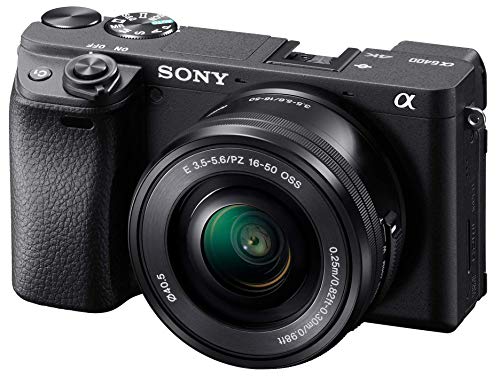


Who Should Buy Which Cameras for an Airbnb?
Start with the job you repeat most often. A host shooting one listing a year needs something different from a guest who films every stay or a host building a condition record at every changeover.
Hosts Photographing a Listing for the First Time
You need a camera that makes a whole room readable in one frame, with reliable auto exposure and colors that look true under household bulbs. Simple menus matter more than advanced controls, because most hosts update only a few photos each season. A compact with a wide lens or an entry level mirrorless camera with its standard zoom both fit well. If you are new to cameras entirely, see our guide to the best starter cameras for the simplest starting points.
Hosts Who Document Condition Between Stays
Your priority is clear detail in ordinary light, fast startup, and easy transfer of photos to your phone so each set joins the right booking record. Short video clips help too, since a quick sweep shows that appliances run and windows close. Photographs you take yourself while cleaning are different from fixed monitoring devices. If you want fixed devices at entry points, see our guide to the best security cameras for airbnb and follow the disclosure rules there, because cameras inside a listing are not allowed and outdoor devices must be disclosed to guests.
Guests and Traveling Creators Who Stay Often
You want one camera that captures both the rental and the trip around it, so size and versatility lead your choice. Look for good 4K video, autofocus that follows people smoothly, and a screen you can turn toward yourself for quick updates from a rental desk or balcony. Weather sealing earns its keep on rainy city breaks and beach stays. Point and shoot compacts suit travelers who value pocket size, while a small mirrorless camera suits those who edit and print.
Key Features to Compare
The features below decide how your rooms actually look on a booking page. Judge each one against your space, your light, and your skill, not against a spec sheet alone.
Features That Matter Most for Airbnb Rooms
In practice, the best cameras for airbnb listings shine on field of view, dynamic range, and honest color. A wide view lets you show a whole bedroom from one corner, while strong dynamic range holds detail in a bright window and a shaded bed at the same time. Accurate white balance keeps white bedding white under warm lamps instead of turning it orange. A tilting screen helps you compose low shots of a kitchen or bathroom without lying on the floor. When guests can judge a room size honestly from your photos, your reviews tend to match your listing.
Sensor Size and Image Quality
Sensor size shapes how clean your photos look when light drops. A 1 inch sensor in a compact already beats most phones in dim rooms, an APS C sensor gathers more light again, and a full frame sensor gives the cleanest shadows and the most control over depth of field. If clean, detailed images matter more to you than small size, see our guide to the best quality cameras for models built around image quality first.
Lens Choice and Field of View
The objective lens decides how much of a room fits in the frame. For interchangeable lens cameras, a wide zoom covering about 16 to 35 mm in full frame terms handles most living spaces, while compacts should start at about 24 mm or wider in equivalent terms. Optical zoom then helps with detail shots of a coffee station or a reading nook without walking closer and changing the perspective. Check that the camera corrects lens distortion, because straight door frames make a room look calm and true.
Ease of Use for Your Skill Level
A camera you understand beats a powerful one you avoid. Full auto and scene modes handle mixed window and lamp light well enough for most listings. App transfer over WiFi moves photos to your phone for quick uploads while you are still at the property. For a wider overview of formats before you narrow down, see our guide to the best digital cameras and then return here to judge each format against your rooms.
Low Light Performance
Many rentals look their best at dusk, and many look dim at noon. A lens with a wide maximum aperture, such as f/2.8 or wider, gathers more light, while usable high ISO settings keep evening shots clean instead of grainy. Image stabilization lets you handhold slower shutter speeds for still rooms, which keeps ISO lower and colors richer. Prefer this combination over direct flash, which flattens a room and leaves harsh shadows behind furniture.
Battery Life and Charging
Manufacturers rate battery life in shots per charge, but video drains a battery far faster than stills, and 4K video is the hungriest mode of all. A listing shoot plus a video tour can empty a small battery in one visit. USB C charging is worth seeking, because you can top up from the same cable and power bank you carry for your phone. Carry one spare battery on changeover days.
Before You Shoot: Preparing a Room and Checking Your Angles
Preparation does more for a listing photo than any camera setting. Clean the space as if guests arrive within the hour, open every curtain, switch on the lamps you want in the shot, hide charging cords, and straighten bedding and cushions. Close toilet lids, line up chairs, and clear the counters, because a camera shows small messes clearly.
Shoot most rooms from a corner or doorway at about chest height, and keep the camera level so walls stay vertical. Take wide shots that show how spaces connect, then a few closer frames of the details guests care about, such as the bed, the desk, and the shower. For condition records, repeat the same angles at every changeover so two sets of photos compare easily. If you also shoot for yourself as a guest or creator, see our guide to the best cameras for photography for composition ideas that go beyond listing work.
Common Mistakes to Avoid When Buying Cameras
- Choosing by megapixel count alone, so dim rooms still look grainy and colors drift under mixed lighting.
- Using the widest lens setting for every shot, so rooms look stretched and furniture near the edges bends.
- Skipping an evening trial shoot, so you discover weak low light results only after guests book from dull photos.
- Buying a large camera you dislike carrying, so listing updates and condition photos quietly stop happening.
- Installing a fixed camera without disclosing it to guests, so a trust problem ends the listing instead of protecting it.
- Relying on one battery and one memory card, so a dead battery on changeover day leaves you with no condition record.
How to Make Your Camera Last Longer
Clean the lens with a proper lens cloth rather than your shirt, because grit trapped in fabric can leave fine scratches on the coating. Keep the camera in a dry, padded bag between uses, ideally where you store the listing supplies, so it stays charged, findable, and protected from cleaning sprays and steam. After shooting exteriors in rain or near the coast, wipe the body dry before storing it, since weather sealing sheds splashes but does not make a camera waterproof.
Small habits protect the parts that fail first. Keep the lens cap or cover on during cleaning visits, recharge batteries before they sit empty for weeks, and store a spare card in the bag rather than loose in a drawer. If dust spots appear in the same place on ceiling areas, have the sensor cleaned by a service shop instead of poking at it yourself.
Frequently Asked Questions
What features matter most in a camera for Airbnb listing photos?
A wide lens, strong dynamic range, and clean low light results matter most in a camera for Airbnb listing photos. Those three decide whether a small room reads clearly and honestly on a booking page. One extra point helps more than buyers expect: turn on the grid overlay if your camera offers one. Level horizons and straight vertical lines make even simple rooms look cared for.
How many megapixels does a camera need for Airbnb listing photos?
About 20 megapixels is plenty for Airbnb listing photos on any current camera. Booking platforms resize and compress your uploads, so extra resolution mostly goes unseen by guests. The useful benefit of a higher count is cropping room: you can straighten a slightly tilted shot or trim a distracting edge and still keep enough detail. Spend the rest of your budget on the lens and light instead of chasing the largest number on the box.
Is a smartphone enough instead of a dedicated camera for an Airbnb listing?
Yes, a recent smartphone is enough for many Airbnb listings, especially in bright rooms. Phones handle mixed lighting automatically and upload photos in seconds. A dedicated camera pulls ahead when rooms are dim, when you want a video tour with cleaner sound, or when you repeat the same shots often and want them to match. A practical middle path is to start with your phone, then upgrade only if evening photos keep disappointing you or your guests.
Which type of camera handles low light Airbnb interiors best?
A mirrorless camera with a larger sensor and a wide aperture lens handles low light Airbnb interiors best. It gathers more light, so evening shots stay clean at settings where a compact starts to smear detail. Rooms offer one advantage people forget: nothing in them moves. A simple tripod lets almost any camera use a slow shutter and low ISO, which can beat a costly camera used handheld, so consider one before you spend more on a body.
How much should a first time Airbnb host spend on a camera?
Most first time hosts do well spending about $250 to $600 on a camera and lens together. That range covers capable compacts with 1 inch sensors and entry mirrorless kits with wide enough starter lenses. Keep a small part of the budget aside for a spare battery, a memory card, and the tripod mentioned above. Spending more mainly buys cleaner dusk photos and faster handling, which matter once you run several listings or shoot very often.
Can a camera record guests inside an Airbnb property?
No, a camera must not record guests inside an Airbnb property. Airbnb prohibits cameras inside a listing, and outdoor cameras must be clearly disclosed and must not point into private spaces. Rules differ by place, so check local law and the current platform policy before installing anything at all. Photographs you take yourself between stays, while no guests are present, are a separate and accepted practice.
The Bottom Line
Match the camera to the job you repeat: wide and honest for listing photos, quick and clear for condition records, small and versatile for travel. Lens width and low light ability will shape your results far more than megapixels or brand loyalty. Use the product table above to compare the types that fit your routine, and choose the best cameras for airbnb work in your home by starting with your darkest, smallest room and letting it set your standards.


