
Best Belkin Surge Protectors (2026): Models for Every Room
Disclosure: We may earn a commission when you buy through links on this page, at no extra cost to you. As an Amazon Associate I earn from qualifying purchases. Learn more

Choosing the best belkin surge protector? Match strips, pivot outlets and wall taps to each room by joules, spacing and cord length.
A summer storm rolls through, the lights flicker once, and everything behind your TV goes dark at the same time. The TV, the streaming box, the console, the router, and two chargers were all sharing one old strip with no protection left in it. Choosing the best belkin surge protector for your home starts with moments like that one, not with the biggest number on a box.
This guide helps you choose by room, by how many people share the outlets, and by budget, with a focus on living rooms, bedrooms, and home offices. If you are still comparing brands, see our guide to the best surge protector first, then use the product table below to match Belkin types to your rooms.


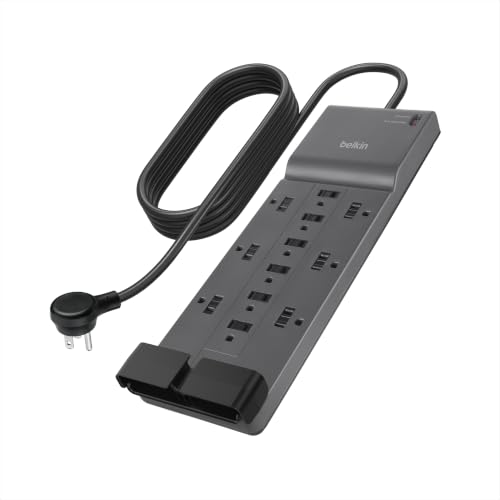
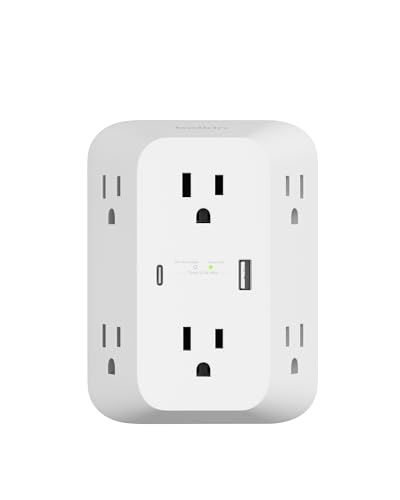


Quick Answer: The Main Types at a Glance
Most households do not need the largest model Belkin sells. They need the right form for each room and a rating matched to the gear in that room.
- A corded strip with a flat plug suits a living room, where outlets sit behind furniture.
- A compact cube or wall mount tap suits a bedroom, where only a few items charge overnight.
- A pivot outlet strip suits a desk, where bulky adapter blocks waste sockets.
- A higher rated strip with a longer cord suits a shared family space.
Before You Buy: A Quick Checklist
Which Type Fits Your Routine
Start with how the room is used each day. A corded strip gives you reach when the wall outlet sits far from your gear. A wall mount tap adds sockets right at the outlet and suits a kitchen counter. A cube takes little space on a nightstand. Rotating outlets help at a desk because each socket can turn to fit a bulky adapter. Choose an outdoor rated housing only for covered outdoor use, and a smart model only if you want scheduling or app control.
Features Worth Paying For and Ones to Skip
The joule rating tells you how much surge energy a unit can absorb over its working life, so a higher rating generally means more protection capacity for costly electronics. Clamping voltage tells you how much voltage the unit lets through before it reacts, and a lower figure such as 330 volts is stronger for gear on a standard home circuit. A protection indicator light is worth paying for because it shows protection is still active. USB ports are worth it where phones charge daily. Skip coax or phone line protection if you have no cable box or landline.
Compatibility Checklist
A surge protector only works as intended in a grounded three prong outlet, so check your wall outlets first, especially in older homes. Measure the distance from the outlet to your gear before you pick a cord length, and check whether a flat plug is needed to push furniture close to the wall. Count adapter blocks as well as plugs, because wide blocks can cover the socket next door. If you are unsure whether the strip you own now protects anything at all, our guide, surge protector vs power strip, explains the difference in plain terms.
Performance per Dollar
Compare what each dollar buys instead of chasing the lowest shelf price. A low price unit with few joules and a short cord protects less and reaches less. A fair comparison looks at protection capacity, the outlet count you will truly use, cord length, and the warranty ceiling together. Paying a bit more for outlets spaced for adapter blocks can save you from buying a second unit later.
Power Draw and Heat Around Plugs
Add up the watts of everything you plan to plug into one unit, and stay within the rating printed on its housing, which is commonly tied to a standard 15 amp home circuit. Space heaters, kettles, and hair dryers draw very heavy loads and belong on a wall outlet, not on a multi outlet strip. Leave air space around adapter blocks that run warm, keep the strip in the open where you can see it, and never run a cord under a rug where heat and wear stay hidden from view.
Warranty and Brand Support
Many Belkin models carry a connected equipment warranty, but the ceiling and the conditions vary a lot from model to model. Read the terms before you buy, keep your receipt, and note any registration step the terms require. The warranty on the unit itself is separate from coverage for connected gear, so check both figures before you compare prices. Support pages that list specs and warranty documents by model make ownership easier when you file a claim.
Realistic Budget Ranges
At under $20 you get basic protection for a lamp, a clock, and a phone charger in a single room. At about $20 to $30 you get more outlets, a longer cord, and a higher joule rating for a bedroom or a small desk. At about $30 to $50 you get spaced or rotating outlets, USB charging, and stronger warranty terms for a living room. At about $50 to $100 you are paying for the highest ratings and longest cords, for large shared setups.
Belkin Types Compared by Room
The right choice depends on the room more than on any single spec, so compare types by where they will live and who will use them.
For Living Rooms and Family Spaces
A corded strip with about eight to twelve outlets, a flat plug, and a cord long enough to reach the TV stand covers most family rooms. Wide spacing at one end holds the larger blocks for a streaming box or a console. A stronger joule rating earns its cost here, because the combined value of a TV, a soundbar, and a router is high. For a setup built around the screen alone, see our guide to the best surge protector for tv.
For Small Budgets and Single Rooms
A compact six outlet strip, a wall mount tap, or a small cube keeps cost down in a dorm room, a guest room, or a single bedroom. These types give up USB ports and higher ratings, but they still beat a plain power strip that offers no protection at all. They also look tidy in plain view on a nightstand. Buy this tier for lamps, clocks, and chargers, and save the bigger budget for the room with costly electronics.
For Larger Homes and Long Term Value
In a larger home, value comes from buying once per room and not replacing units after every season of storms. Look for higher joule ratings, widely spaced outlets, and the strongest connected equipment terms in the range. Keep large appliances out of this plan, because a refrigerator needs its own appliance rated protection. Our guide to the best surge protector for refrigerator covers that separate case.
How to Compare Models Without Guesswork
Work from the maker listing for each model and compare the same fields every time: joule rating, clamping voltage, outlet count and spacing, cord length, USB output, and warranty terms. Confirm that the model carries a UL or ETL listing. Then scan verified buyer comments for patterns about stiff cords or lights that failed early, because repeated notes about fit and build tell you more than any single rating.
The Belkin Surge Protector Lineup Explained
Belkin sells several families that look alike in photos but serve different jobs. Basic strips are the simple corded models for everyday rooms. Pivot plug strips add rotating sockets for desks and media stands crowded with adapter blocks. Wall mount taps and compact cubes trade cord reach for a small footprint at the outlet. Home office models add USB A and USB C charging. Smart models add scheduling through an app.
Two models with the same outlet count can differ in joule rating, cord length, USB output, and warranty ceiling, so the family name alone does not settle the choice. The best belkin surge protector for a shared family room is usually the mid range strip with spaced outlets and a flat plug.
Common Buying Mistakes to Avoid
- Buying by outlet count alone, so adapter blocks cover spare sockets and half the strip goes unused.
- Plugging a space heater into a strip, so a heavy heat load runs through a unit built for small electronics.
- Chaining one surge protector into another, so loads stack on one circuit and warranty terms may no longer apply.
- Ignoring the protection indicator light, so gear stays plugged into a unit that can no longer absorb a surge.
- Tucking a strip under a rug, so heat builds up and cord damage goes unseen.
- Using an indoor model on a porch, so moisture reaches parts never sealed against weather.
Cost of Ownership and Care
A surge protector is a consumable, not a lifetime fixture, because its internal parts wear a little with each surge they absorb. Budget to replace home units every few years, sooner after a major storm event. Our guide on how long do surge protectors last explains the signs that set the timing. USB and smart models draw very little standby power, so running cost stays minor.
Care is simple. Unplug the unit, wipe dust away with a dry cloth, and inspect the cord and plug each time you rearrange a room. Look for cracks, a loose plug, or a socket that no longer grips. Coil a spare cord loosely and store it dry. Keeping the receipt and a photo of the model label makes any warranty claim easier.
FAQ
Can you plug a surge protector into a UPS?
In most cases, no. Most makers of backup power units tell you to plug the backup unit straight into the wall and to plug your gear into its own outlets, because adding a strip on its output can affect how it delivers power and can void its terms. Use the surge only outlets built into the backup unit for gear that does not need battery time, as explained in can you plug a surge protector into a ups.
How long do Belkin surge protectors last?
The clearest end of life sign is the protection indicator light. When that light goes out, the outlets may still deliver power, but the unit is no longer absorbing surges, so replace it even if everything still works. Also replace a unit after a close lightning strike or an event that tripped breakers in your home, even if the light still shows, because its internal parts may have used up much of their capacity in that one event.
How many joules does a home surge protector need?
Match the rating to the cost and the importance of what is plugged in, not to the size of the room. A router and modem draw little power, yet they keep work, school, and security devices online, so many households protect them as carefully as a TV. Basic ratings suit lamps and chargers, mid range ratings suit a TV stand or desk, and the highest ratings suit costly gear sharing one strip.
Is Belkin a good surge protector brand?
Belkin has sold home connectivity gear for many years, and its surge range is broad and widely stocked. Judge each model on its own published ratings and warranty terms rather than on the logo alone. Before you buy, confirm the listing mark and the spec sheet for that exact model on the maker site, because ratings differ across the range.
What is the best belkin surge protector?
There is no single answer, because the right model depends on the room, the gear, and how many people share it. Start from a list of everything that stays plugged in at that spot during a storm, including chargers and the router. The model that covers that list with sockets to spare and a rating matched to the value of the gear is the right one for your home.
Final Thoughts
Look back at the product table above and match each room to a type before you match it to a model. A living room needs reach, spacing, and a rating that fits the value of the screen and sound gear. A bedroom needs a small footprint and simple charging. A desk needs sockets that turn to fit adapter blocks. When you choose the best belkin surge protector that way, you pay for protection your household will actually use.


