
Best Backlight for Monitors Made Simple: A Clear Buying Guide for 2026
Disclosure: We may earn a commission when you buy through links on this page, at no extra cost to you. As an Amazon Associate I earn from qualifying purchases. Learn more

Shopping for the best backlight for monitors for the first time? Learn the terms, compare options, and avoid rookie mistakes with this easy guide.
A soft glow behind your screen can make evening work feel easier and movies look richer, but only if you choose well. Finding the best backlight for monitors means matching the light to your screen size, your room, and how you actually use your desk. This guide walks first time buyers from the basic terms to a sensible shortlist.
We will cover the light built into displays and the add on lights that sit behind a monitor, since both shape what your eyes deal with. You will learn which specs matter, which ones are marketing noise, and how to set everything up on day one. Start with the comparison table below once the terms feel familiar.




Backlights 101: The Basics
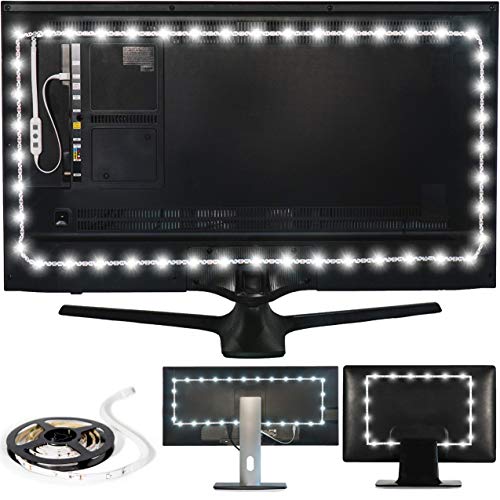
The word backlight covers two related things. Inside an LCD monitor, a backlight is the light source behind the panel that makes the image visible at all. Around a desk setup, it usually means bias lighting, a light strip or bar placed behind the monitor that washes the wall with a gentle glow.
Bias lighting works because your eyes judge screen brightness against the room around it. A dark room with a bright screen forces your pupils to work harder as scenes change, which can leave your eyes tired. A steady, neutral glow behind the screen narrows that gap, so contrast feels deeper and long sessions feel calmer.
Good bias light has three traits. It is bright enough to see clearly but never brighter than the screen itself, its color stays close to neutral white unless you want mood color, and it spreads evenly with no hot spots or visible dots on the wall.
Key Specs Explained in Plain English
Features That Matter for Monitors
Start with fit. Measure the back of your monitor and choose a strip length made for that screen size, with enough coverage on the top and sides to frame the glow. USB powered strips draw power from the monitor itself, so they turn on and off with the screen, which is the simplest setup for most desks.
Brightness control matters more than raw brightness. A dimmer you can adjust in small steps lets you match dim rooms and bright offices with the same strip. If you are also shopping for the display itself, our guide to the best quality monitors explains what separates a strong panel from an average one.
Panel Technology (IPS, VA, OLED, Mini LED)
Panel technology describes the light system inside the monitor, and it changes how much help a bias light gives. IPS panels use a backlight that shines through the full panel, giving wide viewing angles and steady color. VA panels add deeper contrast, so blacks look darker and a gentle bias glow makes that contrast feel even stronger.
OLED panels have no backlight at all, since each pixel makes its own light and can switch off fully for true black. Mini LED panels use many small backlight zones that dim in patches, which improves contrast and HDR punch. Bias lighting still helps OLED and Mini LED owners, because the benefit comes from easing the contrast between screen and room.
Adaptive Sync and Gaming Features
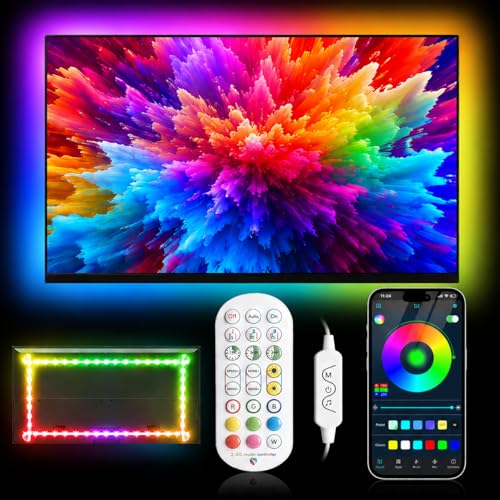
Some backlight kits do more than glow steadily. Screen reactive kits read the colors at the edge of your display and mirror them on the wall, which makes games and films feel larger. These kits use a camera or a sync box, and they need a clean signal path, often through HDMI 2.1 on newer gear.
Adaptive sync features such as G Sync and FreeSync keep game motion smooth, and a reactive light should keep pace with that motion rather than lagging behind it. If fast games are your main use, pair this section with our guide to the best gaming monitors and our guide to the best computer monitors for gaming before you spend on lights.
HDR and Brightness
HDR content swings between dark scenes and bright highlights, and your backlight choice should respect those swings. A bias light set too bright will wash out HDR shadow detail and flatten the very contrast you paid for. As a working rule, keep the glow clearly dimmer than the brightest parts of the screen.
Look for brightness stated in a way you can judge, and for controls that remember your last setting. Color matters too. A neutral white near daylight keeps screen colors honest, while strong color tints are fun for games but can distort how photos and video edits look while you work on them.
Smart Platform and Sound
Many light kits now come with an app or a small remote, and a few tie into wider smart home systems. App control makes schedules easy, so the glow can fade on at sunset and off at bedtime without daily effort. Voice control is a nice extra, but a simple physical dimmer on the desk is faster for quick changes.
Sound reactive modes pulse the light along with music or game audio. They are entertaining for a media room and distracting for focused work, so check that the kit can lock to a steady mode easily. Whatever platform you choose, confirm it still works with a basic switch if the app or network goes down.
Rookie Mistakes to Avoid
- Buying a strip that is too short. A strip that covers only the top edge leaves dark corners and an uneven glow, so match the length to your screen size.
- Setting the light brighter than the screen. The glow should support the picture, not compete with it, or HDR detail and contrast suffer.
- Picking strong color for work light. Saturated color looks fun at night but skews how you judge photos, designs, and video color.
- Sticking strips where cables or vents sit. Heat vents and port areas shorten adhesive life and can make later removal messy.
- Forgetting how the light turns off. A kit that stays on after the monitor sleeps will annoy you daily, so favor USB power or auto off features.
Getting Started: Setup and First Use
Clean the back of the monitor with a dry cloth, plan the strip path, and test the light before you press the adhesive down for good. Run the strip along the top and both sides, keep it a short distance in from the edges, and leave slack at the corner near the power lead. Plug into a USB port on the monitor when you can, so one switch controls everything.
Then tune the picture. Move the monitor out of any vivid mode, which pushes brightness and color too hard, and set the bias light to a gentle level in a darkened room. Sit at your normal distance and raise or lower the glow until the wall feels present but quiet. If a screen uses OLED technology, follow its pixel refresh prompts as the maker directs, since panel care and room light work together for comfort.
Frequently Asked Questions
What features matter most in backlights for monitors?
Correct length, smooth dimming, and neutral color matter most. The strip should frame your screen size without gaps, dim in fine steps so you can match any room, and hold a steady white that does not tint your work. Easy power behavior, such as turning off with the monitor, is the next feature worth paying for.
Is 4K worth it when choosing a monitor backlight?
A 4K screen does not need a special backlight, because bias light responds to brightness and color at the screen edges, not to pixel count. What changes with 4K is screen size, since 4K monitors are often larger and need longer strips. Spend on fit and dimming quality first, and let resolution guide only the length you buy.
Does refresh rate matter for non gamers?
For a steady bias light, refresh rate does not matter, because the glow never changes. It matters only for screen reactive kits that copy on screen color, where fast motion can expose lag in cheaper systems. Non gamers who want a calm, fixed glow can ignore refresh rate completely and judge kits on brightness control and color quality.
How long do monitor backlights last?
Quality LED strips commonly run for years of daily use, and the light inside an LCD panel usually outlasts the monitor itself. Lifespan drops when strips run at full brightness in hot, closed spaces, so moderate settings and some air flow help. Adhesive often fails before the LEDs do, and fresh mounting tape solves that cheaply.
IPS vs OLED: which is better for monitor backlighting?
Both benefit, but in different ways. An IPS monitor has a built in backlight and often a brighter, more even glow, so bias light mainly eases eye comfort in dark rooms. An OLED has no panel backlight and perfect black, so a bias glow adds the most visible contrast lift around the screen. Console players weighing displays can also check our guide to the best monitors for ps5 for pairing ideas.
Our Verdict
Measure your screen, choose a strip that fits it, and insist on smooth dimming and neutral white before you pay for extras like color scenes or music modes. Set the glow below screen brightness and let USB power handle the daily on and off. Compare your shortlist against the product table above, and you will land on the best backlight for monitors for your room without overspending.


