Best Auto Cameras for 2026: Matching the Right Camera to Your Routine
Disclosure: We may earn a commission when you buy through links on this page, at no extra cost to you. As an Amazon Associate I earn from qualifying purchases. Learn more

Match the best auto cameras to your routine, from daily commute dash cams to backup cameras, with honest notes on storage, parking mode, and installation.
Auto cameras means cameras for your vehicle, and the term covers two real product classes: dash cameras that record the road, and backup cameras that show what sits behind you when you reverse. Handheld photography cameras are a different product and are not covered here. Within the vehicle classes, there is no single winner, because the best auto cameras for a long daily commute look nothing like the right pick for a driver who only struggles with tight parking.
So this guide works by routine first. Find the way you actually drive in the groups below, then note the features that routine depends on before you shop.
Who Should Buy Which of the Best Auto Cameras?
Daily Commuters Who Want a Record of Every Drive
If your main worry is a dispute after a crash on a familiar route, a front facing dash camera is your class. Prioritize clean daytime video, reliable loop recording that overwrites old footage on its own, and an incident sensor that locks the file when it detects a hard impact. You do not need a cabin camera or a rear unit for this routine, and skipping them keeps the cost and the wiring simple.
Commute length matters for storage. A driver recording two hours a day fills a card far faster than a weekend driver, so card capacity and easy file access by phone app are worth more to you than exotic video modes.
Drivers Who Reverse Into Tight Spaces Daily
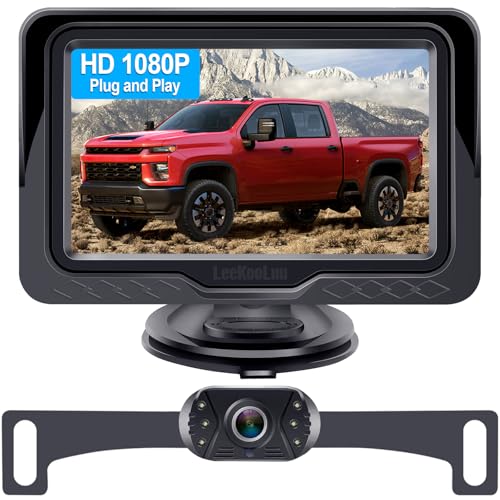
If your stress point is the parking lot, the driveway with a low wall, or a trailer hitch you need to line up alone, a backup camera is your class. Look for a wide rear view, clear distance guidelines, and a display you can actually see in sunlight, whether that is a mirror display, a small screen, or the factory screen where a compatible kit exists.
Water resistance and night illumination decide how useful the camera stays in rain and dark garages. Treat the view as an aid layered on top of your mirrors and a look over your shoulder, a point the footage section below covers in full.
Rideshare, Delivery, and Work Vehicle Drivers
Drivers who carry passengers or cargo for work need coverage in more than one direction. A dual channel setup that records the road ahead and the cabin, or the road ahead and behind, matches this routine, and the cabin view protects you in disputes with passengers as much as the front view protects you in traffic. This is also the group served by the best auto tracking cameras, which add location and fleet style tracking for vehicles that work all day.
Because these cameras record other people, tell passengers a camera is running and check the rules your platform and your area set for in car recording. Endurance storage matters here too, since a full shift of two channel video eats cards quickly.
Households With a Teen or New Driver
A dash camera in a car shared with a new driver can settle arguments about what happened and can encourage calmer driving, but start with an honest conversation, not a hidden install. Tell the young driver what the camera records, when you would look at footage, and that the camera records your driving too when you take the car. A camera installed without anyone knowing damages trust and may break local consent rules for audio.
For this routine, choose simple and sturdy over feature loaded. A basic front camera with a clear incident lock button and easy playback teaches more than a flagship unit nobody in the house can operate.
Key Features to Compare
Resolution, Night Video, and Reading Plates
Higher resolution helps, but be honest about what it buys. At road speed, with vibration, glare, and a dirty windshield, even strong cameras often fail to capture a readable plate from a moving car in the next lane. What resolution reliably improves is the overall scene: lane positions, signal colors, and the sequence of events. Night video depends more on the sensor and lens than on the headline number, and maker night samples are shot in conditions chosen to flatter the camera.
Judge this feature by your routine. City drivers in lit streets need less night reach than rural drivers on unlit roads, and nobody should expect plate reading to do the work of a witness statement.
Field of View: Wide Is Not Always Better
A wide lens sees more of the intersection, catching the car that enters from the side. The trade off is distortion: objects at the edges stretch, distances look greater than they are, and plates get smaller in the frame. A moderate wide view suits most cars, while very wide views suit drivers whose main worry is side impacts at junctions. For backup cameras the logic flips, because a very wide rear view is exactly what you want for spotting a child, a pet, or a low post near the bumper.
Storage, Loop Recording, and Endurance Cards
Every auto camera records to a memory card, and that card is a consumable, not a permanent part. Dash cameras overwrite and rewrite the same card constantly, which wears ordinary cards out in months. Endurance rated cards are built for exactly this duty and cost a little more for a much longer working life.
Most of the models compared in guides to the best auto dash cameras use loop recording, so the camera deletes the oldest unlocked footage when the card fills. Check your card every month or so, confirm recent drives are actually recorded, and replace the card at the first sign of errors or missing files. A camera with a corrupted card records nothing and tells no one.
Parking Mode and Battery Drain
Parking mode keeps watch while the car is off, recording when it senses motion or a bump. It sounds free, and it is not. A camera sipping power all night drains the vehicle battery over days, and a car that will not start is a poor trade for footage of a quiet street. Kits that manage this risk use a hardwire connection with a voltage cutoff that stops the camera before the battery falls too low, and some cameras carry a small internal battery for very short coverage.
Match parking mode to your risk. A car garaged at night gains little, while a car parked on a busy street or in a shared lot gains real coverage, as long as the power side is set up properly.
Backup Camera Displays and Guidelines
A backup camera is only as good as the screen you view it on. Mirror displays keep the factory look and work well in most light, dedicated screens are cheaper and brighter, and phone based wireless kits are the easiest to install but depend on an app opening fast when you shift into reverse. Guidelines come in two forms: fixed lines printed by the camera, and dynamic lines that bend with the steering on kits that read the car data. Fixed lines are fine for judging distance once you learn them, and either type beats guessing.
Mounting, Wiring, and Installation
Dash cameras mount by suction cup or adhesive pad, and adhesive holds better through summer heat. Route the power cable along the headliner and pillar, tucked away from the path of any curtain airbag, and never leave it dangling across your view. A backup camera tied into the reverse lights so it wakes when you shift is genuine wiring work: it involves the light circuit, a clean ground, and weather sealed connections at the rear of the car. If that sentence makes you hesitate, use a qualified installer. A sloppy install causes dead batteries, blown fuses, and cameras that quit in the rain.
Using Footage Honestly: What a Camera Can and Cannot Do
A dash camera records evidence, and evidence cuts both ways. The same footage that shows another driver running a light also records your speed, your lane discipline, and your stop at the last sign. Share footage with your insurer or the police after a crash, and understand that it may help your account or hurt it. A camera is not a verdict, either: fault is decided from the full record, and partial clips that start mid event can mislead.
Two rules protect you and everyone else. First, never interact with a camera while driving: do not adjust it, review clips, or tap through menus at the wheel. Set it up parked, and let it do its job untouched. Second, recording rules vary by place, and audio recording carries stricter consent rules than video in many areas. Turn cabin audio off if your area requires consent you cannot get, and check local rules before relying on recordings for work. Backup cameras carry their own limit: the view assists your mirrors and your own look behind, and never replaces them.
Common Mistakes to Avoid When Buying Auto Cameras
- Buying on resolution alone, while the sensor, lens, and storage decide what your footage actually looks like.
- Fitting a standard memory card and never checking it, so the camera records nothing for months after the card fails.
- Adding parking mode without a voltage cutoff kit, then blaming the camera when the car battery dies.
- Mounting the camera low in the center of the windshield where it blocks your view and invites a ticket in some areas.
- Treating a backup camera as a substitute for mirrors, which leaves blind spots exactly where children and pets stand.
Care and Maintenance Tips
Wipe the lens with a soft cloth every few weeks, because road film and interior haze dull footage long before the camera itself ages. Pop the memory card into a computer monthly, spot check that recent trips are recorded, and format the card in the camera afterward so its file system stays healthy. Heat loosens mounts over time, so press adhesive pads back down at the start of summer and replace a suction cup that no longer holds overnight.
Check for firmware updates from the maker a few times a year, keep the windshield clean inside and out where the camera looks through it, and confirm the time and date are correct, since wrong timestamps weaken any footage you hand over.
Auto Cameras: Your Questions Answered
Does a dash camera prove who was at fault after a crash?
No camera proves fault on its own. Footage shows what the lens saw from one position, and insurers and police weigh it alongside statements, vehicle damage, and road evidence. Good footage can settle a disputed light or lane change quickly, which is its real value. It can just as easily show your own error, so drive as if the record will be watched, because it may be. Fault remains a judgment made from the full record, not a feature any camera sells.
Can a dash camera record while the car is parked?
Yes, with parking mode, but the power has to come from somewhere. Cameras with parking mode draw on the vehicle battery, a small internal battery, or a dedicated battery pack. Without a voltage cutoff, a camera can drain the vehicle battery over a few days of sitting. Drivers who park on the street and want overnight coverage should budget for the hardwire kit with a cutoff, or accept short coverage from an internal battery. Garaged cars gain the least from the feature.
Is a backup camera enough for reversing safely?
No. A backup camera widens what you can see directly behind the car, especially the low zone your mirrors and rear window miss, and that is a genuine gain. It does not show everything: edges distort distance, the lens fogs and gets dirty, and cross traffic approaching from the side may appear late. Safe reversing still means mirrors, a look over your shoulder, and slow speed, with the camera as one more input. Keep the lens wiped clean, because a filmed over lens in winter slush shows you almost nothing.
How long does a memory card last in a dash camera?
A standard card in daily dash camera duty often fails within months, because the camera rewrites it constantly and heat inside a parked car speeds the wear. Endurance rated cards are designed for continuous rewriting and usually last far longer, but they are still consumables with a finite life. The practical habit matters more than any rating: check the card monthly, replace it at the first missing file or error message, and keep a spare in the glove box so a dead card never leaves you recording nothing.
Can I install a backup camera myself?
You can if you are comfortable with basic car wiring, and many owners are not, which is fine. A wireless kit with a mirror or phone display is the easiest route and avoids most wiring. A camera tied into the reverse lights needs clean connections, a solid ground, and sealed joins at the back of the car, and mistakes cause dead batteries or water damage. If the job reaches the point of drilling or tapping circuits you do not fully understand, a qualified installer costs less than repairing a wiring fault.
The Bottom Line
Match the camera to the routine first: commuters need a dependable front dash camera, tight space drivers need a clear backup view, and working drivers need coverage in more than one direction. Then protect the footage with an endurance card, honest power management, and an install that respects airbags and weather. Do that, and the best auto cameras for your car become clear, with no features paid for twice and none missing when it matters.